

































Content ITV PRO
This is Itvedant Content department
Learning Outcome
5
Implement nested decision logic
4
Use if–else–if for conditions
3
Apply if statements correctly
2
Identify types of control statements
1
Understand purpose of control statements
6
Use switch for cleaner code
Imagine you’re driving a car on the road.
You don’t drive randomly—you make decisions at every moment.
Imagine you’re driving a car on the road.
You don’t drive randomly—you make decisions at every moment.
If the traffic light is red, you stop.
If it’s green, you move forward.
While the road continues, you keep driving.
Each decision decides when to stop, go, or continue.
Similarly, programs use rules to control their execution flow.
Without rules, a car would move randomly, causing confusion and accidents.
In the same way, without control statements, a Java program would simply run line by line without thinking or deciding.
But real programs need to:
Make decisions based on conditions
Repeat tasks when needed
Choose different paths for different situations
This is where Java Control Statements come in.
They allow a program to pause, decide, repeat, or jump based on given conditions—just like a driver responding to traffic signals, turns, and road signs.
Control statements are like traffic rules for a program—they control the flow by deciding what to execute, when to execute it, and how many times it should run.
Looping
Statements
Types of Control Statements
Conditional statements
Jump
statements
Conditional statements – used to choose between alternatives
Example : Traffic Light (Decision Making)
If the light is green
If the light is yellow
If the light is red
Looping statements – used to repeat a set of statements
Example: A teacher taking attendance in a class
The teacher calls each student’s name one by one
This process repeats for every student
The teacher stops when all students are checked
Just like this, loops repeat a task until a condition is satisfied.
Jump statements – used to skip or stop execution
Jump statements are like an emergency exit:
You are watching a movie
Suddenly, the fire alarm rings
You immediately leave the hall, skipping everything else
These statements allow for code to be executed based on whether a condition is true or false
if-else
statement
if statement
else if ladder
switch
statement
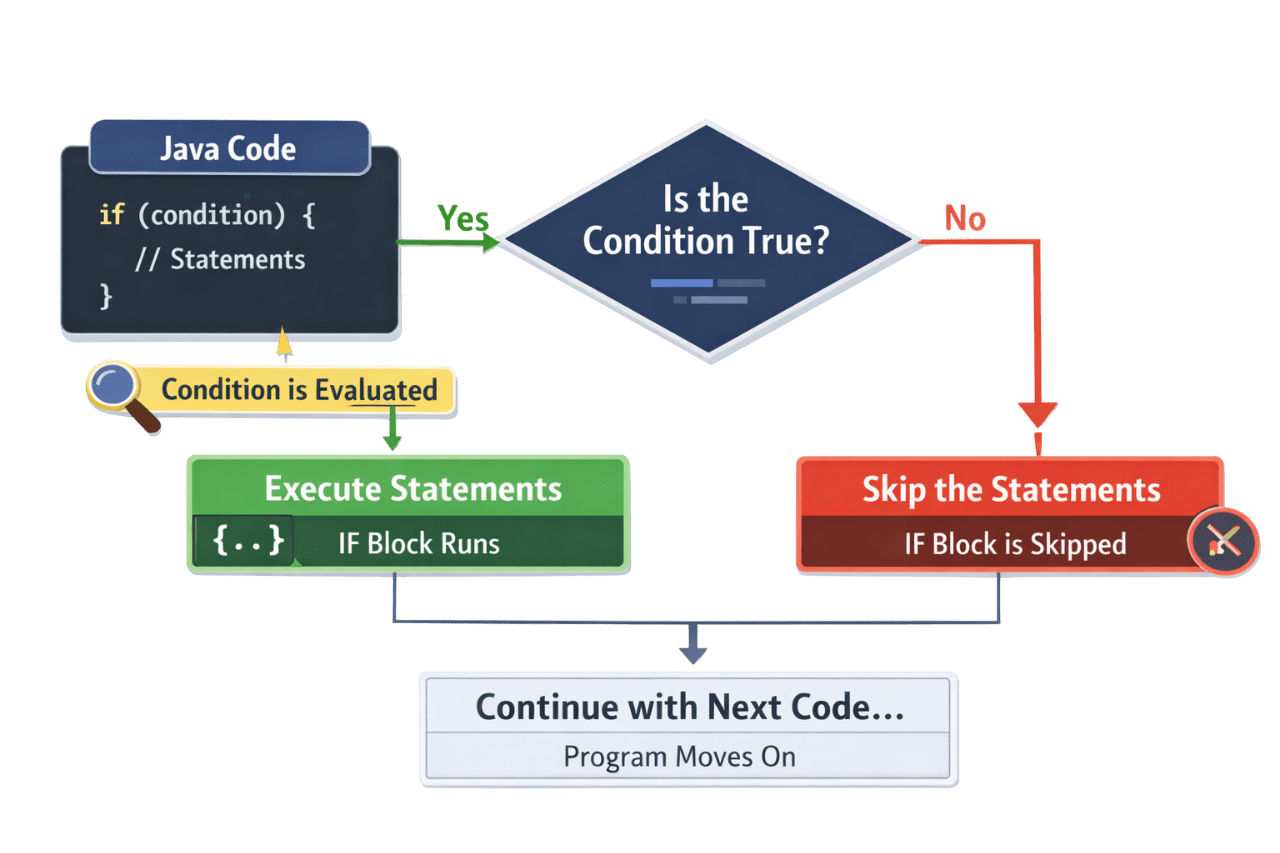
The Java if statement is used to check a condition.
If the condition is true, the code inside the if block executes.
Syntax:
if (condition) {
// code runs only when the condition is true
}
For example
If the door is locked, use the key
Condition:
Door is Locked
Action:
Use key
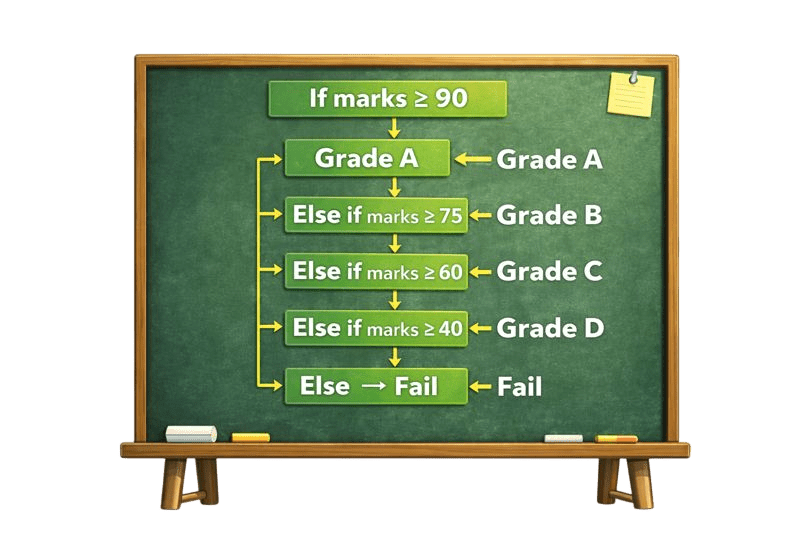
The if–else–if ladder is a decision-making control statement used when multiple conditions are checked one after another, and only one block of code executes.
Example : Imagine a teacher assigning grades based on marks:
Example : Imagine a teacher assigning grades based on marks:
Example: ATM Transaction
Example: ATM Transaction
If yes → Transaction Successful
Else → Incorrect PIN
If the card is inserted
Then check if the PIN is correct
Else → Please insert card
A switch–case statement is used when you need to choose one action from many options.
It checks a single value and executes the case that matches that value.
How does the switch-case statement work?
It checks a variable and compares it with different cases.
When a match is found, the corresponding block of code is executed.
switch(expression) {
case x:
// code block
break;
case y:
// code block
break;
default:
// code block
}
Example : Think of a remote control.
You press a button, and the TV responds based on that button.
Example : Think of a remote control.
You press a button, and the TV responds based on that button.
Press 1 →
News channel
Press 2 → Sports channel
Press 3 → Movies channel
Press any other button → No channel available
Break statement is used to stop the program from continuing further in a loop or switch-case.
Example :
Imagine you are searching for your keys in different rooms.
In the same way, break exits the loop or switch as soon as the required condition is met.
Summary
5
Nested if manages layered decisions
4
If–else–if handles multiple conditions
3
If statement checks single condition
2
Conditional statements enable decision making
1
Control statements manage program flow
6
Nested if manages layered decisions
Quiz
Which control statement is best suited for checking multiple conditions sequentially?
A. if
B. nested
C. if–else–if ladder
D. continue
Which control statement is best suited for checking multiple conditions sequentially?
A. if
B. nested
C. if–else–if ladder
D. continue
Quiz-Answer
By Content ITV