
Content ITV PRO
This is Itvedant Content department
Currency Trading using MetaTrader 5
Business Scenario
You have recently joined a Forex trading company as a Junior Forex Trader. Your manager wants you to practice trading using a MetaTrader 5 (MT5) Demo Account before trading with real money.
In this lab, you will:
Open a free MT5 demo account.
Buy and sell currency pairs.
Understand margin, pip value, and spread.
Calculate your profit or loss after closing the trade.
Pre-Lab Preparation
Topic : Forex market
1) FX spot structure
2) Currency pairs (base and quote)
3) Spot vs forward FX
4) FX settlement conventions
5) Onshore vs offshore markets
6) Relationship between FX forwards and NDFs
Task 1: Execute Demo Currency Trades
Open a Demo Account
1
Open the MetaTrader 5 software.
https://web.metatrader.app/terminal?lang=en
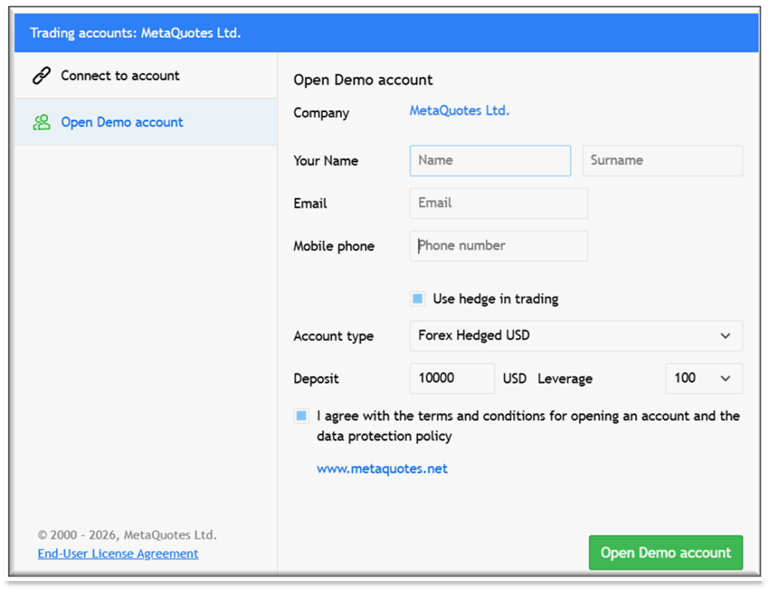
Go to File > Open an Account, and choose to open a demo account.
3. Fill in your details (Name, Email, Mobile phone).
4. Set your Account type to Forex Hedged USD, Leverage to 100, and Deposit to 10000. Check the agreement box and click Open Demo account.
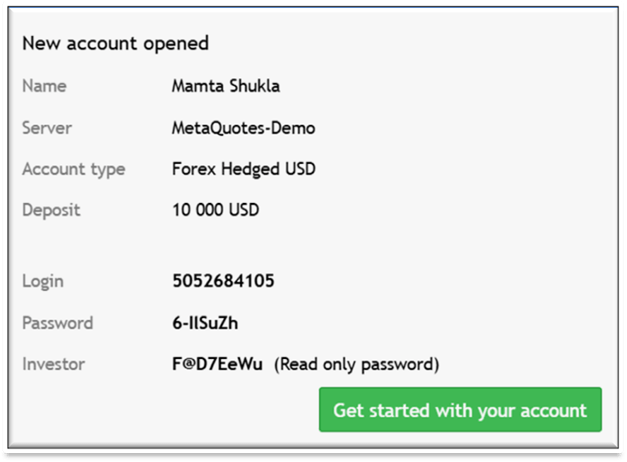
5. A "New account opened" window will appear confirming your Name, Login, Password, and a 10,000 USD deposit. Click Get started with your account to proceed to the trading dashboard.
Select a Major Currency Pair
2
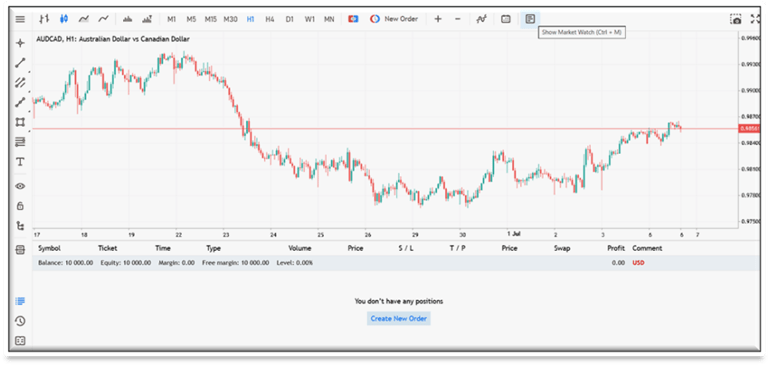
The default interface will open (displaying a chart like AUDCAD).
Open the Market Watch window by clicking its icon on the top toolbar or pressing Ctrl+M to view live currency quotes.
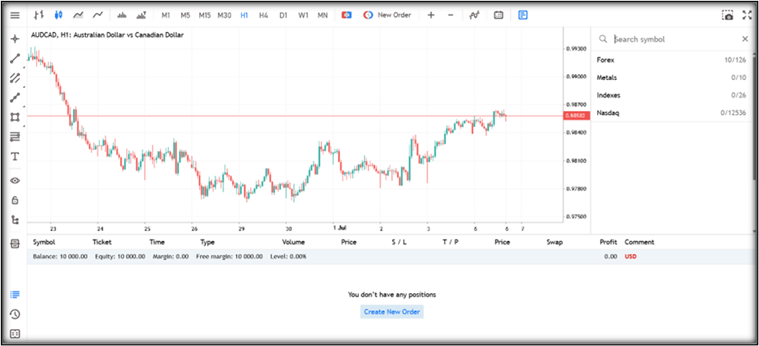
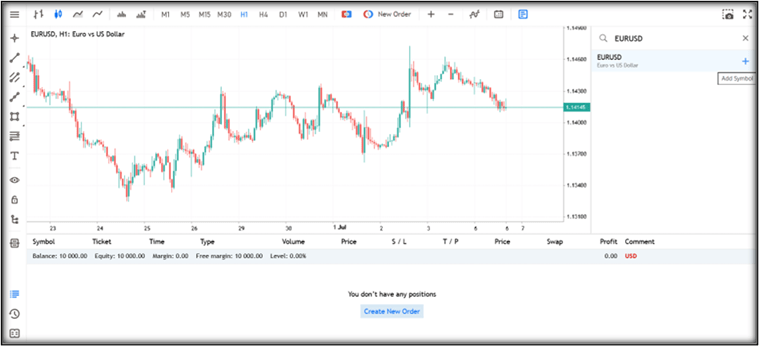
3. In the right-side search panel, click Search symbol and navigate to the Forex category.
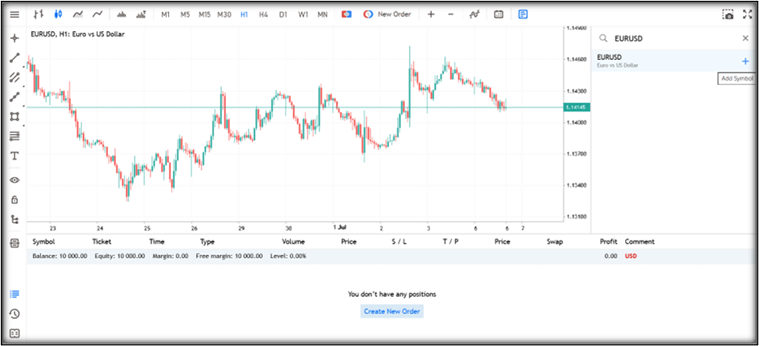
Locate EURUSD (Euro vs US Dollar) and click Add Symbol.
When You Select the EURUSD the chart to view for real-time price action will appear.
Execute a Market Order
3
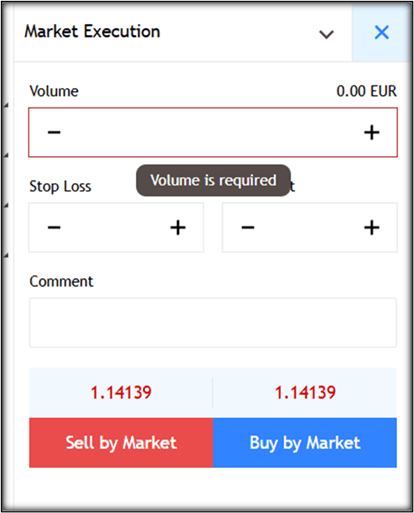
Click the New Order button at the bottom (or press F9).
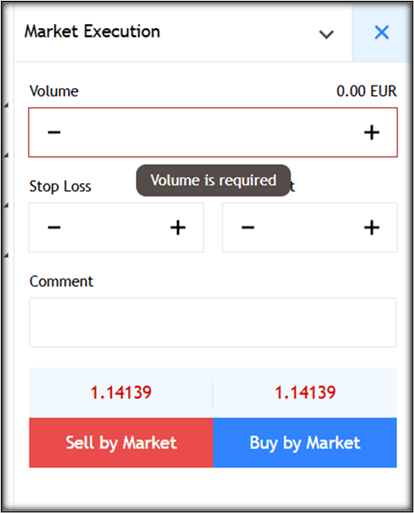
2. The Market Execution window will appear.
3. Set the following parameters for your first demo trade:
Symbol: EUR/USD
Type: Market Execution
Volume (Lot Size): 1.00 (Note: 1 Standard Lot controls 100,000 units of the base currency).
Stop Loss: Leave blank for now.
Take Profit: Leave blank for now.
Click Buy by Market if you anticipate the Euro will strengthen against the US Dollar, or Sell by Market if you expect it to weaken.
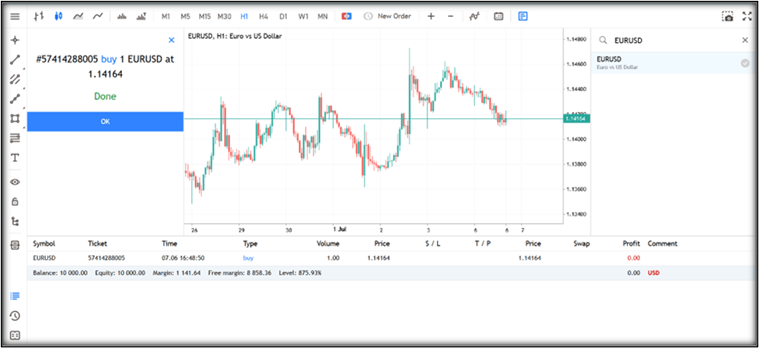
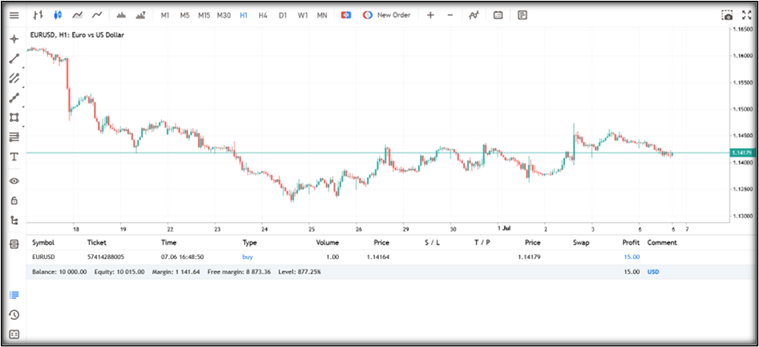
An execution confirmation window will appear buy 1 EURUSD at 1.14164. Your live trade will immediately populate in the Toolbox > Trade tab at the bottom of the screen.
Task 2: Analyze Trade Execution
Review the Trade Metrics Dashboard
1
Look closely at the Trade tab within the bottom Toolbox window. Analyze the critical execution details logged by the broker server:
Ticket / Time: The unique trade identifier (e.g., 57414288005) and exact millisecond of server execution.
Price: Your precise entry price (e.g., 1.14164).
Volume: The size of your position (1.00).
Calculate and Verify the Required Margin
2
Margin is the amount of collateral funds blocked by the broker to hold your leveraged position open. MT5 calculates this automatically, but as an analyst, you must verify the math.
Margin Formula:
Example Calculation:
You buy 1 Standard Lot of EUR/USD
Price = 1.14164
Leverage = 1:100
One Standard Lot = 100,000 EUR
= $1,141.64
Check MT5: The Margin shown on your terminal should also be exactly $1,141.64.
= (100,000 × 1.14164) ÷ 100
Understanding Free Margin:
Suppose your starting account balance is $10,000.00.
Margin Used: $1,141.64
Free Margin = $10,000.00 - $1,141.64 = $8,858.36 (at the exact moment the trade is opened).
This is the money still available for opening new trades.
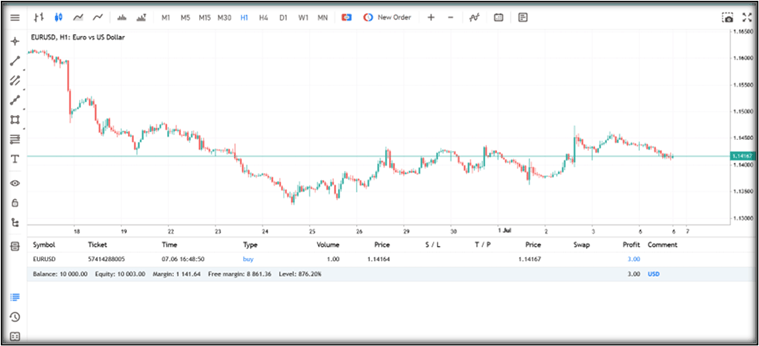
Analyst Note on Floating Equity: If your trade moves into profit, your Free Margin increases! As seen in your updated live dashboard, when the trade reaches $15.00 in profit, your total Equity becomes $10,015.00. Therefore, your exact Free Margin updates dynamically to: $10,015.00 - $1,141.64 = $8,873.36.
Understand the Spread (Demo vs. Real World)
3
If you look closely at your "New Order" window, the Sell Price (Bid) and the Buy Price (Ask) are exactly the same number (e.g., 1.14139). Because the prices are identical, this specific MetaTrader Demo account is giving you a "Zero Spread" environment. It is a perfect, simulated condition.
The Real World (Live Accounts): In real-world Forex trading, standard brokers do not give you the exact same price for buying and selling. They make their money by charging a Spread (the gap between the Buy and Sell price).
Example: Imagine you are at an airport currency exchange booth. If you buy Euros with US Dollars, the booth charges you a higher price. If you change your mind one second later and sell those Euros back, the booth buys them from you at a lower price. The booth keeps the difference. Live trading accounts do the exact same thing!
What is a Pip? Before we look at the cost of the spread, you need to understand how Forex price movement is measured. We measure this movement in Pips (Percentage in Point).
For major pairs like EUR/USD, a pip is the 4th decimal place (0.0001).
Example: If the price moves from 1.14154 to 1.14164, the price has moved exactly 1 Pip. (The 5th decimal is just a fraction of a pip, called a pipette).
Real-World Example: If you were trading 1 Standard Lot on a live account with a normal broker:
The Prices: The Ask (Buy) price might be 1.14164, but the Bid (Sell) price might be 1.14154. The gap is 1 Pip.
The Immediate Loss: When you click "Buy", you pay the higher price. If you close the trade immediately, you must sell at the lower price.
The Financial Impact: Because 1 pip equals $10 on a standard lot, your live trade would immediately start at -$10.00. The market must move 1 pip in your favor just to cover the broker's fee and break even!
Task 3: Evaluate Trade Outcome
Calculate Pip Value
1
For EUR/USD, one pip is measured at the fourth decimal place (0.0001).
Pip Value = Volume in Units × 0.0001
Example:
Volume: 1 Standard Lot = 100,000 Units
Go to the Trade tab.
Click the X beside your trade.
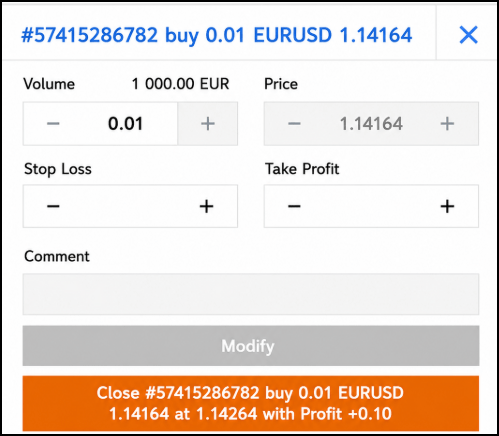
OR Double-click the trade and click Close Market. Your trade is now closed.
Calculation: 100,000 × 0.0001 = $10.00 per pip
This means every 1 pip movement changes your profit or loss by $10.00.
Close the Trade
2
Calculate Final Profit or Loss
3
Go to the History tab to find your closed trade.
Profit / Loss = (Exit Price - Entry Price) × Volume in Units
Example:
Entry Price: 1.14164
Exit Price: 1.14264
Difference: 1.14264 - 1.14164 = 0.00100 (10 Pips)
Calculation: Since 1 Pip = $10, your Profit = 10 × $10 = $100 Profit
Activity
Student Hands-On Lab Activity & Worksheet
Activity Instructions:
You are assigned to execute, analyze, and evaluate trade performance for three different currency pairs utilizing varying lot sizes on your MT5 Demo Account.
1. Open your MT5 platform and confirm your $10,000 demo balance with 1:100 leverage.
2. Execute three separate market orders exactly as instructed in the table below.
3. Allow the trades to run for 15 to 30 minutes, or manually close them once they move at least 5 pips in either direction.
4. Record your live execution data and perform the required mathematical evaluations in the ledger below.
Student Worksheet: MT5 Trade Execution & Evaluation Ledger
Student Name: _______________________ | Date: _____
Demo Account Balance: $ | Leverage: 1:100
| Trade Task | Execution Data (Fill from MT5) | Margin & Pip Calculation | Trade Outcome (Fill after closing) |
|---|---|---|---|
| Trade 1: EUR/USD • Action: Buy • Volume: 1.00 Lot (Standard) | Entry Price: _________ Time: _________ | Margin Held ($): ________ Pip Value ($): $10.00 | Close Price: _________ Pips Gained/Lost: ________ |
| Trade Task | Execution Data (Fill from MT5) | Margin & Pip Calculation | Trade Outcome (Fill after closing) |
|---|---|---|---|
| Trade 1: EUR/USD • Action: Buy • Volume: 1.00 Lot (Standard) | Entry Price: _________ Time: _________ | Margin Held ($): ________ Pip Value ($): $10.00 | Close Price: _________ Pips Gained/Lost: _________ Net P&L ($): _________ |
| Trade 2: GBP/USD • Action: Sell • Volume: 0.10 Lot (Mini) | Entry Price: _________ Time: _________ | Margin Held ($): _________ Pip Value ($): $1.00 | Close Price: _________ Pips Gained/Lost: ________ Net P&L ($): _________ |
| Trade 3: USD/JPY • Action: Buy • Volume: 0.01 Lot (Micro) | Entry Price: _________ Time: _________ | Margin Held ($): _________ Pip Value ($): $1.00 | Close Price: _________ Pips Gained/Lost: ________ Net P&L ($): _________ |
Congratulations on completing this lab!
You created and used an MT5 Demo Account to execute Forex trades, calculate margin requirements, pip values, and profit or loss. You also analyzed trade execution details and understood the impact of leverage, spreads, and currency price movements on trading performance. These concepts provide a strong foundation for practical Forex trading and risk management.
Checkpoint
Next-Lab Preparation
Topic : Swaps & NDF
1) Interest rate swaps (fixed vs floating legs)
2) Currency swaps (principal and interest exchange)
3) Equity swaps (total return)
4) Credit default swaps
5) Non-deliverable forwards
6) Cash settlement mechanism
7) Fixing and reset process
Next-Lab Preparation
Topic : Swaps & NDF
1) Interest rate swaps (fixed vs floating legs)
2) Currency swaps (principal and interest exchange)
3) Equity swaps (total return)
4) Credit default swaps
5) Non-deliverable forwards
6) Cash settlement mechanism
7) Fixing and reset process
By Content ITV