PYTHON-3
BY 企鵝
REVIEW
Tuple
Tuple是不可變的 (immutable):
a = (0,1,2,3,4)
a[2] = "two" #TypeError
a = (0,1,2,3,4)
print(len(a)) #5
print(max(a)) #4
print(min(a)) #0
print(5 in a) #False
print(5 not in a) #True
print(a + a) #(0, 1, 2, 3, 4, 0, 1, 2, 3, 4)
print(a * 2) #(0, 1, 2, 3, 4, 0, 1, 2, 3, 4)Tuple 和 List 也有很多函式是共通的:
Set
在一個 set 裡的元素必須是不可變的 (immutable)
Set Operations
x = {1, 2.33, "strings", (1, 2, 3)}x = {1, 2, 3, 5}
x.remove(5)
print(x) #{1, 2, 3}
print(4 in x) #False
print(5 not in x) #True
x.add(6)
print(x) #{1, 2, 3, 5, 6}
y = [3, 2, 1, 5, 3, 1]
s = set(y)
print(s) #{1, 2, 3, 5}Set
& (and):取兩個set之間重複的部分變成一個新set
| (or):取兩個set之間沒有重複的部分變成一個新set
^ (xor):取兩個set之間重複以外的部分變成一個新set
x = {1, 2, 3, 5}
y = {1, 7, 8, 9}

print(x & y) #{1}
print(x | y) #{1, 2, 3, 5, 7, 8, 9}
print(x ^ y) #{2, 3, 5, 7, 8, 9}
Queue & Stack
Queue遵照First-In, First-Out (FIFO)的輸入輸出順序
Stack遵照Last-In, First-Out (LIFO)的輸入輸出順序
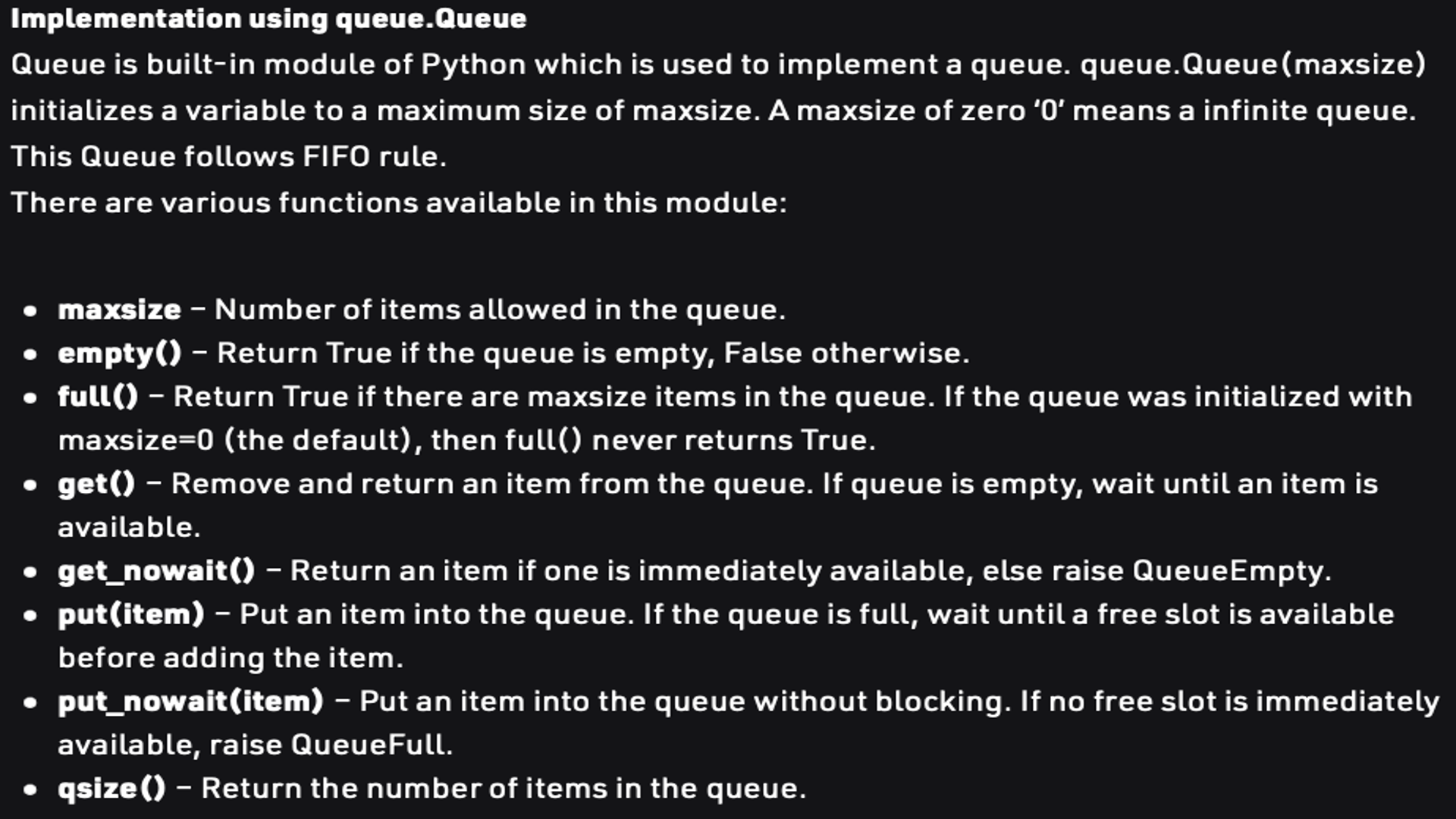
Queue & Stack Operations
Queue & Stack
#Queue
from queue import Queue

Q = Queue(maxsize = 3)
print(Q.qsize()) #0

Q.put('a')
Q.put('b')
Q.put('c')
print("Full :",Q.full()) #Full : True

print(Q.get()) #a
print(Q.get()) #b
print(Q.get()) #c
print("Empty :", Q.empty()) #Empty : True
Queue & Stack
#Stack
from queue import LifoQueue

st = LifoQueue(maxsize = 3)
print(st.qsize()) #0

st.put('a')
st.put('b')
st.put('c')
print("Full :", st.full()) #Full : True

print(st.get()) #c
print(st.get()) #b
print(st.get()) #a
print("Empty :", st.empty()) #Empty : True
Dictionary
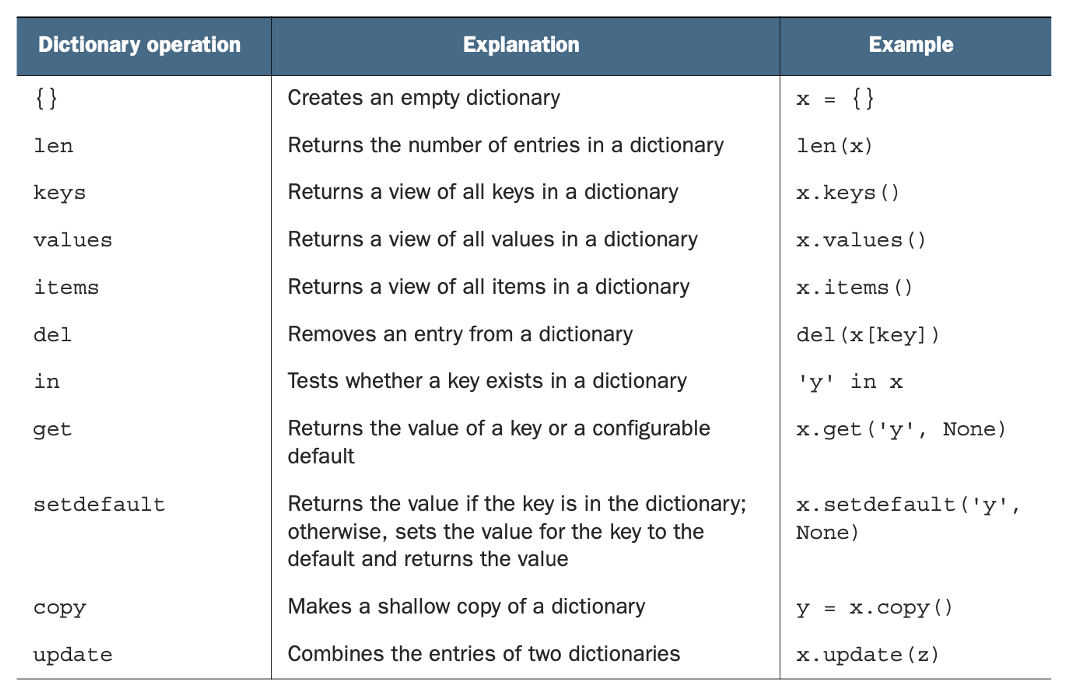
字典是一種鍵(Key)-值(Value)對應的資料型態
en_to_french = {"red": "rouge", "blue": "bleu", "green": "vert"}
print(en_to_french["red"]) #rouge
STRING
String as Sequences of Characters
string(字串),是python其中一種資料型態
string可以用類似list的方式取string當中的字元:
my_str = "Hello"
print(my_str[0]) #'H'
print(my_str[-1]) #'o'
一如list,string 也有len( )可以取得string的字元數:
my_str = "Hello"
print(len(my_str)) #5
String as Sequences of Characters
當string被宣告後,
無法更改string裡的某個字元
my_str = "Hello"
my_str[0] = 'h' #TypeError
my_str.append('t') #TypeError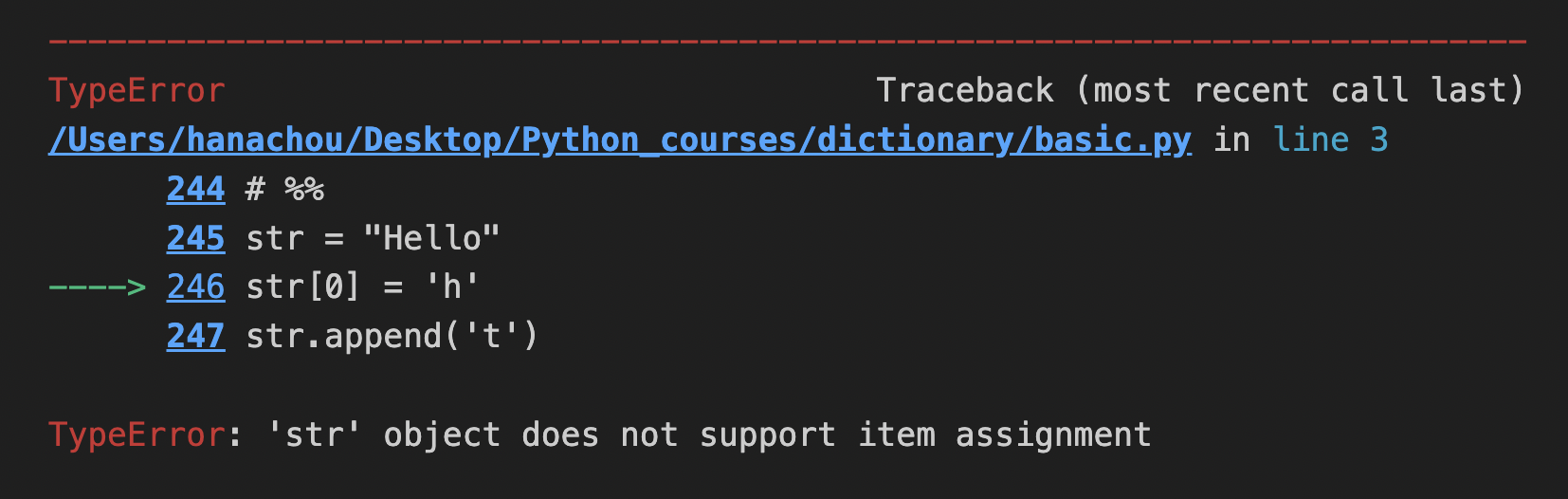
String Operations
upper( )可以將所有字元都轉成大寫
lower( )則是小寫
title( )可以將字串的第一個字元轉成大寫
" " . join( )可以將一個list裡的元素接在一起,
變成一個字串,各元素以'' ''裡的內容隔開
my_str = "Hello"
print(my_str.upper()) #HELLO
print(my_str.lower()) #hello

text = "texts"
print(text.title()) #Texts

lst = ["Python", "is", "better", "than", 'C']
print(' '.join(lst)) #Python is better than C
print('::'.join(lst)) #Python::is::better::than::C
print(''.join(lst)) #PythonisbetterthanC
String Operations
split( )可以將一個字串以空白(預設)分開,
在( )放" "可以將一個字串以" "裡的內容分開
split( ,num)可以分成num+1個段落
x = "You\t\t can have tabs\t\n \t and newlines \n\n mixed in"
print(x.split())
#['You', 'can', 'have', 'tabs', 'and', 'newlines', 'mixed', 'in']

x = "Mississippi"
print(x.split("ss")) #['Mi', 'i', 'ippi']

x = 'a b c d'
print(x.split(' ', 1)) #['a', 'b c d']
print(x.split(' ', 2)) #['a', 'b', 'c d']
print(x.split(' ', 9)) #['a', 'b', 'c', 'd']
String Operations
find("string")可以在字串中尋找特定字串
rfind("string")就是從字串的最後開始往前找
count("string")計算在一個字串中該字串出現過幾次
x = "Mississippi"

print(x.find("ss")) #2
print(x.find("zz")) #-1
print(x.rfind("ss")) #5
print(x.count("ss")) #2
String Operations
startswith("string")回傳該字串是否是字串的開頭
endswith("string")回傳該字串是否是字串的結尾
如果("string", "string"),則只要其中一個成立,
就會回傳True
x = "Mississippi"
print(x.startswith("Miss")) #True
print(x.startswith("Mist")) #False
print(x.endswith("pi")) #True
print(x.endswith("p")) #False
print(x.endswith(("i", "u"))) #True
String Operations
isdigit( )會回傳字串是否只包含數字,若是則回傳True
isalpha()會回傳字串是否只包含字母,若是則回傳True
islower()會回傳字串是否只由小寫字母組成,若是則回傳True
isupper()會回傳字串是否只由大寫字母組成,若是則回傳True
x = "123"
print(x.isdigit()) #True
print(x.isalpha()) #False

x = "M"
print(x.islower()) #False
print(x.isupper()) #True
String Operations
replace("string", "string")可以將部分字串更換成指定字串
translate("string", "string")可以將指定標點符號更換成其他標點符號
( , )中前者是要被更換的字串,後者是要更換成的字串
x = "Mississippi"
x = x.replace("ss", "+++")
print(x) #Mi+++i+++ippi

x = "~x ^ (y % z)"
table = x.maketrans("~^()", "!&[]")
x = x.translate(table)
print(x) #!x & [y % z]
String Operations
在Python中,幾乎任何資料型態都可以轉換成字串
repr( )可以將其他資料型態轉為字串的型態
我們可以利用repr( )轉換進行輸出的整理:
x = [1, 2, 3]
print(type(x)) #<class 'list'>
print(type(repr(x))) #<class 'str'>

x.append([3, 4])
x.remove(2)
print("The list x is " + repr(x))
#The list x is [1, 3, [3, 4]]
Modifying Strings with List manipulations
透過資料型態間的轉換,我們也可以玩出不少花樣:
text = "Hello, World"

word_lst = list(text)
print(word_lst)
#['H', 'e', 'l', 'l', 'o', ',', ' ', 'W', 'o', 'r', 'l', 'd']

word_lst[6:] = []
print(word_lst) #['H', 'e', 'l', 'l', 'o', ',']

word_lst.reverse()
print(word_lst) #[',', 'o', 'l', 'l', 'e', 'H']

text = "-".join(word_lst)
print(text) #,-o-l-l-e-H
QUICK CHECK : STRING
my_str = "This is a string"
my_str = my_str.upper()
lst = my_str.split()
my_str = '-'.join(lst)
my_str += '!'
print(my_str) #THIS-IS-A-STRING!

lst = list(my_str)
lst.sort()
print(lst)
#['!', '-', '-', '-', 'A', 'G', 'H', 'I', 'I', 'I', 'N', 'R', 'S', 'S', 'S', 'T', 'T']
lst[0:4] = []
my_set = set(lst)
lst = list(my_set)
lst.sort()
my_str = "".join(lst)
print(my_str) #AGHINRST
請將 "This is a string" 更改成 "THIS-IS-A-STRING!"
再將 "THIS-IS-A-STRING!" 改成 "AGHINRST"
FORMAT METHOD
Format Method
Format Method (格式化輸出),
是能夠方便串接字串和變數的方法
"{0} is {1} than {2}.".format("Python", "better", "C")
#Python is better than C.

"{{C}} is {0} than {1}.".format("better", "C++")
#{C} is better than C++.

"{a} is {b} than {c}.".format(a = "Python", b = "better", c = "C")
#Python is better than C.

"{c} is {b} than {a}.".format(a = "Python", b = "better", c = "C")
#C is better than Python.

"{c} is {b} than {a}.".format(a = "Python", b = "worse", c = "C")
#C is worse than Python.

"{0} is better than {lst[1]}.".format("Python", lst = ["C", "C++", "Java"])
#Python is better than C++.
Format Method
"{0:10} is better than C.".format("Python")
"{0:{1}} is better than C.".format("Python", 10)
"{code:{width}} is better than C.".format(code = "Python", width = 10)
#Python     is better than C.

"{0:>10} is better than C.".format("Python")
#    Python is better than C.

"{0:&>10} is better than C.".format("Python")
#&&&&Python is better than C.
format method 讓使用者能在字串中增加格式化空格:
Format Method
"{0} is {1} than {2}.".format("Python", "better", "C")
"%s is %s than %s." % ("Python", "better", "C")
#Python is better than C.

x = ["Python", "better", "C"]
"The %s contains: %s." % ("list x", x)
#The list x contains: ['Python', 'better', 'C'].

"Pi = %-6.2f" % 3.14159
#'Pi = 3.14  '

num_dict = {'e' : 2.718, "pi" : 3.14159}
"%(pi).2f - %(pi).4f - %(e).2f" % num_dict
#3.14 - 3.1416 - 2.72
除了使用上面的方法,
Python也提供類似C語言的 printf 的輸出方法
前者是字串,對應後者的tuple, int或dict
Format Method
lst = ["C", "C++", "Python"]
print(f"{lst[2]} is better than {lst[0]} and {lst[1]}.")
#Python is better than C and C++.

pi = 3.14159
print(f"pi = {pi:{10}.{2}}")
#pi =        3.1
Python 3.6以上也提供另一種formatting method:
CONTROL FLOW
Control Flow
control flow (流程控制),
泛指條件判斷 (if-else)和迴圈 (loop)
常見迴圈有for和while兩種
提到流程控制又不得不提的就是boolean (布林值)
表示True 或 False
通常在流程控制中,會有布林值的欄位
判斷是否應該執行下列的判斷程式
Control Flow : if-elif-else
if 後面接條件式,
如果條件是回傳True就會執行,
若回傳False就不會執行(或停止執行)
electricity = 15

if electricity >= 10:
  print("so dian!!!")
Control Flow : if-elif-else
elif只會在前述所有if & elif都不成立時
才會進行判斷:
electricity = 15

if electricity > 15:
    print("electricity > 15")
elif electricity < 15:
    print("electricity < 15")
elif electricity == 15:
    print("so dian!!!")

#so dian!!!
Control Flow : if-elif-else
else和elif一樣只會在前述所有if & elif都不成立時
才會進行判斷:
不同的是,else不需填入條件式
當不需要執行任何動作時,可以使用pass
electricity = 3

if electricity < 5:
    pass
else:
    electricity = 5
    print(electricity)
Control Flow : for in
for 的概念是去遍歷一個複合資料結構,
for會設定一個變數,
去接遍歷的資料結構中的每個值
lst = [3, 2, 1]
for i in lst:
    print(i)
#3
#2
#1
Control Flow : for in
range(n)表示0~n的數列
讓for可以去遍歷,
並用range值取得lst中的值
lst = [1, 3, -7, 4, 9, -5, 4]
for item in range(len(lst)):
    if lst[item] < 0:
        print(lst[item])
#-7
#-5
Control Flow : range( )
range(初始值, 結束值, 間隔)
print(list(range(2, 10)))
#[2, 3, 4, 5, 6, 7, 8, 9]
print(list(range(5, 3)))
#[]
print(list(range(5, 3, -1)))
#[5, 4]
print(list(range(0, 10, 2)))
#[0, 2, 4, 6, 8]
Control Flow : for in
如果我們想因應某些條件
跳過或終止迴圈,
可以使用continue(跳過此次迴圈)
或break(跳出迴圈)
lst = [1, 3, -7, 4, 0, -5, 4]
for item in range(len(lst)):
    if lst[item] < 0:
        continue
    elif lst[item] == 0:
        break
    print(lst[item])
#1
#3
#4
Control Flow : for in
我們也可以對多重陣列進行操作:
lst = [[1, 4], [3, 7], [9, 5]]
result = 0
for item in lst:
    result += (item[0] * item[1])
print(result) #70
lst = [(1, 4), (3, 7), (9, 5)]
result = 0
for x, y in lst:
result += (x * y)
print(result) #70Control Flow : for in
enumerate( ),
括號裡放複合資料型態(ex:list, tuple)
會回傳(index, item)的tuple
lst = [1, 3, -7, 4, 9, -5, 4]
for i, n in enumerate(lst):
    if lst[i] < 0:
        print(n)
#-7
#-5
Control Flow : while
while迴圈的寫法如下:
while 後面接布林值,代表是否要執行此程式
如果一直是True,就會無限重覆執行
若是False,就會中斷迴圈
冒號下一行要縮排,表示在迴圈內
electricity = 15
while electricity > 10:
  print("so dian!!!")
  electricity -= 1

#so dian!!!
#so dian!!!
#so dian!!!
#so dian!!!
#so dian!!!
QUICK CHECK : CONTROL FLOW
1. 給定一個 list x = [1, 3, 5, 0, -1, 3, -2],
請將所有正數取出並列印
2. 給定一個 list y = [[1, -1, 0], [2, 5, -9], [-2, -3, 0]]
請以迴圈算出所有數字相加的結果
3. 當x < -5時,列印"very low"
當 -5 <= x < 0 ,列印"low"
當x == 0時,列印"neutral"
當 0 < x <= 5 ,列印"high"
當x > 5時,列印"very high"
QUICK CHECK : CONTROL FLOW
x = [1, 3, 5, 0, -1, 3, -2]
lst = []
for i in x:
    if i > 0:
        lst.append(x[i])
print(lst) #[1, 3, 5, 0, 3]
y = [[1, -1, 0], [2, 5, -9], [-2, -3, 0]]
result = 0
for i in y:
for j in i:
result += j
print(result) #-7QUICK CHECK : CONTROL FLOW
x = 9
if x < -5:
    print("very low")
elif -5 <= x < 0:
    print("low")
elif x == 0:
    print("neutral")
elif x <= 5:
    print("high")
elif x > 5:
    print("very high")
QUICK CHECK : CONTROL FLOW
infile = open("word_count.txt")
lines = infile.read().split("\n") #list

count_lines = len(lines)
count_words = 0
count_char = 0
for line in lines:
    words = line.split()
    count_words += len(words)
    count_char += len(line)

print(f"count_lines = {count_lines}, count_word = {count_words}, count_char = {count_char}")
給定一個txt檔案,
請算出該檔案有幾行、幾個單字、幾個字元
infile = open("word_count.txt")
lines = infile.read().split("\n") #list
PYTHON聯課第三堂
By d11130110周月蘅