Python-2
BY 企鵝
review
print("Hello World!\n")
#print()輸出
#\n換行
##註解
Review : print( ) & # & \n
a = int(input("a = ?"))
b = int(input("b = ?"))

a = a + b #a += b
a = a - b #a -= b
a = a * b #a *= b
a = a / b #a /= b
a = a % b #a %= b
Review : 變數&運算&輸出
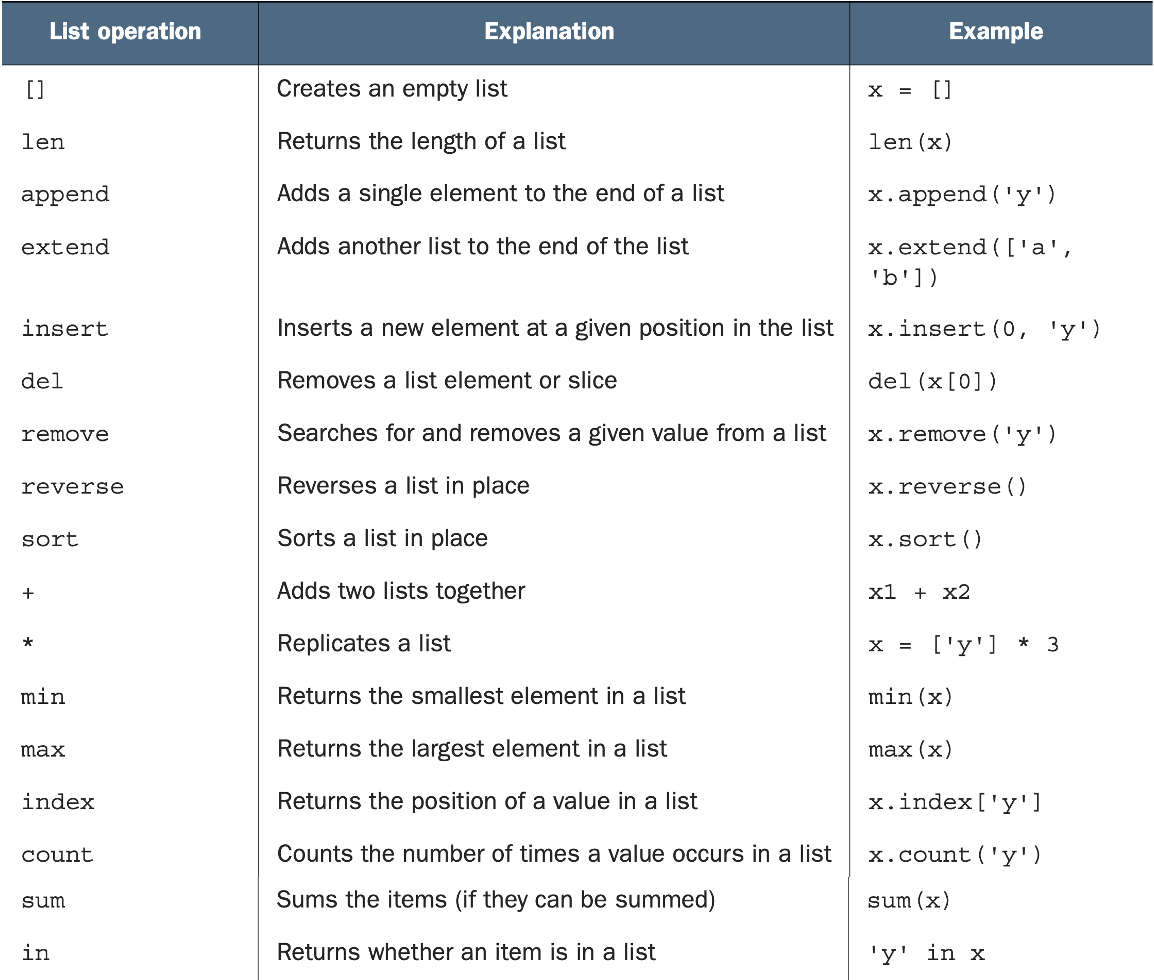
Review : List Operation
List, Tuple, Set:Tuple
Tuple Basic
Tuple 和 List 的結構很類似,
差別在於Tuple是不可變的 (immutable),
只能在第一次宣告時賦值
a = (0,1,2,3,4)
a[2] = "two" #TypeError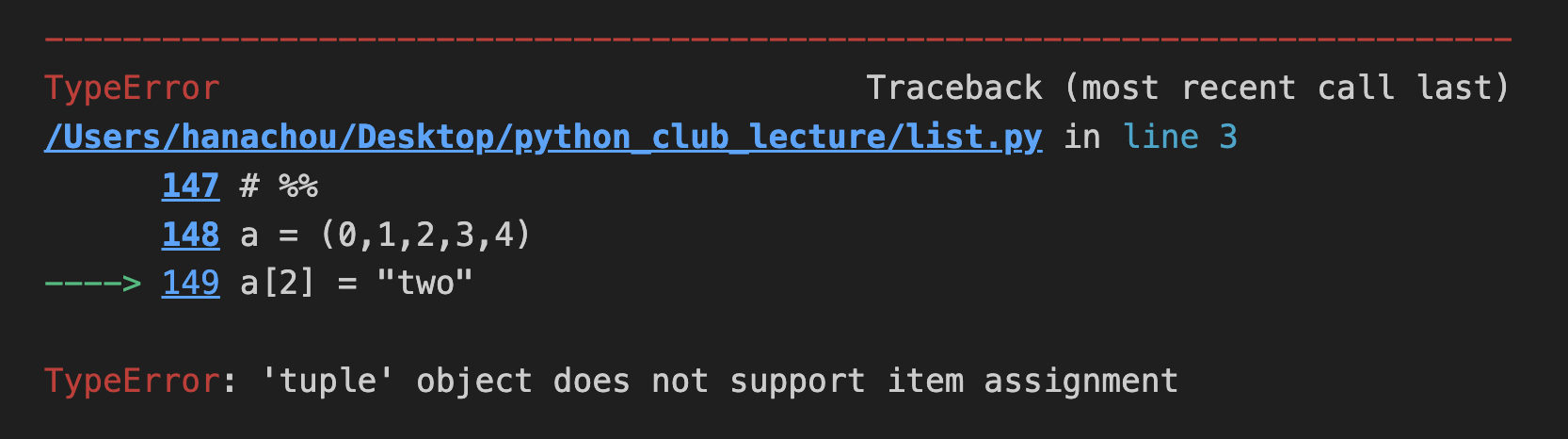
Tuple Basic
Tuple 和 List 也有很多函式是共通的:
a = (0,1,2,3,4)

print(len(a)) #5
print(max(a)) #4
print(min(a)) #0
print(5 in a) #False
print(5 not in a) #True
print(a + a) #(0, 1, 2, 3, 4, 0, 1, 2, 3, 4)
print(a * 2) #(0, 1, 2, 3, 4, 0, 1, 2, 3, 4)
Tuple Basic
Tuple 和四則運算的括號長得很像,
為了區分,會在 Tuple 加一個 ' , '
表示這是一個 Tuple,不是四則運算
x = 3
y = 4

print((x + y)) #7
print((x + y,)) #(7,)
Tuple : Packing and Unpacking
(one, two, three, four) = (1, 2, 3, 4)
print(one) #1
print(two) #2
print(one, two, three, four) #1 2 3 4
one = 1
two = 2
three = 3
four = 4
print(one, two, three, four) #(1, 2, 3, 4)Python permits tuples to appear on the left side of an assignment operator, in which case variables in the tuple receive the corresponding values from the tuple on the right side of the assignment operator.
Tuple : Packing and Unpacking
x = (1, 2, 3, 4, 5)

*a, b, c = x
print(a, b, c) #[1, 2, 3] 4 5

a, *b, c = x
print(a, b, c) #1 [2, 3, 4] 5

a, b, *c = x
print(a, b, c) #1 2 [3, 4, 5]

a, b, c, d, e, *f = x
print(a, b, c, d, e, f) #1 2 3 4 5 []
Python 3 has an extended unpacking feature, allowing an element marked with * to absorb any number of elements not matching the other elements.
Converting between lists and tuples
x = (1, 2, 3, 4, 5)
y = [1, 2, 3, 4, 5]
z = (5, 3, 1, 2, 4)

print(list(x)) #[1, 2, 3, 4, 5]
print(tuple(y)) #(1, 2, 3, 4, 5)
print(sorted(z)) #[1, 2, 3, 4, 5]
list 和 tuple之間可以很輕易的互相轉換:
list( ) 可以將tuple轉成list
tuple( )可以將list轉成tuple
而sorted( )可以將tuple轉成由小排到大的list
QUICK CHECK: TUPLES
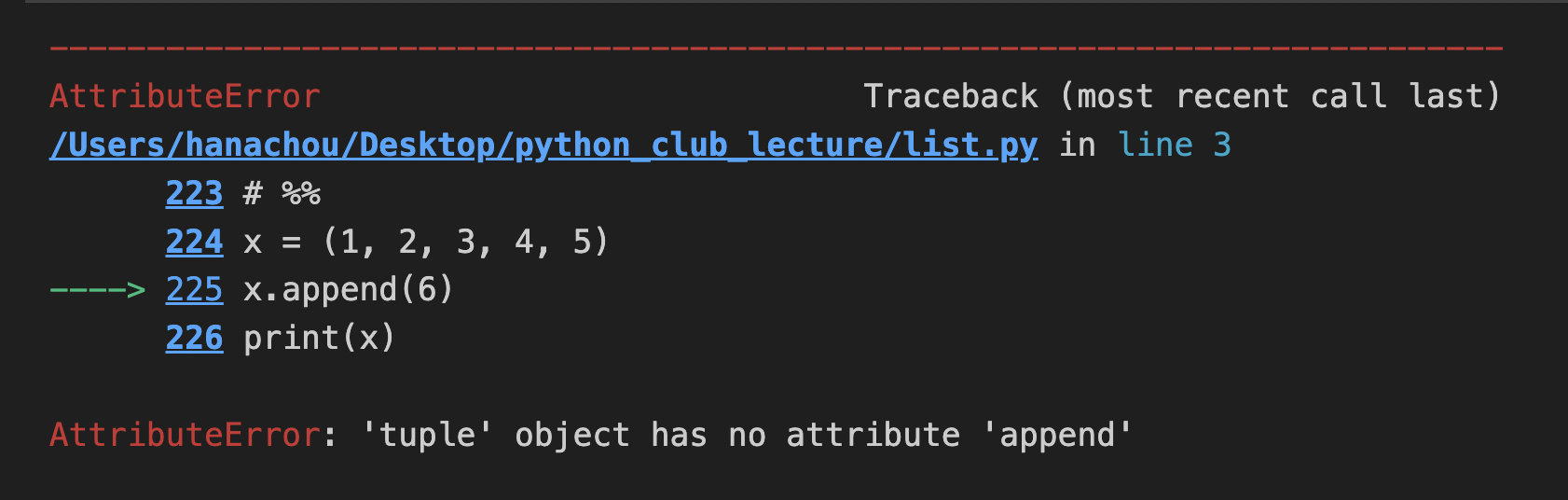
x = (1, 2, 3, 4, 5)
x.append(6)
print(x)
請解釋以下程式錯誤的原因:
QUICK CHECK: TUPLES
x = (7, 15, 0, -3, 2)

a = x.remove(2)
b = x.sort()
c = x.index(7)
請問下列哪幾行是合法的、意義是什麼:
x = (7, 15, 0, -3, 2)

a = x.remove(2) #AttributeError
b = x.sort() #AttributeError
c = x.index(7) #0
List, Tuple, Set:Set
Set Basic
在一個 set 裡的元素必須是不可變的 (immutable)
因此,int, float, strings, tuple都可以放在set裡
但list, dictionary, 和set本身都不能放在set裡
x = {1, 2, 3, 5}
print(x) #{1, 2, 3, 5}

y = [3, 2, 1, 5, 3, 1]
s = set(y)
print(s) #{1, 2, 3, 5}
Set Operations
set也有許多和list共通的函式:
x = {1, 2, 3, 5}
x.remove(5)
print(x) #{1, 2, 3}
print(4 in x) #False
print(5 not in x) #True
也有一些set自己獨有的:
x = {1, 2, 3, 5}
x.add(6)
print(x) #{1, 2, 3, 5, 6}

y = [3, 2, 1, 5, 3, 1]
s = set(y)
print(s) #{1, 2, 3, 5}
Set Operations
& (and):取兩個set之間重複的部分變成一個新set
| (or):取兩個set之間沒有重複的部分變成一個新set
^ (xor):取兩個set之間重複以外的部分變成一個新set
x = {1, 2, 3, 5}
y = {1, 7, 8, 9}

print(x & y) #{1}
print(x | y) #{1, 2, 3, 5, 7, 8, 9}
print(x ^ y) #{2, 3, 5, 7, 8, 9}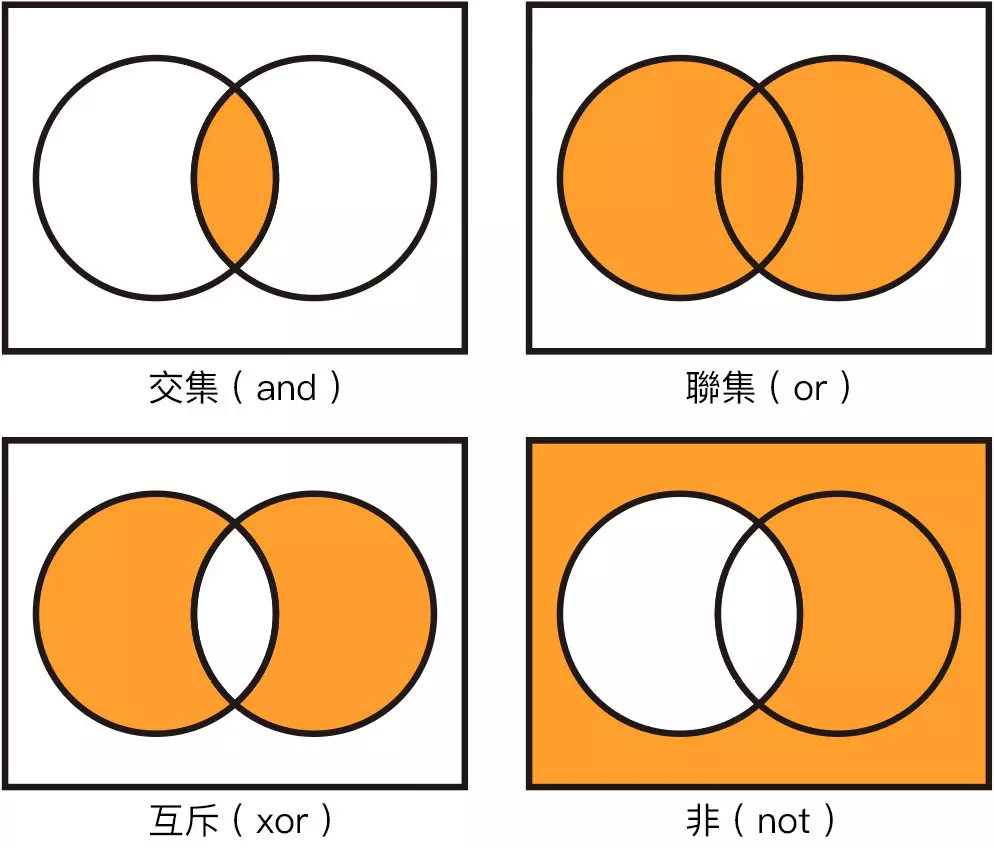
Set : Frozensets
Frozensets,顧名思義,冷凍的set
表示其不可變更 (immutable) 的特性
和tuple一樣,在宣告後就不可變更
lst = [3, 2, 1, 5, 3, 1]
lst_2_set = set(lst)
frozens = frozenset(lst_2_set)
print(frozens) #frozenset({1, 2, 3, 5})

frozens.add(6) #AttributeError

lst_2_set.add(frozens)
print(lst_2_set) #{1, 2, 3, 5, frozenset({1, 2, 3, 5})}
Queue & stack
What is Queue?
可以視為一種資料型態,
遵照First-In, First-Out (FIFO)的輸入輸出順序
我們可以用list來模擬一下queue的輸出方法:
queue = []

queue.append('a')
queue.append('b')
queue.append('c')

print("The initial queue :", queue)

print("The elements removed from queue :")
print(queue.pop(0))
print(queue.pop(0))
print(queue.pop(0))

print("The queue after removing elements :")
print(queue)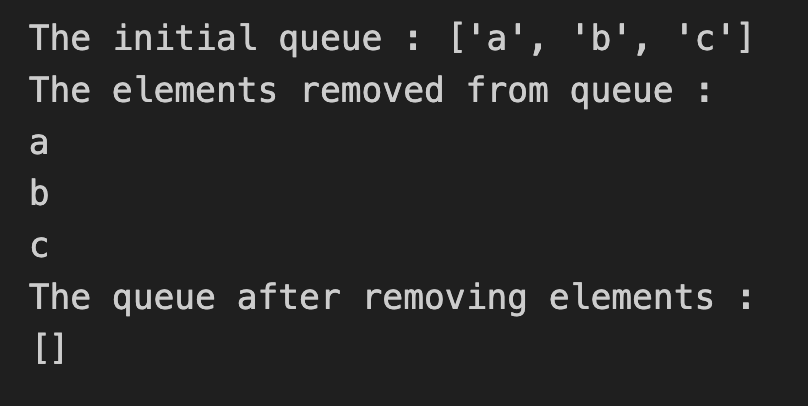
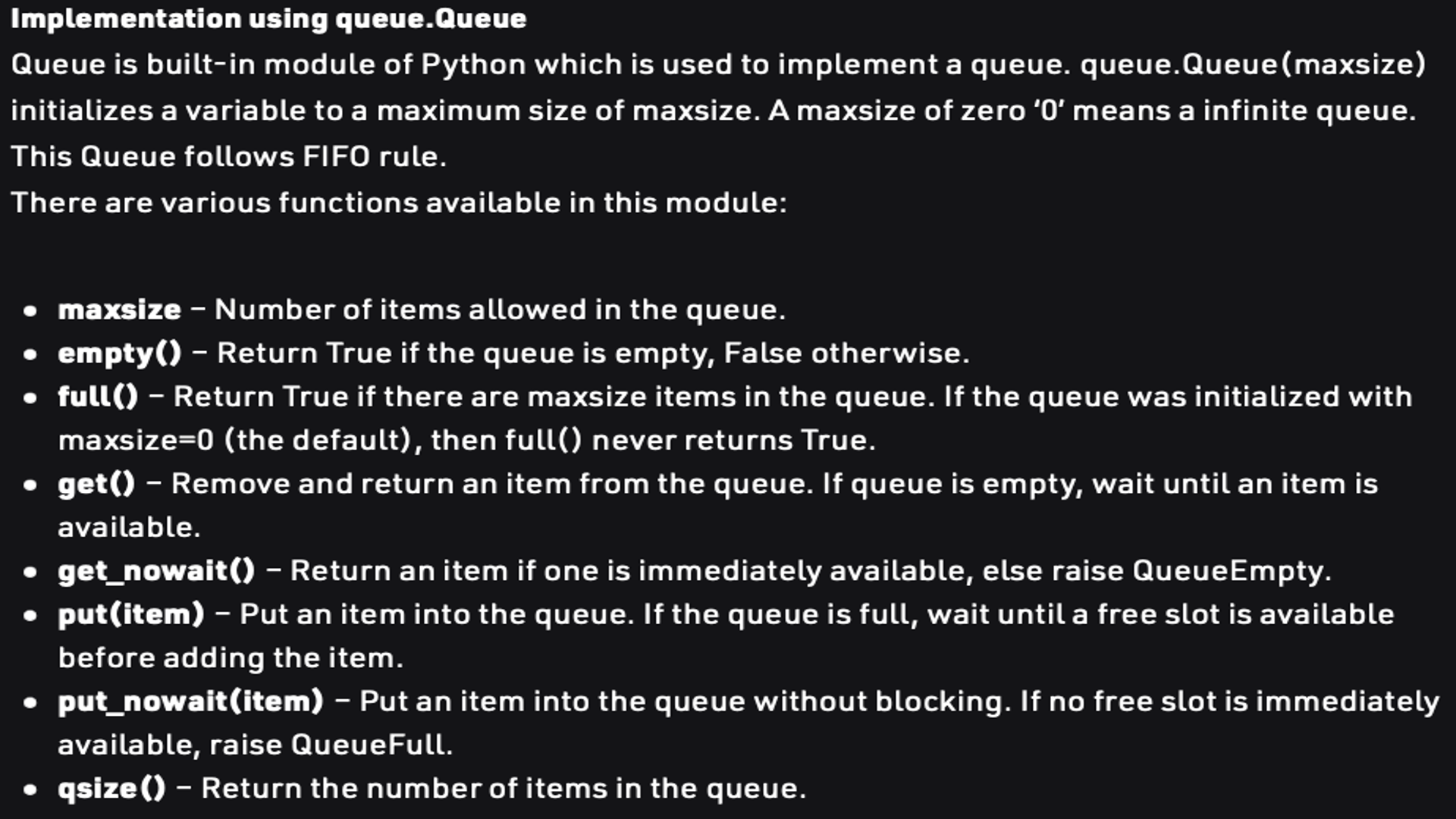
Queue Operations
Queue in Use
使用python函式庫裡的queue,
我們可以輕易地實現queue的操作:
from queue import Queue

Q = Queue(maxsize = 3)
print(Q.qsize()) #0

Q.put('a')
Q.put('b')
Q.put('c')
print("Full :",Q.full()) #Full : True

print(Q.get()) #a
print(Q.get()) #b
print(Q.get()) #c
print("Empty :", Q.empty()) #Empty : True
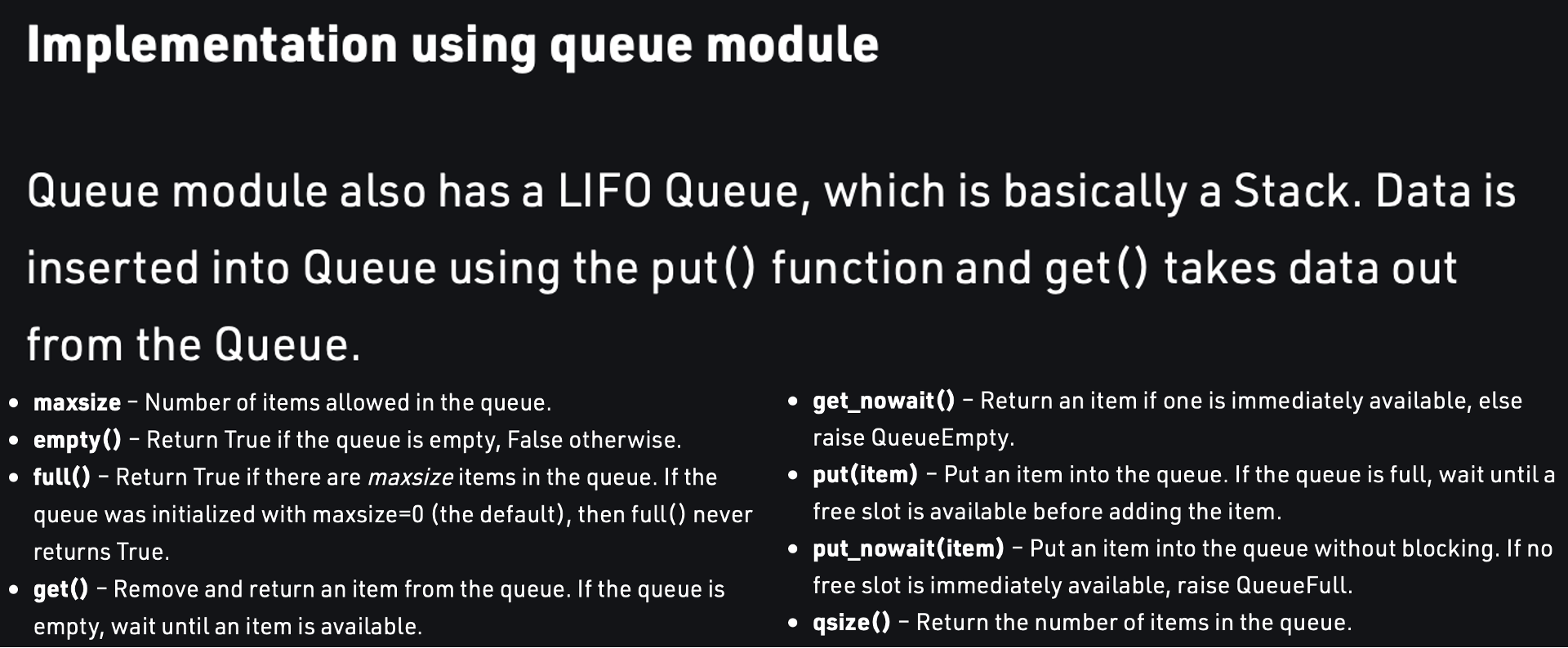
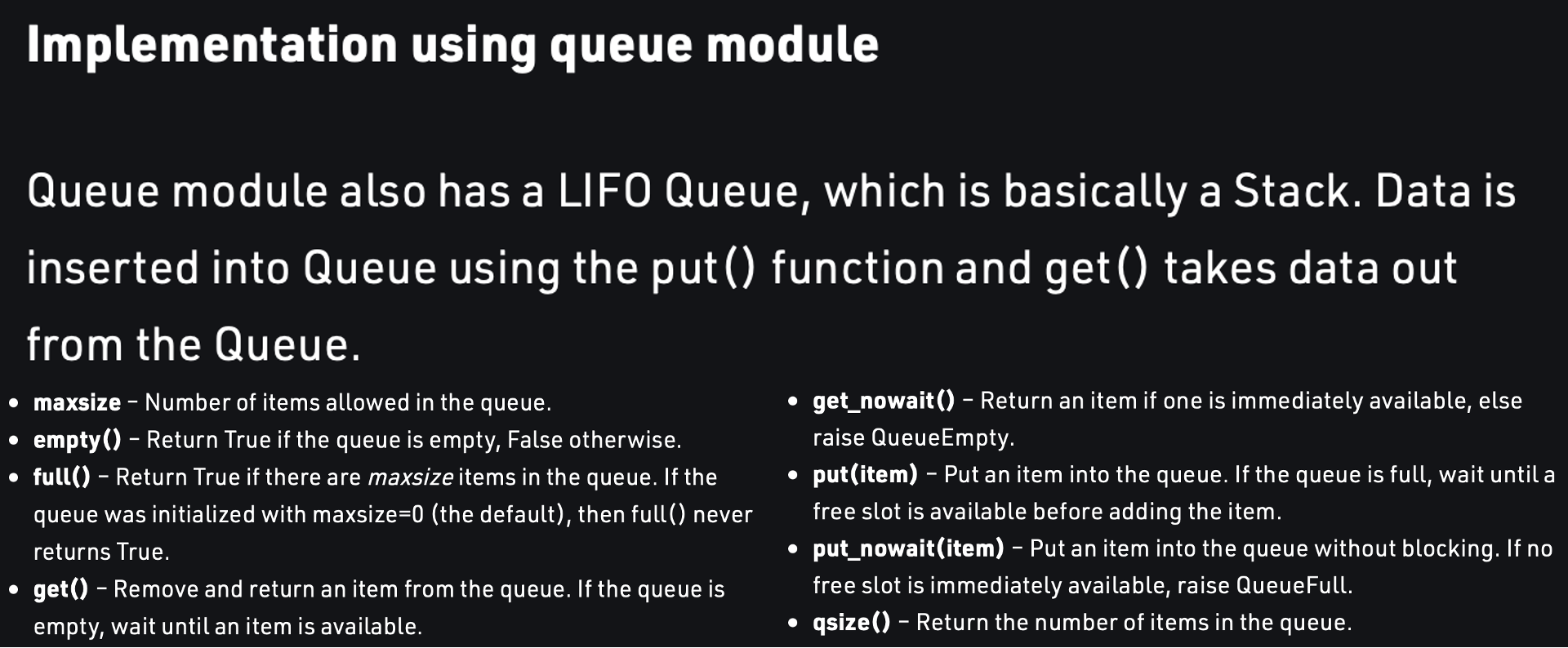
What is Stack?
是queue的相反,
遵照Last-In, First-Out (LIFO)的輸入輸出順序
一樣,先用list來模擬一下stack的輸出方法:
stack = []

stack.append('a')
stack.append('b')
stack.append('c')

print("The initial stack :", stack)

print("The element popped from stack :")
print(stack.pop())
print(stack.pop())
print(stack.pop())

print("The satck after elements are popped :")
print(stack)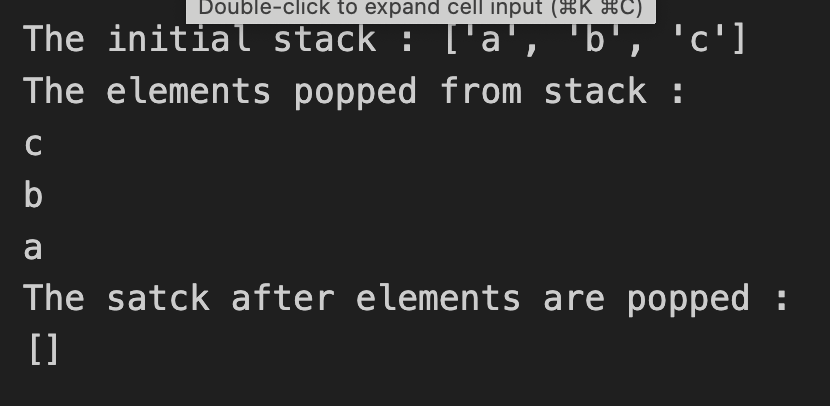
Stack Operations
Stack in Use
與queue類似,使用python函式庫裡的Lifoqueue,
我們可以輕易地實現stack的操作:
from queue import LifoQueue

st = LifoQueue(maxsize = 3)
print(st.qsize()) #0

st.put('a')
st.put('b')
st.put('c')
print("Full :", st.full()) #Full : True

print(st.get()) #c
print(st.get()) #b
print(st.get()) #a
print("Empty :", st.empty()) #Empty : True
QUICK CHECK: QUEUE & STACK
請設計一個程式,讓使用者能輸入3個人名,
並分別按照FIFO和LIFO的方式輸出
#LIFO
from queue import LifoQueue

st = LifoQueue(maxsize = 3)

st.put('a')
st.put('b')
st.put('c')

print(st.get()) #c
print(st.get()) #b
print(st.get()) #a
#FIFO
from queue import Queue
Q = Queue(maxsize = 3)
Q.put('a')
Q.put('b')
Q.put('c')
print(Q.get()) #a
print(Q.get()) #b
print(Q.get()) #cstring
String as Sequences of Characters
string(字串),是python其中一種資料型態
string可以用類似list的方式取string當中的字元:
str = "Hello"
print(str[0]) #'H'
print(str[-1]) #'o'
一如list,string 也有len( )可以取得string的字元數:
str = "Hello"
print(len(str)) #5
String as Sequences of Characters
當string被宣告後,
無法更改string裡的某個字元
str = "Hello"
str[0] = 'h' #TypeError
str.append('t') #TypeError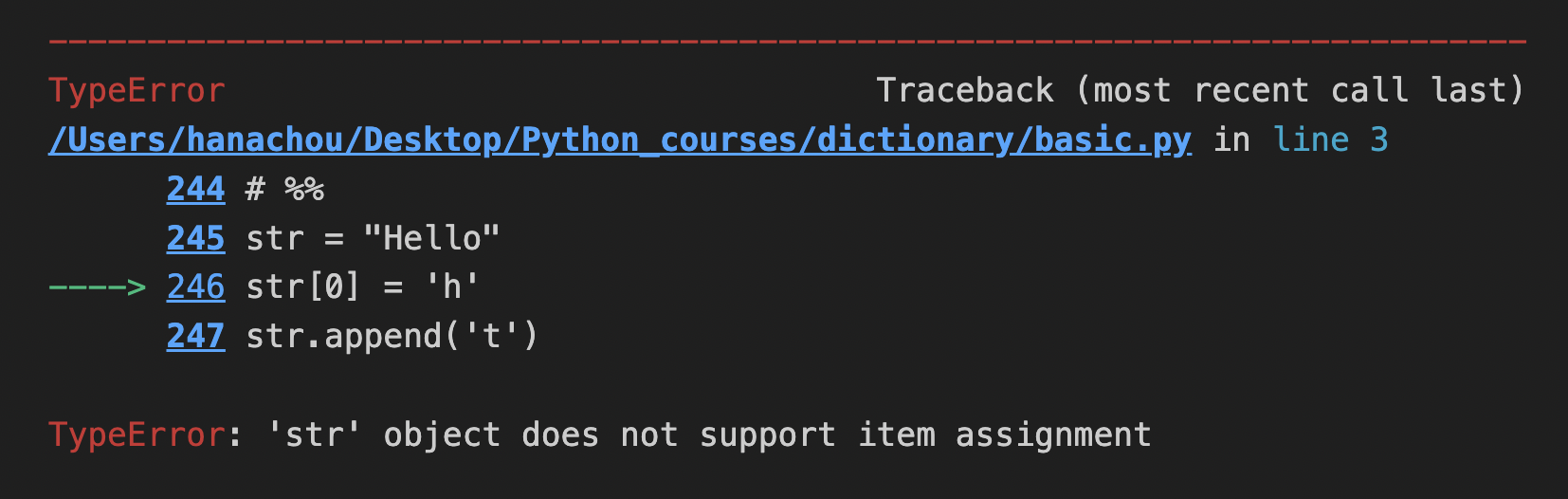
String Operations
upper( )可以將所有字元都轉成大寫
lower( )則是小寫
" " . join( )可以將一個list裡的元素接在一起,
變成一個字串,各元素以'' ''裡的內容隔開
str = "Hello"
print(str.upper()) #HELLO
print(str.lower()) #hello

lst = ["Python", "is", "better", "than", 'C']
print(' '.join(lst)) #Python is better than C
print('::'.join(lst)) #Python::is::better::than::C
print(''.join(lst)) #PythonisbetterthanC
String Operations
split( )可以將一個字串以空白(預設)分開,
在( )放" "可以將一個字串以" "裡的內容分開
split( ,num)可以分成num+1個段落
x = "You\t\t can have tabs\t\n \t and newlines \n\n mixed in"
print(x.split())
#['You', 'can', 'have', 'tabs', 'and', 'newlines', 'mixed', 'in']

x = "Mississippi"
print(x.split("ss")) #['Mi', 'i', 'ippi']

x = 'a b c d'
print(x.split(' ', 1)) #['a', 'b c d']
print(x.split(' ', 2)) #['a', 'b', 'c d']
print(x.split(' ', 9)) #['a', 'b', 'c', 'd']
QUICK CHECK : SPLIT & JOIN
請將 "This is a string" 更改成 "THIS-IS-A-STRING"
str = "This is a string"
str = str.upper()
lst = str.split()
str = '-'.join(lst)
print(str)
String Operations
find("string")可以在字串中尋找特定字串
rfind("string")就是從字串的最後開始往前找
count("string")計算在一個字串中該字串出現過幾次
x = "Mississippi"
x.find("ss") #2
x.find("zz") #-1

x = "Mississippi"
x.rfind("ss") #5

x = "Mississippi"
x.count("ss") #2
String Operations
startswith("string")回傳該字串是否是字串的開頭
endswith("string")回傳該字串是否是字串的結尾
如果("string", "string"),則只要其中一個成立,
就會回傳True
x = "Mississippi"
x.startswith("Miss") #True
x.startswith("Mist") #False
x.endswith("pi") #True
x.endswith("p") #False
x.endswith(("i", "u")) #True
Dictionary
Dictionary Basic
字典,簡稱dict,是一種鍵(Key)-值(Value)對應的資料型態
也就是說,我們可以用一個欄位的名稱
而非它的索引來操作它的值
en_to_french = {"red": "rouge", "blue": "bleu", "green": "vert"}
print(en_to_french["red"]) #rouge
print(en_to_french["blue"]) #bleu
print(en_to_french["green"]) #vert
範例中的en_to_french就是一個dictionary
在大括號裡用key:value的形式配對鍵-值
Dictionary Basic
和tuple不一樣的是,dict可以在需要用的時候
再新增新的值進入dictionary
english_to_french = {}
english_to_french['red'] = 'rouge'
english_to_french['blue'] = 'bleu'
english_to_french['green'] = 'vert'
print("red is", english_to_french['red']) #red is rouge
QUICK CHECK : DICTIONARY
請設計一個程式,讓使用者能依序輸入
三個名字與其對應的年齡
完成名字與年齡的輸入後,
再輸入一個名字,並輸出該名字所對應的年齡
name_2_age = {}

names = input("Name please?")
name_2_age[names] = input("Age please?")

names = input("Name please?")
name_2_age[names] = input("Age please?")

names = input("Name please?")
name_2_age[names] = input("Age please?")

name = input("Which person's age do you want to know?")
print("His/Her age is :", name_2_age[name])
Other Dictionary Operations
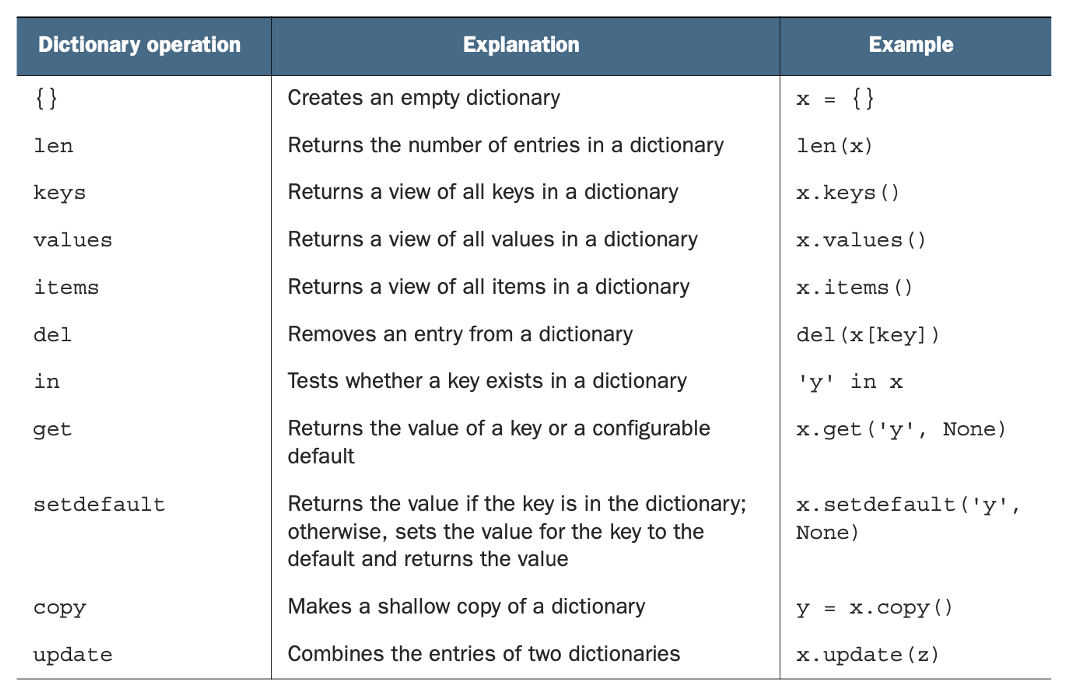
len( )可以回傳dict的長度
keys( )可以獲得dict的所有key的值
values( )可以獲得所有value的值
items( )可以將每一組key-value轉成一對tuple
english_to_french = {'red': 'rouge', 'blue': 'bleu', 'green': 'vert'}
len(english_to_french) #3

list(english_to_french.keys()) #['green', 'blue', 'red']

list(english_to_french.values()) #['vert', 'bleu', 'rouge']

list(english_to_french.items())
# [('green', 'vert'), ('blue', 'bleu'), ('red', 'rouge')]
Other Dictionary Operations
del 可以刪除一個指定的key,並連同value一起刪除
in & not in 會回傳布林值 (True or False) ,
表示是否在dictionary中
list(english_to_french.items())
# [('green', 'vert'), ('blue', 'bleu'), ('red', 'rouge')]

del english_to_french['green']
list(english_to_french.items())
#  [('blue', 'bleu'), ('red', 'rouge')]

'red' in english_to_french #True
'orange' in english_to_french #False
Other Dictionary Operations
get( )可以以指定key取dictionary中的某個value,
如果dict中沒有該key,則會回傳指定文字
copy( ),就是copy
update( ),將指定dict更新成另一dict的值,
沒有重複的部分則保留
english_to_french = {'red': 'rouge', 'blue': 'bleu', 'green': 'vert'}

print(english_to_french.get('blue', 'No translation'))
# bleu
print(english_to_french.get('chartreuse', 'No translation'))
# No translation

x = {0: 'zero', 1: 'one'}
y = x.copy()
print(y) #{0: 'zero', 1: 'one'}

z = {1: 'One', 2: 'Two'}
x.update(z)
print(x) #{0: 'zero', 1: 'One', 2: 'Two'}
Summery
QUICK CHECK : DICTIONARY OPERATION
請問執行以下程式後的輸出結果:
x = {'a': 1, 'b': 2, 'c': 3, 'd': 4}
y = {'a': 6, 'e': 5, 'f': 6}

del x['d']
z = y.copy()
x.update(z)

print(x)
print(x) #{'a': 6, 'b': 2, 'c': 3, 'e': 5, 'f': 6}PYTHON聯課第二堂
By d11130110周月蘅