#VemProReact #JEP #2

#VemProReact
Correção da atividade!
#VemProReact
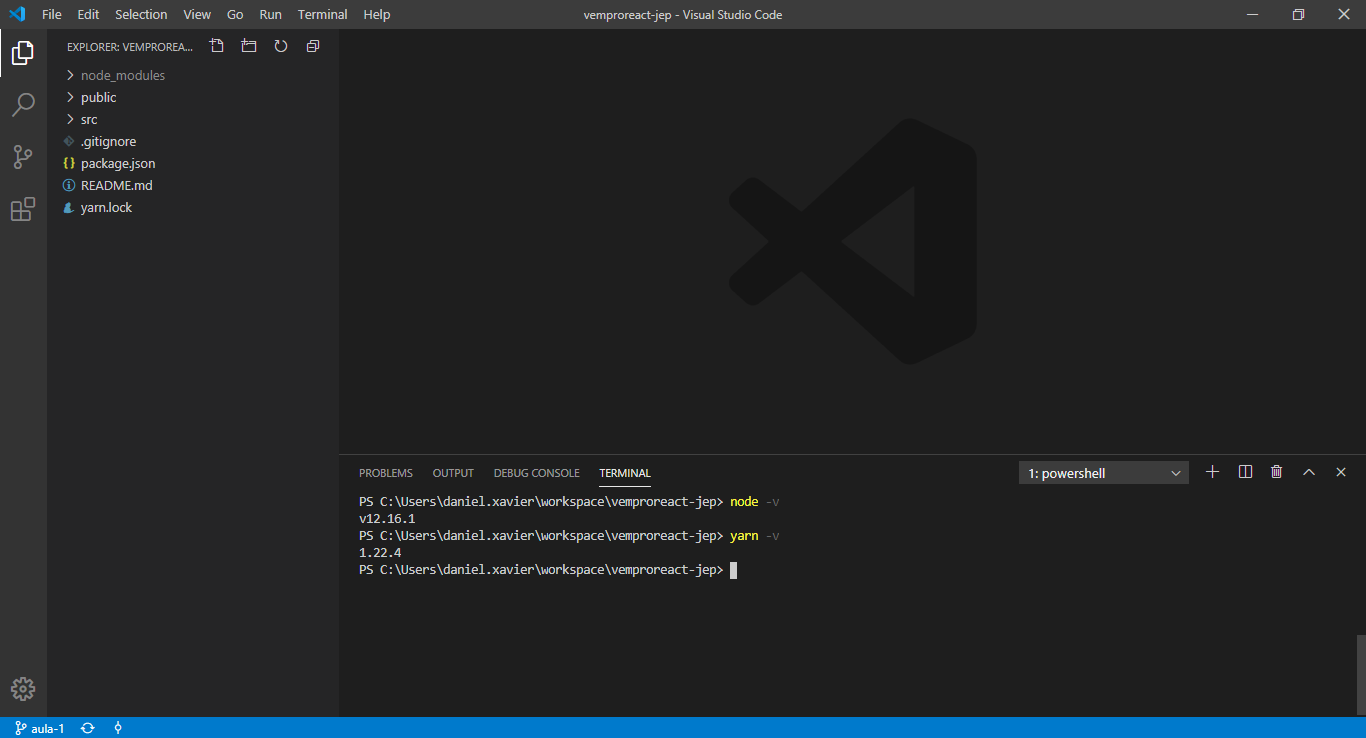
create-react-app
A estrutura do projeto
#VemProReact
create-react-app
node_modules
#VemProReact
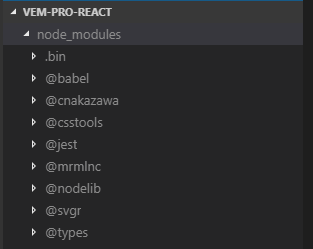
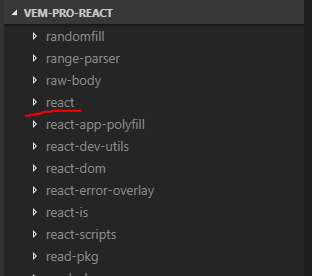
node_modules
Neste diretório estarão os pacotes npm instalados no projeto. Inclusive o React!
#VemProReact
create-react-app
public/index.html
#VemProReact
public/index.html
Este é o arquivo que o browser irá interpretar primeiro. Contém configurações iniciais da página e um container onde o React será "executado".
<!DOCTYPE html>
<html lang="en">
  <head>
    <meta charset="utf-8" />
    <link rel="icon" href="%PUBLIC_URL%/favicon.ico" />
    <meta name="viewport" content="width=device-width, initial-scale=1" />
    <meta name="theme-color" content="#000000" />
    <meta
      name="description"
      content="Web site created using create-react-app"
    />
    <link rel="apple-touch-icon" href="%PUBLIC_URL%/logo192.png" />
    <!--
      manifest.json provides metadata used when your web app is installed on a
      user's mobile device or desktop. See https://developers.google.com/web/fundamentals/web-app-manifest/
    -->
    <link rel="manifest" href="%PUBLIC_URL%/manifest.json" />
    <!--
      Notice the use of %PUBLIC_URL% in the tags above.
      It will be replaced with the URL of the `public` folder during the build.
      Only files inside the `public` folder can be referenced from the HTML.

      Unlike "/favicon.ico" or "favicon.ico", "%PUBLIC_URL%/favicon.ico" will
      work correctly both with client-side routing and a non-root public URL.
      Learn how to configure a non-root public URL by running `npm run build`.
    -->
    <title>React App</title>
  </head>
  <body>
    <noscript>You need to enable JavaScript to run this app.</noscript>
    <div id="root"></div>
    <!--
      This HTML file is a template.
      If you open it directly in the browser, you will see an empty page.

      You can add webfonts, meta tags, or analytics to this file.
      The build step will place the bundled scripts into the <body> tag.

      To begin the development, run `npm start` or `yarn start`.
      To create a production bundle, use `npm run build` or `yarn build`.
    -->
  </body>
</html>
#VemProReact
src/App.css
create-react-app
#VemProReact
src/App.css
Contém os estilos (CSS) do component App
.App {
  text-align: center;
}

.App-logo {
  height: 40vmin;
  pointer-events: none;
}

@media (prefers-reduced-motion: no-preference) {
  .App-logo {
    animation: App-logo-spin infinite 20s linear;
  }
}

.App-header {
  background-color: #282c34;
  min-height: 100vh;
  display: flex;
  flex-direction: column;
  align-items: center;
  justify-content: center;
  font-size: calc(10px + 2vmin);
  color: white;
}

.App-link {
  color: #61dafb;
}

@keyframes App-logo-spin {
  from {
    transform: rotate(0deg);
  }
  to {
    transform: rotate(360deg);
  }
}
#VemProReact
src/App.js
create-react-app
#VemProReact
src/App.js
Este é um componente React
import React from 'react';
import logo from './logo.svg';
import './App.css';

function App() {
  return (
    <div className="App">
      <header className="App-header">
        <img src={logo} className="App-logo" alt="logo" />
        <p>
          Edit <code>src/App.js</code> and save to reload.
        </p>
        <a
          className="App-link"
          href="https://reactjs.org"
          target="_blank"
          rel="noopener noreferrer"
        >
          Learn React
        </a>
      </header>
    </div>
  );
}

export default App;
#VemProReact
src/App.test.js
create-react-app
#VemProReact
src/App.test.js
Contém um exemplo de teste unitário do component App
import React from 'react';
import { render } from '@testing-library/react';
import App from './App';

test('renders learn react link', () => {
  const { getByText } = render(<App />);
  const linkElement = getByText(/learn react/i);
  expect(linkElement).toBeInTheDocument();
});
#VemProReact
src/index.css
create-react-app
#VemProReact
src/index.css
body {
  margin: 0;
  font-family: -apple-system, BlinkMacSystemFont, 'Segoe UI', 'Roboto', 'Oxygen',
    'Ubuntu', 'Cantarell', 'Fira Sans', 'Droid Sans', 'Helvetica Neue',
    sans-serif;
  -webkit-font-smoothing: antialiased;
  -moz-osx-font-smoothing: grayscale;
}

code {
  font-family: source-code-pro, Menlo, Monaco, Consolas, 'Courier New',
    monospace;
}
Contém os estilos (CSS) globais da aplicação
#VemProReact
src/index.js
create-react-app
#VemProReact
src/index.js
import React from 'react';
import ReactDOM from 'react-dom';
import './index.css';
import App from './App';
import * as serviceWorker from './serviceWorker';

ReactDOM.render(<App />, document.getElementById('root'));

// If you want your app to work offline and load faster, you can change
// unregister() to register() below. Note this comes with some pitfalls.
// Learn more about service workers: https://bit.ly/CRA-PWA
serviceWorker.unregister();
Este é o arquivo que irá "instanciar" o React e aplicá-lo ao container que vimos no index.html
#VemProReact
package.json
create-react-app
#VemProReact
package.json
{
  "name": "vemproreact-jep",
  "version": "0.1.0",
  "private": true,
  "dependencies": {
    "@testing-library/jest-dom": "^4.2.4",
    "@testing-library/react": "^9.3.2",
    "@testing-library/user-event": "^7.1.2",
    "react": "^16.12.0",
    "react-dom": "^16.12.0",
    "react-scripts": "3.4.0"
  },
  "scripts": {
    "start": "react-scripts start",
    "build": "react-scripts build",
    "test": "react-scripts test",
    "eject": "react-scripts eject"
  },
...
Este arquivo contém as informações do projeto, dependências de pacotes, scripts que podem ser executados e outras configurações
...
  "eslintConfig": {
    "extends": "react-app"
  },
  "browserslist": {
    "production": [
      ">0.2%",
      "not dead",
      "not op_mini all"
    ],
    "development": [
      "last 1 chrome version",
      "last 1 firefox version",
      "last 1 safari version"
    ]
  }
}
#VemProReact
yarn.lock
create-react-app
#VemProReact
yarn.lock
Contém todos os detalhes dos pacotes instalados no projeto, bem como suas dependências
...
  optionalDependencies:
    fsevents "2.1.2"

react@^16.12.0:
  version "16.12.0"
  resolved "https://artifactory.softplan.com.br/artifactory/api/npm/npm/react/-/react-16.12.0.tgz#0c0a9c6a142429e3614834d5a778e18aa78a0b83"
  integrity sha1-DAqcahQkKeNhSDTVp3jhiqeKC4M=
  dependencies:
    loose-envify "^1.1.0"
    object-assign "^4.1.1"
    prop-types "^15.6.2"

read-pkg-up@^2.0.0:
  version "2.0.0"
...
#VemProReact
README.md
create-react-app
#VemProReact
README.md
É o cartão de visitas do projeto. Contém informações sobre o projeto, instruções para instalação, execução e qualquer outra informação relevante para quem estiver vendo o projeto pela primeira vez
# vemproreact-jep

This project was bootstrapped with [Create React App](https://github.com/facebook/create-react-app).

## Available Scripts

In the project directory, you can run:

### `yarn start`

Runs the app in the development mode.<br />
Open [http://localhost:3000](http://localhost:3000) to view it in the browser.

The page will reload if you make edits.<br />
You will also see any lint errors in the console.

### `yarn test`

Launches the test runner in the interactive watch mode.<br />
See the section about [running tests](https://facebook.github.io/create-react-app/docs/running-tests) for more information.

### `yarn build`

Builds the app for production to the `build` folder.<br />
It correctly bundles React in production mode and optimizes the build for the best performance.

The build is minified and the filenames include the hashes.<br />
Your app is ready to be deployed!

See the section about [deployment](https://facebook.github.io/create-react-app/docs/deployment) for more information.

### `yarn eject`

**Note: this is a one-way operation. Once you `eject`, you can’t go back!**

If you aren’t satisfied with the build tool and configuration choices, you can `eject` at any time. This command will remove the single build dependency from your project.

Instead, it will copy all the configuration files and the transitive dependencies (webpack, Babel, ESLint, etc) right into your project so you have full control over them. All of the commands except `eject` will still work, but they will point to the copied scripts so you can tweak them. At this point you’re on your own.

You don’t have to ever use `eject`. The curated feature set is suitable for small and middle deployments, and you shouldn’t feel obligated to use this feature. However we understand that this tool wouldn’t be useful if you couldn’t customize it when you are ready for it.

## Learn More

You can learn more in the [Create React App documentation](https://facebook.github.io/create-react-app/docs/getting-started).

To learn React, check out the [React documentation](https://reactjs.org/).

### Code Splitting

This section has moved here: https://facebook.github.io/create-react-app/docs/code-splitting

### Analyzing the Bundle Size

This section has moved here: https://facebook.github.io/create-react-app/docs/analyzing-the-bundle-size

### Making a Progressive Web App

This section has moved here: https://facebook.github.io/create-react-app/docs/making-a-progressive-web-app

### Advanced Configuration

This section has moved here: https://facebook.github.io/create-react-app/docs/advanced-configuration

### Deployment

This section has moved here: https://facebook.github.io/create-react-app/docs/deployment

### `yarn build` fails to minify

This section has moved here: https://facebook.github.io/create-react-app/docs/troubleshooting#npm-run-build-fails-to-minify
#VemProReact
Perceberam o HTML, CSS e JavaScript juntos?
create-react-app
#VemProReact
React
O que faz isto funcionar no React é o JSX
#VemProReact
JSX
const element = <h1>#VemProReact</h1>;- É uma definição de sintaxe
- É uma "linguagem" de templates
- Não é suportada pelos browsers
Na prática, visualmente, é uma mistura louca de variáveis e funções JavaScript com tags HTML
#VemProReact
Dúvidas?
#VemProReact
Atividade!
- Alterar o título da página para "#VemProReact #JEP"
- Fazer o logo do React girar para o outro lado e com o dobro da velocidade
- Dividir o App.js em pelo menos 3 componentes, criando um arquivo .js e .css (quando necessário) para cada um e mantendo o funcionamento da aplicação
- Estudar o conceito de Arrow Functions
#VemProReact
Correção da atividade!
<title>#VemProReact #JEP</title>animation: App-logo-spin infinite 10s linear reverse;HTML
CSS
#VemProReact
Correção da atividade!
App.css
import React from 'react';
import './App.css';

import Logo from './Logo'
import Text from './Text'
import Link from './Link'

function App() {
  return (
    <div className="App">
      <header className="App-header">
        <Logo />
        <Text />
        <Link />
      </header>
    </div>
  );
}

export default App;
.App {
text-align: center;
}
.App-header {
background-color: #282c34;
min-height: 100vh;
display: flex;
flex-direction: column;
align-items: center;
justify-content: center;
font-size: calc(10px + 2vmin);
color: white;
}App.js
#VemProReact
Correção da atividade!
import React from 'react';
import logo from './logo.svg';
import './Logo.css';

function Logo() {
  return (
    <img src={logo} className="App-logo" alt="logo" />
  );
}

export default Logo;
Logo.js
#VemProReact
Correção da atividade!
Logo.css
.App-logo {
  height: 40vmin;
  pointer-events: none;
}

@media (prefers-reduced-motion: no-preference) {
  .App-logo {
    animation: App-logo-spin infinite 10s linear reverse;
  }
}

@keyframes App-logo-spin {
  from {
    transform: rotate(0deg);
  }
  to {
    transform: rotate(360deg);
  }
}
#VemProReact
Correção da atividade!
import React from 'react';

function Text() {
  return (
    <p>
      Edit <code>src/App.js</code> and save to reload.
    </p>
  );
}

export default Text;
Text.js
#VemProReact
Correção da atividade!
import React from 'react';
import './Link.css';

function Link() {
  return (
    <a
      className="App-link"
      href="https://reactjs.org"
      target="_blank"
      rel="noopener noreferrer"
    >
      Learn React
    </a>
  );
}

export default Link;
Link.js
Link.css
.App-link {
  color: #61dafb;
}
#VemProReact
Correção da atividade!
E as Arrow Functions?
#VemProReact
Arrow Functions
- Este termo vem da utilização dos sinais "=>"
- É uma maneira simplificada de escrever uma função
- Não tem escopo definido pela palavra chave this
- Podem ser declaradas e executadas no mesmo instante (IIFE)
Exemplos:
const soma = (a, b) => {
  return a + b;
}
const soma = (a, b) => a + b;let soma;
((a, b) => {
soma = a + b;
})(1, 2);#VemProReact
Arrow Functions
Como transformar uma function expression em arrow function?
#VemProReact
Arrow Functions
function soma(a, b) {
    return a + b;
}
const soma = (a, b) => {
return a + b;
}const soma = (a, b) => a + b;Considerando a função soma abaixo:
Seria, simplesmente, criar uma variável para receber a função, remover a palavra function e adicionar a arrow:
Como a função só retorna valores, ainda podemos omitir o return e as chaves:
#VemProReact
Components
- São uma forma de você dividir sua aplicação React em partes menores de código
- Facilita a manutenção
- Evita a repetição de código comum
- Facilita os testes unitários
- Podem ser utilizados dentro de outros componentes
- Podem receber parâmetros (props)
Na teoria:
#VemProReact
Components
Na prática:
São um tipo de função que retorna um código HTML JSX, e que poderá ser utilizada várias vezes em qualquer lugar da aplicação
#VemProReact
Function Components
É a maneira mais simples de definir um componente React
Na teoria:
import React from 'react';

const Text = () => (
  <p>
    Edit <code>src/App.js</code> and save to reload.
  </p>
);

export default Text;
Exemplo:
#VemProReact
Function Components
Na prática...
import React from 'react';Importamos o React:
const Text = () => (
  <p>
    Edit <code>src/App.js</code> and save to reload.
  </p>
);
Criamos a função:
export default Text;Exportamos o componente:
#VemProReact
Function Components
E para utilizar...
import Text from './Text';Importamos o componente:
<Text />E utilizamos como se fosse uma tag HTML:
Simples assim!
#VemProReact
props
Props, basicamente, são parâmetros que podemos passar para o componente
Existem props nativas do React.
Por exemplo: children
Não precisam ser declaradas dentro do componente
São imutáveis! Ou seja, não podemos modificar o valor de uma prop dentro do componente
#VemProReact
props
Lembrando da semelhança entre componentes e funções, as props são o primeiro parâmetro da função:
const Ola = (props) => <h1>Olá, {props.nome}!</h1>;<Ola nome="Daniel" />E para defini-las:
DICA: O parâmetro props é um objeto! Por isso usamos props.nome
#VemProReact
props
E a prop children?
Como eu uso?
Como eu defino?
#VemProReact
props
Pra usar é exatamente igual:
const Titulo = (props) => <h1>{props.children}</h1>;<Titulo>Olá, Daniel!</Titulo>E para definir:
Simples assim!
#VemProReact
Dúvidas?
#VemProReact
Atividade!
- Converter todos os componentes para arrow functions
- Criar um componente para o header que está dentro do App.js, também com arrow function
Dica: use a prop "children" para manter o mesmo formato e deixar os outros components dentro da "tag"
- Estudar o conceito de Destructuring Assignment
#VemProReact
#Desafio!
Depois de fazer os deveres, adicione uma prop chamada "repeat" ao seu componente Logo, informando um número entre 1 e 6.
Dentro do componente Logo, crie uma inteligência para repetir a imagem o número de vezes que receber nesta prop.
Dica: lembre-se que um componente contém JSX, e não HTML.
Ou seja, você pode misturar JavaScript com HTML.
Isto vai te ajudar a resolver o desafio.
Além disto, faça com que cada imagem gire no sentido oposto à próxima. Por exemplo: a primeira em sentido horário, a segunda em sentido anti-horário e assim por diante.
#VemProReact
Obrigado!

#VemProReact #JEP #2
By Softplan Planejamento e Sistemas
#VemProReact #JEP #2
create-react-app; JSX; #desafio