dargstack
A bouquet of microservices
- container recap
- development & production
- dargstack
- a real world example
Structure
1/4 container recap

- layered file system
- resource sharing
- fast starts
- parallelism
- idempotence
- no config scattering
Quickstart


Service

Stack
2/4 development & production
website
database
reverse proxy
websi.te
adminer.websi.te
traefik.websi.te
Services
Domains
Additional Components


Let's create
a stack
for that!
Stack Configuration
services:
  dargstack-example:
    command: ...
    deploy:
      labels:
      - traefik.enable=true
      - traefik...
    image: dargmuesli/dargstack-example:dev
    volumes:
    - ../../dargstack-example/:...
    - ./certificates/:...
Stack Configuration
services:
  adminer:
    deploy:...
    image: adminer:...
    volumes:
    - ../production/configurations/adminer/adminer.css:...
  postgres:
    environment:
      POSTGRES_PASSWORD_FILE: /run/secrets/postgres_password
      ...
    image: postgres:...
    secrets:
    - postgres_password
    - ...
    volumes:
    - postgres_data:...
  postgres_backup:
    environment:
      POSTGRES_PASSWORD_FILE: ...
      ...
    image: prodrigestivill/postgres-backup-local:...
    secrets: ...
    volumes:
    - postgres_data:...
    - ../production/backups/postgres/:/backups/
Stack Configuration
secrets:
  postgres_password:
    file: ./secrets/postgres_password.secret
  ...
version: "3.6"
volumes:
  postgres_data: {}
Træfik

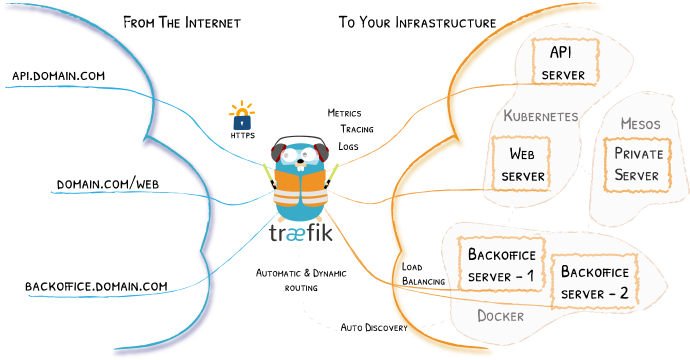
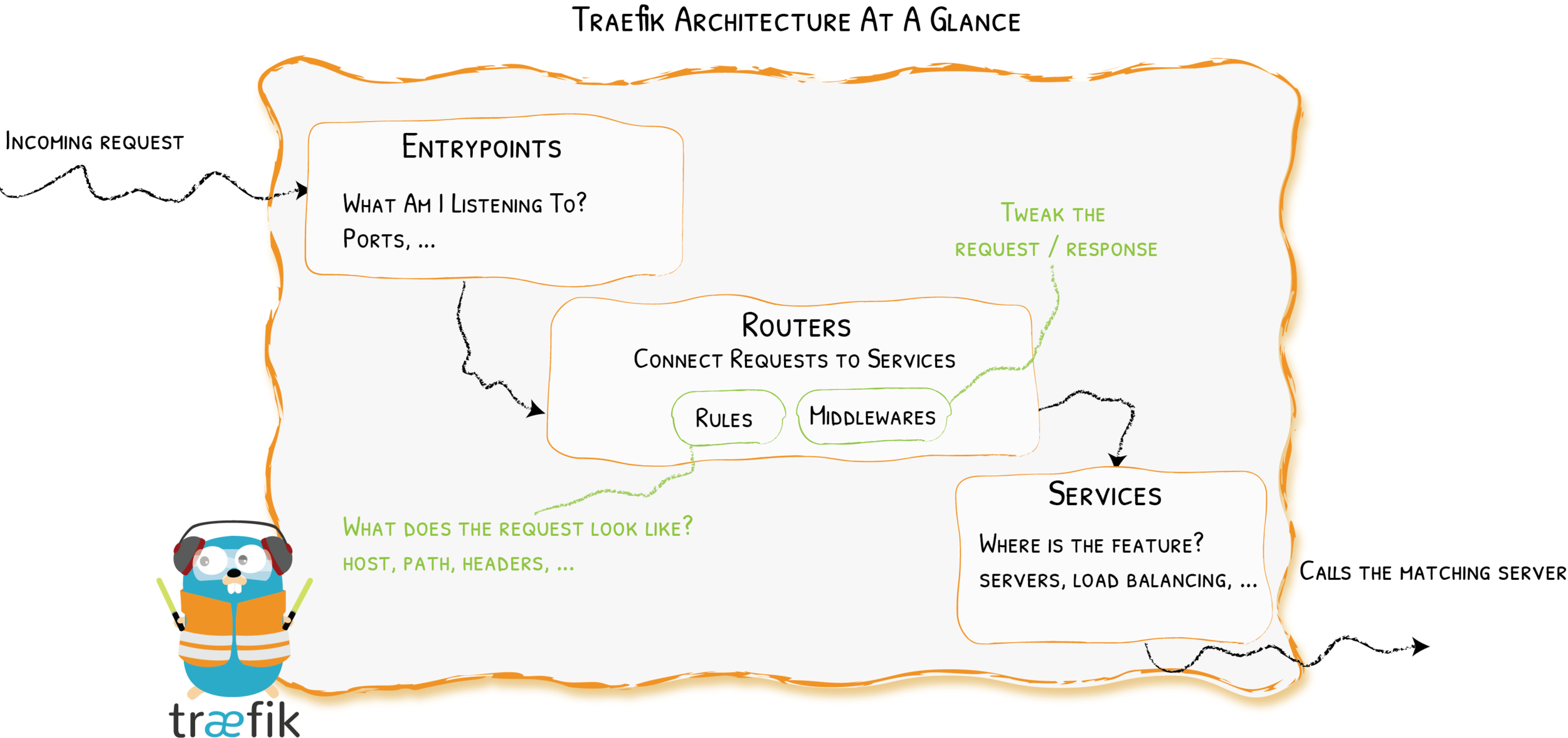
Stack Configuration
services:
  traefik:
    command:
      - --providers.docker=true
      - ...
    deploy: ...
      mode: global
      placement:
        constraints:
        - node.role == manager
    image: traefik:2...
    ports:
    - mode: host
      protocol: tcp
      published: 80
      target: 80
    - mode: host
      protocol: tcp
      published: 443
      target: 443
    volumes:
    - /var/run/docker.sock:/var/run/docker.sock
    - ./certificates/:...
    - ./configurations/traefik/dynamic.yml:... #DARGSTACK-REMOVE
That was
Development.
But what about
Production?
For Production
We may want to...
- use real certificates
- use real secrets
- add/remove secrets/volumes
- set version tags
- set different environment variables
- use variables inside the stack configuration
- or apply regular expressions to it
Let's
think about that
for a sec.
Production configuration
is a
modification
of the
development configuration.
We want to
derive
production configuration
from development configuration!
But
how?
It's a Template.
It's a Template.
📦 project
├─ 📂 src
└─ 📜 Dockerfile
It's a Template.
📦 project
├─ 📂 src
└─ 📜 Dockerfile

📦 project_stack
└─ 📂 development
   ├─ 📂 [resource-folders]
   ├─ 📂 secrets
   └─ 📜 stack.yml
resource folders:
- backups/
- certificates/
- configurations/
It's a Template.
📦 project
├─ 📂 src
└─ 📜 Dockerfile

📦 project_stack
├─ 📂 development
│  ├─ 📂 [resource-folders]
│  ├─ 📂 secrets
│  └─ 📜 stack.yml
└─ 📂 production
   ├─ 📂 [resource-folders]
   ├─ 📜 production.sed
   ├─ 📜 production.yml
   ├─ 📜 stack.env.template
   └─ 📜 stack.yml¹
resource folders:
- backups/
- certificates/
- configurations/
The Script
usage: dargstack <module> <options>

modules
    build [sibling]           Builds the main project or the specified sibling, tagged as dev.
                              Only for development.
    deploy                    Deploys a Docker project either from a full local development
                              clone of the project or, with the --production parameter
                              provided, by doing a sparse Git checkout containing only the
                              production configuration. In the latter case derive is executed
                              first and the existence of required environment variables is
                              checked before deployment starts.
    derive                    Derives a ./production/stack.yml from ./development/stack.yml.
    rgen                      Generate the README.
    rm                        Removes the stack.
    self-update               Updates the helper script.
    validate                  Checks for an up-2-date README.

options
    -a, --advertise-addr      The address Docker Swarm advertises.
    -h, --help                Display this help. Usable with modules: all.
    -o, --offline               Do not try to update the checkout
    -p, --production <tag>    Execute in production mode. Version must equal a tag name or
                              latest. Usable with modules: deploy.
    -u, --url <url>           The URL to clone from. May include the substrings <owner> and
                              <name> that are replaced by their corresponding value that is
                              inferred from the DargStack directory structure. Usable with
                              modules: deploy.
4/4 a real world example
1. Development
stack.yml
📦 project
├─ 📂 src
└─ 📜 Dockerfile

📦 project_stack
├─ 📂 development
│  ├─ 📂 [resource-folders]
│  ├─ 📂 secrets
│  └─ 📜 stack.yml            <----------
└─ 📂 production
   ├─ 📂 [resource-folders]
   ├─ 📜 production.sed
   ├─ 📜 production.yml
   ├─ 📜 stack.env.template
   └─ 📜 stack.yml¹
secrets:
postgres_db:
file: ./secrets/postgres/db.secret
postgres_password:
file: ./secrets/postgres/password.secret
postgres_user:
file: ./secrets/postgres/user.secret
postgres-backup_db:
file: ./secrets/postgres-backup/db.secret
services:
adminer:
deploy:
labels:
- traefik.enable=true
- traefik.http.routers.adminer.middlewares=redirectscheme
- traefik.http.routers.adminer.rule=Host(`adminer.${STACK_DOMAIN}`)
- traefik.http.routers.adminer_secure.rule=Host(`adminer.${STACK_DOMAIN}`)
- traefik.http.routers.adminer_secure.tls.options=mintls13@file #DARGSTACK-REMOVE
- traefik.http.services.adminer.loadbalancer.server.port=8080
image: adminer:4@sha256:4ca2a6eb39e94af14d317232e86855c8fc442c3d5332fab9ce70d0bc3b112d65
volumes:
- ../production/configurations/adminer/adminer.css:/var/www/html/adminer.css:ro
dargstack-example:
command: ng serve --host=0.0.0.0 --disable-host-check --port 80 #DARGSTACK-REMOVE
deploy:
labels:
- traefik.enable=true
- traefik.http.routers.dargstack-example.middlewares=redirectscheme
- traefik.http.routers.dargstack-example.rule=Host(`${STACK_DOMAIN}`, `www.${STACK_DOMAIN}`)
- traefik.http.routers.dargstack-example_secure.rule=Host(`${STACK_DOMAIN}`, `www.${STACK_DOMAIN}`)
- traefik.http.routers.dargstack-example_secure.tls.options=mintls13@file #DARGSTACK-REMOVE
- traefik.http.services.dargstack-example_secure.loadbalancer.server.port=80
image: dargmuesli/dargstack-example:dev
volumes:
- ../../dargstack-example/:/var/www/dargstack-example/
- ./certificates/:/etc/nginx/cert/
postgres:
environment:
POSTGRES_DB_FILE: /run/secrets/postgres_db
POSTGRES_PASSWORD_FILE: /run/secrets/postgres_password
POSTGRES_USER_FILE: /run/secrets/postgres_user
image: postgres:12-alpine@sha256:55ce4ed5ea366bfe9bd141b85608eb62a9f26f524ce0d095fb4c0a3ee50228cd
secrets:
- postgres_db
- postgres_password
- postgres_user
volumes:
- postgres_data:/var/lib/postgresql/data/
postgres_backup:
environment:
POSTGRES_DB_FILE: /run/secrets/postgres-backup_db
POSTGRES_HOST: postgres
POSTGRES_PASSWORD_FILE: /run/secrets/postgres_password
POSTGRES_USER_FILE: /run/secrets/postgres_user
image: prodrigestivill/postgres-backup-local:12-alpine@sha256:b02a430e5f71d2a71f85a3c00217ea4717e67860dc27c8e8da13e28addad80a7
secrets:
- postgres-backup_db
- postgres_password
- postgres_user
volumes:
- postgres_data:/var/lib/postgresql/data/
- ../production/backups/postgres/:/backups/
traefik:
command:
- --api=true
- --entryPoints.web.address=:80
- --entryPoints.web-secure.address=:443
- --providers.docker=true
- --providers.docker.endpoint=unix:///var/run/docker.sock
- --providers.docker.exposedByDefault=false
- --providers.docker.swarmMode=true
- --providers.file.filename=/dynamic.yml #DARGSTACK-REMOVE
- --providers.file.watch=true #DARGSTACK-REMOVE
deploy:
labels:
- traefik.enable=true
- traefik.http.middlewares.redirectscheme.redirectscheme.scheme=https
- traefik.http.routers.traefik.middlewares=redirectscheme
- traefik.http.routers.traefik.rule=Host(`traefik.${STACK_DOMAIN}`)
- traefik.http.routers.traefik_secure.rule=Host(`traefik.${STACK_DOMAIN}`)
- traefik.http.routers.traefik_secure.service=api@internal
- traefik.http.routers.traefik_secure.tls.options=mintls13@file #DARGSTACK-REMOVE
- traefik.http.services.traefik.loadbalancer.server.port=8080
mode: global
placement:
constraints:
- node.role == manager
image: traefik:v2.0.4@sha256:b1ec4ff7894929afd3760c5ab7505669d28c21759234ba171011fbfe37359341
ports:
- mode: host
protocol: tcp
published: 80
target: 80
- mode: host
protocol: tcp
published: 443
target: 443
volumes:
- /var/run/docker.sock:/var/run/docker.sock
- ./certificates/:/etc/traefik/acme/
- ./configurations/traefik/dynamic.yml:/dynamic.yml:ro #DARGSTACK-REMOVE
version: "3.6"
volumes:
postgres_data: {}
stack.yml
2. Production
production.yml
📦 project
├─ 📂 src
└─ 📜 Dockerfile

📦 project_stack
├─ 📂 development
│  ├─ 📂 [resource-folders]
│  ├─ 📂 secrets
│  └─ 📜 stack.yml
└─ 📂 production
   ├─ 📂 [resource-folders]
   ├─ 📜 production.sed
   ├─ 📜 production.yml       <----------
   ├─ 📜 stack.env.template
   └─ 📜 stack.yml¹
secrets:
traefik_cf-dns-api-token:
external: true
...
services:
dargstack-example:
deploy: ...
image: dargmuesli/dargstack-example:1.2.0@...
volumes:
- (( replace ))
- acme_data:...
traefik:
command:
- (( prepend ))
- --certificatesResolvers...
deploy: ...
environment:
CF_DNS_API_TOKEN_FILE: /run/secrets/traefik_cf-dns-api-token
...
secrets:
- traefik_cf-dns-api-token
- ...
traefik_certs-dumper:
image: ldez/traefik-certs-dumper:...
command: ...
environment: ...
volumes:
- acme_data:...
...
volumes:
acme_data: {}
production.yml
stack.env.template
📦 project
├─ 📂 src
└─ 📜 Dockerfile

📦 project_stack
├─ 📂 development
│  ├─ 📂 [resource-folders]
│  ├─ 📂 secrets
│  └─ 📜 stack.yml
└─ 📂 production
   ├─ 📂 [resource-folders]
   ├─ 📜 production.sed
   ├─ 📜 production.yml
   ├─ 📜 stack.env.template   <----------
   └─ 📜 stack.yml¹
STACK_ACME_EMAIL=
STACK_ACME_PROVIDER=
STACK_AUTH_BASIC=
STACK_DOMAIN=stack.env.template
production.sed
📦 project
├─ 📂 src
└─ 📜 Dockerfile

📦 project_stack
├─ 📂 development
│  ├─ 📂 [resource-folders]
│  ├─ 📂 secrets
│  └─ 📜 stack.yml
└─ 📂 production
   ├─ 📂 [resource-folders]
   ├─ 📜 production.sed       <----------
   ├─ 📜 production.yml
   ├─ 📜 stack.env.template
   └─ 📜 stack.yml¹
s/replace this/with that/production.sed
that's pretty much it.
For the basics,
let's get comfortable, fast.
dargstack - A bouquet of microservices
By Jonas Thelemann
dargstack - A bouquet of microservices
Did you always want to run your website and a stack of tools, such as CodiMD, Nextcloud and Traefik, as a simple to manage and dynamic container stack on your server? Then this talk is just right for you. After briefly repeating the basic idea behind microservices, bringing the audience to the same level of understanding, this talk reveals the problem of separated development and production environments in the otherwise well-defined, containerized software development process. After recognizing and analyzing this problem in detail, a possible solution is presented: dargstack. A template for projects that focuses on the development configuration and derives the production configuration from it. And because Docker stacks are so easy to work with, the next step - deployment - with dargstack, is also shown through the speaker's personal set of web services.


