Productive Terraform

Takeaway.com's best practices for Terraform projects
About me
- David Mariassy
- Software Engineer in Takeaway.com's Data Infrastructure and Analytics Team since 1 year
Scope (a.k.a. expectation management)
- Terraform is a simple, perhaps the simplest tool for provisioning infrastructures
- "The Unix philosophy is widely known for preaching the virtues of software that is simple, modular and composable. This approach prefers many smaller components with well defined scopes that can be used together."
- The Tao of Hashicorp
- "The Unix philosophy is widely known for preaching the virtues of software that is simple, modular and composable. This approach prefers many smaller components with well defined scopes that can be used together."
-
Terraform's Getting Started guide is awesome
- Instead of a hands-on tutorial, let's focus on pitfalls, tricks and hidden gems
- AWS-focused
Tip 1
- "Using Terraform, the production environment can be codified and then shared with staging, QA or dev." - Terraform Use Cases
-
Problem:
- Many resources have "name" attributes which must be either globally or AWS account-wide unique
- aws_s3_bucket
- Hard-coded names will haunt you if you attempt to deploy infrastructure clones for different environments (qa, dev, prod)
The holy 'quadrinity' of the "team-project-region-environment" variables
Tip 1
The holy 'quadrinity' of the "team-project-region-environment" variables
# DO

variable "team" {default = "dia"}
variable "project" {default = "information-portal"}
variable "region" {default = "eu-central-1"}
variable "environment" {default = "qa"}

resource "aws_s3_bucket" "bucket" {
  bucket = "${var.team}-${var.project}-my-bucket-${element(split("-", var.region), 1)}-${environment}"
}


# DON'T

resource "aws_s3_bucket" "bucket" {
  bucket = "my-bucket"
}
Tip 2
- Remote state stores terraform state files, well, in remote data stores
-
Alternatives and Problems:
-
No shared state.
- As many infrastructure duplicates as developers.
-
Using version control to share state.
- Team members can destroy or duplicate parts of the infrastructure if they don't push after and pull before each apply
-
No shared state.
Store state on S3
Tip 2
- Use versioned buckets
- Threats:
- Manual editing of state file
- Accidental deletion of state file
- Terraform cannot work with broken state files, and fixing them is not the easiest thing - see this blog post
- Having a history of state files can save your day, job, sanity
Store state on S3

Tip 2
- Use encrypted buckets and conservative access control policies
- State files store everything in plaintext format
Store state on S3
Tip 2/3
- Useful for infrastructures using a pattern of components
Query remote state as a data source
data "terraform_remote_state" "network" {
    backend = "s3"
    config {
        bucket = "terraform-state"
        key    = "network/terraform.tfstate"
        region = "eu-west-1"
    }
}

resource "aws_instance" "web" {
    # ...
    subnet_id = "${data.terraform_remote_state.network.subnet_id}"
}
Tip 3
- Terraform plan, apply and destroy only look for configuration files stored in a single directory
- Naive approach:
When in doubt be more verbose
Tip 3
- Terraform plan, apply and destroy only look for configuration files stored in a single directory
- Naive approach:
When in doubt be more verbose

Tip 3
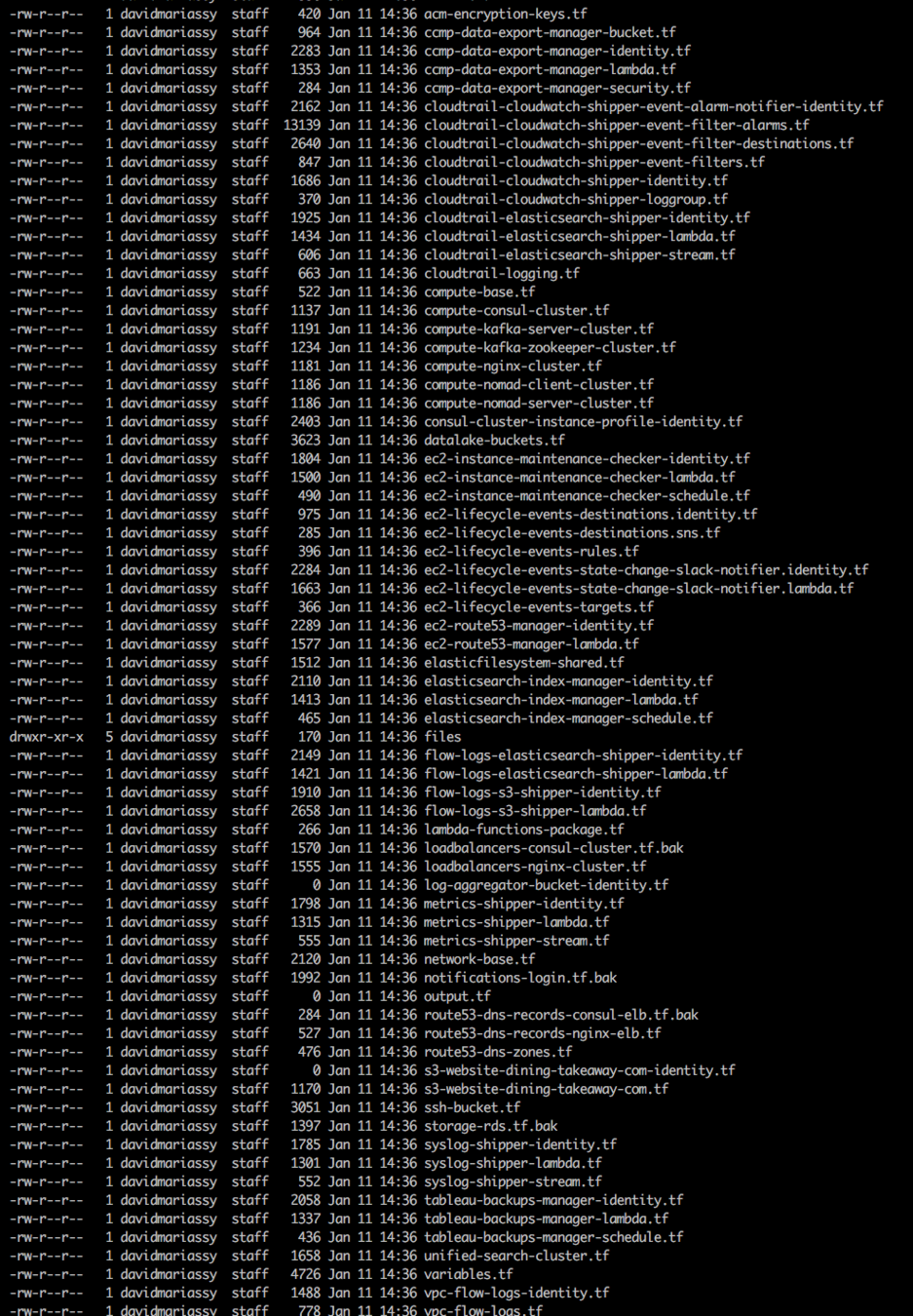
- Been there, done that...
- Having a dump of 80+ configuration files in one project defeats the purpose of using Terraform to self-document an infrastructure
- Fix: let's be more modular!
When in doubt be more verbose
Tip 3
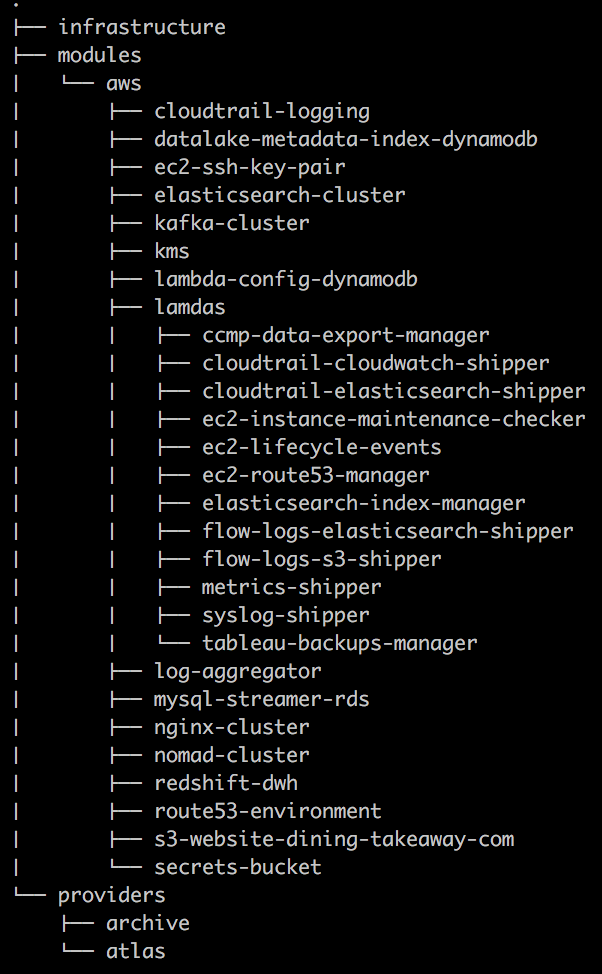
- Our convention:
- Create a "modules" and an "infrastructure" directory
- Collect executable configurations in "infrastructure"
- File names in "infrastructure" should always match the name of a corresponding module
- .tf files in "infrastructure" must only provision modules, and never resources directly
When in doubt be more verbose
Tip 3
- The shortcomings of the modular approach are that:
- In the absence of a global variable namespace, terraform variables must be declared and defined over and over and over again..
- Passing data between resources is
no longer possible by simply
referencing resource 1's
TYPE.NAME.ATTR in resource 2,
but has to be explicitly managed
through the definition and
passing of "output" variables.
When in doubt be more verbose

Tip 3
- Conclusion:
- Finding the right project structure is hard!
- You need to strike a balance between clarity and conciseness.
- We think that the former is more important and try to manage the corollary repetitive tasks through scripts as much as possible
- E.g. we use scripts which extract variable names from configuration files and create the corresponding variables.tf files
When in doubt be more verbose
Tip 4
- Storing the output of and metadata about our terraform builds in an external database (ArangoDB) allows us to keep track of how our infrastructures change over time
- Semantic versioning system using the output of terraform plans
- Add = Patch, Change = Minor, Destroy = Major
Infrastructure versioning

Tip 5
-
Problem:
- Certain terraform resources contain sensitive data in their configuration
- aws_db_instance
- You don't want to check this into version control...
Managing secrets with Vault provider
Tip 5
Managing secrets with Vault provider
provider "vault" {
  address = "https://vault.service.consul:8200"
  token = "5fe1466c-2c7c-cfd3-1222-5d32ea761e79"
}

data "vault_generic_secret" "rds" {
  path = "secret/rds"
}

resource "aws_db_instance" "default" {
  allocated_storage    = 10
  engine               = "mysql"
  engine_version       = "5.6.17"
  instance_class       = "db.t1.micro"
  name                 = "mydb"
  username             = "${data.vault_generic_secret.rds.data["username"]}"
  password             = "${data.vault_generic_secret.rds.data["password"]}"
  db_subnet_group_name = "my_database_subnet_group"
  parameter_group_name = "default.mysql5.6"
}
Tip 6
- Data modules are awesome
- A lot of new data modules have been introduced in recent versions that can reduce boilerplate, and help replace hard-coded configurations with dynamic ones
- Our favs:
- aws_vpc - get a VPC's CIDR block by VPC id
- aws_subet - get a subnet's parent VPC id by subnet id
- aws_iam_policy_document - generate valid IAM policy documents using native terraform code
- aws_s3_bucket_object - access the contents of a file stored on S3
- terraform_remote_state - get data about another terraform-managed infrastructure
Get intimate with data modules
Tip 6
- Terraform v0.9 will allow using data sources in count
- https://github.com/hashicorp/terraform/pull/11482
Get intimate with data modules
data "aws_availability_zones" "available" {}

resource "aws_subnet" "public" {

  count = "${length(data.aws_availability_zones.available.id)}"
  availability_zone = "${data.aws_availability_zones.available.id[count.index]}"

}
Tip 7
-
Problem:
- All terraform "resources" support "provisioning" blocks
- Provisioning blocks can execute commands locally or remotely
- Modules, however, do not support provisioners
Register provisioning callbacks for modules using null_resources
Tip 7
- Fear not! Null_resources and terraform 0.8+ to the rescue!
- null_resource:
- Behaves like a resource, hence allows the definition of provisioner blocks
- But doesn't actually create new resources
- terraform 0.8+:
- Before 0.8, it was not permitted to declare that a "resource" explicitly depended on a "module"
- With the new graph introduced in 0.8, resources' "depends_on" attribute can now also reference modules
Register provisioning callbacks for modules using null_resources
Tip 7
Register provisioning callbacks for modules using null_resources
module "consul-cluster" {

  source = "git::ssh://git@git.takeaway.com/bigdata/consul-cluster.git"

  team                                = "${var.team}"
  project                             = "${var.project}"
  account_id                          = "${var.account_id}"
  region                              = "${var.region}"
  environment                         = "${var.environment}"
  cluster_size                        = "3"
  ssh_key_name                        = "${var.ssh_key_name}"
}

resource "null_resource" "consul-join" {

  depends_on   = ["module.consul-cluster"]
  count        = "3"

  provisioner "remote-exec" {

    connection {
      type        = "ssh"
      user        = "ubuntu"
      host        = "${element(module.consul-cluster.public_ips, count.index)}"
      private_key = "${file(var.ssh_private_key_path)}"
    }
    inline = ["consul join ${element(module.consul-cluster.private_ips, count.index)}"]
  }
}
Thanks and happy provisioning!
terraform
By david-mariassy