ASP.NET Core SignalR
What is SignalR?
ASP.NET Core SignalR is an open-source library that simplifies adding real-time web functionality to apps. Real-time web functionality enables server-side code to push content to clients instantly.
Such as:
- Notifications
- Dashboards
- Collaborative editing
- Games
- Slide presentation apps
- Writing your own live chat service
Let's get started
git clone https://github.com/davidgruar/SignalRDemo.gitcd SignalRDemo/SignalRDemo.App/ClientApp
npm install @aspnet/signalrClone a skeleton ASP.NET Core/React app
Install SignalR client library
SignalR is already included in Microsoft.AspNetCore.App. No need to install anything server-side!
Wiring it up
namespace SignalRDemo.App.Hubs
{
    using Microsoft.AspNetCore.SignalR;

    public class ChatHub : Hub
    {
    }
}
Create an empty hub class
Wire up Startup.cs
public void ConfigureServices(IServiceCollection services)
{
    // ...

    services.AddSignalR();
}

public void Configure(IApplicationBuilder app, IHostingEnvironment env)
{
    app.UseMvc(routes =>
    {
        routes.MapRoute(
            name: "default",
            template: "{controller}/{action=Index}/{id?}");
    });

    // Must go after UseMvc and before UseSpa
    app.UseSignalR(options =>
    {
        options.MapHub<ChatHub>("/chat");
    });
}
Let's chat!
import { HubConnectionBuilder } from "@aspnet/signalr";

export class LiveChat extends Component<{}, LiveChatState> {

    private connection = new HubConnectionBuilder().withUrl("/chat").build();

    public async componentDidMount() {
        try {
            await this.connection.start();
        } catch (e) {
            console.error(e);
        }
    }

    public componentWillUnmount() {
        this.connection.stop();
    }
}
Connect to the hub
private sendMessage = async (message: string) => {
    await this.connection.send("sendMessage", message);
    this.addMessage(message);
}
Send a message to the hub...
...receive it...
    public class ChatHub : Hub
    {
        public Task SendMessage(string message)
        {
            return this.Clients.Others.SendAsync("messageReceived", message);
        }
    }
...and receive a message in the client
public async componentDidMount() {
    //...

    this.connection.on("messageReceived", this.addMessage);
}

private addMessage = (message: string) => this.setState(state => ({
    messages: [...state.messages, message]
}));
this.Clients.All
this.Clients.AllExcept("some-connection-id")
this.Clients.Caller
this.Clients.Others
this.Clients.Group("chat-1")
this.Clients.GroupExcept("chat-1", "some-connection-id")
this.Clients.OthersInGroup("chat-1")Choose your client
    public interface IChatClient
    {
        Task MessageReceived(string message);
    }

    public class ChatHub : Hub<IChatClient>
    {
        public Task SendMessage(string message)
        {
            return this.Clients.Others.MessageReceived(message);
        }
    }
Strongly typed hubs
Here's one I made earlier...

Try it yourself
- Move a box in two browser windows simultaneously
- Live chat with operators and users
- Collaborative document editing
- Quiz game
- ...
Scaling
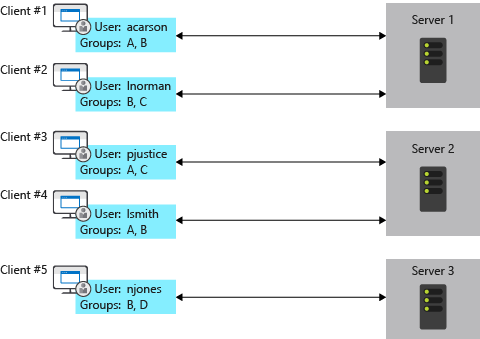
The problem
Solution: Azure SignalR Service
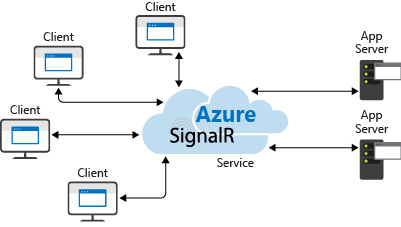
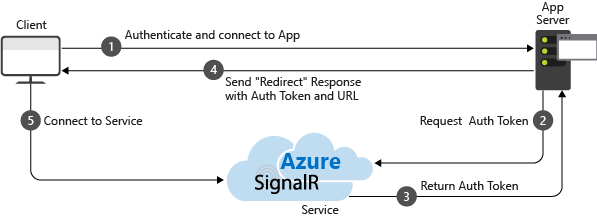
Azure SignalR Service
Create the resource
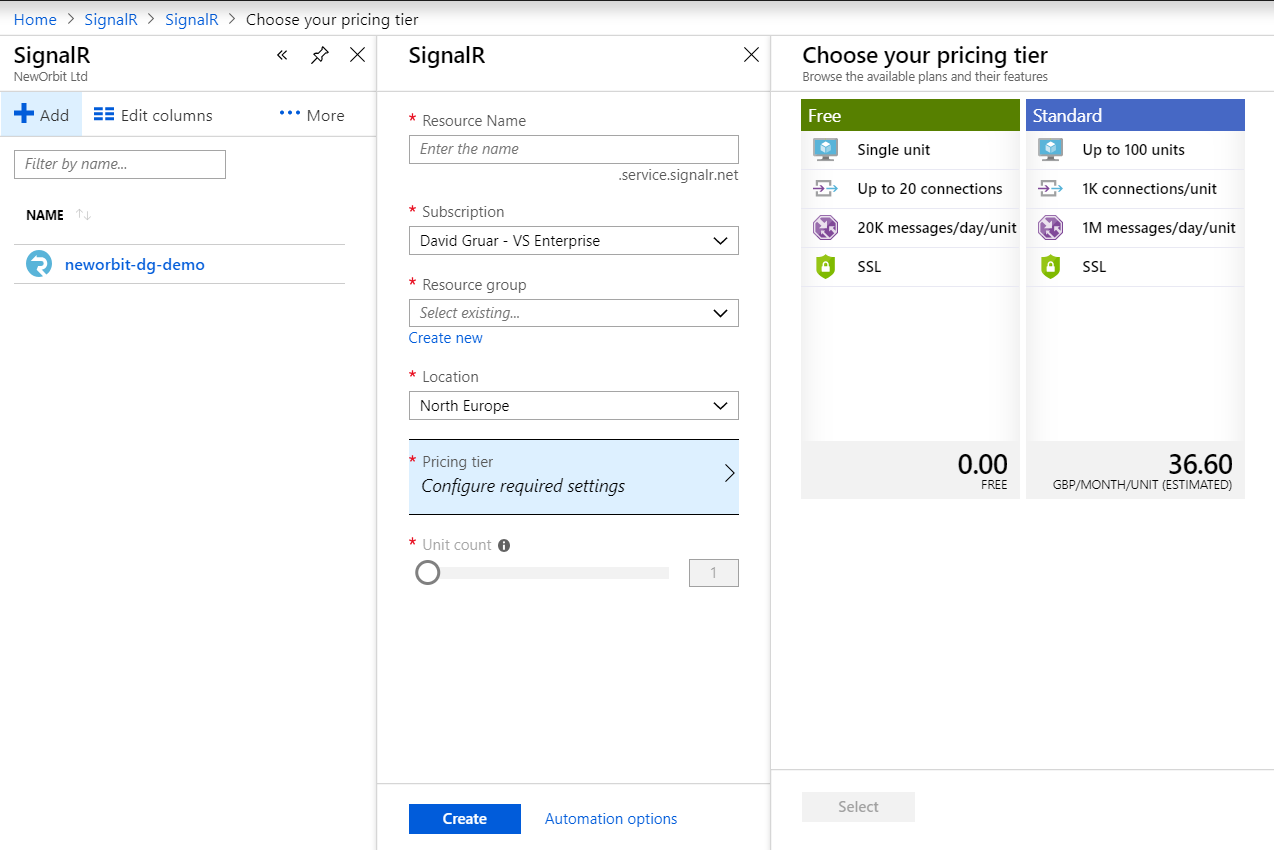
Install the package
dotnet add package Microsoft.Azure.SignalRAdd the connection string to config
{
  "Azure": {
    "SignalR": {
      "ConnectionString": "*****"
    }
  }
}
Modify Startup.cs
    services.AddSignalR().AddAzureSignalR();

    app.UseAzureSignalR(options =>
    {
        options.MapHub<ChatHub>("/chat");
    });
}
The end
SignalR
By David Gruar
SignalR
ASP.NET Core SignalR tech talk and workshop