Clicks
A simple camera tool
Dhruv Shrivastava
DART 205
Dr. O'Toole
Index
Click on any of the bars to be navigated to the respective page
Project Description
- My final project is about using the camera to make some interesting images on the spot with the help of Processing.
- There will be a camera inputting an image and there will be some settings, inspired by some image processing concepts, to manipulate the image to make a desired image.
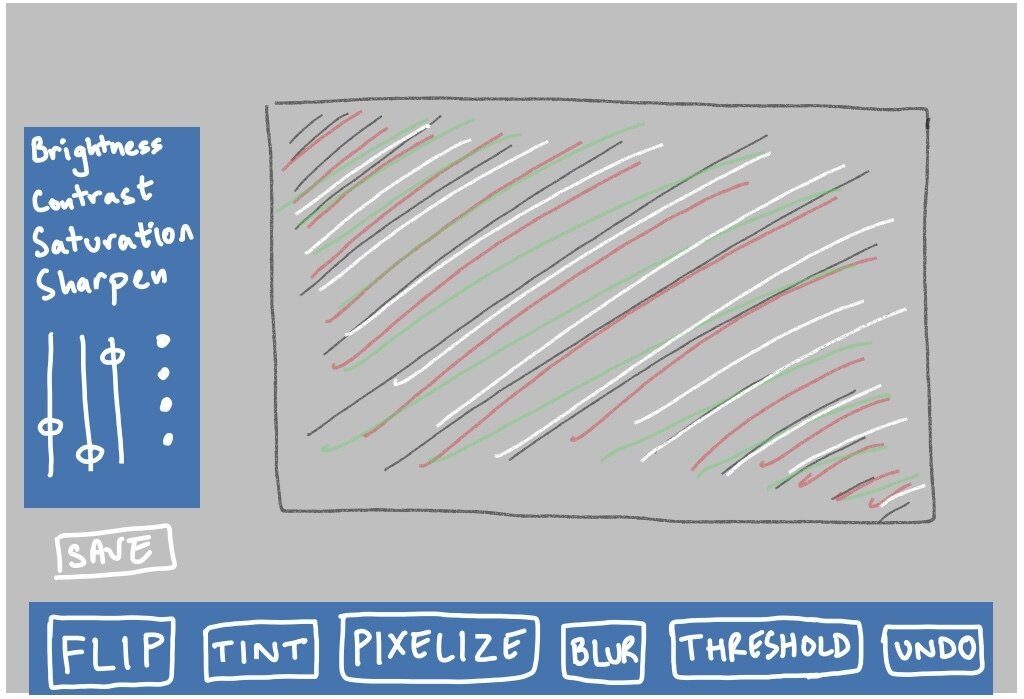
- There will be a bar with the respective buttons and sliders to visually see the differences being painted onto the image CLICKED by the camera, and then output the image in some format.
- Assuming the end user does have a camera in their computing device (i.e. a laptop camera or a desktop webcam).
Project Rationale
- I wanted to understand and play around with some tangible elements to the graphics and image processing concepts with the help of Processing and my laptop's camera.
- I believe that architecting and building something like this will be an interesting challenge for me (in addition to the relative complexity of the game project) to make me confident not only in my skills in processing, but also my strive for bringing my intentions into something tangible. Which is an important skill in my opinion.
- There will need to be a greater understanding of OOP concepts in order to construct the skeleton of the project and then work on the different image processing algorithms that I can embed into the project, and lastly focus on the user interface of the application, all the while essentially clicking the picture, processing it, and then outputting it in some format.
- Exploring images as both images and frames and their composition with pixels has always seemed to be an interest of mine, as they appear to be in films or any form of storytelling content.
Image Processing Algorithms
Reading the Learning Processing textbook gave me an impromptu, but effective introduction to image processing and computer vision concepts.
A
PImage Class/Data Type
Experimenting with loading and drawing images helped me understand functionality and many possibilities of manipulation by the use of pixels.
B
Video Library for Processing 4
Watching Daniel Shiffman's YouTube videos about working with videos in Processing gave me the most important tool to make my final project.
C
Research

One of the first inspirations for my final project was the population MacOS application Photo Booth, which later on expanded to Photoshop.
Some Interesting Links
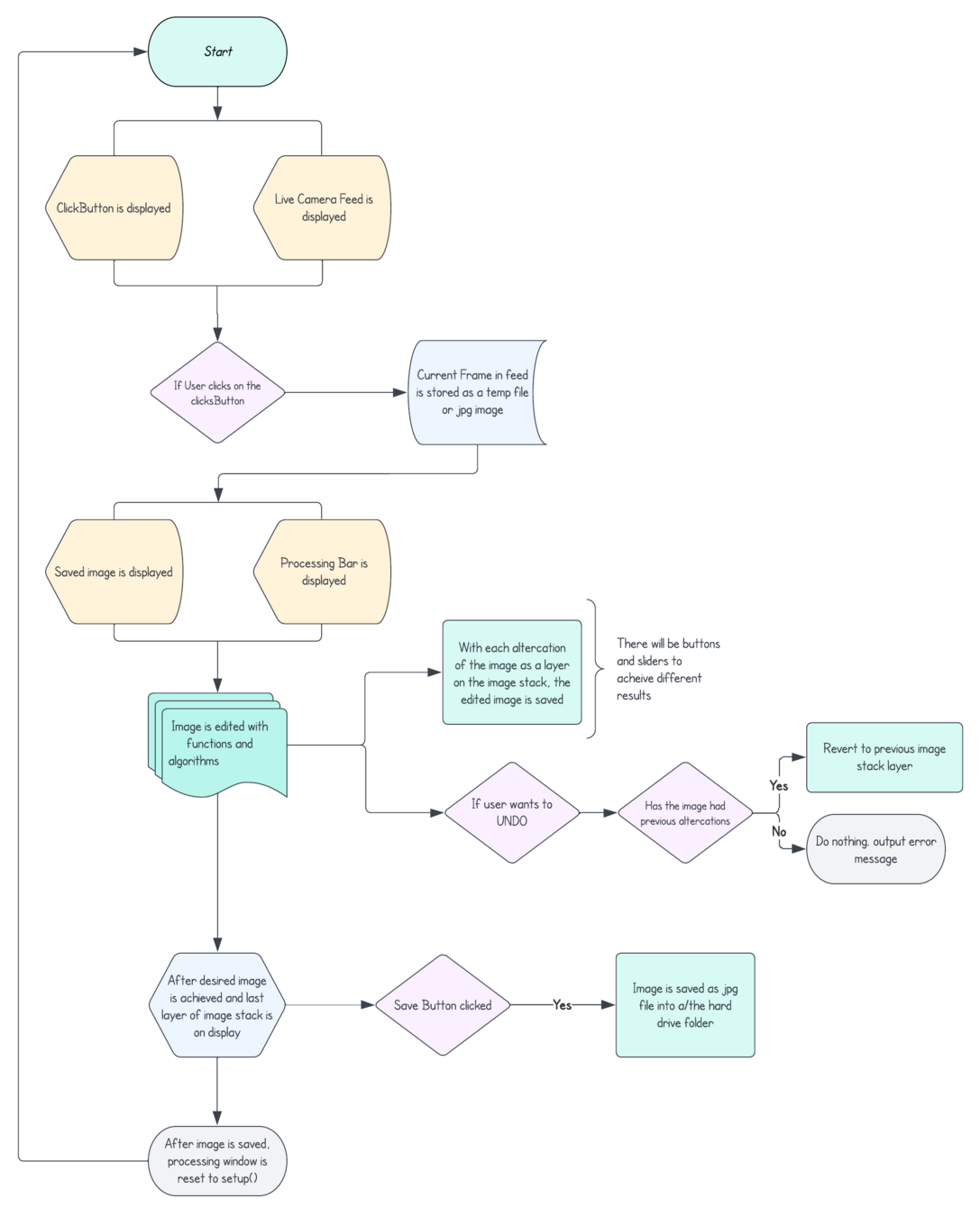
Flowchart
Classes
Libraries
Functions
Video for Processing 4
Image Processing for Processing
Image Class (derived from PImage and Capture Class)
Button Class (for ClickButton and other Buttons)
Slider Class (for different sliders)
saveFrame() - to save image after click
saveImage() - to save after edits have been made
restart() - restarting the whole process after image has been saved
mousePressed() - detecting mouse clicks are making a better user interface
functions to implement image processing algorithms
Psuedocode
Storyboarding and Visual Aesthetic
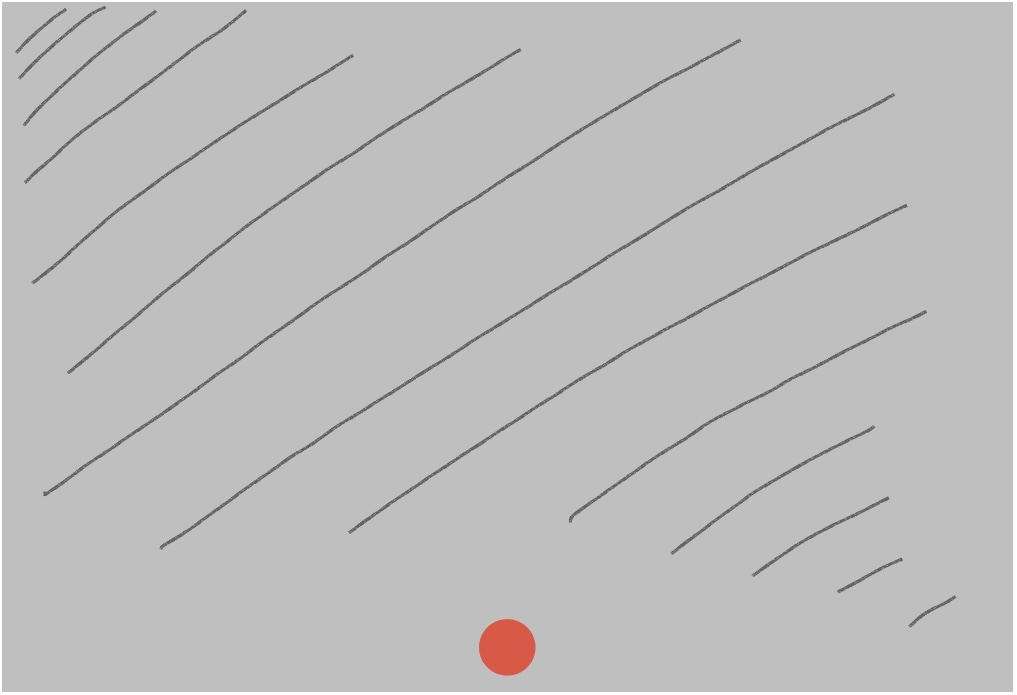
Trying to imagine the project result to the best of my ability within the time constraints. The layout and visual aesthetic aren't different to a great degree. But there will definitely be some compromises and improvements throughout the coding process.
Clicks
A simple camera tool
Dhruv Shrivastava
DART 205
Dr. O'Toole
Serif
By Dhruv Shrivastava