Modern Front-End
입문자를 위한 웹 프론트엔드 3
Front-End Library






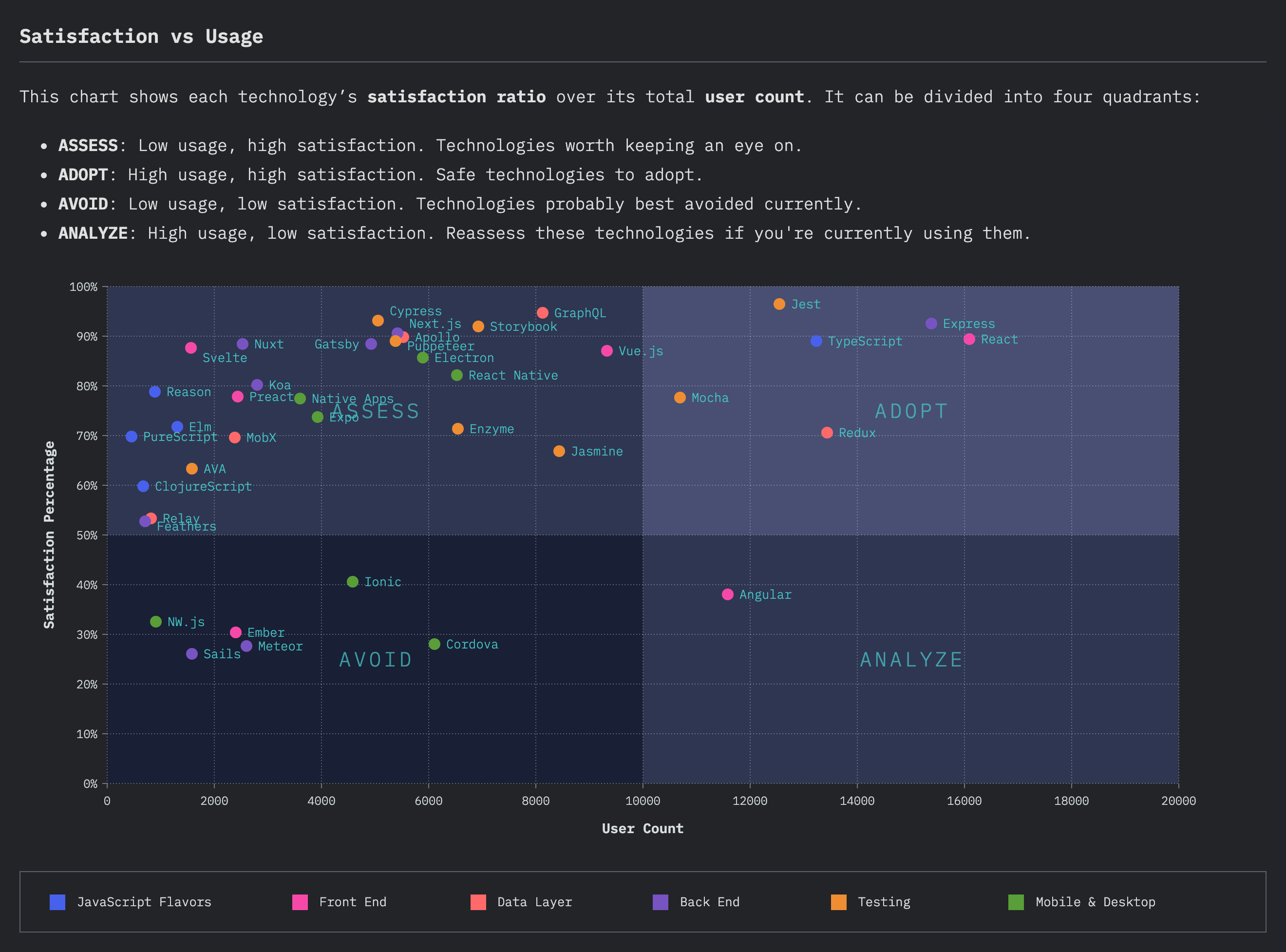
State of JavaScript 2019
Stack Overflow Survey 2020
Create React App
npx create-react-app app

---

npm install -g create-react-app
create-react-app app
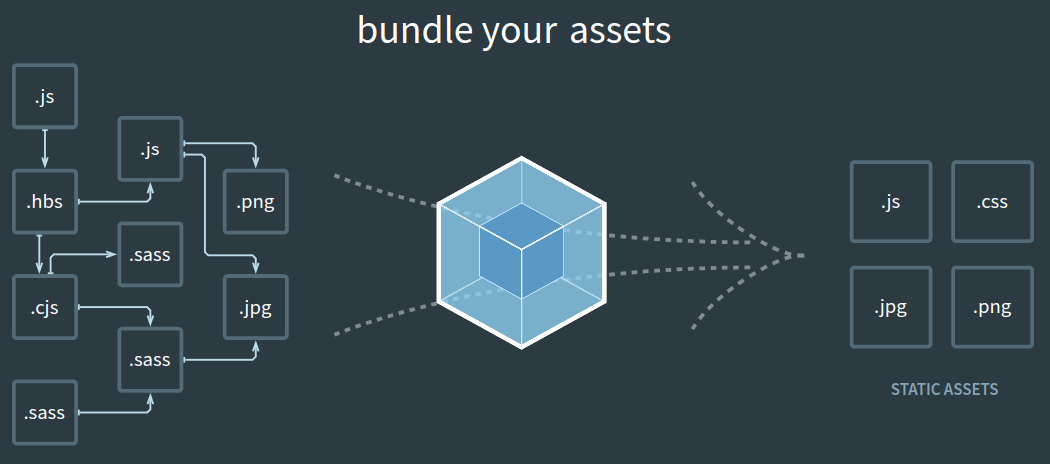
Webpack
React
npm start
React Component

State
import React from "react";

const App = () => {
  let count = 0;

  return (
    <div>
      <span>{count}</span>
      <button
        onClick={() => {
          count++;
          console.log(count);
        }}
      >
        Count
      </button>
    </div>
  );
};

export default App;
import React from "react";

const App = () => {
  const [count, setCount] = React.useState(0);

  return (
    <div>
      <span>{count}</span>
      <button onClick={() => setCount(count + 1)}>Count</button>
    </div>
  );
};

export default App;
State - Object
import React from "react";

const App = () => {
  const [list, setList] = React.useState(["google", "dsc"]);

  return (
    <div>
      <ul>
        <li>{list}</li>
      </ul>
    </div>
  );
};

export default App;
import React from "react";

const App = () => {
  const [list, setList] = React.useState(["google", "dsc"]);

  const items = list.map((item) => <li>{item}</li>);

  return (
    <div>
      <ul>{items}</ul>
    </div>
  );
};

export default App;
import React from "react";

const App = () => {
  const [list, setList] = React.useState(["google", "dsc"]);

  const items = () => {
    const array = [];
    for (const item of list) {
      array.push(<li>{item}</li>);
    }
    return array;
  };

  return (
    <div>
      <ul>{items()}</ul>
    </div>
  );
};

export default App;
import React from "react";

const App = () => {
  const [list, setList] = React.useState(["google", "dsc"]);

  const items = list.map((item, index) => <li key={index}>{item}</li>);

  return (
    <div>
      <ul>{items}</ul>
    </div>
  );
};

export default App;
Event
import React from "react";

const App = () => {
  const [list, setList] = React.useState(["google", "dsc"]);

  const items = list.map((item, index) => <li key={index}>{item}</li>);

  const handleAddItem = () => {
    setList([...list, "item"]);
  };

  return (
    <div>
      <ul>{items}</ul>
      <div>
        <button onClick={handleAddItem}>Add</button>
      </div>
    </div>
  );
};

export default App;
import React from "react";

const App = () => {
  const [list, setList] = React.useState(["google", "dsc"]);
  const [text, setText] = React.useState("text");

  const items = list.map((item, index) => <li key={index}>{item}</li>);

  const handleAddItem = () => {
    setList([...list, text]);
  };

  return (
    <div>
      <ul>{items}</ul>
      <div>
        <input onChange={(event) => setText(event.target.value)}></input>
        <button onClick={handleAddItem}>Add</button>
      </div>
    </div>
  );
};

export default App;
React Design Library


Material-UI
<!DOCTYPE html>
<html lang="en">
  <head>
    <meta charset="utf-8" />
    <link rel="icon" href="%PUBLIC_URL%/favicon.ico" />
    <meta name="viewport" content="width=device-width, initial-scale=1" />
    <meta name="theme-color" content="#000000" />
    <meta
      name="description"
      content="Web site created using create-react-app"
    />
    <link rel="apple-touch-icon" href="%PUBLIC_URL%/logo192.png" />
    <!--
      manifest.json provides metadata used when your web app is installed on a
      user's mobile device or desktop. See https://developers.google.com/web/fundamentals/web-app-manifest/
    -->
    <link rel="manifest" href="%PUBLIC_URL%/manifest.json" />
    <!--
      Notice the use of %PUBLIC_URL% in the tags above.
      It will be replaced with the URL of the `public` folder during the build.
      Only files inside the `public` folder can be referenced from the HTML.

      Unlike "/favicon.ico" or "favicon.ico", "%PUBLIC_URL%/favicon.ico" will
      work correctly both with client-side routing and a non-root public URL.
      Learn how to configure a non-root public URL by running `npm run build`.
    -->
    <title>React App</title>

    <link
      rel="stylesheet"
      href="https://fonts.googleapis.com/css?family=Roboto:300,400,500,700&display=swap"
    />
    <link
      rel="stylesheet"
      href="https://fonts.googleapis.com/icon?family=Material+Icons"
    />
  </head>
  <body>
    <noscript>You need to enable JavaScript to run this app.</noscript>
    <div id="root"></div>
    <!--
      This HTML file is a template.
      If you open it directly in the browser, you will see an empty page.

      You can add webfonts, meta tags, or analytics to this file.
      The build step will place the bundled scripts into the <body> tag.

      To begin the development, run `npm start` or `yarn start`.
      To create a production bundle, use `npm run build` or `yarn build`.
    -->
  </body>
</html>
import React from "react";
import CssBaseline from "@material-ui/core/CssBaseline";
import { ThemeProvider, createMuiTheme } from "@material-ui/core/styles";

const theme = createMuiTheme();

const App = () => {
  const [list, setList] = React.useState(["google", "dsc"]);
  const [text, setText] = React.useState("text");

  const items = list.map((item, index) => <li key={index}>{item}</li>);

  const handleAddItem = () => {
    setList([...list, text]);
  };

  return (
    <ThemeProvider theme={theme}>
      <CssBaseline />
      <div>
        <ul>{items}</ul>
        <div>
          <input onChange={(event) => setText(event.target.value)}></input>
          <button onClick={handleAddItem}>Add</button>
        </div>
      </div>
    </ThemeProvider>
  );
};

export default App;
Material-UI
import React from "react";
import CssBaseline from "@material-ui/core/CssBaseline";
import { ThemeProvider, createMuiTheme } from "@material-ui/core/styles";
import Input from "@material-ui/core/Input";
import Button from "@material-ui/core/Button";

const theme = createMuiTheme();

const App = () => {
  const [list, setList] = React.useState(["google", "dsc"]);
  const [text, setText] = React.useState("text");

  const items = list.map((item, index) => <li key={index}>{item}</li>);

  const handleAddItem = () => {
    setList([...list, text]);
  };

  return (
    <ThemeProvider theme={theme}>
      <CssBaseline />
      <div>
        <ul>{items}</ul>
        <div>
          <Input onChange={(event) => setText(event.target.value)}></Input>
          <Button variant="outlined" onClick={handleAddItem}>
            Add
          </Button>
        </div>
      </div>
    </ThemeProvider>
  );
};

export default App;
Props
import React from "react";

const QuoteList = (props) => {
  const items = props.list.map((item, index) => <li key={index}>{item}</li>);

  return <ul>{items}</ul>;
};

export default QuoteList;
import React from "react";
import CssBaseline from "@material-ui/core/CssBaseline";
import { ThemeProvider, createMuiTheme } from "@material-ui/core/styles";
import Input from "@material-ui/core/Input";
import Button from "@material-ui/core/Button";

import QuoteList from "./QuoteList";

const theme = createMuiTheme();

const App = () => {
  const [list, setList] = React.useState(["google", "dsc"]);
  const [text, setText] = React.useState("text");

  const handleAddItem = () => {
    setList([...list, text]);
  };

  return (
    <ThemeProvider theme={theme}>
      <CssBaseline />
      <div>
        <QuoteList list={list} />
        <div>
          <Input onChange={(event) => setText(event.target.value)}></Input>
          <Button variant="outlined" onClick={handleAddItem}>
            Add
          </Button>
        </div>
      </div>
    </ThemeProvider>
  );
};

export default App;
import React from "react";
import List from "@material-ui/core/List";
import ListItem from "@material-ui/core/ListItem";
import ListItemText from "@material-ui/core/ListItemText";

const QuoteList = (props) => {
  const items = props.list.map((item, index) => (
    <ListItem button key={index}>
      <ListItemText primary={item} />
    </ListItem>
  ));

  return <List component="nav">{items}</List>;
};

export default QuoteList;
State Management

References
Modern Front-End
By Dong-Young Kim