The C♯ Language
The Required Tutorial
Language Basics
- C, C++,Java inspired/based -- general purpose
- Traditional compiled language, but to an intermediate language (like Java) with garbage collection
- Object-oriented, imperative/procedural, with functional programming features
- Statically typed, strongly typed
- Originally developed by Microsoft with .NET, now internationally standardized
- Native on Windows, Mono on Linux, now cross-platform via .NET Core
- Big, expressive language
Whenever you learn a new construct in a programming language, you should ask these three questions:
1.What is the syntax?
2.What are the type-checking rules?
3.What are the evaluation rules?
EXAMPLE
■Variables:
–Syntax: a sequence of letters, underscores, etc.
–Type-checking: look up the variable in the current static environment and use that type
–Evaluation: look up the variable in the current dynamic environment and use that value
Data and Types
Numeric Types
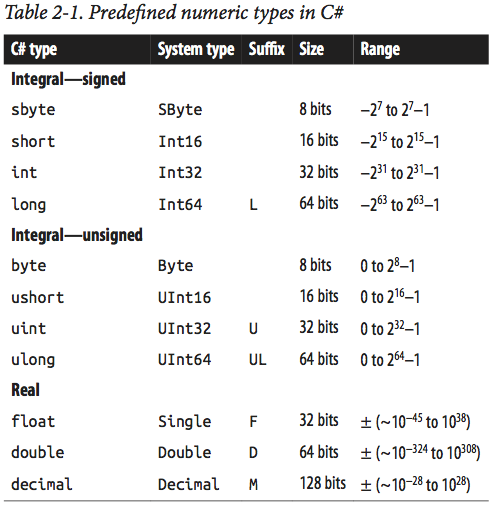
int a = 123;
System.Int32 b = 123;
| sbyte | short, int, long, float, double, or decimal |
| byte | short, ushort, int, uint, long, ulong, float, double, or decimal |
| short | int, long, float, double, or decimal |
| ushort | int, uint, long, ulong, float, double, or decimal |
| int | long, float, double, or decimal |
| uint | long, ulong, float, double, or decimal |
| long | float, double, or decimal |
| ulong | float, double, or decimal |
| float | double |
Other Value Types
- char (System.Char)
- bool (System.Boolean)
- struct
- enum
enum Season {
Spring,
Summer,
Autumn,
Winter }
Reference Types
- object (System.Object)
- string (System.String)
- interface
- array (System.Array)
- delegate
int    a = 5;
double b = 30.43;
bool   c = false;
char   d = 'Z';
string e = "Welcome to C#";
ArrayList f = new ArrayList();
Array and Struct
char[] vowels  = new char[5];
char[] vowels2 = new char[] {'a','e','i','o','u'};
char[] vowels3 = {'a','e','i','o','u'};

for(int i = 0; i < vowels.Length; i++)
{
    Console.Write(vowels[i]);
}

public struct Point
{
    public int X, Y;
    public Point(int x, int y) { X = x; Y = y; }
}

Point p = new Point(4,5);
Basic Program Structure
using System;

namespace MyConsoleAppName
{
    class Program
    {
        static void Main(string[] args)
        {
            Console.WriteLine("Hello World!");
        }
    }
}
using System;
namespace MyConsoleAppName
{
enum BallType
{
Basketball,
Baseball,
Soccerball,
Volleyball
}
class Ball
{
private double radius;
private BallType type;
public Ball(double radius, BallType type)
{
this.radius = radius;
this.type = type;
}
public BallType GetBallType () {return type;}
}
} Control Structures
All the usual
- if-else
- while, do-while
- for, foreach
- continue, break
- switch-case
- try-catch-finally
int x = 10;

// Argument must be a boolean
if(x < 20)
{
    Console.WriteLine("Less than");
}
else
{
    Console.WriteLine("Greater than or equal to");
}
Expressions and Operators
No surprises here. All the usual expression operators.
- Arithmetic operators that perform arithmetic operations with numeric operands
- Comparison operators that compare numeric operands
-
Boolean logical operators that perform logical operations with
booloperands - Bitwise and shift operators that perform bitwise or shift operations with operands of the integral types
- Equality operators that check if their operands are equal or not
See later slides for unusual operators.
Methods
- Base syntax is exactly as C, C++ and Java
- No "naked" functions allowed; all functions go inside classes and are called methods
-
staticmethods can be called like functions without an instance of the class. - Program entry point is a static method
- Can pass methods to methods as parameters (see Function delegates later)
Parameter Passing
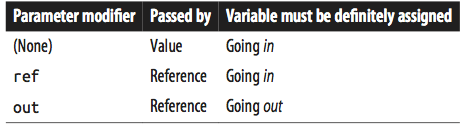
using System;

// "Normal" scenario
class Test
{
    static void Foo(int p)
    {
        Console.WriteLine(p);
    }

    static void Main()
    {
        Foo(8);
    }
}
using System;
class Test
{
static void Foo(int p)
{
p = p + 1;
Console.WriteLine(p);
}
static void Main()
{
int x = 8;
Foo(x);
Console.Writeline(x);
}
}using System;
class Test // ref modifier
{
static void Foo(ref int p)
{
Console.WriteLine(p);
p = p + 1;
}
static void Main()
{
int x = 8;
Foo(ref x);
Console.WriteLine(x); // x is now 9
}
}using System;
class Test // ref modifier useful swap
{
static void Swap(ref string a, ref string b)
{
string temp = a;
a = b;
b = temp;
}
static void Main()
{
string x = "Penn";
string y = "Teller";
Swap (ref x, ref y);
Console.WriteLine (x);
Console.WriteLine (y);
}
}
// outputs:
// Teller
// Pennusing System;
class Test // out modifier
{
static void Split (string name, out string firstNames, out string lastName)
{
int i = name.LastIndexOf (' ');
firstNames = name.Substring (0, i);
lastName = name.Substring (i + 1);
}
static void Main()
{
string a, b;
Split ("Stevie Ray Vaughan", out a, out b);
Console.WriteLine (a);
Console.WriteLine (b);
}
}
// outputs:
// Stevie Ray
// Vaughanusing System;
class Test // params modifier
{
static int Sum (params int[] ints)
{
int sum = 0;
for (int i = 0; i < ints.Length; i++)
sum += ints[i];
return sum;
}
static void Main()
{
int total = Sum (1, 2, 3, 4);
Console.WriteLine (total);
}
}using System;
class Test // Optional parameters
{
static string JoinWith(char a, char b, string del = ",")
{
// C# 6 "interpolated string literal
return $"{a}{del}{b}";
}
static void Main()
{
Console.WriteLine( JoinWith('u','v') );
Console.WriteLine( JoinWith('u','v',"___") );
}
}
// outputs:
// u,v
// u___vclass NamedExample
{
static void Main(string[] args)
{
// The method can be called in the normal way, by using positional arguments.
PrintOrderDetails("Gift Shop", 31, "Red Mug");
// Named arguments can be supplied for the parameters in any order.
PrintOrderDetails(orderNum: 31, productName: "Red Mug", sellerName: "Gift Shop");
PrintOrderDetails(productName: "Red Mug", sellerName: "Gift Shop", orderNum: 31);
// Named arguments mixed with positional arguments are valid
// as long as they are used in their correct position.
PrintOrderDetails("Gift Shop", 31, productName: "Red Mug");
PrintOrderDetails(sellerName: "Gift Shop", 31, productName: "Red Mug"); // C# 7.2 onwards
PrintOrderDetails("Gift Shop", orderNum: 31, "Red Mug"); // C# 7.2 onwards
// However, mixed arguments are invalid if used out-of-order.
// The following statements will cause a compiler error.
// PrintOrderDetails(productName: "Red Mug", 31, "Gift Shop");
// PrintOrderDetails(31, sellerName: "Gift Shop", "Red Mug");
// PrintOrderDetails(31, "Red Mug", sellerName: "Gift Shop");
}
static void PrintOrderDetails(string sellerName, int orderNum, string productName)
{
if (string.IsNullOrWhiteSpace(sellerName))
{
throw new ArgumentException(message: "Seller name cannot be null or empty.", paramName: nameof(sellerName));
}
Console.WriteLine($"Seller: {sellerName}, Order #: {orderNum}, Product: {productName}");
}
}// Expression-bodied function members
// general syntax: member => expression;
public int AddTwo(int a, int b) => a + b;Var and Nulls
// Implicitly typed local variables

var i = 5;

var adj = "a superlative";

var arr = new[] {1,2,3};

var expr =
    from c in customers
    where c.City == "London"
    select c;
Null-Coalescing Operator (??)
string s = null;
string s1 = s ?? "something else";
//s1 evaluates to "something else"

string s = "Hello World";
string s1 = s ?? "Not a string";
//s1 evaluates to "Hello World"
Null-Conditional Operator (?.)
// Prevents NullReferenceException
// AKA: Safe navigation operator
System.Text.StringBuilder sb = null;
string s = sb?.ToString();

// short circuits and is safe
x?.y?.z;

System.Text.StringBuilder sb = null;
string s = sb?.ToString() ?? "something else";
Nullable Types (?)
string s = null;    // just fine
int a = null;       // does not compile

int? id = null;     // OK
System.Nullable<int> id = null;

// common MVC pattern
public ActionResult Details(int? id)
{
    if(id == null)        // or !id.HasValue
    {
        return new HttpStatusCodeResult(400, "Missing user identifier in request");
    }
    User user = db.Users.Find(id);
    // ...
}//Example Lab 4
Operator Lifting with Nullable Types
int? x = 8;
int? y = 100;
int? z = null;      // i.e. System.Nullable<int> z

// operators are lifted from int
// Normal:
x == y
x + y
x < y

// But must worry about effect of null
x == z     // False
x + z      // null
x < z      // False
x > z      // False
Naming Conventions
Namespaces
namespace namespace_name {
   // code declarations
}


namespace_name.item_name;
using System;
namespace first_space {
class namespace_cl {
public void func() {
Console.WriteLine("Inside first_space");
}
}
}
namespace second_space {
class namespace_cl {
public void func() {
Console.WriteLine("Inside second_space");
}
}
}
class TestClass {
static void Main(string[] args) {
first_space.namespace_cl fc = new first_space.namespace_cl();
second_space.namespace_cl sc = new second_space.namespace_cl();
fc.func();
sc.func();
Console.ReadKey();
}
}Namespaces - The Using Keyword
using System;
using first_space;
using second_space;

namespace first_space {
   class abc {
      public void func() {
         Console.WriteLine("Inside first_space");
      }
   }
}
namespace second_space {
   class efg {
      public void func() {
         Console.WriteLine("Inside second_space");
      }
   }
}
class TestClass {
   static void Main(string[] args) {
      abc fc = new abc();
      efg sc = new efg();
      fc.func();
      sc.func();
      Console.ReadKey();
   }
}
Nested Namespaces
namespace namespace_name1 {

   // code declarations
   namespace namespace_name2 {
      // code declarations
   }
}
using System;
using first_space;
using first_space.second_space;
namespace first_space {
class abc {
public void func() {
Console.WriteLine("Inside first_space");
}
}
namespace second_space {
class efg {
public void func() {
Console.WriteLine("Inside second_space");
}
}
}
}
class TestClass {
static void Main(string[] args) {
abc fc = new abc();
efg sc = new efg();
fc.func();
sc.func();
Console.ReadKey();
}
}public partial class Employee
{
public void DoWork()
{
}
}
public partial class Employee
{
public void GoToLunch()
{
}
}Partial Classes
// Auto generated code in: file1.cs
namespace MyApp
{
    partial class MyClass { public void MyMethod(){} }
    // other members
}

// Your code in: file2.cs
namespace MyApp
{
    partial class MyClass { public void OtherMember(){} }
}
Classes
using System;

public class Wolf : Canine, IEquatable<Wolf>
{
    public string Name = "Wolfie";
    public string Owner;
    public int Legs;
    private static int totalCount;
    private DateTime birthday;

    public Wolf() {}
    public Wolf(string name)
    {
        this.Name = name;
    }
    //...
}
Object Initializers
Wolf w1 = new Wolf("Sharp Teeth") { Owner="Me", Legs=4 };
Wolf w2 = new Wolf { Name="Ghost", Owner="John Snow", Legs=4 };
Properties
public class Stock
{
    private decimal maxPrice;   // private "backing field"

    public decimal MaxPrice
    {
        get { return maxPrice; }
        set { maxPrice = value; }
    }

    // Automatic property
    public decimal CurrentPrice { get; set; }
}
var s = new Stock();
s.MaxPrice = 99.99M;
s.CurrentPrice = 89.99M;
Console.WriteLine(s.CurrentPrice);// Read-only property
string symbol; // set in the constructor
public string Symbol
{
get { return symbol; }
}
// Expression-bodied property (also read-only)
public decimal Worth => currentPrice * sharesOwned;
(public decimal Worth {get{return currentPrice *
sharesOwned;}})
// Initializer
public int Volume { get; set; } = 100;Typical Class in MVC
public partial class Comment
{
    public Comment(){}

    public int ID { get; set; }

    public DateTime SubmissionDate { get; set; }

    public string Body { get; set; }
}
Object and Boxing/Unboxing
// System.Object or object is the base of the object hierarchy
object o = new House();

// C# has boxing and unboxing
int age = 32;
object obj = age;

int myAge = (int)obj;
Delegates
// Declare a new type
public delegate double BinaryOperator( double a, double b );

// Create methods we want to use
public static double Add( double a, double b ) => a + b;
public static double Sub( double a, double b ) => a - b;
public static double Div( double a, double b ) => a / b;
public static double Mul( double a, double b ) => a * b;

    // Create an instance of the delegate type
    BinaryOperator bop = Sub;

    // Use it
    Console.WriteLine( "7 - 9.3 = " + bop(7,9.3) );
- Is type safe
- Used to create callback functions
- Used in lambda functions (expressions) and LINQ
- Useful in MVC and with testing
- Has other features
- Multi-cast
- Integrates with events
- Can use generics
Lambda Functions
// Expression Lambdas
// (input parameters) => expression

x => x * x
(x,y) => x == y
(int x, string s) => s.Length > x
// Statement Lambdas
// (input parameters) => { statement1; statement2; statement3; }
() => {Console.WriteLine("Hello Lambda!");}
(x,y) => { return x == y; } // weird way to write that!Consider Generic Delegates
// C# 3.0 defined
namespace System{
    public delegate TResult Func<out TResult>();
    public delegate TResult Func<in T, out TResult>(T arg);
    public delegate TResult Func<in T1, in T2, out TResult>(T1 arg1, T2 arg2);
}Func<double, double, double> sum = (x,y) => x + y;
public static IEnumerable<U> Map(Func<T, U> fn, IEnumerable<T> list)
{
//apply fn to list and return resulting new list
}
var output = Map( x => x * x, nums );Extension Methods
- Extend an existing type with new methods
- Doesn't alter original type
- Need to add a
usingstatement for extension class in order to use it (i.e.using System.Linq;for LINQ operators) - Needs to be a static method in a static class
-
thismodifier as first parameter - Works for interface types too
// "Add" to string class
public static class StringHelper
{
    public static bool IsCapitalized (this string s)
    {
        if (string.IsNullOrEmpty(s))
            return false;
        return char.IsUpper (s[0]);
    }
}
// Call it as a built-in method
"Perth".IsCapitalized();
// or as a static method
StringHelper.IsCapitalized("Perth");

// How it's translated:
arg0.Method(arg1, arg2, ...);              // Extension method call
StaticClass.Method(arg0, arg1, arg2, ...); // Static method call
// Map example from previous slide
// written as an extension method
Func<double, double, double> sum = (x,y) => x + y;
public static IEnumerable<U> Map(this IEnumerable<T> list, Func<T, U> fn)
{
//apply fn to list and return resulting new list
}
var output = nums.Map( x => x * x );Chaining
Look at some definitions in IEnumerable<T>
int[] ints = { 10, 45, 15, 39, 21, 26 };
var result = ints.OrderBy(g => g).Take(4).Average();

// Versus
var result = Average(Take(OrderBy(ints, g=>g),4));
Anonymous Types
- Simple un-named reference type; inherits directly from
object - Compiler generates code using a template to create the class
- Must use a
varkeyword to create new objects of this type - You automatically get an
.Equals()that compares members for equality - Access by name (property), i.e. like Name/Value pairs
var obj = new {Name = "Jane", Age = 28, CellNumber = "555-555-1111" };

 // or

var obj2 = new {
    Store = "ShoesForLess",
    Categories = new String[]{"Running","Leisure","Dress","Sandals"},
    Date = DateTime.Now
    }

Console.WriteLine(obj2.Store);
Useful in LINQ select queries
var categories = db.ProductCategories
                   .OrderBy( pc => pc.Name )
                   .Select( pc => new { Name = pc.Name,
                                        Id   = pc.ProductCategoryID } );
Collections
Built-in data structures of both generic and non-generic types
- List, ArrayList, LinkedList, ImmutableList, ...
- Queue, Stack
- HashSet, SortedSet, Dictionary, OrderedDictionary, ...
- Generic versions: LinkedList<T>
Yup, the usual:
using System;
using System.Collections;
public class SamplesArrayList
{
   public static void Main()
   {
      // Creates and initializes a new ArrayList.
      ArrayList myAL = new ArrayList();
      myAL.Add("Hello");
      myAL.Add("World");
      myAL.Add("!");

      // Displays the properties and values of the ArrayList.
      Console.WriteLine( "myAL" );
      Console.WriteLine( "    Count:    {0}", myAL.Count );
      Console.WriteLine( "    Capacity: {0}", myAL.Capacity );
      Console.Write( "    Values:" );
      PrintValues( myAL );
   }

   public static void PrintValues( IEnumerable myList )
   {
      foreach ( object obj in myList )
         Console.Write( "   {0}", obj );
      Console.WriteLine();
   }
}
And in generic form
// using System.Collections.Generic List<T>
List<string> dinosaurs = new List<string>();

Console.WriteLine("\nCapacity: {0}", dinosaurs.Capacity);

dinosaurs.Add("Tyrannosaurus");
dinosaurs.Add("Amargasaurus");
dinosaurs.Add("Mamenchisaurus");
dinosaurs.Add("Deinonychus");
dinosaurs.Add("Compsognathus");
Console.WriteLine();
foreach(string dinosaur in dinosaurs)
{
    Console.WriteLine(dinosaur);
}
We frequently use objects of these types:
and should look closely at these interfaces
Copy of C# Language
By drmorgan