Styling and Layout with CSS
Text
The Web
| HTML | Meaning and Content |
| CSS | Presentation & Style |
| Javascript | Scripting, manipulate everything about the page |
| HTTP | Transport, client-server behavior |
CSS
- Style sheet language
- Associates style rules with HTML elements
- Reusable
- Styles "cascade", or have known order of precedence
- 2 Parts: selection of elements to apply style property values
(MDN Web Docs)
Syntax
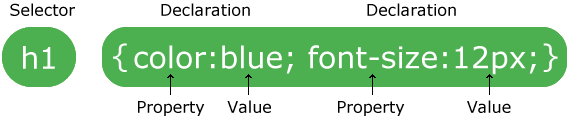
- Each rule has one or more selectors and a declaration block
- Declaration block contains a set of properties with their values
body {
    font-family: Arial, Verdana, sans-serif;
    font-size: 12px;
    color: #6605AA;
}
Selectors
Select which HTML elements the rule(s) apply to
/* Select all elements */
* { }

/* Select specific elements, here all <h1>, <h2> and <h3>
(using grouping syntax) */
h1, h2, h3 { }

/* Select all elements where class attribute has value "questions" */
.questions { }

/* Select all <p> elements where class attribute has value "questions" */
p.questions { }

/* Select all elements where id attribute has value "topstory" */
#topstory { }
And lots more
/* Matches any F element that is a descendant of an E element */
E F { }
h1 { color: red }
em { color: red }
h1 em { color: blue }
/* Matches any F element that is a child of an element E */
E > F { }
body > P { line-height: 1.3 }/* Matches any F element immediately preceded by a sibling element E */
E + F { }
h1 + h2 { margin-top: -5mm }/* Matches element E when E is the first child of its parent (pseudo-class) */
E:first-child { }p:first-child em { font-weight : bold }/* Matches element E if E is the source anchor of a hyperlink
of which the target is not yet visited or already visited (pseudo-class)*/
E:link { }
a:link { color: blue}
E:visited { }a:visited{ color: green}
/* Matches E during certain user actions (pseudo-class)*/
E:active { }
E:hover { }
E:focus { }

/* Matches any E element with the "foo" attribute set (to any value) */
E[foo] { }

/* Selectors can be combined: */

div p *[href] { }
div ol>li p { }
a:active { color: lime } /* active links */
a:hover { color: yellow } /* user hovers */
a:focus { background: Azure}
h1[title] { color: Azure; }
Precedence (Cascading)
When two or more selectors match an element:
- If identical, the latter one applies, otherwise
- The more specific one takes precedence (specificity)
- A rule labeled "!important" indicates it should take precedence
| Inherited styles | Lowest specificity of all selectors - since an inherited style targets the element's parent, and not the HTML element itself. |
| * | Lowest specificity of all directly targeted selectors |
| element | Higher specificity than universal selector and inherited styles. |
| attribute | Higher specificity than element selector |
| class | Higher specificity than attribute, element and universal selectors. |
| ID | Higher specificity than class selector. |
| Combined selectors | Gets the specificity of the selectors combined. |
| CSS properties set directly on element, inside style attribute. |
Stronger specificity than ID selector. |
Inheritance
- Elements inherit some properties from their parent in the DOM tree
- e.g.
font-family,font-size,font-weight,colorare inherited - You can force inheritance of a parent's property with the "inherit" value
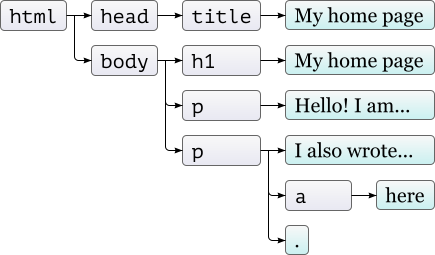
<!doctype html>
<html>
  <head>
    <title>My home page</title>
  </head>
  <body>
    <h1>My home page</h1>
    <p>Hello, I am Marijn and this is my home page.</p>
    <p>I also wrote a book! Read it
      <a href="http://eloquentjavascript.net">here</a>.</p>
  </body>
</html>
Properties
Just about anything you can think of. Properties for:
- Colors
- Fonts, font weight
- Borders
- Animations: hover, fade,
- Spacing, position, margins, alignment
- Layout of elements and flow
Where to put it?
- In the element
- In the head of the document
- In a separate file, "imported" via a link element
In the element
<p style="font-family:tahoma"> Lorem ipsum dolor sit amet consectetur adipisicing
<span style="vertical-align:sub;border-style:dotted;border:3px dotted rgb(255, 0, 212);border-radius:20px;font-size:120%;font-family:Impact, sans-serif">elit.</span>
</p>
In the head of the document
<head>
    <style type="text/css">
        body {
          background-color: silver;
          color: white; }
    </style>
</head>
In a separate file
/* File: css/styles.css */
body {
  background-color: silver;
  color: white;
}

ul li {
    line-height: 1.5;
    background-image: url(star.svg);
}
<!--index.html-->
<head>
<link rel="stylesheet" href="css/styles.css">
</head>CSS
By drmorgan
CSS
Introduction to CSS for 366