Contents
- Version Control - Git
- HTML
- CSS
Why Version Control?
- How can I keep from losing my work?
- What was that code for anyway?
- How can I go back and see what my code was like before?
- How can I undo some changes or mistakes I made?
- How can I work on the same codebase on my home machine and laptop?
- How can I maintain several different versions of my project?
- How can several people all work on the same codebase at the same time?
- Who made these changes?
Why Version Control with Git?
- Why Git?

Git Theory
Images from: Pro Git
Snapshots

A Commit

3 Commits

Branch "Pointers"

Branches

A Commit History

Preparing to Merge

After Merge


Git in Practice
Demonstration of regular workflow -- single developer, local and remote repository
3 States

Lifecycle

Start from Scratch -- local repo
- Initialize
- add, commit
- Inspect
Start from Scratch -- local repo + remote
- Initialize
- fetch/pull, add, commit, push
Other Topics
- clone
- branch, checkout
- merge
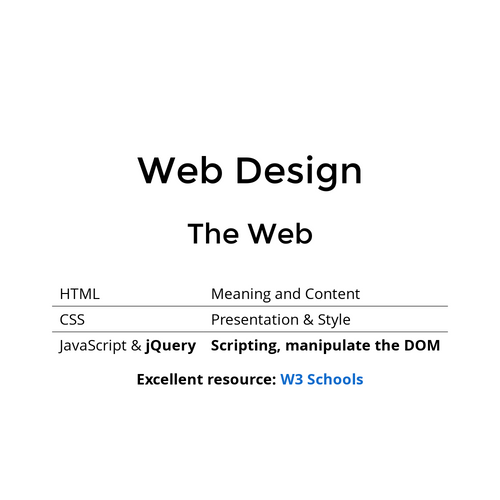
The Web
| HTML | Meaning and Content |
| CSS | Presentation & Style |
| Javascript | Scripting, manipulate DOM |
| HTTP | Transport, client-server behavior |
HTML
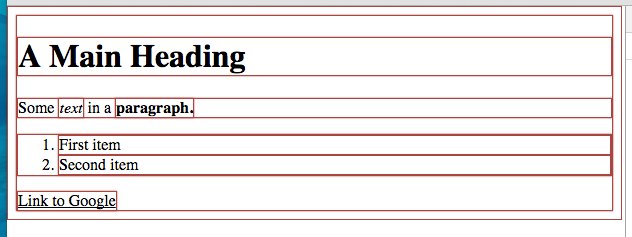
<!DOCTYPE html>
<html lang="en">
	<head>
	<meta charset="UTF-8">
		<title>The Title</title>
	</head>
	<body>
		<h1>A Main Heading</h1>
		<p>Some text in a paragraph.</p>
		<ol>
			<!--This is an ordered list -->
			<li>First item</li>
			<li>Second item</li>
		</ol>
		<a href="https://www.google.com">Link to Google</a>
	</body>
</html>
Element Attributes
Elements have name / value pair attributes
<!-- Double quoted attributes -->
<p lang="en-us" class="main-content">Some paragraph</p>

<!-- Unquoted and a boolean attribute-->
<p id=extra_info hidden>More stuff</p>

<!-- A void element with unquoted and single quoted values -->
<input type=submit value='Submit' />

<!-- Use this style though: -->
<input type="text" name="the username" maxlength="30" />
id Attribute
A global attribute. Used to uniquely identify an element (from CSS or Javascript).
class Attribute
Used to make this element a member of a named class. Also a global attribute.
Common use of id attribute
<form action="/form-handler-page" method="post">
    <label for="msg">Message:</label>
    <textarea id="msg" name="user_message"></textarea>
    <button type="submit">Send your message</button>
</form>
Common use of class attribute
<pre><code class="hljs python snippet">
    def foo(a):
        print(a)
</code></pre>
Layout Algorithm
Two categories of elements:
- Block Level Elements
- Always start on a new line, they stack vertically
- Inline Elements
- Appear to continue on the same line as their neighboring elements, placed horizontally until the end of the line
Block Level Elements
Examples include
<form> |
<p> |
<table> |
<hr> |
<h1> |
<ol> |
<li> |
<div> |
Inline Elements
Examples include
<a> |
<em> |
<strong> |
<img> |
<sub> |
<button> |
<input> |
<span> |
Styling and Layout with CSS
- Style sheet language
- Associates style rules with HTML elements
- Styles "cascade", or have known order of precedence
- Each rule has one or more selectors and a declaration block
body {
	font-family: Arial, Verdana, sans-serif;
	font-size: 12px;
	color: #665544;
}
Selectors
Select which HTML elements the rule(s) apply to
/* Select all elements */
* { }

/* Select specific elements, here all <h1>, <h2> and <h3>
   (using grouping syntax) */
h1, h2, h3 { }

/* Select all elements where class attribute has value "questions" */
.questions { }

/* Select all <p> elements where class attribute has value "questions" */
p.questions { }

/* Select all elements where id attribute has value "topstory" */
#topstory { }
And lots more
/* Matches any F element that is a descendant of an E element */
E F { }

/* Matches any F element that is a child of an element E */
E > F { }

/* Matches any F element immediately preceded by a sibling element E */
E + F { }

/* Matches element E when E is the first child of its parent */
E:first-child { }

/* Matches element E if E is the source anchor of a hyperlink
   of which the target is not yet visited or already visited */
E:link { }
E:visited { }
/* Matches E during certain user actions */
E:active { }
E:hover { }
E:focus { }

/* Matches any E element with the "foo" attribute set (to any value) */
E[foo] { }

/* Selectors can be combined: */

div p *[href] { }
div ol>li p { }
Precedence (Cascading)
When two or more selectors match an element:
- If identical, the latter one applies, otherwise
- The more specific one takes precedence (specificity)
- A rule labeled "!important" indicates it should take precedence
Inheritance
Some properties are inherited, e.g. font-family, font-size, font-weight, color
You can force inheritance of a parent's property with the "inherit" value
Properties
Just about anything you can think of. Properties for:
- Color
- Text
- Boxes
- Lists, tables, forms
- Layout of elements and flow
- Images
Where to put it?
<head>
	<style type="text/css">
	body {
		background-color: silver;
		color: white; }
	</style>
or
/* File: css/styles.css */
body {
	background-color: silver;
	color: white; }
deck
By drmorgan