Lunch & Learn - Clean Code
June 17, 2016
-
What is clean code?
-
Why is clean code so important?
-
Hands on
-
How to write cleaner code?
Agenda
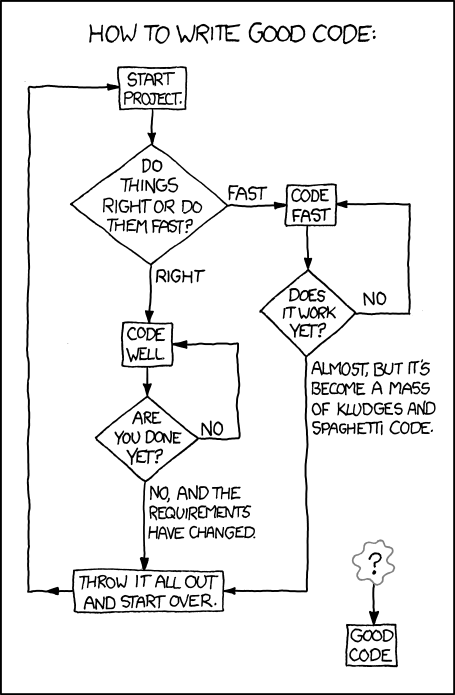
http://xkcd.com/844/
What is clean code?
What is clean code?
- Reads like well-written prose
- Clarifies the designer's intent
- Sustains simple and direct modules
- Preserves straightforward logical flow
- Employs efficient abstractions
- Fosters maintenance and enhancement
- Provides one way to do one thing
- Presents a clear and minimal API
- Includes unit and acceptance tests
What is clean code?
- Reads like well-written prose
- Clarifies the designer's intent
- Sustains simple and direct modules
- Preserves straightforward logical flow
- Employs efficient abstractions
- Fosters maintenance and enhancement
- Provides one way to do one thing
- Presents a clear and minimal API
- Includes unit and acceptance tests
Clean code is the reward for elegant design, planning, and execution.
Why is clean code so important?
In particular - why is clean code so important at this stage of your career?
As a student:
- Solve it
- Test it
- Fix it
- Turn it in
- Forget about it
Why is clean code so important?
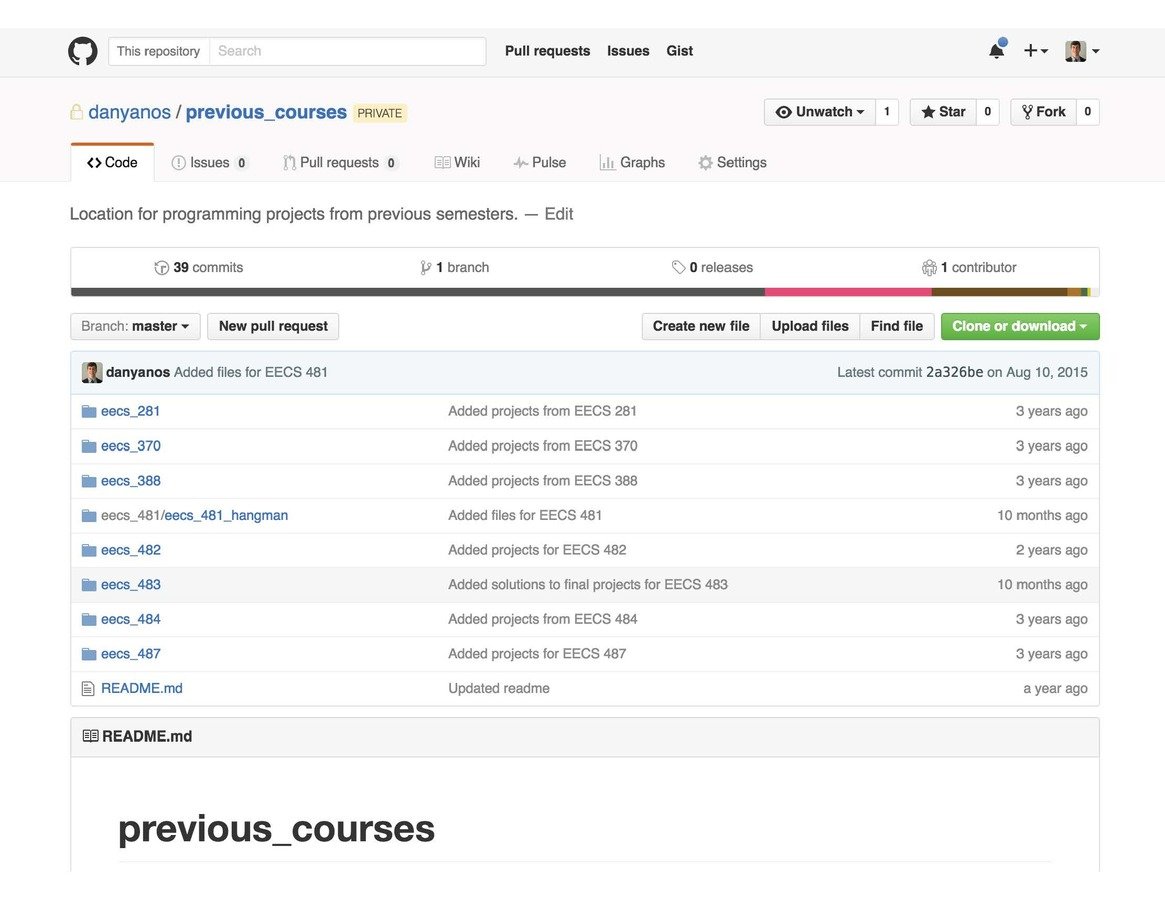
As a student:
- Solve it
- Test it
- Fix it
- Turn it in
- Forget about it
As a professional:
- Solve it
- Make it easy to understand
- Make it easy to use
- Make it easy to change
- Test it
- Fix it
- Review it
- Commit it
- Test it
- Release it
- Support it
Why is clean code so important?
#!/usr/bin/python
 import os
import sys
import csv
import datetime
import time
import twitter

def test():

        #run speedtest-cli
        print 'running test'
        a = os.popen("python /home/pi/speedtest/speedtest-cli --simple").read()
        print 'ran'
        #split the 3 line result (ping,down,up)
        lines = a.split('\n')
        print a
        ts = time.time()
        date =datetime.datetime.fromtimestamp(ts).strftime('%Y-%m-%d %H:%M:%S')
        #if speedtest could not connect set the speeds to 0
        if "Cannot" in a:
                p = 100
                d = 0
                u = 0
        #extract the values for ping down and up values
        else:
                p = lines[0][6:11]
                d = lines[1][10:14]
                u = lines[2][8:12]
        print date,p, d, u
        #save the data to file for local network plotting
        out_file = open('/var/www/assets/data.csv', 'a')
        writer = csv.writer(out_file)
        writer.writerow((ts*1000,p,d,u))
        out_file.close()

        #connect to twitter
        TOKEN=""
        TOKEN_KEY=""
        CON_SEC=""
        CON_SEC_KEY=""

        my_auth = twitter.OAuth(TOKEN,TOKEN_KEY,CON_SEC,CON_SEC_KEY)
        twit = twitter.Twitter(auth=my_auth)

        #try to tweet if speedtest couldnt even connet. Probably wont work if the internet is down
        if "Cannot" in a:
                try:
                        tweet="Hey @Comcast @ComcastCares why is my internet down? I pay for 150down\\10up in Washington DC? #comcastoutage #comcast"
                        twit.statuses.update(status=tweet)
                except:
                        pass

        # tweet if down speed is less than whatever I set
        elif eval(d)<50:
                print "trying to tweet"
                try:
                        # i know there must be a better way than to do (str(int(eval())))
                        tweet="Hey @Comcast why is my internet speed " + str(int(eval(d))) + "down\\" + str(int(eval(u))) + "up when I pay for 150down\\10up in Washington DC? @ComcastCares @xfinity #comcast #speedtest"
                        twit.statuses.update(status=tweet)
                except Exception,e:
                        print str(e)
                        pass
        return

if __name__ == '__main__':
        test()
print 'completed'import os
import sys
import time
from datetime import datetime
import daemon
import signal
import threading
import twitter
import json
import random
from logger import Logger
shutdownFlag = False
def main(filename, argv):
print "======================================"
print " Starting Speed Complainer! "
print " Lets get noisy! "
print "======================================"
global shutdownFlag
signal.signal(signal.SIGINT, shutdownHandler)
monitor = Monitor()
while not shutdownFlag:
try:
monitor.run()
for i in range(0, 5):
if shutdownFlag:
break
time.sleep(1)
except Exception as e:
print 'Error: %s' % e
sys.exit(1)
sys.exit()
def shutdownHandler(signo, stack_frame):
global shutdownFlag
print 'Got shutdown signal (%s: %s).' % (signo, stack_frame)
shutdownFlag = True
class Monitor():
def __init__(self):
self.lastPingCheck = None
self.lastSpeedTest = None
def run(self):
if not self.lastPingCheck or (datetime.now() - self.lastPingCheck).total_seconds() >= 60:
self.runPingTest()
self.lastPingCheck = datetime.now()
if not self.lastSpeedTest or (datetime.now() - self.lastSpeedTest).total_seconds() >= 3600:
self.runSpeedTest()
self.lastSpeedTest = datetime.now()
def runPingTest(self):
pingThread = PingTest()
pingThread.start()
def runSpeedTest(self):
speedThread = SpeedTest()
speedThread.start()
class PingTest(threading.Thread):
def __init__(self, numPings=3, pingTimeout=2, maxWaitTime=6):
super(PingTest, self).__init__()
self.numPings = numPings
self.pingTimeout = pingTimeout
self.maxWaitTime = maxWaitTime
self.config = json.load(open('./config.json'))
self.logger = Logger(self.config['log']['type'], { 'filename': self.config['log']['files']['ping'] })
def run(self):
pingResults = self.doPingTest()
self.logPingResults(pingResults)
def doPingTest(self):
response = os.system("ping -c %s -W %s -w %s 8.8.8.8 > /dev/null 2>&1" % (self.numPings, (self.pingTimeout * 1000), self.maxWaitTime))
success = 0
if response == 0:
success = 1
return { 'date': datetime.now(), 'success': success }
def logPingResults(self, pingResults):
self.logger.log([ pingResults['date'].strftime('%Y-%m-%d %H:%M:%S'), str(pingResults['success'])])
class SpeedTest(threading.Thread):
def __init__(self):
super(SpeedTest, self).__init__()
self.config = json.load(open('./config.json'))
self.logger = Logger(self.config['log']['type'], { 'filename': self.config['log']['files']['speed'] })
def run(self):
speedTestResults = self.doSpeedTest()
self.logSpeedTestResults(speedTestResults)
self.tweetResults(speedTestResults)
def doSpeedTest(self):
# run a speed test
result = os.popen("/usr/local/bin/speedtest-cli --simple").read()
if 'Cannot' in result:
return { 'date': datetime.now(), 'uploadResult': 0, 'downloadResult': 0, 'ping': 0 }
# Result:
# Ping: 529.084 ms
# Download: 0.52 Mbit/s
# Upload: 1.79 Mbit/s
resultSet = result.split('\n')
pingResult = resultSet[0]
downloadResult = resultSet[1]
uploadResult = resultSet[2]
pingResult = float(pingResult.replace('Ping: ', '').replace(' ms', ''))
downloadResult = float(downloadResult.replace('Download: ', '').replace(' Mbit/s', ''))
uploadResult = float(uploadResult.replace('Upload: ', '').replace(' Mbit/s', ''))
return { 'date': datetime.now(), 'uploadResult': uploadResult, 'downloadResult': downloadResult, 'ping': pingResult }
def logSpeedTestResults(self, speedTestResults):
self.logger.log([ speedTestResults['date'].strftime('%Y-%m-%d %H:%M:%S'), str(speedTestResults['uploadResult']), str(speedTestResults['downloadResult']), str(speedTestResults['ping']) ])
def tweetResults(self, speedTestResults):
thresholdMessages = self.config['tweetThresholds']
message = None
for (threshold, messages) in thresholdMessages.items():
threshold = float(threshold)
if speedTestResults['downloadResult'] < threshold:
message = messages[random.randint(0, len(messages) - 1)].replace('{tweetTo}', self.config['tweetTo']).replace('{internetSpeed}', self.config['internetSpeed']).replace('{downloadResult}', str(speedTestResults['downloadResult']))
if message:
api = twitter.Api(consumer_key=self.config['twitter']['twitterConsumerKey'],
consumer_secret=self.config['twitter']['twitterConsumerSecret'],
access_token_key=self.config['twitter']['twitterToken'],
access_token_secret=self.config['twitter']['twitterTokenSecret'])
if api:
status = api.PostUpdate(message)
class DaemonApp():
def __init__(self, pidFilePath, stdout_path='/dev/null', stderr_path='/dev/null'):
self.stdin_path = '/dev/null'
self.stdout_path = stdout_path
self.stderr_path = stderr_path
self.pidfile_path = pidFilePath
self.pidfile_timeout = 1
def run(self):
main(__file__, sys.argv[1:])
if __name__ == '__main__':
main(__file__, sys.argv[1:])
workingDirectory = os.path.basename(os.path.realpath(__file__))
stdout_path = '/dev/null'
stderr_path = '/dev/null'
fileName, fileExt = os.path.split(os.path.realpath(__file__))
pidFilePath = os.path.join(workingDirectory, os.path.basename(fileName) + '.pid')
from daemon import runner
dRunner = runner.DaemonRunner(DaemonApp(pidFilePath, stdout_path, stderr_path))
dRunner.daemon_context.working_directory = workingDirectory
dRunner.daemon_context.umask = 0o002
dRunner.daemon_context.signal_map = { signal.SIGTERM: 'terminate', signal.SIGUP: 'terminate' }
dRunner.do_action()How to write cleaner code?
- Naming conventions
- Modularity
What significant changes were made between the first piece of code and the second piece of code?
Why are naming conventions important?
If you can't come up with a good name for it, then it's a mess. The names are the API talking back to you, so listen to them.
- Joshua Bloch
The ratio of time spent reading vs. writing is well over 10:1. We are constantly reading old code as part of the effort to write new code.
- Robert C. Martin
Naming Conventions - Some Simple Examples
Reveal Intention
int d; // elapsed time in days
int daysSinceCreation;
Avoid disinformation
Account[] accountList;
boolean notActive;
Make meaningful distinctions
void arrayCopy(char[] a1, char[] a2);
void arrayCopy(char[] source, char[] destination);
Pronounceable
String evtStCd, evtAudtg;Searchable
Date date, transactionDate;
public class RequestBuilder { ...
Solution/Problem relevant
int tableUsage, loadFactor;
Node tortoise, hare;
Coupling and Cohesion
Coupling is a measure of how closely connected two routines or modules are.
Cohesion is a measure of how strongly related each piece of functionality is.
Coupling and Cohesion have an inverse relationship.
With tightly coupled systems:
-
a change in one module forces changes in the others.
-
modules are harder to reuse.
-
modules are harder to test.
With low cohesion systems:
-
modules are complex with more operations.
-
modules are less maintainable and harder to work with.
Orthogonality
Two or more modules are orthogonal if
changes in one do not affect the other.
-
When components are highly interdependent, there is no such thing as a quick, local fix.
-
Orthogonal software provides increased productivity and decreased risk because developers never have to worry about side-effects of making changes.
-
Orthogonal components are easier to swap meaning less dependence on a specific library or vendor.
Lunch & Learn - Clean Code
By dyanos91
Lunch & Learn - Clean Code
June 17, 2016