Web scraping in R
Ujang Fahmi


Tujuan
- Apa web Scraping?
- Mengapa kita perlu melakukan web Scraping?
- Bagaimana cara melakukan web Scraping?
- Prinsip Kerja web Scraping di R dengan paket rvest
- Scraping table
- Scraping static webpage
- Scraping multipage
- Storing scraped data in data frame
UMUM
KHUSUS

Apa web Scraping?
Web scraping, data scraping, web extraction adalah proses mengekstrak data dari halaman sebuah website dengan memanfaatkan beberapa teknik seperti copy paste , html parsing , DOM parsing , dan lain-lain.


HTTP
Instruksi sesuai dengan API
Mengapa Scraping
diperlukan?
Data is new differentiator
Bernard Marr, Forbes
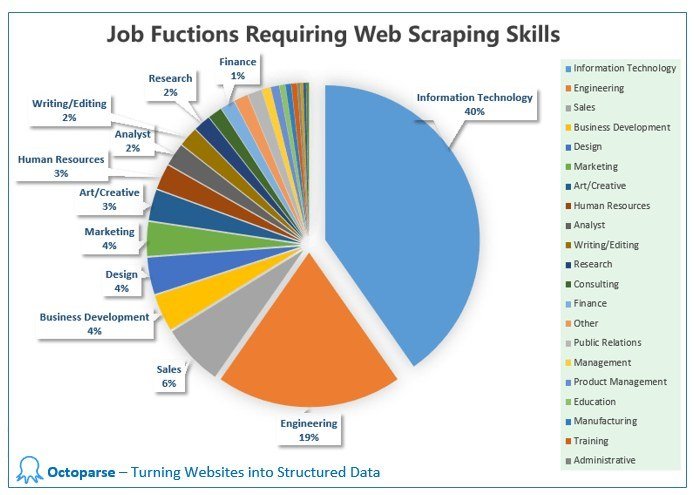
An essential skill to acquire in today’s digital world
Bagaimana
Scraping di R?
-
Download html using read_html()
-
Extract specific nodes using html_nodes()
-
Extract element of a nodes using html_text() , html_atr() , html_table() , etc.
-
Pre-process
Menggunakan xpath dan css nodes
<?xml version="1.0" encoding="UTF-8"?>

<bookstore>

<book>
  <title lang="en">Harry Potter</title>
  <price>29.99</price>
</book>

<book>
  <title lang="en">Learning XML</title>
  <price>39.95</price>
</book>

</bookstore>| Expression | Result |
|---|---|
| nodename | Selects all nodes with the name " nodename" |
| / | Selects from the root node |
| // | Selects nodes in the document from the current node that match the selection no matter where they are |
| . | Selects the current node |
| .. | Selects the parent of the current node |
| @ | Selects attributes |
| Path Expression | Result |
|---|---|
| bookstore | Selects all nodes with the name "bookstore" |
| /bookstore | Selects the root element bookstore
Note: If the path starts with a slash ( / ) it always represents an absolute path to an element! |
| bookstore/book | Selects all book elements that are children of bookstore |
| //book | Selects all book elements no matter where they are in the document |
| bookstore//book | Selects all book elements that are descendant of the bookstore element, no matter where they are under the bookstore element |
| //@lang | Selects all attributes that are named lang |
| //book/title | //book/price | Selects all the title AND price elements of all book elements |
Menggunakan xpath dan css nodes
Contoh xpath
library(tidyverse)
library(rvest)

page <- read_html("https://www.kdnuggets.com/news/top-stories.html")

# xpath
page %>%
  html_nodes(xpath = "//ol[1]/li/a/b") %>%
  html_text(trim = TRUE)

page %>%
  html_nodes(xpath = "//ol[1]//li//a") %>%
  html_attr("href") %>%
  ifelse(. == " ", NA, .)
Mendaparkan judul artikel bagian most shared dari laman https://www.kdnuggets.com/news/top-stories.html
| Selector | Example | Example description |
|---|---|---|
| .class | .intro | Selects all elements with class="intro" |
| .class1.class2 | <div class="name1 name2">...</div> | Selects all elements with both name1 and name2 set within its class attribute |
| element>element | div > p | Selects all <p> elements where the parent is a <div> element |
| element+element | div + p | Selects all <p> elements that are placed immediately after <div> elements |
| :nth-child(n) | p:nth-child(2) | Selects every <p> element that is the second child of its parent |
| element1~element2 | p ~ ul | Selects every <ul> element that are preceded by a <p> element |
| element,element | div, p | Selects all <div> elements and all <p> elements |
Menggunakan xpath dan cssnodes
Contoh css
library(tidyverse)
library(rvest)

page <- read_html("https://www.kdnuggets.com/news/top-stories.html")

page %>%
  html_nodes(css = "ol:nth-child(3) > li > a > b") %>%
  html_text(trim = TRUE) %>%
  data_frame()

page %>%
  html_nodes(css = "ol:nth-child(3) > li > a") %>%
  html_attr("href") %>%
  data_frame()
Menggunakan css selector
Multiple Page 1
halaman 1
halaman 2
halaman
angka halaman
baseurl
nomor halaman
endurl
Multiple Page 2
library(rvest)

baseurls <- "https://jdih.dprd-diy.go.id/?pagenum="
page <- (0:2)
endurls <- "&totalrow=27&cat=5"

# list kosong
urls <- list()

# membuat daftar urls
for (i in seq_along(page)) {
  url<- paste0(baseurls, page[i], endurls)
  urls[[i]] <- url
}
Target: Membuat daftar url yang akan diambil datanya
# list kosong untuk menampung hasil
undang2 <- list()

# loop over the urls and get the table from each page
for (i in seq_along(urls)) {
  pages <- read_html(urls[[i]])

  tentang <- pages %>%
    html_nodes("tr:nth-child(3) td~ td+ td") %>%
    html_text(trim = TRUE) %>%
    data_frame()

  download <- pages %>%
    html_nodes("tr:nth-child(6) > td") %>%
    html_node("a") %>%
    html_attr("href") %>%
    ifelse(. == " ", NA, .) %>%
    data_frame()

  download$. <- paste0("https://jdih.dprd-diy.go.id/", download$.)
  undang <- bind_cols(tentang, download)
  undang2[[i]] <- undang
}
Target: mengambil elemen teks tentang dan downoad dari tiap halaman
library(rvest)
library(tidyverse)

pages <- read_html("http://www.dpr.go.id/jdih/pp")

hasil <- html_nodes(pages, "table") [[1]] %>%
  html_table()

hasil <- pages %>%
  html_nodes("table") %>%
  html_table()

hasil <- hasil[[1]]

pages %>%
  html_nodes("table") %>%
  html_table()
Target: mengambil tabel dan isinya dari sebuah halaman website
Scraping tabel
Rangkuman
- Scraping bisa dilakukan di R
- Scraping memanfaatkan css nodes dan atau xpath nodes
- Tidak ada nodes yang lebih baik, terkadang kita harus mencobanya dan melihat hasilnya
- Melihat perubahan urls merupakan strategi umum yang bisa digunakan untuk melakukan scraping dari beberpa halaman
- Nodes untuk tabel umumnya adalah table, jika banyak bisa diurukan tabel ke berapa
- Sering mencoba (praktik)
webscrap
By Eppofahmi
webscrap
Web scraping using rvest in R