Statements and Control Flow in C/C++
C/C++中的语句与控制流
by 方泓睿
With reveal.js and plantUML
Who am I
喜闻乐见的自我介绍环节
Graduated high school student.
高中毕业生
Prospective college student of Northwestern Polytechnical University(NPU).
西北工业大学准大一
Maintainer of golang's arm builder and net package.
golang项目维护者
Opensource projects contributor.
开源项目贡献者
And The Most Important Thing....

I’m ex-ex-leader of Chaoyue‘s physical team.
超越物理组前组长

To Contact Me....
联系方式
As for github account......
I think none of you knows github for now .......
| Telephone | 17603085740 |
| 318388589 | |
| chfanghr | |
| chfanghr@gmail.com | |
| @RealFangHongrui |
.....And one more sentence for you guys
The code in this presentation follows C++17 standard.
示例代码均使用c++17标准。
The 'auto' Keyword in C++
C++的auto 关键字
The auto keyword specifies that the type of the variable that is being declared will be automatically deducted from its initializer. In case of functions, if their return type is auto then that will be evaluated by return type expression at runtime.
auto关键字指定将自动从其初始化程序中推断正在声明的变量的类型。 在函数的情况下,如果它们的返回类型是auto,则将在运行时通过返回类型表达式来计算。
The 'auto' Keyword in C++
C++的auto 关键字
In brief, auto keyword is used to make compiler automatically infer types of variables and reduce pain.
简而言之,auto关键字用于让编译器自动推断变量类型,减少程序员的痛苦。
Let’s see an example.....
The 'auto' Keyword in C++
C++的auto 关键字
auto a=1; // type of a is int
auto b=1.0f; // type of b is float (32bits float number)

using std::vector;
auto c=vector<int>(); // type of c is vector<int>

auto d={1,2,3,4,5,6}; // type of d is int[6]
What's the Diffenence Between Expression and Statement???
我们先来弄清楚什么是表达式,什么是语句。
What are Expressions
什么是表达式
An expression is a sequence of operators and their operands, that specifies a computation.
表达式是一系列运算符及其操作数,用于指定计算。
Let's see an example then...
What are Expressions
什么是表达式
auto what_are_expressions()->void{
    auto a=0,b=1;//variable declaration and assignment

    // In this expression, operator is +, operands are a and b.
    // Some expressions don't produce any result, like this one.
    a+b;//expression


    // Expression can also produce results.
    // c,d,e are all results of expressions.
    auto c=a+b;//expression
    auto d=a-b;//expression
    auto e=a*b-b;//expression

    // Note that in C, expressions can not have any side effects
    // unless you use tricky marco.
    // But in C++, expressions can have side effects
    // like print some text to your console.
    // Because C++ have feature - operator reload.
    using std::cout;
    cout<<c;//expression,which produces side effect
}
What are Statements
什么是语句
A simple C++ statement is each of the individual instructions of a program, like the variable declarations , expressions and also function calls.
一个简单的C++语句是程序中的每一个指令,比如定义变量、各种表达式以及函数调用。
Function and function call will be introduced in the following lessons.
函数及函数调用会在之后的课介绍。
What are Statements
什么是语句
They always end with a semicolon (;), and are executed in the same order in which they appear in a program.
它们总是以分号(;)结尾,并按照它们在程序中出现的顺序执行。
... And There're also
Compound Statements
其实还有一个叫复合语句的东西
A compound statement is a group of statements (each of them terminated by its own semicolon), but all grouped together in a block, enclosed in curly braces: {}:
复合语句是一组语句(每个语句都以它自己的分号结尾),但是所有语句都在一个块中组合在一起,用大括号括起来:{}:
{
    statement1;
    statement2;
    statement3;
}
The entire block is considered a single statement (composed itself of multiple substatements). Whenever a generic statement is part of the syntax of a flow control statement, this can either be a simple statement or a compound statement.
整个块被认为是单个语句(由多个子语句组成)。 每当泛型语句是流控制语句的语法的一部分时,它可以是简单语句或复合语句。
The text which is crossed off is what you cannot understand for now.
Compound Statements
复合语句
... Additionally
If you have learnt the concept of scope before,you should know that variables defined in a compound statement can only be used inside that compound statement.
从定义域的角度来说,在复合语句中定义的变量只能在复合语句中使用,即变量的定义域为复合语句中变量定义之后的部分。
auto compound_statement_variables_scope()->void{
    {
        int a=0;
        // scope of a start here
        // do something with a
        a=10;
        // scope of a end here
    }
    a=10;// invalid usage to a
    // a is undefined in this scope
}
A Full Example for Statements
一个例子
// This example looks weird but it can get compiled!
auto a()->void{}


auto main()->int{
    ; // Yes this is a valid statement
    a(); // Function call
    int b=1+3; // Variable declaration and assignment
    auto c=0;
    b=c+1; // Expression

    {
        a();
        float b=1.0f;// shadow b
    }// Compound statement
}
Expressions can be considered as the true subset of statements.
表达式可以看作语句的真子集。
Conclusion
But why we need flow control statements?
我们为什么需要流控制语句?
....Because
Programs are not limited to a linear sequence of statements. During its process, a program may repeat segments of code, or take decisions and bifurcate. For that purpose, C/C++ provides flow control statements that serve to specify what has to be done by our program, when, and under which circumstances.
程序不限于线性语句序列。 在其过程中,程序可以重复代码段,或者做出决定和分叉。 为此,C / C ++提供了流程控制语句,用于指定程序在何时以及何种情况下必须完成怎样的的操作。
Flow Control Statements Include.....
流控制语句包括:
-
Selection statements 选择语句
-
Iteration statements (loops) 循环语句
-
Jump statements 跳转语句
They have one thing in common
Which is.....
All of them can influence the control flow.
他们都能影响控制流
Convention(s)
约定
The condition is an expression that is being evaluated and has a boolean result.
”条件“是一个求值后有布尔型结果的表达式。
Convention(s) : Some condition
约定
Let's assume that there's a variable/expression named x......
When x is numberic type:
if x is 0: bool(x)=false, else bool(x)=true.
当x是个数字时,如果x为0,x被求值为布尔类型时为假,否则为真
When x is a pointer:
if x is nullptr(or NULL):bool(x)=false,else bool(x)=true.
当x是个指针时,如果x为空指针(nullptr/NULL),x被求值为布尔类型时为假,否则为真
Selection Statements
选择语句
if and else
The if keyword is used to execute a statement or block, if, and only if, a condition is fulfilled. Its syntax is:
if关键字被用于:当且仅当条件满足(为真)时,执行语句。if的语法是:
if (condition){
    statement1;
    statement2;
    statement3;
    statement4;
}

// if there is only one statement to be executed,you can write:

if(condition)
    statement1;
if and else
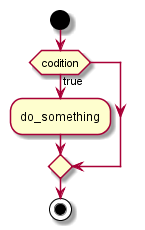
The condition is the expression that is being evaluated. If this condition is true, statement is executed. If it is false, statement is not executed (it is simply ignored), and the program continues right after the entire selection statement.
条件是被求值的表达式。 如果此条件为真,则执行语句。 如果为false,则不执行语句(只是忽略它),程序在整个选择语句之后继续。
if and else
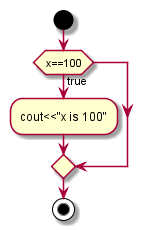
For example, the following code fragment prints the message (x is 100), only if the value stored in the x variable is indeed 100:
例如,以下代码片段仅在存储在x变量中的值确实为100时才打印消息(x为100):
if (x == 100)
  cout << "x is 100";
If x is not exactly 100, this statement is ignored, and nothing is printed.
如果x不是100,则忽略此语句,并且不打印任何内容。
if and else
If you want to include more than a single statement to be executed when the condition is fulfilled, these statements shall be enclosed in braces ({}), forming a block:
如果要在满足条件时包含多个要执行的语句,则这些语句应括在大括号({})中,形成一个块:
if (x == 100)
{
   cout << "x is ";
   cout << x;
}

// you can also write:

if (x == 100){cout << "x is "; cout << x;}
if and else
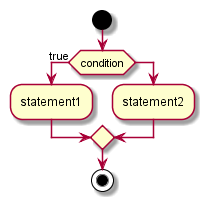
Selection statements with if can also specify what happens when the condition is not fulfilled, by using the elsekeyword to introduce an alternative statement. Its syntax is:
使用if的选择语句还可以通过使用else关键字引入替代语句来指定在未满足条件时应执行的语句。 它的语法是:
if (condition)
    statement1
else
    statement2
where statement1 is executed in case condition is true, and in case it is not, statement2 is executed.
当条件为真时执行statement1,如果不是,则执行statement2。
if and else
if (x == 100)
  cout << "x is 100";
else
  cout << "x is not 100";
For example:
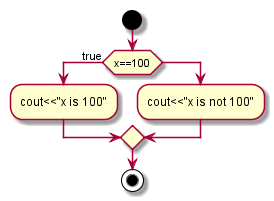
This prints "x is 100", if indeed x has a value of 100, but if it does not, and only if it does not, it prints "x is not 100" instead.
如果x的值确实为100这段代码打印“x is 100”,但如果不是,并且只有在不是的情况下,这段代码打印“x is not 100”。
if and else
Several if + else structures can be concatenated with the intention of checking a range of values. For example:
可以连接几个if + else结构,以便检查一系列值。 例如:
if (x > 0)
  cout << "x is positive";
else if (x < 0)
  cout << "x is negative";
else
  cout << "x is 0";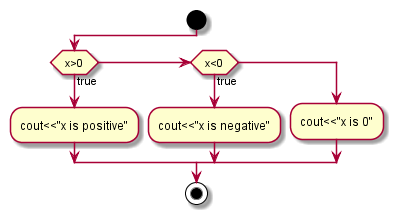
This prints whether x is positive, negative, or zero by concatenating two if-else structures. Again, it would have also been possible to execute more than a single statement per case by grouping them into blocks enclosed in braces: {}.
这段代码通过连接两个if-else结构来打印x是正数,负数还是零。 同样,通过将它们分组为括号中的块{},每个情况也可以执行多个语句。
Exercise
练习
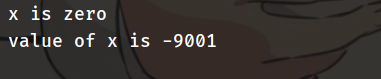
Tell me what's the output of the code on the right:
告诉我右边这段代码的输出是啥
#include <iostream>

using std::cout, std::endl;

auto main() -> int {
  auto x = 1000;
  {
    x -= 1000;
    x *= x;
  }

  if (x)
    cout << "x is not zero" << endl;
  else
    cout << "x is zero" << endl;

  if (!x) {
    x += 1000;
    x *= 9;
    x++;
    x = -1*x;
  } else if (x > 0)
    x = -1*x;

  cout << "value of x is " << x << endl;
}
Exercise
练习
The correct answer is ...
正确答案:
Iteration statements (loops)
循环语句
Loops repeat statements a certain number of times, or while a condition is fulfilled. They are introduced by the keywords while, do, and for.
循环语句以特定的次数重复执行语句,或者直到某一条件满足。循环通过关键字while,do和for来引入。
while
The simplest kind of loop is the while-loop. Its syntax is:
最简单的循环类型是while循环。它的语法是:
while(expression){
    statement1;
    statement2;
    statement3;
}

// If you have only one statement to be executed,you can write:

while(expression)
    statement;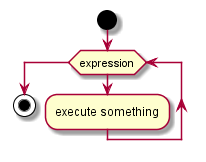
while
The while-loop simply repeats statement while expression is true. If, after any execution of statement, expression is no longer true, the loop ends, and the program continues right after the loop.
while循环只是简单的在当表达式为真时重复执行语句。如果在数次执行语句之后表达式不再为真,循环停止,程序继续执行while之后的语句。
For example, let's have a look at a countdown using a while-loop:
看看这个用while循环倒数的例子:
while
#include <iostream>

using std::cout,std::endl;

auto main()->int{
    auto n=10;

    while(n>0){
        cout<<n<<endl;
        --n;
    }

    cout<<"lift off!"<<endl;
}
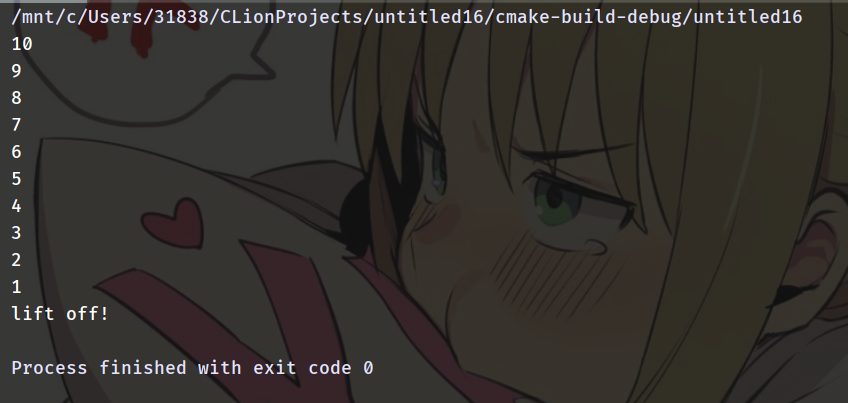
Tell me what's the output of the code on the right:
告诉我右边这段代码的输出是啥
while
The result is.....
结果是....
Saber!!!!!!!

OK...OK...Let's go back to the freaking course
while
The first statement in main sets n to a value of 10. This is the first number in the countdown. Then the while-loop begins: if this value n fulfills the condition n>0 (that n is greater than zero), then the block that follows the condition is executed, and repeated for as long as the condition (n>0) remains being true.
main函数中的第一个语句把n设置为10。这是倒数的第一个数。然后while循环开始:如果变量n满足条件n>0,while的语句块将被执行。在语句块中,每一次执行a都会被减去1。就这样,while的语句块会被不停地重复执行,直到条件n>0为假。
The next one is do...while statement
下一个是do..while循环
do...while
A very similar loop is the do-while loop, whose syntax is:
另一个相似的循环语句是do-while循环,语法是:
do{
    statement1;
    statement2;
    //...
}while(expression)

//if you have only one statement

do statement while(expression);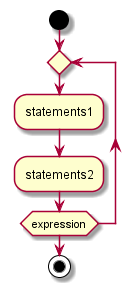
do...while
It behaves like a while-loop, except that expression is evaluated after the execution of statement instead of before, guaranteeing at least one execution of statement, even if condition is never fulfilled.
do...while循环工作起来就像while循环一样,除了do..while中的expression是在每一次执行语句之后之后才会被求值,而while循环中的expression是在每一次执行语句之前对expression求值。这保证了语句会被至少执行一次,甚至条件永远不会被满足的情况。
do{
    statement1;
    statement2;
    //...
}while(expression)

//if you have only one statement

do statement while(expression);
do...while
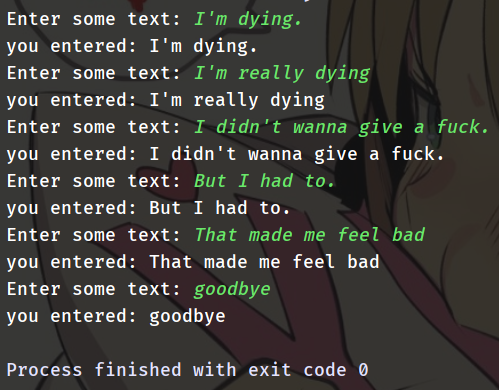
For example, the following example program echoes any text the user introduces until the user enters goodbye:
以下例子将用户的输入重新输出到屏幕上直到用户输入goodbye
#include <iostream>

using std::cout, std::endl, std::cin;

auto main() -> int {
  std::string str;
  do {
    cout << "Enter some text: ";
    getline(cin, str);
    cout << "you entered: " << str << endl;
  } while (str!="goodbye");
}
do...while
The do-while loop is usually preferred over a while-loop when the statement needs to be executed at least once, such as when the condition that is checked to end of the loop is determined within the loop statement itself. In the previous example, the user input within the block is what will determine if the loop ends. And thus, even if the user wants to end the loop as soon as possible by entering goodbye, the block in the loop needs to be executed at least once to prompt for input, and the condition can, in fact, only be determined after it is executed.
当语句需要至少执行一次时,例如当被检查的循环结束的条件是在循环语句本身内确定时,do-while循环通常优于while循环。 在前面的示例中,块内的用户输入将决定循环是否结束。 因此,即使用户想要通过输入再见来尽快结束循环,循环中的块也需要至少执行一次以提示输入,并且事实上,条件只能在它 被执行之后确定。
for is the next loop statement to be introduced
下一个是for循环
for
for is designed to iterate a number of times. Its Basic syntax is:
for 被设计用于重复一定的次数。for 循环的语法是:
for (initialization; condition; increase) {
    statement1;
    statement2;
    statement3;
}

// And if you have only one statement to be executed

for (initialization; condition; increase) statement;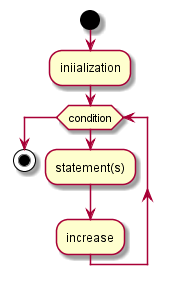
for
Like the while-loop, this loop repeats statement while condition is true. But, in addition, the for loop provides specific locations to contain an initialization and an increase expression, executed before the loop begins the first time, and after each iteration, respectively. Therefore, it is especially useful to use counter variables as condition.
与while循环一样,此循环当且仅当条件为真时重复语句。 但是,除此之外,for循环提供了包含初始化和增加表达式的特定位置,分别在循环开始第一次之前和每次迭代之后执行。 因此,将计数器变量用作条件尤其有用。
It works in the following way:
for 语句这样工作:
1. initialization is executed. Generally, this declares a counter variable, and sets it to some initial value. This is executed a single time, at the beginning of the loop.
1. 执行初始化。 通常,这会声明一个计数器变量,并将其设置为某个初始值。 这在循环开始时执行一次。
2. condition is checked. If it is true, the loop continues; otherwise, the loop ends, and statement is skipped, going directly to step 5.
2. 条件被检查。 如果为真,则循环继续; 否则,循环结束,并跳过语句,直接进入步骤5。
It works in the following way:
for 语句这样工作:
3. statement is executed. As usual, it can be either a single statement or a block enclosed in curly braces { }.
3. 语句被执行。 它可以是单个语句,也可以是用大括号{}括起来的块。
4. increase is executed, and the loop gets back to step 2.
4. 执行增加语句,循环返回到步骤2。
5. the loop ends: execution continues by the next statement after it.
5. 循环结束,继续执行for之后的下一个语句。
for
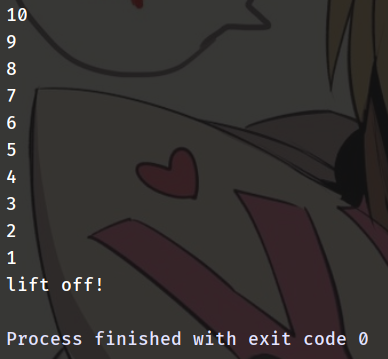
Here is the countdown example using a for loop:
这里还是一个倒计时的例子,但用for来实现:
#include <iostream>

using std::cout, std::endl;

auto main() -> int {

  for (auto i = 10; i > 0; --i)
    cout << i << endl;
// I didn't write braces here
// because we have only one statement to be executed

  cout << "lift off!" << endl;
}
What's the output?
输出是啥?
for
The result is.....
结果是....
for
The three fields in a for-loop are optional. They can be left empty, but in all cases the semicolon signs between them are required. For example, for (;n<10;) is a loop without initialization or increase (equivalent to a while-loop); and for (;n<10;++n) is a loop with increase, but no initialization (maybe because the variable was already initialized before the loop). A loop with no condition is equivalent to a loop with true as condition (i.e., an infinite loop).
for循环中的三个字段是可选的。 它们可以留空,但在所有情况下都需要它们之间的分号。 例如,for(; n <10;)是一个没有初始化语句或增加语句的循环(相当于while循环); 而对于(; n <10; ++ n)是一个有增加语句的循环,但没有初始化语句(可能是因为变量在循环之前已经初始化)。 没有限制条件的循环等效于无限循环。
infinite loop(aka endless loop)
无限循环/死循环
for(;;)
    statement;

while(true)
    statement;

// another style:
while(1)
    statement;


do statement while(true);
//or
do statement while(1);
When their is no condition to restrict the loop, or the condition which restrict the loop is always true,the loop become infinite, which means it will never stop from executing its statement(s).
当没有条件来限制循环应该进行的次数,或者限制循环进行次数的条件永远为真时,循环就变成了无限循环,这意味着,循环内的语句将被一直执行。
Exercise
练习
#include <iostream>

using std::cout, std::endl;

auto main() -> int {
  auto a = 0;

  for (auto i = 0; i < 11; i++)
    a += i;

  while (a < 100)
    a += a;

  do
    a++;
  while (a < 0);

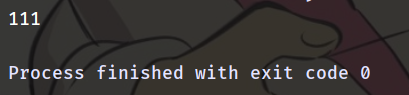
  cout << a << endl;
}
Tell me what's the output of the code on the right:
告诉我右边这段代码的输出是啥
Exercise
练习
The result is .....
结果是.....
Ok, the freaking loop statement is finally finished.
恶 臭 的循环语句终于 讲 完 了
别乱动,别乱动
「暴れんな!暴れんなよ…!」

Jump Statements
跳转语句
Jump statements allow altering the flow of a program by performing jumps to specific locations.
跳转语句通过跳转到特定位置来改变程序的流程。
break
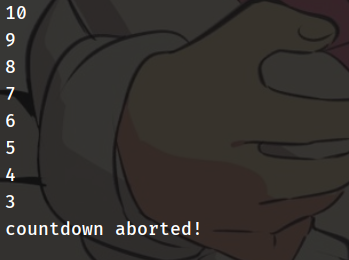
break leaves a loop, even if the condition for its end is not fulfilled. It can be used to end an infinite loop, or to force it to end before its natural end. For example, let's stop the countdown before its natural end:
即使不满足其结束条件,break也会令控制流离开循环(使循环直接结束)。 它可用于结束无限循环,或强制它在自然结束之前结束。 例如,让我们在自然结束前停止倒计时:
#include <iostream>
using std::cout, std::endl;

auto main() -> int {
  for (auto n = 10; n > 0; n--) {
    cout << n << endl;
    if (n==3) {
      cout << "countdown aborted!" << endl;
      break;
    }
  }
}
continue
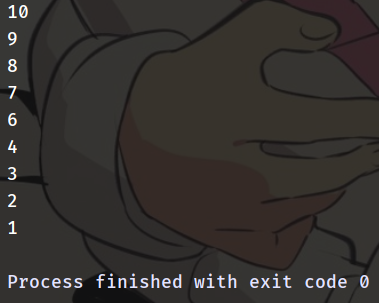
The continue statement causes the program to skip the rest of the loop in the current iteration, as if the end of the statement block had been reached, causing it to jump to the start of the following iteration. For example, let's skip number 5 in our countdown:
continue语句导致程序在当前迭代中跳过循环的其余部分,直接跳转到下一次迭代的开始。 例如,让我们在倒计时中跳过5:
#include <iostream>
using std::cout, std::endl;

auto main() -> int {
  for (auto n = 10; n > 0; n--) {
    if (n==5)
      continue;
    cout << n << endl;
  }
}
goto
goto allows to make an absolute jump to another point in the program. This unconditional jump ignores nesting levels.
goto允许绝对跳转到程序中的另一个点。 此无条件跳转忽略嵌套级别。
The destination point is identified by a label, which is then used as an argument for the goto statement. A label is made of a valid identifier followed by a colon (:).
目标点由标签标识,然后将其用作goto语句的参数。 标签由有效标识符后跟冒号(:)组成。
goto
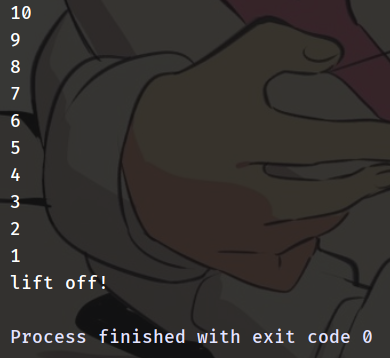
Here is a version of our countdown loop using goto:
还是一个用goto倒计时的例子:
#include <iostream>

using std::cout, std::endl;

auto main() -> int {
  auto n = 10;
  again:
  cout << n << endl;
  n--;
  if (n > 0)
    goto again;
  cout << "lift off!" << endl;
}
Exercise
练习
#include <iostream>

using std::cout, std::endl;

auto main() -> int {
  auto n = 10;

  again:
  for (auto i = 0; i < 11; i++) {
    if (i==5) {
      n += 12;
      continue;
    }
    if (i==9)
      break;
    n += i;
  }

  if (n < 110)
    goto again;

  cout<<n<<endl;
}
Tell me what's the output of the code on the right:
告诉我右边这段代码的输出是啥
Exercise
练习
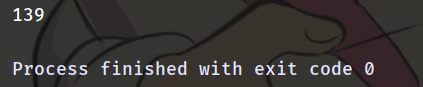
The result is .....
结果是.....
Ok. Let's switch to switch
接下来讲一下switch关键字
Actually switch is a selection statement.
But why do I talk about it at last?
事实上 switch是选择语句
那么为什么放到最后才讲呢??
Because switch is generally used with break statement.
因为switch常与break语句一起使用。
switch
The syntax of the switch statement is a bit peculiar. Its purpose is to check for a value among a number of possible constant expressions. It is something similar to concatenating if-else statements, but limited to constant expressions. Its most typical syntax is:
switch语句的语法有点奇怪。 其目的是检查许多可能的常量表达式中的值。 它类似于多个连接起来的if-else语句,但仅限于常量表达式。 其最典型的语法是:
switch (expression)
{
  case constant1:
     group-of-statements-1;
     break;
  case constant2:
     group-of-statements-2;
     break;
  .
  .
  .
  default:
     default-group-of-statements
}
Constant Expression
常量表达式
Expressions that can be evaluated at compile time.
能在编译时求值的表达式。
int a=1;
a; // not a constant expression
const int b=1;
b; // is a constant expression

switch(x){
    case a: // won't compile because a is not a constant expression
        // ......
    case b: // ok cause b is a constant expression
        // ......
}
switch
switch (expression)
{
  case constant1:
     group-of-statements-1;
     break;
  case constant2:
     group-of-statements-2;
     break;
  .
  .
  .
  default:
     default-group-of-statements
}
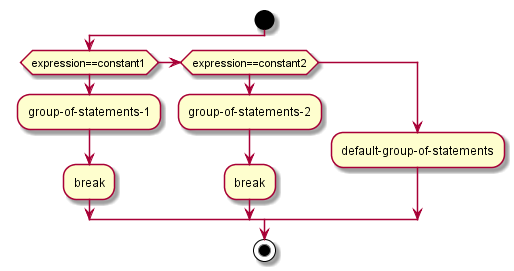
It works in the following way: switch evaluates expression and checks if it is equivalent to constant1; if it is, it executes group-of-statements-1 until it finds the break statement. When it finds this break statement, the program jumps to the end of the entire switch statement (the closing brace).
它按以下方式工作:switch计算expression并检查它是否等于constant1; 如果是,则执行group-of-statements-1直到找到break语句。 当它找到这个break语句时,程序跳转到整个switch语句的结尾(结束括号)。
switch
switch (expression)
{
  case constant1:
     group-of-statements-1;
     break;
  case constant2:
     group-of-statements-2;
     break;
  .
  .
  .
  default:
     default-group-of-statements
}
If expression was not equal to constant1, it is then checked against constant2. If it is equal to this, it executes group-of-statements-2 until a break is found, when it jumps to the end of the switch.
如果表达式不等于constant1,则对照constant2进行检查。 如果它等于constant2,则它执行group-of-statements-2直到找到break,然后跳转到switch的末尾。
switch
switch (expression)
{
  case constant1:
     group-of-statements-1;
     break;
  case constant2:
     group-of-statements-2;
     break;
    // and other cases
  default:
     default-group-of-statements
}
Finally, if the value of expression did not match any of the previously specified constants (there may be any number of these), the program executes the statements included after the default: label, if it exists (since it is optional).
最后,如果表达式的值与之前指定的任何常量都不匹配(这些常量可能有任何数量),程序将执行default标签之后包含的语句(如果存在)(因为default标签是可选的)
Exercise
练习
#include <iostream>

using std::cout,std::endl;

const auto a=1;

auto main()->int{
    switch(a){
        case 1:
            cout<<"a is 1"<<endl;
            break;
        case 2:
            cout<<"a is 2"<<endl;
            break;
        default:
            cout<<"a is other vale"<<endl;
    }
}
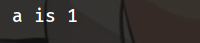
Tell me the output of the code on the right.
告诉我右边代码的输出是啥。
Exercise
练习
switch
If the example above lacked the break statement after the first group for case one...
如果之前的代码在第一个case之后的语句中缺失了break语句...
#include <iostream>

using std::cout,std::endl;

const auto a=1;

auto main()->int{
    switch(a){
        case 1:
            cout<<"a is 1"<<endl;
            // break;
        case 2:
            cout<<"a is 2"<<endl;
            break;
        default:
            cout<<"a is other vale"<<endl;
    }
}
switch
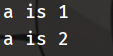
It will be like this .
会产生这样的输出
switch
If the example above lacked the break statement after the first group for case one, the program would not jump automatically to the end of the switch block after printing a is 1, and would instead continue executing the statements in case two (thus printing also a is 2). It would then continue doing so until a break statement is encountered, or the end of the switch block. This makes unnecessary to enclose the statements for each case in braces {}, and can also be useful to execute the same group of statements for different possible values.
如果之前的例子中的第一个case中缺失了break语句,程序不会在打印a is 1之后自动跳到switch的末尾,相反的程序会继续执行在第二个case里面的语句(因此打印a is 2).程序将会继续执行直到遇到第一个break,或者到了switch块的末尾。这使得没有必要把每一个case所要执行的代码包裹在大括号{}中,并且可以被方便的用于为不同的可能的值执行同一组相同的操作。
switch
#include <iostream>

using std::cout,std::endl;

auto print_number(int a)->void{
    switch(a){
        case 1:
        case 2:
        case 3:
            cout<<"a is"<<a<<endl;
            break;
        default:
            cout<<"a is other value"<<endl;
    }
}

auto main()->int{
    auto a=1;
    print_number(a);
    a=2;
    print_number(a);
    a=3;
    print_number(a);
    a=4;
    print_number(a);
}
So absolutely, the code on the right will output...
右边这段代码会输出什么?
switch
The result would be....
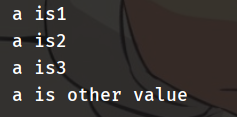
So just remember switch keyword in C/C++ have a feature :automatically fallthrough cases.
记住C/C++中的switch有一个重要的特性:
自动继续执行。
And...
Notice that switch is limited to compare its evaluated expression against labels that are constant expressions. It is not possible to use variables as labels or ranges, because they are not valid C++ constant expressions.
To check for ranges or values that are not constant, it is better to use concatenations of if and else if statements.
请注意,switch仅限于将其计算的表达式与作为常量表达式的标签进行比较。 不能将变量用作标签或范围,因为它们不是有效的C ++常量表达式。
要检查非常量的范围或值,最好使用if和else if语句的连接。
Thanks for listening
And special thanks to those who encouraged me when I lost confident and those who helped me review this presentation :@AdeleAura and @Thunghuan.
2019 Chaoyue Summer Camp Presentation 1
By 方泓睿