React JS
Introduction

Introduction to React
But before we start…Imagine this.
You open a webpage.
You click a button.
either,
- A message appears,
- A cat picture loads or
- The button turns green.
That’s not magic, it’s JavaScript talking to the browser ✨
Something changes...
But how does that work under the hood?
When your browser loads an HTML file,
The DOM is Born
It doesn't just display it.
It builds a living, breathing structure behind the scenes:
🌳 The DOM : Document Object Model
Every <div>, <h1>, <button> becomes a room or object inside that house
And the best part? JavaScript can walk through this house and rearrange furniture anytime!
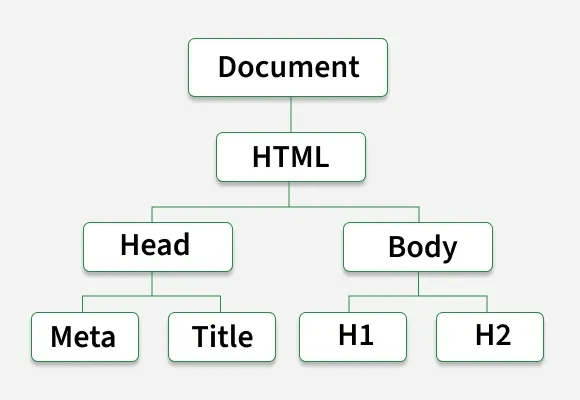
Think of it like this:
<!DOCTYPE html>
<html lang="en">
  <head>
    <meta charset="UTF-8" />
    <title>Document</title>
  </head>
  <body>
    <h1>Hello, World!</h1>
    <h2>Welcome to my website</h2>
  </body>
</html>
Your HTML = blueprint
The DOM = actual house the browser builds from that blueprint
You already know the DOM.
When a user clicks a button on a classic webpage,
here's what actually happens:
- Event fires: The browser captures the `click` event on the DOM element.
- JS runs your handler: Your function executes: updates a variable, fetches data, whatever.
- You update the DOM manually: `document.querySelector('#counter').textContent = count`
- Browser repaints: The browser re-renders only the affected element (hopefully).
Let's see it in action.
<button id="toggleBtn">Show/Hide Secret</button>
<p id="secret">Shhh… I’m a secret! 🤫</p>
const btn = document.getElementById("toggleBtn");
const msg = document.getElementById("secret");
btn.addEventListener("click", () => {
if (msg.style.display === "none") {
msg.style.display = "block";
} else {
msg.style.display = "none";
}
});Let’s say we want to hide a secret message when someone clicks a button. Here’s how we’d do it with plain JavaScript:
It works!
But what if we have 10 secrets? 100 buttons?
That was… fine. For one button.
Suddenly we're:
- Writing the same code over and over…
- Forgetting which element has which ID…
- Praying nothing breaks when we add a new feature
But how does that work
The DOM is a tree of objects.
Every change can trigger expensive operations.
- Reflow: When you change layout properties (width, height, padding), the browser has to recalculate the positions of ALL elements, even ones that didn't change!
- Repaint: After reflow, the browser redraws pixels to the screen. Happens on every visual change. Can be very slow on complex UIs.
<!-- DOM tree (simplified) -->
<body>
	<header> → cart badge updates here
		<nav>, <logo>, <links>...
	<main>
		<ProductList> ← re-renders
        	<ProductCard × 48>
        <sidebar> → filter state
        <footer>
</body>
The Real Problem
As your app grows, DOM manipulation becomes fragile and hard to track. Why?
-
Too many moving parts: You update one element, but forget it affects another.
-
No single source of truth: Is the data in a variable? In the DOM? In localStorage?
-
Performance issues: Changing the DOM is slow, browsers weren’t built for constant updates
-
Readability nightmare: Your code looks like a bowl of callback spaghetti 🍝
You start spending more time fixing bugs than building features !
There has to be a better way.
Spoiler: there is.
What if you could just describe what your UI should look like,
and let someone else figure out what changed and how to update it?
That's exactly what React was built to do.
Introducing ⚛ React
Facebook built React in 2013 to solve exactly this problem.
And it changed frontend development forever.
The old way vs. The React way
❌ Without React :
Manual DOM manipulation
- State changes
- You find the element
- You update its content
- You update related elements
- You manage all edge cases
- You handle errors yourself
- You miss one thing… 💥 bug in production.
✅ With React
Declarative & automatic
1. State changes
2. React compares Virtual DOMs
3. React finds the diff
4. React updates only what changed
5. ✨ That's it. You're done.
The Key Insight
Imperative (vanilla JS) → "Find element #counter, set its text to 5, then find #badge…"
- Instead of telling the browser HOW to update the UI…
- with React, you describe WHAT the UI should look like
- and React figures out the rest.
Declarative (React) → "The UI looks like this when count is 5."
So what is React, really?
Let's clear up the confusion first.
- ❌ Not a framework
It doesn't tell you how to structure your whole app.
It only handles the View layer.
- ❌ Not a language
It's pure JavaScript.
No new syntax to learn, well, except JSX, but we'll get there !
- ✅ A UI Library
React is a JavaScript library for building user interfaces
from small, reusable pieces called components.
Think of your UI like a LEGO set.
Each component is a LEGO brick, self-contained, reusable.

You snap them together to build complex UIs.
Change one brick? Only that brick updates.
The rest? Untouched.
Why React? The numbers speak.
- Declarative: describe the UI, React handles updates via Virtual DOM
- Component-based: build UIs from isolated, reusable pieces
- Learn once, write anywhere: web + mobile (React Native)
- Massive ecosystem: 22M+ weekly npm downloads
> React is the most used frontend library in the world.
> Not the newest. Not the flashiest. The most used.
> There's a reason for that.
Dev
Environment

Before we write a single line of React code…
we need a workspace where:
- Our fancy modern JavaScript works in every browser
- We can split code into neat files (not one giant script!)
- We can use new react features (like JSX, import, etc.)
But browsers? They’re… kinda old-school.
They don’t understand import React from 'react'
So we need a secret translator + organizer.
What are bundlers ?
A bundler does 3 things:
- Combines all your files into one (or few) files browsers can load.
- Transpiles modern JS/JSX into older JS that even Internet Explorer (RIP) could almost understand.
- Optimizes everything (minify, compress, cache) so your app loads fast.
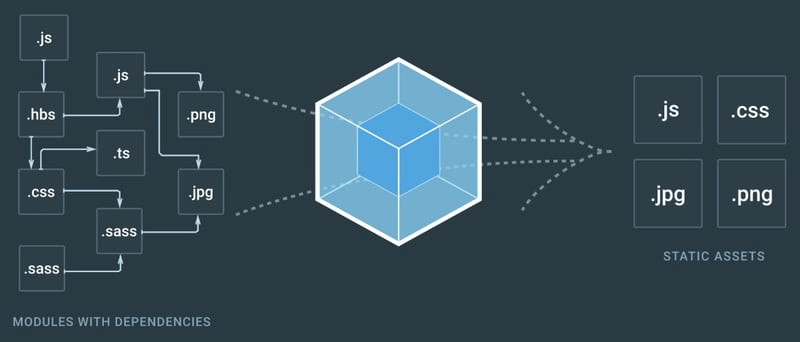
Without a bundler, you'd ship 200 separate JS files to the browser.
With a bundler? One clean, optimized bundle.
Popular bundlers for React
Webpack
Powers Create React App (legacy), which is the traditional way to create single-page React applications. It sets up a new React project with a pre-configured build setup.

Vite
Vite is a next-generation build tool for frontend development. It focuses on speed and efficiency by leveraging ES Module imports and server-side rendering (SSR) capabilities.

But wait, how does Vite convert your code so fast?
SWC excels in performance and modern JavaScript/TypeScript support, making it ideal for projects that require fast compilation times and support for the latest ECMAScript features.
SWC
Babel, while slightly slower in compilation speed compared to SWC, offers unparalleled flexibility, extensive plugin support, and broad compatibility across different JavaScript environments and syntax versions.
Babel
Creating a new React project using Vite
1. Open your terminal and type:
npm create vite@latest my-app
2. Select your project settings
3. run your app
cd my-app
npm install
npm run dev
Your app is live at http://localhost:5173 (or similar), and it hot-reloads (changes appear instantly as you code)!
3 commands. That's all it takes.
✔ Select a framework: React
✔ Select a variant: JavaScript + SWC
✓ Project created!
Understanding the project structure
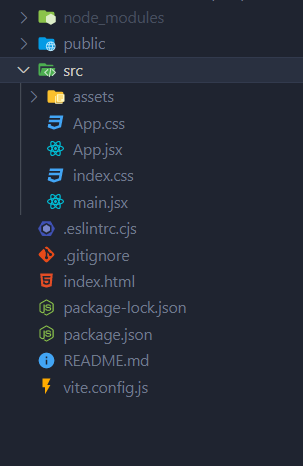
main.jsx: the entry point.
It grabs `<div id="root">` from `index.html` and renders your entire React app inside it.
That one `<div>`. That's it. React builds everything from there.
Managing project dependencies with npm
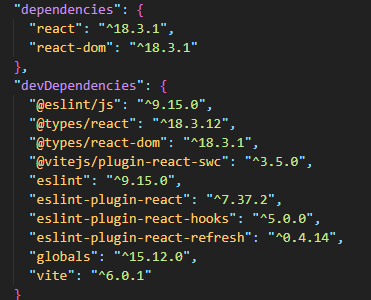
Creating and using components in React
Components and JSX
In React, a component is a reusable, self-contained piece of code that encapsulates the structure (HTML), behavior (JavaScript), and styling (CSS) of a part of the user interface.
There are two types:
- Class Components: ES6 classes that extend
React.Component. - Functional Components: Simple JS functions that return JSX.
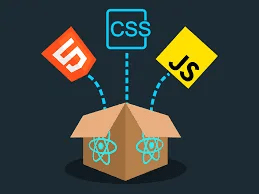
React’s Component-Based Approach vs Traditional HTML, CSS, and JavaScript
Why React’s Approach is Better ?
- Encapsulation
- Reusability
- Maintainability
- Scalability
What is JSX ?
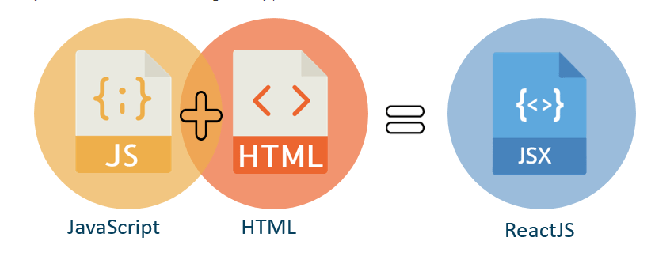
JSX (JavaScript XML) is a syntax extension for JavaScript that allows you to write HTML-like code directly in your JavaScript files.
Why use JSX?
- Readability: JSX looks like HTML, making it easier to visualize the structure of your components.
-
Expressiveness: You can embed JavaScript expressions inside JSX using curly braces
{}. - Encapsulation: JSX allows you to keep your UI logic and structure together in one place.
What is JSX ?
<div>
  	<h1>Hello, {fullName}!</h1>
	<p>Welcome to my React app.</p>
</div>
const fullName="Naruto UZUMAKI"Components
Class Components
Class components are ES6 classes that extend the React.Component class. They can have state and lifecycle methods, making them more suitable for complex logic and interactions.
Creating Class Components
import React from 'react';

class Header extends React.Component {
  render() {
    return <header>Welcome to My React App ! 🎉</header>;
  }
}
The Header component is a class component that returns a <header> element using JSX.
Creating Class Components
import React from 'react';

class Counter extends React.Component {
  constructor(props) {
    super(props);
    this.state = { count: 0 };
  }

  handleIncrement = () => {
    this.setState({ count: this.state.count + 1 });
  };

  render() {
    return (
      <div>
        <p>Count: {this.state.count}</p>
        <button onClick={this.handleIncrement}>Increment</button>
      </div>
    );
  }
}
Components
Functional Components
Functional components are JavaScript functions that return JSX (JavaScript XML) to describe what should be rendered on the screen. They are simpler and modern approach to building components. They are stateless, meaning they don't have internal state or lifecycle methods.
Creating Functional Components
function Header() {
  return <header>Welcome to My React App ! 🎉</header>;
}
Creating Functional Components
import React from 'react';

const MyComponent = (props) => {
  return (
    <div>
      <h2>Hello, {props.name}!</h2>
      <p>{props.message}</p>
    </div>
  );
};
4. Props
In React, data is typically passed from a parent component to a child component through props. Props (short for "properties") are read-only and allow data to flow in one direction, from parent to child components.
Properties
// ParentComponent.js
import React from 'react';
import ChildComponent from './ChildComponent';

const ParentComponent = () => {
  const name = 'John Doe';
  return <ChildComponent name={name} />;
};
// ChildComponent.js
import React from 'react';
const ChildComponent = (props) => {
return <p>Hello, {props.name}!</p>;
};
Props Destructuring: Cleaner Code
// ParentComponent.js
import React from 'react';

function UserCard({ name, age }) {
  return (
    <div>
      <h2>{name}</h2>
      <p>Age: {age}</p>
    </div>
  );
}
// ChildComponent.js
import React from 'react';
function Greeting(pops) {
return <h1>Hello, {props.name}!</h1>;
}
function Greeting({ name }) {
return <h1>Hello, {name}!</h1>;
Destructuring is a JavaScript feature that allows you to extract values from objects or arrays into variables. It makes your code cleaner and easier to read.
Exo: Color palette Gallery
Passing Functions as Props
// Parent Component
function App() {
  const handleClick = () => {
    alert('Button clicked in the parent component!');
  };

  return <Button onClick={handleClick} />;
}

// Child Component
function Button({ onClick }) {
  return <button onClick={onClick}>Click Me</button>;
}
Sometimes, you need to pass a function from a parent component to a child component to handle events or update the parent’s state. This is a common pattern in React.
PropTypes: Validating Props
npm install prop-typesPropTypes are a way to validate the types of props passed to a component. They help catch bugs by ensuring that the correct data types are used.
import PropTypes from 'prop-types';
function UserCard({ name, age }) {
  return (
    <div>
      <h2>{name}</h2>
      <p>Age: {age}</p>
    </div>
  );
}
UserCard.propTypes = { // Define PropTypes
  name: PropTypes.string.isRequired,
  age: PropTypes.number.isRequired,
};
PropTypes: Validating Props
Common PropTypes
-
PropTypes.string: The prop must be a string.
-
PropTypes.number: The prop must be a number.
-
PropTypes.bool: The prop must be a boolean.
-
PropTypes.func: The prop must be a function.
-
PropTypes.node: The prop must be a renderable value (e.g., string, number, element).
-
PropTypes.element: The prop must be a React element.
Children Props: Nesting Components
The children prop is a special prop that allows you to pass content between the opening and closing tags of a component. It’s like a placeholder for nested content.
function App() {
  return (
    <Card>
      <h2>Hello, World!</h2>
      <p>This is a card component.</p>
    </Card>
  );
}

// Child Component
function Card({ children }) {
  return <div style={styles.card}>{children}</div>;
}
States
The Component's Memory
State
Imagine a YouTube video player.
- Is it paused or playing? → state
- What's the current volume? → state
- Is the video liked? → state
Without state, your UI is a static screenshot.
With state, it becomes a living, breathing app.
> State = data that changes over time and that the UI needs to react to.
Without State, Nothing Updates
You click. `count` becomes 1, 2, 3...
let count = 0;

function Counter() {
  return (
      <p>{count}</p>
      <button onClick={() => count++}>Click me</button>
  );
}
But the screen never changes.🧊
> React has no idea `count` changed.
> It's just a JavaScript variable. React isn't watching it.
State in Class Components
class Counter extends React.Component {
  constructor(props) {
    super(props);
    this.state = { count: 0 }; // Initialize state
  }
  increment = () => {  // Method to increment count
    this.setState({ count: this.state.count + 1 });
  };
  decrement = () => {  // Method to decrement count
    this.setState({ count: this.state.count - 1 });
  };
  render() {
    return (
      <div>
        <p>Count: {this.state.count}</p>
        <button onClick={this.increment}>Increment</button>
        <button onClick={this.decrement}>Decrement</button>
      </div>
    );
  }
}
export default Counter;
In class components, state is built-in, it is initialized in the constructor and updated using the setState method.
`this.setState()` → React sees the change → re-renders. ✅
> State is native to classes. It just works.
setState callback
increment = () => {
  this.setState(
    { count: this.state.count + 1 },
    () => {
      console.log('State updated! New count:', this.state.count);
    }
  );
};
Sometimes, you need to perform an action after the state has been updated. You can pass a callback function as the second argument to setState.
But What About Functional Components? 🤔
function Counter() {
  // 🚫 Where do we put state?
  // There's no constructor.
  // There's no `this`.
  // There's no setState.

  return (
      ???
      +
  );
}
Functional components are simpler, cleaner, more readable.
Everyone loves them. But there's a catch.
State in Functional Components
Before 2019, functional components were stateless by design.
They could only receive props and render UI. That's it.
> So developers were forced to use class components
> just to get state. Even for simple things.
React 16.8 introduced Hooks, special functions that let
functional components do everything class components could.
The Solution
React Hooks !
Hooks
Superpowers for Functions
🪝
Hooks
React Hooks are special functions that were introduced to address some of the limitations of functional components and to provide a more cohesive way to handle state and side effects in React applications.

Hooks let you "hook into" React features from functional components:
- State → `useState`
- Side effects → `useEffect`
- Global data → `useContext`
- And many more...
"Why write 50 lines in a class when 10 lines in a function do the same?"
State Hook
The useState hook is the simplest and most commonly used hook. It lets you manage data that can change in your component.

useState : Anatomie
const [state, setState] = useState(initialValue);
//     ↑           ↑              ↑
//  current     setter        starting value
`useState` returns exactly two things, always destructured as an array.
Examples
const [count, setCount]   = useState(0);
const [name, setName]     = useState('');
const [isOpen, setIsOpen] = useState(false);
Rules:
- Read state → use `count`
- Update state → always use `setCount(...)`, never `count = ...`
- Every update → React re-renders the component
> The setter is the only door into state, Don't try to sneak in through the window.
import { useState } from 'react';

function ThemeButton() {
  const [isDark, setIsDark] = useState(false);

  const toggle = () => {
     setIsDark(prev => !prev)
  };

  return (
    <div>
      <p>{isDark ? '🌙 Dark Mode' : '☀️ Light Mode'}</p>
      <button onClick={toggle}>
      	Switch to {isDark ? 'Light' : 'Dark'}
      </button>
    </div>
  );
}
Example: Dark Mode Toggle
One state. One setter. One toggle.
That's 80% of UI interactions right there.
Note !
`prev => !prev` => always use the functional form when new value depends on old value.
import React, { useState } from 'react';

function InputField() {
  const [inputValue, setInputValue] = useState('');

  const handleInputChange = (event) => {
    setInputValue(event.target.value);
  };

  return (
    <div>
      <input
        type="text"
        value={inputValue}
        onChange={handleInputChange}
        placeholder="Type something..."
      />
      <p>You typed: {inputValue}</p>
    </div>
  );
}
Example 3: Input Field with Controlled State
import React, { useState } from 'react';

function TemperatureConverter() {
  const [celsius, setCelsius] = useState(0);
  const [fahrenheit, setFahrenheit] = useState(32);

  const handleCelsiusChange = (event) => {
    const newCelsius = event.target.value;
    const newFahrenheit = (newCelsius * 9) / 5 + 32;
    setCelsius(newCelsius);
    setFahrenheit(newFahrenheit);
  };

  const handleFahrenheitChange = (event) => {
    const newFahrenheit = event.target.value;
    const newCelsius = ((newFahrenheit - 32) * 5) / 9;
    setFahrenheit(newFahrenheit);
    setCelsius(newCelsius);
  };
  // return part
}
Example 4: Multiple States part
return (
    <div>
      <label>
        Celsius:
        <input type="number"
    		value={celsius}
			onChange={handleCelsiusChange}/>
      </label>
      <br />
      <label>
        Fahrenheit:
        <input type="number"
		value={fahrenheit}
		onChange={handleFahrenheitChange}/>
      </label>
    </div>
  );
import React, { useState } from 'react';
function UserProfile() {
const [user, setUser] = useState({
firstName: '',
lastName: '',
email: '',
});
const handleInputChange = (event) => {
const { name, value } = event.target;
setUser({ ...user, [name]: value });
};
// return part
}
Example 5: Managing an Object State
  return (
    <div>
      <input type="text" name="firstName" value={user.firstName}
  		onChange={handleInputChange} placeholder="First Name" />
      <input type="text" name="lastName" value={user.lastName}
		onChange={handleInputChange} placeholder="Last Name"/>
      <input type="email" name="email" value={user.email}
		onChange={handleInputChange} placeholder="Email" />
      <p>{`Hello, ${user.firstName} ${user.lastName}`}</p>
      <p>Email: {user.email}</p>
    </div>
  );
So... useState handles data.
But what about everything outside the component?
-
Fetching data from an API
-
Setting a timer
-
Listening to window resize events
-
Changing the page title
These are called side effects, things that reach outside the React world.
- `useState` manages what you see.
- `useEffect` manages what you do.
Effect Hook
The useEffect Hook in React is used to manage side effects in functional components. It allows you to perform tasks that can't or shouldn't happen within the regular rendering process.
In short
useEffect tells React: "Do something after the component renders or when certain data changes."
Basic Syntax
useEffect(() => {
  // Code to run after rendering or
  //  when dependencies change
  return () => {
    // Cleanup code (optional)
  };
}, [dependencies]); // Dependency array (optional)- The first argument is a function that contains the code you want to run as a side effect.
- The second argument is an optional array of dependencies.
Dependencies
useEffect(() => {
  // Your side effect code here
}, [dependencies]);- []: empty array means this effect runs only on the mount of the component.
- [list_of_dependencies]: every time one of these dependencies changes the effect will run.
- no array: will run after every render.
Example: Change the Page Title (DOM)
import { useState, useEffect } from 'react';

function App() {
  const [count, setCount] = useState(0);

  useEffect(() => {
    document.title = `You clicked ${count} times`;
  }, [count]); // Dependency: `count`

  return (
    <div>
      <p>You clicked {count} times</p>
      <button onClick={() => setCount(count + 1)}>Click me</button>
    </div>
  );
}

export default App;
Common useEffect Mistakes
const [count, setCount] = useState(0);

useEffect(() => {
  setCount(count + 1); // Infinite loop!
}, [count]); // `count` changes on every render- Forgetting Dependencies: If you forget to include a dependency in the array, useEffect won’t run when that dependency changes.
- Infinite Loops: If you modify a dependency inside useEffect without proper handling, you can create an infinite loop.
-
Forgetting Cleanup: If you subscribe to an event or timer, don’t forget to clean it up to avoid memory leaks.
Rules of Hooks : Non-Negotiable
1. Only call hooks at the top level
// ❌ Never inside conditions or loops
if (isLoggedIn) {
  const [user, setUser] = useState(null); // 💥
}
2. Only call hooks from React functions
React introduction
By Fatima BENAZZOU