Previously:
- Two ways to create MovieClips
- Reviewed the Classic vs Motion Tween
- Animated the Run Cycle/Walk Cycle
- More Motion Tween options
- Color Tool/Gradients
- Animate the Banner Ads
TODAY:
- Finish Animating our Banner Ads
- 3D Transform Motion Tweens
- Shape Tween with an External Image
- Animate our Banner Ads
- Buttons/MouseEvents
3D Transform/Rotation Tools
Assign MovieClips X,Y,Z properties
Animate using Motion Tween
Class Exercise:
Animate a zoom through an archway to a background image.
Exercise Files:
http://goo.gl/Len9Nc
Class Exercise:
Animate a card flip using 3D rotation.
Class Exercise:
Animate a space scene using 3D translation.
Class Exercise:
Import an illustrator file and
animate by modifying the shape tween envelope.
Class Exercise:
Import the monkey.fla file, and
animate the monkey swinging on the vine.
Class Exercise:
Import the Banner Ad psd/ai file and create an
animation that resolves into the final banner ad image.
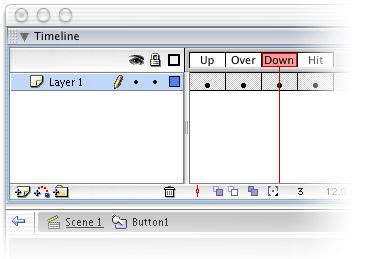
Buttons
- 4 timeline frames/states - (Up/Over/Down/Hit)
- Hand cursor displays on rollover
- Can nest movieClips inside a button frame
- Can make the hitArea different position/area from graphic
Flash Lecture 4
By fdu