Previously:
- HTML Test - Awards Page
- HTML Forms / Input Elements
Today:
- Linking to External Style Sheets
- Intro to Cascading Style Sheets
- Styling the Container Area
- CSS Box Model
- Styling the Content
Intro to Cascading Style Sheets
Linking to an external style sheet
<!DOCTYPE html>
<html>
<head>
<link rel="stylesheet" href="style.css">
</head>
.
</html>
<html>
<head>
<link rel="stylesheet" href="style.css">
</head>
.
</html>
CSS external file is a text file saved using .css extension
Follow the exact same format we used inside the <style> tags
Selector { Property: Value ; }
Follow the exact same format we used inside the <style> tags
Selector { Property: Value ; }
Examples:
body { background-color: gray;}
p { color: blue;}
h3 { font-size: 12pt;}
CSS Comments
A comment starts with /* and ends with */
Example:
/* This comment spans one line *//* This is a comment thatspans multiple lines */
CSS Selectors
- Universal Selector - matches any element type
- Element Type Selector - specific element type name
- Class Selector - selects specified class attribute value
- ID Selector - matches an element's specific id attribute value
- Attribute Selector - selects elements on attribute values
other types of selectors:
http://www.w3schools.com/cssref/css_selectors.asp
Measurements
% percentage
in inch
cm centimeter
mm millimeter
em 1em is equal to the current font size. 2em means 2 times the size of the current font.
ex one ex is the x-height of a font (x-height is usually about half the font-size)
pt point (1 pt is the same as 1/72 inch)
pc pica (1 pc is the same as 12 points)px pixels (a dot on the computer screen)
CSS Colors
Three Color Options:
- Setting the foreground color for contents
- Setting the background color for an area
- Setting a background image to fill out an area
CSS Color Values
- Predefined color names
- Hexadecimal colors
- RGB colors
- RGBA colors
- HSL colors
- HSLA colors
Predefined Color Names (17 standard)
aqua olive
black orange
blue purple
fuchsia red
gray silver
green teal
lime white
maroon yellow
navy
plus 123 more! http://www.w3schools.com/html/html_colornames.asp
CSS Color Values
Hexadecimal - # xxxxxx
( hex range: 00-FF )
RGB, RGBA - rgb ( val, val, val ) , rgba (val, val, val , alpha)
( decimal range: 0-255, alpha range : 0.0 - 1.0 )
HSL, HSLA - hsl ( hue, sat%, light%) , hsla (hue, sat%, light%, alpha)
( decimal range: 0-360, % range: 0-100%, alpha range : 0.0 - 1.0 )
http://goo.gl/I062re
CSS Background Properties
- background-color
- background-image
- background-attachment
- background-origin
- background-position
- background-repeat
-
background-size
- background-clip
Intro to Cascading Style Sheets
Specifying a background image to be displayed.
background-image : url ('filename');
Example:
body {background-image: url(logo.gif); }
body {background-image: url(http://someplace.com/logo.gif);}
Three image formats: jpg, png, gif
It's also good practice to assign a background-color,
if the image file is not available.
Intro to Cascading Style Sheets
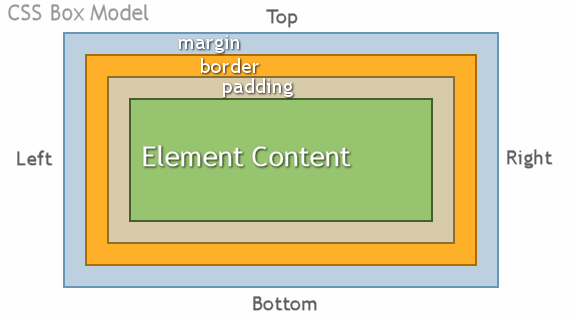
CSS Box Model
- Every element in an HTML document is considered to be a box
- Margins are always transparent
- Borders come in various styles
- Background settings apply to the the area of the padding and content areas
CSS Border Properties
- border-width - (#px, thin, medium, and thick)
- border-color - (hex, rgb, rgba, hsl, hsla, name)
- border-style - (dotted, dashed, solid, groove, ridge, none)
- border - (properties compiled into single line)
CSS Margin and Padding Properties
- margin
- margin-top
- margin-right
- margin-bottom
- margin-left
- padding
- padding-top
- padding-right
- padding-bottom
- padding-left
CSS Positioning and Floats
Styling Content : Fonts
Styling Content : Text
Styling Content : Hyperlinks (pseudo-class)
Example:
a:link {color: blue;}a:visited {color: purple;}a:active {background-color: yellow;}a:hover {color:red;}
Styling Content : Multiple Columns
Example:
div {
      -moz-column-count:3;    /* Firefox */
      -webkit-column-count:3; /* Safari and Chrome */
      -ms-column-count:3;     /* IE */
      column-count:3;
}
Note: Some CSS properties require the use of prefixes for items not yet official CSS spec
External CSS and the Box Model
By fdu