Today:
- Quick review of the first half semester
- Revisit the background Image
- Styling the Text Content
- Styling HTML Exercises with CSS
- Converting Design Layout into CSS
Basic HTML skeleton
Tags can be nested inside other tags.<!DOCTYPE html>
<html><head><html><title>Sample HTML</title></head>
<body>
</body>
The <head> and <body> tags are nested inside the <html> tag.
<h1> to <h6> Defines HTML headings
Providing Context to the Content
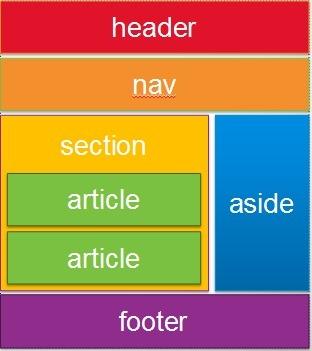
LIST of Semantic HTML LAYOUT ElEMENTS
- article
- aside
- details
- figcaption
- figure
- footer
- header
- nav
- section
HTML <form> tag
A container for a collection of <input> tags
Required Attributes:
- action = "URL to server script" (php, asp, perl, cgi)
- method = "get" or "post" (get server response)
HTML form <input> elements
Required Attributes:
-
type = "text", "checkbox", "radio button"
-
name = variable id name for server usage
- value = "default" value if there is no input
<!DOCTYPE html>
<html>
<head>
<link rel="stylesheet" href="style.css">
</head>
<html>
<head>
<link rel="stylesheet" href="style.css">
</head>
Selector { Property: Value ; }
Examples:
body { background-color: gray;}
p { color: blue;}
h3 { font-size: 12pt;}
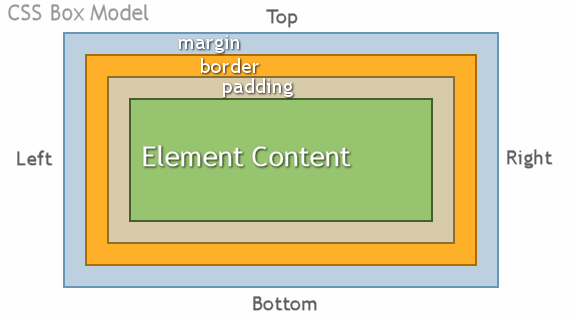
- Every element in a html document is considered to be a box
- Margins are always transparent
- Borders come in various styles
- Background settings apply to the the area of the padding and content areas
CSS positioning
Revisiting the background Image
Review Exercise
Create Semantic HTMLmarkup page
and insert background images
body {background-image: url(logo.gif); }
Styling Text Content : Fonts
Styling Text Content : Text
Styling Text Content : Hyperlinks (pseudo-class)
Example:
a:link {color: blue;}a:visited {color: purple;}a:active {background-color: yellow;}a:hover {color:red;}
Styling Text Content : Multiple Columns
Example:
div {
      -moz-column-count:3;    /* Firefox */
      -webkit-column-count:3; /* Safari and Chrome */
      -ms-column-count:3;     /* IE */
      column-count:3;
}
Note: Some CSS properties require the use of prefixes for items not yet official CSS spec
Styling HTML Content Exercises
- Exercise 1: Styling HTML text
- Exercise 2: Converting a layout into CSS
- Exercise 3: Creating a horizontal Nav bar
http://goo.gl/VVHkmx
Styling HTML Content Exercises
- Exercise 4: Style a 2 column layout
- Exercise 5: Style an article page layout
- Exercise 6: Modify a blog page layout
http://goo.gl/unAEdk
Converting Site Design Layout into CSS
- Arrange Your HTML Page with Semantic HTML elements Classes/ID's
- Use CSS Float and Alignment to layout the Containers elements
- Position Content using the CSS Box Model
- Finish Styling the Content
Converting a Site Design Layout into CSS
Walk-through a couple of example layouts
- Layout 1: Journal Entry
- Layout 2: Company Website
http://goo.gl/xx3xtP
http://goo.gl/wygo9d
Layout Design - CSS Styling
By fdu