Accessibility
Contents
WHY
Legal Basics
"Public bodies [like FIZ] design their websites, including apps and other applications for mobile devices, as well as graphical program interfaces
that are displayed using information technology, in such a way that
people with disabilities can generally use them without restrictions."
"The requirements for barrier-free design are determined according to the stipulations of the Barrierefreie-Informationstechnik-Verordnung (BITV)."
"Public bodies may in individual cases refrain from doing so
if this leads to a disproportionate burden."
Landesgesetz zur Gleichstellung
von Menschen mit Behinderungen
L-BGG Baden-Württemberg
§ 10 (abridged)
Verordnung zur Schaffung barrierefreier Informationstechnik nach dem Behindertengleichstellungsgesetz
BITV 2.0
- based on Web Content Accessibility Guidelines (WCAG 2.1) by the W3C (compliance for public bodies required in EU)
- 98 criteria
- https://bitvtest.de/bitv_test/das_testverfahren_im_detail/pruefschritte.html
WHAT
Types of Impairments
Visual
- partially impaired vision
- colours
- contrast
- size/spacing
- blindness
- use of screen reader
Auditory
- partially impaired hearing
- frequencies
- quality
- hearing loss
- text alternatives
- sign language
Mobility
- keyboard navigation
Cognitive
- Leichte Sprache
How
10 Most Important Techniques
(you won't believe #8)
Semantic Elements
HTML content should use semantic elements whenever possible
for most of them there are also ARIA roles available
- h1, ..., h6 (observe correct ordering and avoid gaps)
-
<div role="heading" aria-level="1..6">
-
- header, nav, section, article, footer, ...
-
role="navigation/article/..."
-
- ul, ol, dl
-
role="list/listitem"
-
- table
-
role="table/row/cell/rowheader/columnheader"
-
- strong, em instead of b, i
1
Sufficient Contrasts
-
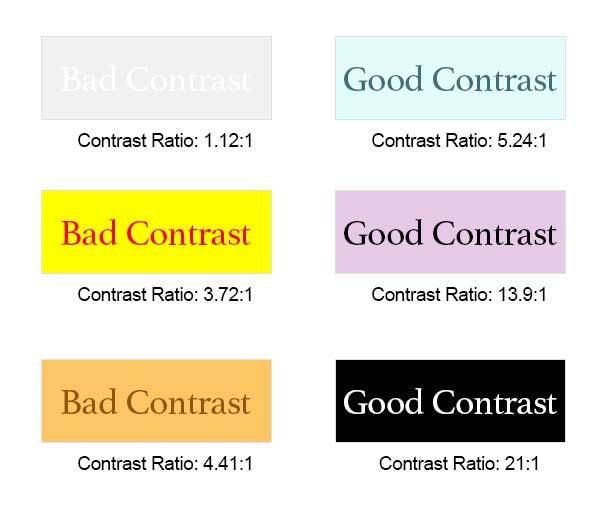
contrast ratio should be at least 4.5:1
- many tools available to check it
- browser
- websites
- external programs
- many tools available to check it
- information should never be carried solely by colour
2
Project 1
Project 2
Project 3





Resizable Text
- text should be resizable to at least 200%
- avoid horizontal scrolling
- try setting user style sheet to
3
body, body * {
    line-height: 1.5 !important;
    letter-spacing: 0.12em !important;
    word-spacing: 0.16em !important;
}
p {
    margin-bottom: 2em !important;
}
Keyboard Usage
- everything that reacts to mouse input should also be reachable via keyboard
- this includes tooltips, hover effects, etc.
- apply :hover effects also to :focus
- use tabindex:
- ="-1" to explicitly exclude from tabbing
- ="0" to include into tabbing order at the place where it is defined
- tab order should be sensible
4
Accurate Link Texts
- link texts should clearly state where they go (they are read by screen readers)
- links should mention the file type
- it should also mention if it opens in a new tab
5
Click here for the main part and here for the appendix.
Here is the main part and here the appendix.
Download our brochure (PDF) or view zbMATH on Twitter ⎋
- use aria-hidden/sr-only (Bootstrap) for icons
Meaningful Page Titles
- different subpages should have their own page titles
- they should consist of a specific and a general part
- Documents Search - zbMATH Open
- Documents Search Results - zbMATH Open
- Authors Search - zbMATH Open
- the specific part should come first
6
Labeling of Form Elements
- form elements (input boxes/text areas, checkboxes/radio buttons, options etc.) must have a label
- use <label for="...">...</label>
- if an asterisk (*) is used for required fields, it should be explained in the beginning
- placeholders are not enough for labeling!
7
Alt Texts
- images must have alt texts
- for image buttons:
- description of the action
- for image links:
- description of the target
- for informational graphics:
- description of the content (different from title/caption!)
-
for layout/decorative images:
-
alt=""
-
- for image buttons:
8

<img
  src="..."
  title="alt text example"
  alt="a cute little kitten playing with a small plant in the street"
>
Accessible Names
in HTML, every element can have an accessible name
- can be given for example by aria-label, title, label, or element content
- placeholder is not enough!
9
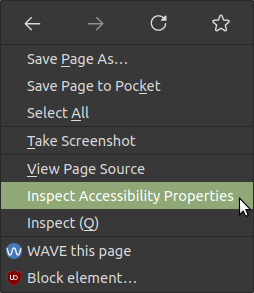
important: visible description should be part of the accessible name!
Autocomplete Attributes
form elements should carry the autocomplete attribute whenever possible
10
name
username
email
current-password
new-password
one-time-code
organization
street-address
postal-code
country
autocomplete="
"
Resources
Thank You!
Questions?
Accessibility
By fmux