<Web Workshop>

Webpages?!?
What are they?
Where do they live?

Also, name this cat!
ps: My Cat's name is Taylor
Webpage
- The webpage is a collection of .html + .css
- We edit and save the files to make changes to our webpage
- We view webpages on web browsers
Server
- This is where our files live
- They are computers that are built and stored somewhere
- "Web Hosting" provides us with servers to use for our pages

hey, press the down arrow on your keyboard
Webpages
www.stuff.co.nz
www.trademe.co.nz
www.clintonhassuperpowers.com

and again.
Servers (hosting)
CloudCannon
NeoCities
OpenHost
Your computer! (I know right?)


Before we begin
Let's get our tools ready!

What we need
- Web Browser
- Text editor
- An Idea / Topic
- A Wireframe (a basic plan)
- A place to host our site
Web Browser
Google Chrome is a well known Web browser. :)
We use chrome to VIEW and TEST our webpage.
How many of you have used Chrome before???

Text Editor
Sublime Text 2
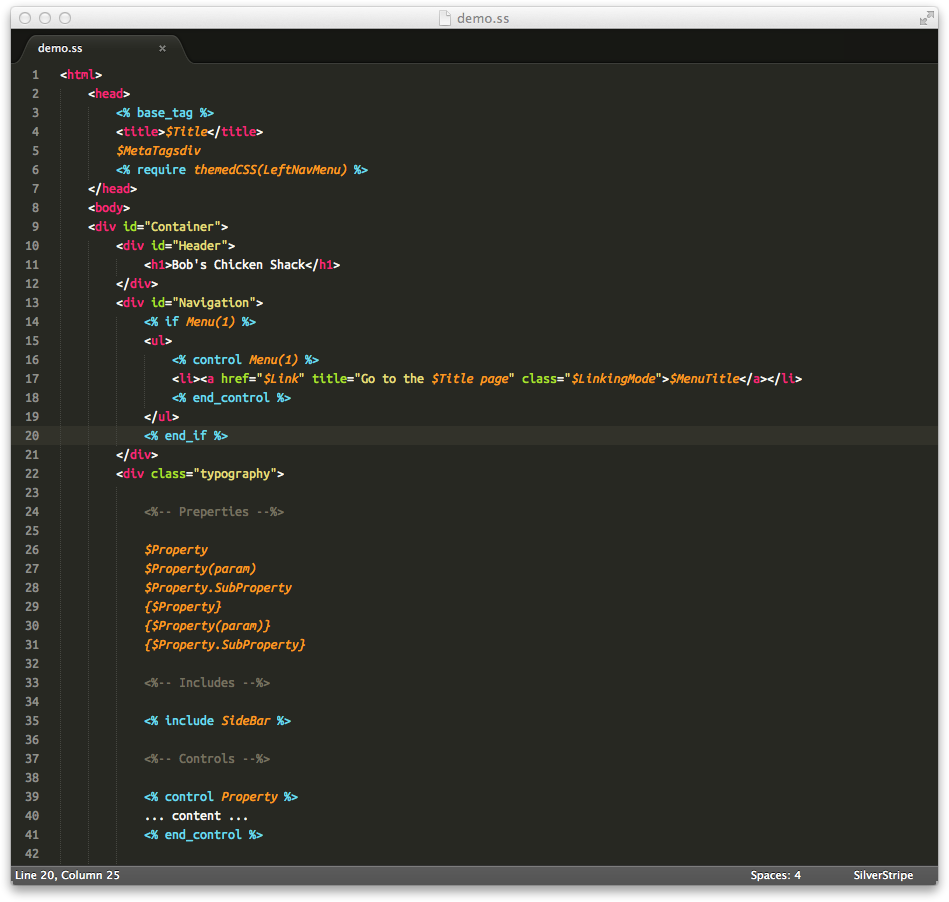
Atom



We use Text Editors to WRITE our code. Writing code is how we MAKE our websites. :)
The Keyboard
Your greatest super power!!!
hey, press the down arrow on your keyboard


Keyboard Shortcuts
hey, press the down arrow on your keyboard

HOLD CTRL and tap A to SELECT ALL
HOLD CTRL and tap C to COPY
HOLD CTRL and tap V to PASTE
Copy this text by clicking on the textbox, then using CTRL + A then CTRL + C
Paste that text by clicking on the textbox, then using CTRL + V
Moving the Cursor!
hey, press the down arrow on your keyboard
The mouse is pretty cool... but using the arrow keys...
EVEN COOLER!!!
Click on the text box below and use your arrow keys on the
keyboard to move your flashing cursor around the screen.
Oh, click anywhere off the textbox to change slides
Selecting Text with Keyboards
Cool! So when we click on a textbox we can use our arrow keys to move the cursor.
Now, if you click on a textbox and HOLD SHIFT while you move the arrow keys... it selects text as you move.
Give it a try below!! :D

This will come in handy when you copy links / images from other webpages. :D
An Idea / Topic
You can make ANYTHING
Some ideas:
- Favorite Sports
- Favorite TV Show
- Favorite Cartoon
- Spider Monkeys
- Why your presenter is awesome

Just Albert Einstein just hanging out on FaceBook - LOL
Website Wireframe
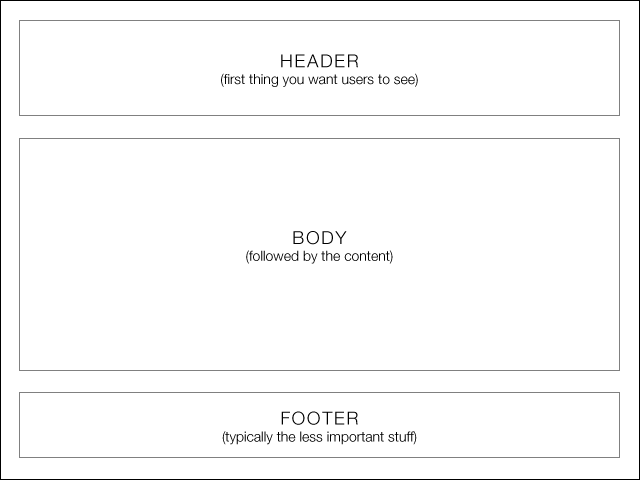
Wireframes are basic sketches of how we want our webpage to look

CloudCannon
cloudcannon is a really cool host that let's your storage and edit your HTML and CSS files. Once we've finished our workshop today we will be uploading our websites.

Question Time

down arrow remember :P
Question Time
What are we MAKING our websites in?
What are we TESTING our websites in?
What do Ninjas eat for lunch?
How do you COPY text with the keyboard?
How do you PASTE text with the keyboard?
Ready
Steady
Code;

index.html
This is the base or the body of our website. It will contain all of our text / code.
style.css
This is our prettiness... or well the style of our website. We set the font size, colour, look and feel of our site here.
down arrow remember :P
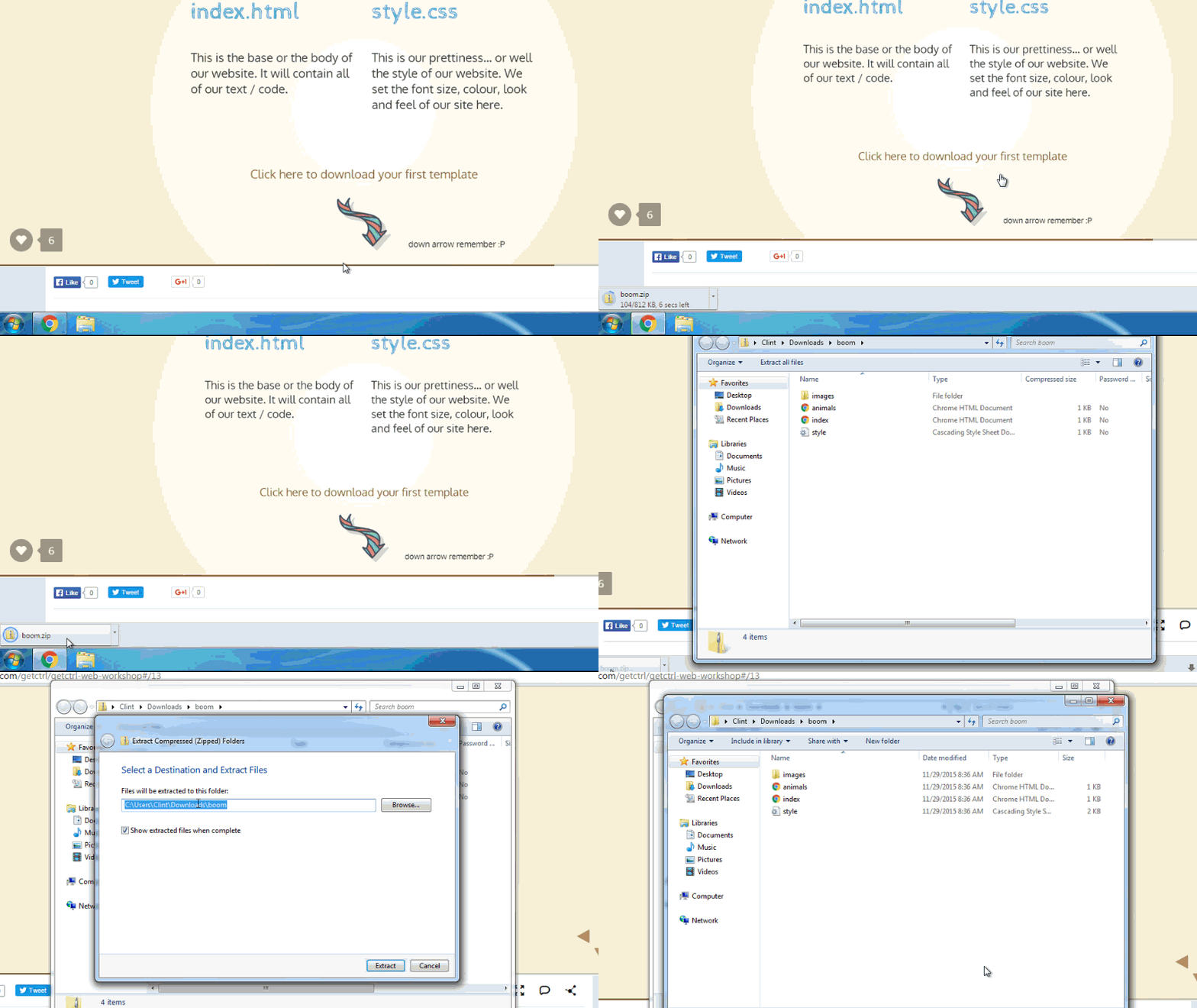
Extracting your ZIP FILE
How to extract .zip files
down arrow remember :P
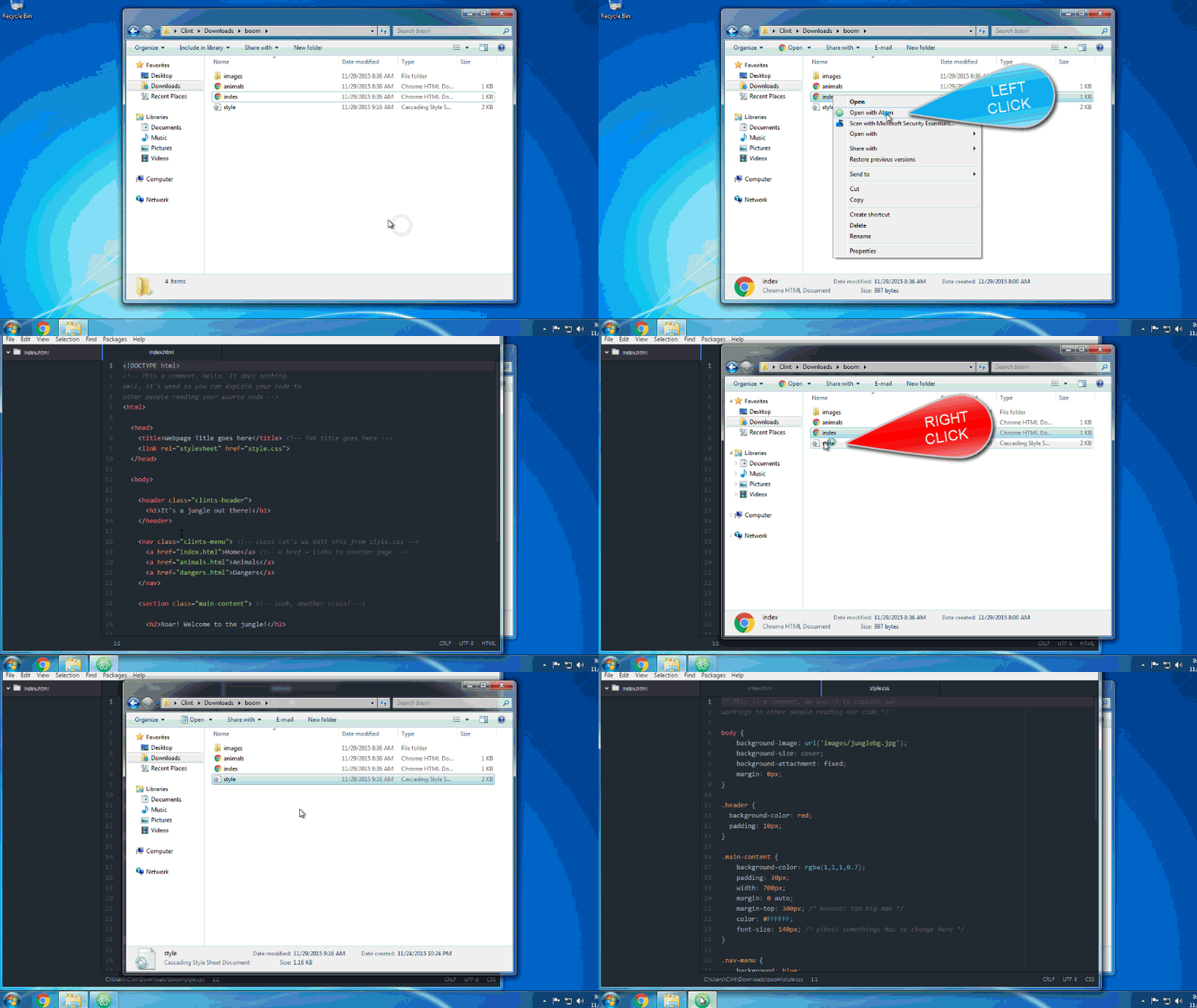
Editing your files
How to edit your .html and .css
down arrow remember :P
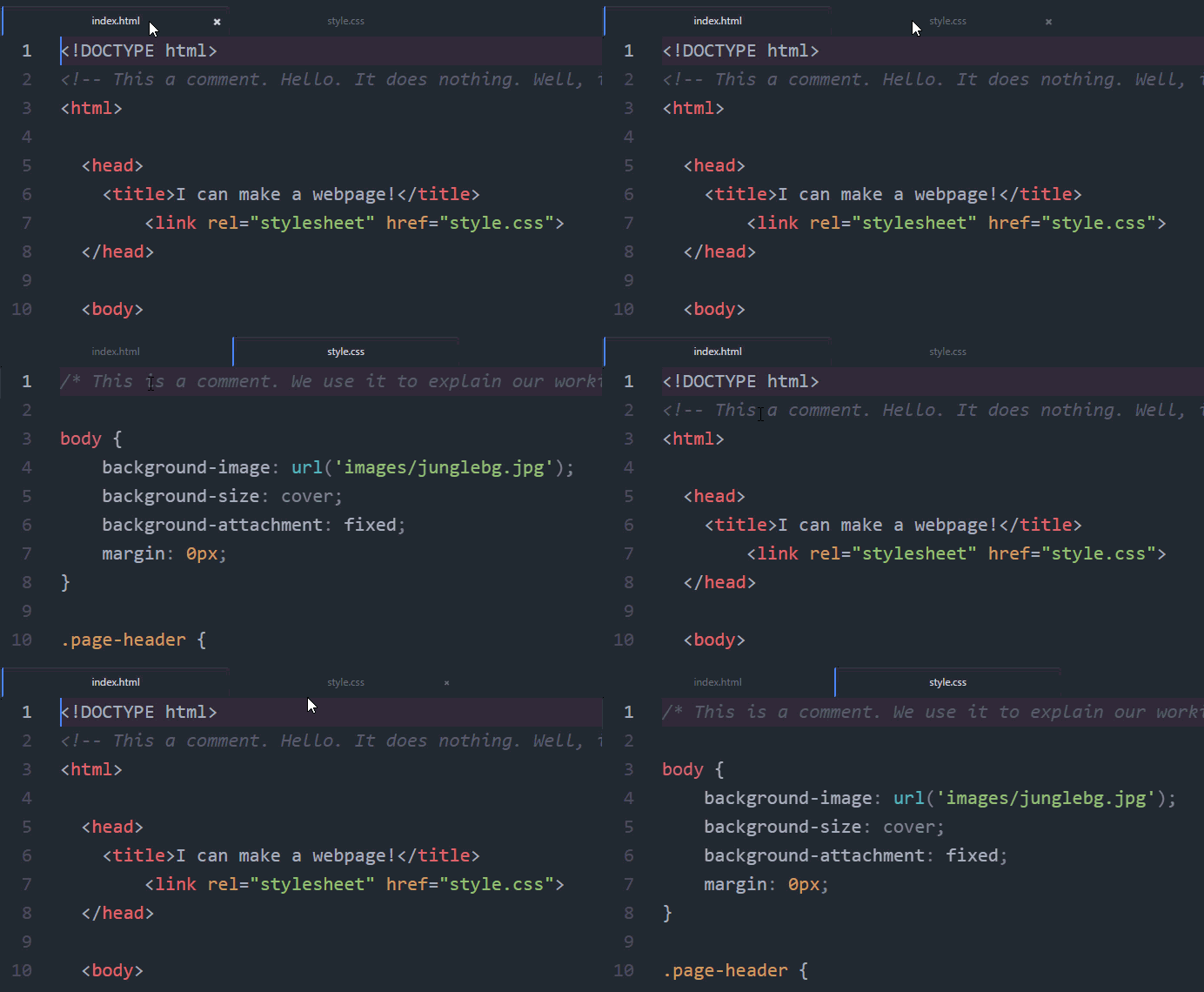
Tabs in a Text Editor
Working with multiple tabs
index.html
Let's look inside
<!DOCTYPE html>
<!-- This a comment. Hello. It does nothing.
Well, it's used so you can explain your code to
other people reading your source code -->
<html>

  <head>
    <title>Webpage Title goes here</title> <!-- Tab title goes here -->
    <link rel="stylesheet" href="style.css">
  </head>

  <body>

    <header class="pageHeader">
      <h1>It's a jungle out there!</h1>
    </header>

    <nav class="clintsMmenu"> <!-- class let's us edit this from style.css -->
      <a href="index.html">Home</a> <!-- a href = links to another page -->
      <a href="animals.html">Animals</a>
      <a href="dangers.html">Dangers</a>
    </nav>

    <section class="content"> <!-- look, another class! -->

      <h2>Roar! Welcome to the jungle!</h2>

      <p>Jungles are so cool! My website is going todo
      show you
      why the jungle rocks!
        Thanx for checking it out. Tell your

         friends.</p>

    </section>

  </body>

</html>
index.html
Technical stuff
<!DOCTYPE html>
<!-- This a comment. Hello. It does nothing.
Well, it's used so you can explain your code to
other people reading your source code -->
<html>
This bit of code tells the browser, like Chrome, that the page it is going to display is an HTML Webpage.
index.html
<head>
<head>
  <title>Webpage Title goes here</title> <!-- Tab title goes here -->
  <link rel="stylesheet" href="style.css">
</head>
The <head> tag is invisible stuff. It is only used by your Browser. It has your page title and link to your CSS file
index.html
<title>
<head>
    <title>Webpage Title goes here</title>
    <link rel="stylesheet" href="style.css">
</head>
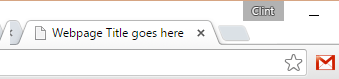
See, it's the name of the tab!
index.html
<link>
<head>
    <title>Webpage Title goes here</title>
    <link rel="stylesheet" href="style.css">
</head>
This links our stylesheet
to our html page

index.html
<body>
<body>

  <header class="pageHeader">
    <h1>It's a jungle out there!</h1>
  </header>

  <nav class="clintsMmenu"> <!-- class let's us edit this from style.css -->
    <a href="index.html">Home</a> <!-- a href = links to another page -->
    <a href="animals.html">Animals</a>
    <a href="dangers.html">Dangers</a>
  </nav>

  <section class="content"> <!-- look, another class! -->

    <h2>Roar! Welcome to the jungle!</h2>

    <p>Jungles are so cool! My website is going todo
      show you
      why the jungle rocks!
        Thanx for checking it out. Tell your

         friends.</p>

  </section>

</body>
GetCTRL Web Workshop
By GetCTRL
GetCTRL Web Workshop
Let's make cool websites