CSS

Cascading Style Sheet
Syntax
selector {
    property: value;
    another-property: value;
}
Who?
What?
How?
Syntax
<h1>Almakinah</h1>h1{
color:grey;
background-color:yellow;
font-size: 50px;
}
Attaching CSS to a document
- Using inline style on HTML node.
- Using the <style> tag in the HTML document
- Using the <link> tag to reference external files
Using inline style on HTML node
<h1 style="color:green">Almakinah</h1>Using the <style> tag in the HTML document
<style>
h1{
  color: green;
}
</style>
<h1>Almakinah</h1>
Using the <link> tag to reference external files
<link rel="stylesheet" type="text/css"href="css/styles.css"/>
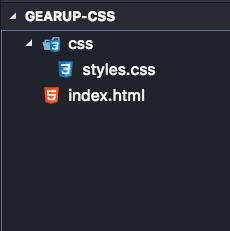
<h1>Almakinah</h1>- open your editor
- create a new folder
(gearup-css) - create an HTML file
(gearup-css/index.html) - create a folder inside your folder
(gearup-css/css) - create a CSS file inside your css folder (gearup-css/css/styles.css)
<!DOCTYPE html>
<html>
  <head>
    <title>Page Title</title>
    <link rel="stylesheet" href="css/styles.css" />
  </head>
  <body></body>
</html>
index.html
Selectors
Type(element) Selector
span{
    text-transform: uppercase;
}
ID Selector
#special-title{
border: 5px solid pink;
}
<h1 id="special-title">Almakinah</h1>
Class Selector
.readmore {
    background-color: blue;
    color: white;
}
<a class="readmore" href="#">read more</a>
<a class="readmore" href="#">read more</a>
<a href="#">See All </a>Group Selectors
/* Two tags at the same time */
h1,h2  {

}

/* Element selector and class*/
td.highlighted{

}
/* Descendant Selector: td that is a child of tfoot*/
tfoot td {

}

/* Direct Child Selector: th that is a direct child of tfoot */
tfoot > th {

}

/* always select the second p */
p + p {

}
Grades Table Exercise
Color Palette Exercise
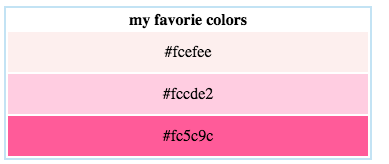
table
{
- border
- half width
- centered text
height:40px;
}
http://scratchpad.io/auspicious-sweater-8954
Color Palette Exercise
merged table
{
- border
- full width
- centered text
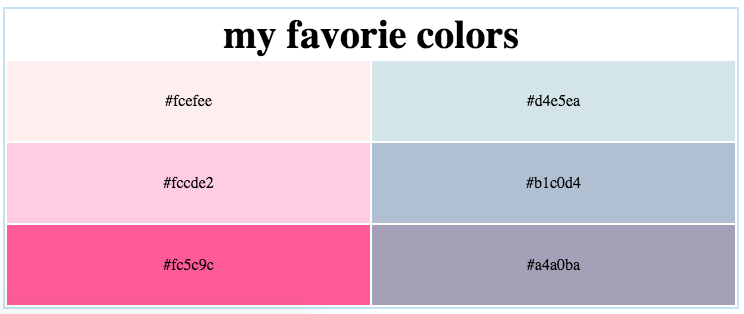
width:50%;
height:80px;
}
CSS
By Habiba Gadalla