Intro To Javascript
by Halah Al-Shaikhly
Objectives for today's lecture
- what is code and programming languages?
- Web applications and javascript
- Why javascript is awesome
- Javascript Syntax
- Javascript examples and exercises
What is code?
It is a set of instructions to perform a certain task.
These instructions need to be written in a specific format.
the format is called Syntax
Instructions that are written with a specific syntax are called programming languages.
Javascript is a programming Langauge!
Web applications and Javascript
What are web applications?
How is that related to javascript?
Frontend
Also referred to as client side.
Backend
referred to as serverside.
Web Application components
Frontend
It is what you see on the page. The labels, buttons, dropdown menus, navigation bars .. etc. It is the interface between you and what is actually happening on the backend. What programming languages handle this?
Programming languages for front end
HTML
CSS
Javascript
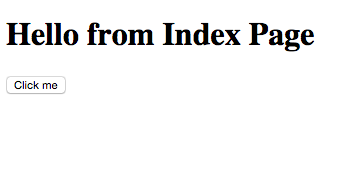
Page with no style
Page with style

Backend/serverside
Backend is the data that appears on the interface and the logic that is performed on that data.
The Data
tables with records of data such as users, files etc. Those records are inserted/deleted/edited using languages such SQL and MongoDB.
Data manipulation
Accessing the data and sending it back and and forth from the user interface to the tables of records using Languages such as Javascript (NodeJS), php and ruby .. etc
Why Javascript is awesome?
It was written in 10 days only ..
it is supported by most web browsers and it can be used within other environments too
It can be used at frontend and backend!
Javascript syntax time!
Instructions
Each instruction is a statement
var a =0;
var a = 10;
In programming, to hold values, we use variables. How do we declare variables in Javascript? We declare them using the word var.
a is the name of the variable. a is like a box containing the value 10
= is the equality operator. What is an operator? It is character that represents an action. That action can be performed on values and variables. Other operators are +,- , * ..etc
10 is just a value.
Coding time!
- Open sublime text editor, atom text editor or
-
Open Repl. https://repl.it/languages/javascript_web
-
Open developer’s tool on your chrome/firefox browser using this command (command + shift + j or sometimes i). Or Right click anywhere on your browser’s window and click inspect and click on the console tab.
-
If you’re using windows PC or/and IE .. download chrome and use it to order a new MacBook.
-
IE: Open Tools -> Developer Tools
- Safari : Develop -> Show web inspector
Try it yourself
// variable a to store the value10
var a =10 ;
//variable b to store the value 2
var b = 2;
// var c to calculate the multiplication of a & b and store the value of it
var c = a * b;
// prints the result to your console.
console.log(c);
Exercise Time : Age Calculator
// variable called year
var year = 1989;
//variable called now
var now = 2016;
//variable called age
var age = now - year;
// console.log is used to print out whatever between the parathensis
console.log(age);
Console.log('hello world');
-
it logs what is inside the parentheses to your console. Try it.
-
In that example, it takes a string (What is a string? It is immutable string of characters, must be between quotation marks like this ‘Halah’).
-
Does the console.log take a variable?
var a = 10;
console.log(a);
-
Does it take a combination of strings and variables?
Variable Naming
-
To create a variable, you must give it a name. Are there any rules to naming variables in javascript?
-
A variable name must begin with a either letter, $ or _.
-
It can contain letters, numbers, $ and _.
-
They’re case sensitive, meaning a variable name aBC is different from one named abc.
-
Do not use reserved words for variable names. Reserved words you say? They’re special words reserved for javascript. Reserved for what? When you use these words, javascript understand that you’re doing something special.
- examples of reserved words : var, switch, while.
Example time!
Subtitle
Open any console and play around with these. Which one of these is not a valid variable name? Why?
-
var var = 10;
-
var 10 = 5;
-
var $10 = 5;
-
var _10 = 5;
- var 1_10 = 10;
Exercise Time
Write some code that converts temperature from Celsius to Fahrenheit and prints the results to your console.
Hints
-
Hint you need a variable to store the result of celsius temperature.
-
to convert from celsius to fahrenheit, you multiply the celsius by 9, then you divide by 5 and afterwards, you add 32.
-
Hint: use the multiplication, division and the addition operators.
-
Hint you need a variable to store the result of the conversion
- print the results to your console. Hint : use console.log()
Solution
// declare a variable to store some celsius value
var celsius = 0;
// convert the celsius to fahrenheit and store the result in a variable
var f = celsius * 9 / 5 + 32;
// print the result
console.log(f);
The end
Introduction to Javascript
By Halah Al- Shaikhly