Git, gitty up!
Git + commit messages
- Use imperative
- Message format
- About committing
- Continuos integration (CI)
- Links
Git commit messages
- Consider messages as the instructions for what applying the commit will do.
- Git itself uses imperative in its commit messages.
- Example: “Merge” not “Merged”, “Rebase” not “Rebased”.
- Its few characters and more concise.
- Use verbs like:
- Add
- Rename
- Move
- Correct
- Use
- Update
- ...
1. Use imperative
and NOT
- Adding
- Moved
- Correcting
- Applied
- Using
- Updated
- ...
Examples
feat(styles/Icon): enlarge tap area even more
feat(p5.items.Item): convert keywords on `get` method to an array
style(p5.legal.agreementModals): move functions to bottom
chore(cordova): add cordova keyboard plugin
feat(http-backend-stub): add optional delay to requests
chore: release 0.0.6 wooden-pillow
Git commit messages
2. Message format
<type>(<scope>): <subject>
blank line
<body>
blank line
<footer>
Allowed <type>
-
feat (feature)
-
fix (bug fix)
-
docs (documentation)
-
style (formatting, missing semi colons, …)
-
refactor
-
perf (performance improvement)
-
test (when adding missing tests)
-
chore (maintain, release)
Allowed <scope>
Scope could be anything specifying place of the commit change. This is very project-specific, basic scopes should be defined by the team.
It could be names of modules or particular areas in the app.
(like "searchResults" or "myAccount").
<subject> text
- Use imperative, present tense: “change” not “changed” nor “changes”.
- Don't capitalize first letter.
- No dot (.) at the end.
- Use maximum of 72 chars.
Git commit messages
2. Message format
Message <body>
- Just as in <subject> use imperative, present tense: “change” not “changed”.
- Includes motivation for the change and contrasts with previous behavior.
- Long description of the changes.
Message <footer>
Breaking changes
- All breaking changes have to be mentioned in footer with the description of the change, justification and migration notes.
Referencing issues
- Closed bugs should be listed on a separate line in the footer prefixed with "Closes" or "Fixes" keyword like this:
Fixes #4979
Fixes #5945
Closes #8803-
Or in one line:
Closes #4979, #5945, #8803BREAKING CHANGE:
The `blur` and `focus` event fire
synchronously...
Do this and that.<type>(<scope>): <subject>
blank line
<body>
blank line
<footer>Example #1
refactor(p5Avatar): use better reusable syntax for `info`

The avatar used a not so clever syntax. This commit changes that.

BREAKING CHANGE:
The `p5Avatar` now uses a reusable syntax for `info` param, which now
supports multiple icon + text pairs.

```html
<!-- Before -->
<p5-avatar class="Site-menuAvatar"
           url="{{ currentUser.avatarUrl }}"
           name="{{ currentUser.name }}"
           info="{{ currentUser.location }}"
           info-icon="slideIconPin"></p5-avatar>

<!-- After -->
<p5-avatar class="Site-menuAvatar"
           url="{{ currentUser.avatarUrl }}"
           name="{{ currentUser.name }}"
           info="[{ icon: 'slideIconPin', text: currentUser.location }]"></p5-avatar>
```

Fixes #212
Example #2
refactor(p5.legal.agreementModals): multiple changes

- Rename to `p5.legal.agreements`.
- Use a dedicated anonymous controller and put it on modals' scope.
- Move `translationData` to view.
Git commit messages
2. Message format
Main advantages:
- A changelog with relevant commits could be automatically generated.
- The "Fixes" or "Closes" could even point to Redbooth tasks.
- Easier navigation through new commits (by a glance).
- Used in the p5-app (mobile app) project, go take a look.
0.0.4 crazy-dave (2014-09-08)
Features
- styles/Avatar: add large avatar modifier (e6fa9e4d)
- styles/BlurZone: add *--largeAvatar for large avatars (57d9a17b)
- styles/Content: extend to work with a blur zone in a subheader (6e3a3a58)
- styles/SubheaderBar: extend to work with a blur zone (b1dd4530)
Breaking Changes
- p5Avatar: due to 5bb410f3
The p5Avatar now uses a reusable syntax for info param, which now supports multiple icon + text pairs.
<!-- Before -->
<p5-avatar class="Site-menuAvatar"
           url="{{ menuCtrl.currentUser.details.avatarUrl }}"
           name="{{ menuCtrl.currentUser.name }}"
           info="{{ menuCtrl.currentUser.details.location }}"
           info-icon="slideIconPin"></p5-avatar>

<!-- After -->
<p5-avatar class="Site-menuAvatar"
           url="{{ menuCtrl.currentUser.details.avatarUrl }}"
           name="{{ menuCtrl.currentUser.name }}"
           info="[{ icon: 'slideIconPin', text: menuCtrl.currentUser.details.location }]"></p5-avatar>
Git commit messages
3. About committing
- Try committing atomicly so that its easy to understand what happens when the commit is applied.
- This means that you should think before you code.
- Use or for interactive mode.
- This allows you to stage hunks, which are like blocks of changes. In turn, you can stage and commit parts of files.
- See http://johnkary.net/blog/git-add-p-the-most-powerful-git-feature-youre-not-using-yet/ for interactive videos.
- The github mac client supports per-line commiting of files.
git add -pgit add -iGit commit messages
3. About committing
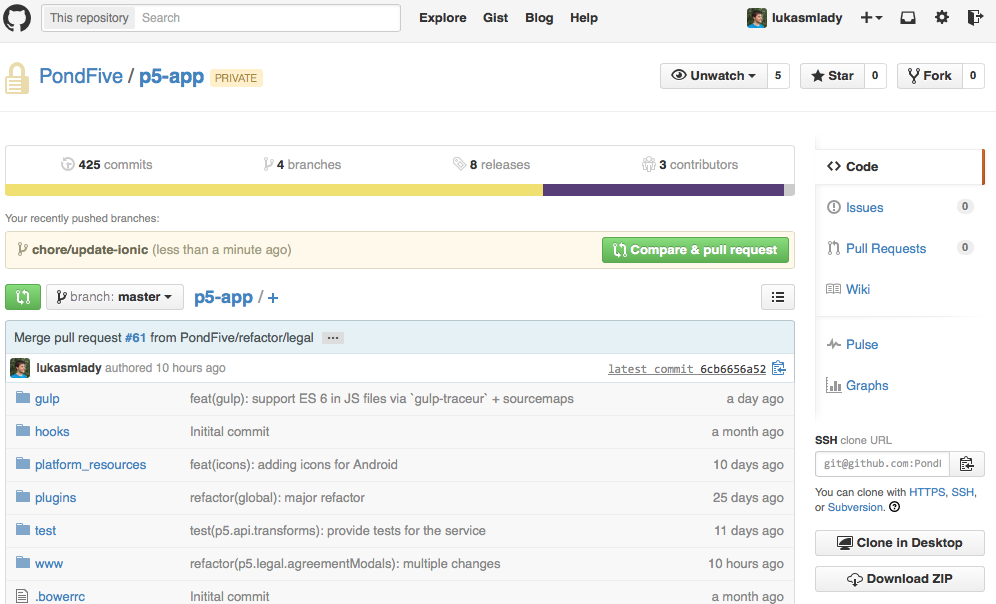
- Every fix or feature should be branched-off of master and, after its implemented via several commits, push it to github and create a pull request (PR) (how to is in 4. Links).
- To notify relevant people about the PR (for code review), use @username in PR description.
- Example names of those branches:
feat:paying-with-nose
perf:faster-search-results
fix:my-account-translations
Creating a PR
Git commit messages
3. About committing
- If you need to build upon code that is on a branch different than master, branch-off of that branch.
- If you're on a feature (or any other) branch and need changes from master, just merge master to your branch.
- Ideal structure of servers (branch -> server):
- master -> production - main server
- rc -> RC (Release Candidate) - tested by all
- stage -> stage - tested by devs
- Features should bubble from stage -> rc -> master.
- Hotfixes could be applied to master directly.
Git commit messages
4. Continuos integration (CI)
- Use something like https://travis-ci.com
- In short, runs tests, lints code and deploys the app continuously.
- Could be hooked onto github hooks - like when you create a pull request, the code in it runs through travis and reports tests/linting errors.
- Needs more research.
http://365git.tumblr.com/post/3308646748/writing-git-commit-messages
https://docs.google.com/a/pond5.com/document/d/1QrDFcIiPjSLDn3EL15IJygNPiHORgU1_OOAqWjiDU5Y/edit
About writing commit messages
Enable commit message 72 chars limit in JetBrains products
(Version control -> at the bottom -> Commit message right...)
http://grab.by/Ajfq
Git commit messages
5. Links
https://help.github.com/articles/creating-a-pull-request
Creating a pull request
Git, gitty up!
By Lukáš Mladý
Git, gitty up!
Git pro-tips.