Webix Way of Data Loading
and Presenting
Lets create a playground!
The answer is Multiview!
How to effectively display a lot of views in one application?
MultiView: Cells
var main = {
  cells:[
    { cols:[ data, form ]},
    { template:"Users view"},
    { template:"Products view"}
  ]
};
var main = {
cols:[data, form]
}; webix.ui({
rows:[
topbar,
{ cols:[ side, { view:"resizer" }, main ]},
bottombar
]
});MultiView
Layout
All rows/cols
are visible
at a moment
Only one cell
is visible
at a moment
MultiView: Show Cells
1. Some view to control cell visibility:
- tabbar
- segmented button
- selectable list
2. Define ids for cells
3. Call .show() method when users clicks the 'switch'
{ view:"list", select:true } cells:[
{ id:"Dashboard", cols:[data,form] },
{ id:"Users", template:"Users View" }
] $$("mylist").attachEvent("onAfterSelect", function(id){
$$(id).show(); //id is "Dashboard", "Users"
});Data Components
Datatable
List
Chart
Tree
TreeTable
Dataview
Menu
Why such groups?
Data Types
Linear and Hierarchical
Data types: JSON, XML, CSV, JSArray
 data: [
    { id:1, value:"My Fair Lady" },
    { id:2, value:"The Godfather" },
    { id:3, value:"My Fair Lady" },
    { id:4, value:"The Shawshank Redemption" }
 ]
 data: [
   { id:"1", value:"My Fair Lady", data:[
        { id:"1.1", value:"Part 1" },
        { id:"1.2", value:"Part 2" },
    ]},
    { id:"2", value:"The Godfather", data:[
        { id:"2.1", value:"Part 1" },
        { id:"2.2", value:"Part 2" }
    ]}
 ]
- JSON and XML - both linear and hierarchical
- CSV and JSArray - only linear
Data Origin and Loading
- Client side (available in browser)
- Server side (in external file or on server)
| Client side | Server side | |
| in config | { view:"list" data:data } |
{ view:"list", url:"data.js" } |
| by method | $$("mylist").parse(data); | $$("mylist").load("data.js"); |
{
    view:"list",
    id:"mylist",
    data:data
}
$$("l1").load("data.js");
$$("l2").load("data.php");cols:[
{ view:"list", id:"l1", url:"data.js"},
{ view:"list", id:"l2", url:"data.php"}
]$$("mylist").parse(data);* When parsing the same client-side data, it's good to wrap it into webix.copy()
Loaded! How to see it?
    {
        view:"list",
        data:[ "Dashboard", "Users", "Products"]
    }
{
view:"list",
data:[
{ id:"Dashboard", value:"Dashboard"},
{ id:"Users", value:"Users"},
{ id:"Products", value:"Products"}
]
} {
view:"list",
template:"#value#",
data:[
{ id:"Dashboard", value:"Dashboard"},
{ id:"Users", value:"Users"},
{ id:"Products", value:"Products"}
]
}Simple:
Detailed:
Template:
Data Templates
    {
        view:"list",
        template:"#title#",
        data:[
            { id:"Dashboard", title:"Dashboard"},
            { id:"Users", title:"Users"}
        ]
    }
{
view:"list",
template:function(obj){
return obj.title;
},
data:[
{ id:"Dashboard", title:"Dashboard"},
{ id:"Users", title:"Users"}
]
}String template:
Function template:
- Simple
- Custom HTML
- Complex HTML
- Conditions
DataTable Templates
    {
        view:"datatable",
        columns:[
            { id:"id",	header:"", width:50},
            { id:"title",	header:"Film title", width:200},
            { id:"year",    header:"Year"}
        ],
        data: [
    	    { id:1, title:"The Shawshank Redemption", year:1994},
    	    { id:2, title:"The Godfather", year:1972}
        ]
    }
    columns:[
        { id:"title", header:"Title", template:"Film name is #title#" }
    ]
Column ids:
Templates for columns:
Active Elements in Items
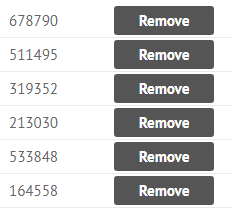
    {
          view:"list",
          select:true,
          template:"#votes# <span class='removeBtn'>Remove</span>"
    }
    {
          view:"list",
          select:true,
          template:"#votes# <span class='removeBtn'>Remove</span>",
          onClick:{
              removeBtn:function(e, id){
                   this.remove(id);
                   return false;
              }
          }
    }
- CSS-specific clicks
- return false to cancel further processing
Active Elements in Items
    view:"datatable", columns:[
        { id:"edit", template:"{common.editIcon()}" },
        { id:"del", template:"{common.trashIcon()}" }
    ],
    onClick:{
  	"wxi-trash":function(e, id){
             this.remove(id);
             return false;
        }
}- {common.icon()}
- {common.folder()}
- {common.radio()}
- {common.checkbox()}
- {common.treetable()}
Own functionality
Custom functionality
Data Item CSS
    {
        view:"list",
        template:"#title#",
        data:styled_data
    }
$css
    {
        view:"datatable",
        autoConfig:true,
        data: styled_data
    }
    var styled_data = [
    	{ id:1, title:"The Shawshank Redemption" },
    	{ id:2, title:"The Godfather", $css:"green" }
    ];
<div class="webix_list_item green"></div>
    <div class="webix_cell green"></div>
<div class="webix_cell green"></div>DataTable Item CSS
$cellCSS
   { view:"datatable", data: [
      { id:1, title:"My Fair Lady" },
      { id:2, title:"The Godfather",
          $cellCSS:{
              title: "green",
              year:"red"
          }
       }
   ]}
    <div class="webix_cell green"></div>
    <div class="webix_cell red"></div>
Column CSS
  { view:"datatable", columns:[
      { id:"rank", header:"", css:"rank" },
      { id:"title", header:"Film title" }
  ]}
Hover CSS
    <div class="webix_column green">
        <div class="webix_cell"></div>
        <div class="webix_cell"></div>
    </div>
{ view:"datatable", hover:"myhover" } <div class="webix_cell myhover"></div>
<div class="webix_cell myhover"></div>Data Storage
    webix.ui({
        view:"list",
        template:"#id#.#title#",
        data: [
            { id:1, title:"The Shawshank Redemption", year:1994},
            { id:2, title:"The Godfather", year:1972 }
        ]
    });

    //Datastore accessor
    $$("mylist").data;
//all records as hash
$$("mylist").data.pull;
{
1:{ id:1, title:"The Shawshank Redemption", year:1994},
2:{ id:2, title:"The Godfather", year:1972}
}
//current order in component as plain array
$$("mylist").data.order;
[ 1, 2 ]DataStore - inner module for storing data
Why id should
be unique?
Data Item id and index
    webix.ui({
        view:"list",
        template:"#id#.#title#",
        data: [
            { title:"The Shawshank Redemption", year:1994},
            { title:"The Godfather", year:1972 }
        ]
    });
//all records as hash
$$("mylist").data.pull;
{
1510240943485:{ id:1510240943485, title:"The Shawshank Redemption"},
1510240943486:{ id:1510240943486, title:"The Godfather"}
}
//current order in component as array
$$("mylist").data.order;
[ 1510240943485, 1510240943486] // indices 0, 1, etc.- What happens to Webix component without id?
- What can happen to data item without id?
Data Operations
$$("mylist").count();

$$("mylist").data.each(function(obj){
    console.log(obj);
});

$$("mylist").clearAll();- Count items?
- Iterate items?
- Clear the component?
4. Filter data
5. Sort data
$$('mylist').filter("#year#", "1994");

$$('mylist').sort("#year#","desc");
CRUD Operations
Read:
Create:
Update:
Delete:
$$("mylist").add({id:100, title:"New film", year:2000});var item = $$("mylist").getItem(100);
//{id:100, title:"New film", year:2000}$$("mylist").updateItem(100, {title:"Old film", year:1950});$$("mylist").remove(100);Useful Links
Webix topics:
Practice: click here

Follow-up text: click here
1-3. Webix Basics. Data Loading and Presenting.
By ihelga
1-3. Webix Basics. Data Loading and Presenting.
How to populate widgets with data and visualize data items.