Client-Side Data Processing
.. in Webix Apps

EditAbility: Grid Data
webix.ui({
    view:"datatable",
    columns:[
	{ id:"rank",	editor:"text",	header:""},
	{ id:"title",	editor:"text",	header:"Film title"},
	{ id:"year",	editor:"text",	header:"Released"},
	{ id:"votes",	editor:"text",	header:"Votes"}
    ],
    editable:true
});- datatable/treetable is editable
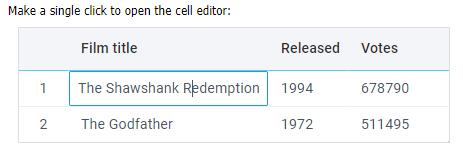
- columns have editor
Text
*There are > 10 types of editors
Editability: Column Options
    view:"datatable",
    columns:[
        { id:"title",   editor:"text" },
        { id:"cat_id",  editor:"select", options:["Crime", "Thriller"] },
    ],
    editable:true,
    data: [
        { id:1, title:"The Shawshank Redemption", cat_id:"Thriller" },
        { id:2, title:"The Godfather", cat_id:"Crime" }
]- select
- richselect
- combo
Editability: Column Options
view:"datatable", id:"grid", data:data,
columns:[
    { id:"title", fillspace:true},
    { id:"categoryId", editor:"select", collection:options}
]
var data = [
    { id:1, title:"...", categoryId:1 },
    { id:2, title:"...", categoryId:2 },
    { id:3, title:"...", categoryId:3 }
];
var options = [
{ id:1, value:"Crime"},
{ id:2, value:"Thriller"},
{ id:3, value:"Drama" }
];Data
Options
Text
- plain array
- array of 'id-value' pairs
- path to external storage
EditAbility: List and Tree Data
webix.protoUI({
    name:"editlist"
}, webix.EditAbility, webix.ui.list);

webix.ui({
    view:"editlist",
    template:"#rank#. #title#",
    editable:true,
    editor:"text",
    editValue:"title"
});
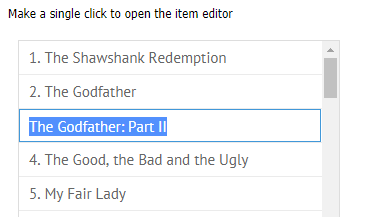
- the component is 'upgraded' with webix.EditAbility
- the component is editable
- the component has editor and editValue
Wow, I can create Webix components myself!..

On-Edit Validation
view:"datatable", //any data component
rules:{
    "title":webix.rules.isNotEmpty,
    "year":webix.rules.isNumber
}How did we validate form values?
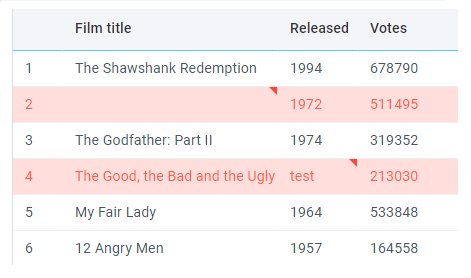
Validation starts after data change (e.g. editor closes)
Rules!
Datatable Filtering
datatable.filterByAll();
- title
- year
- votes
- rating
- rank
Value changes in any filter
filter.compare || default compare
And
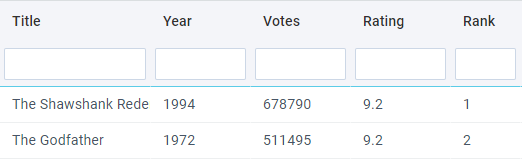
Datatable Filtering
compare function
{ content:"textFilter", compare:function(value, filter, item){
      var year = value.getFullYear().toString();
      return year.toString().indexOf(filter.toLowerCase()) !==-1;
}}
...
data:[
     { text:"Joint 2", start:new Date(2011,1,14) }
]change .filterByAll()
$$("grid").filterByAll=function(){
    this.filter(function(obj){
        if (...) return true;
        return false;
    });
};Datatable Filtering
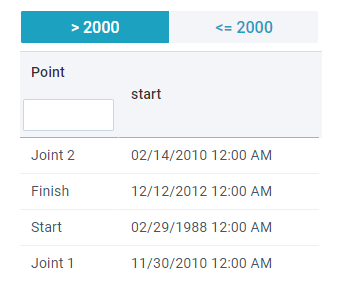
Add an extra field
rows:[
    {  view:"segmented", id:"selector", options:[
        { id:1, value: ">2000" },
        { id:2, value: "<2000" }
    ]},
    {  view:"datatable", id:"grid" }
]$$("grid").registerFilter(
$$("selector"),
{
columnId:"start",
compare:function(value, filter, item){
var year = value.getFullYear();
if(filter == 1) return year > 2000;
else return year <=2000;
}
},
{
getValue:function(node){ return node.getValue(); },
setValue:function(node, value){ node.setValue(value); }
}
);
Grouping Data
Grouping criterion
Aggregating data
    view.group({
        by:"year"
    });
{ id:1, title:"The Shawshank Redemption", year:1994, votes:678790},
{ id:2, title:"The Godfather", year:1972, votes:511495},
{ id:3, title:"The Godfather: Part II", year:1994, votes:319352},
{ id:4, title:"The Good, the Bad and the Ugly", year:1972, votes:213030} view.group({
by:"year",
map:{
votes:[ "votes", "sum" ],
title:[ "year", "any" ]
}
});Visualizing the result
    columns:[
        { id:"title", template:function(obj, common){
           if(obj.$group) return common.treetable(obj, common) + obj.title;
           else  return obj.title;
        }}
    ]
Grouping Data: Chart
Grouping criterion - X axis
Aggregating data - Y Axis
view.group({
    by:"year"
});
{ id:1, title:"The Shawshank Redemption", year:1994, votes:678790},
{ id:2, title:"The Godfather", year:1972, votes:511495},
{ id:3, title:"The Godfather: Part II", year:1994, votes:319352},
{ id:4, title:"The Good, the Bad and the Ugly", year:1972, votes:213030}view.group({
by:"year",
map:{
votes:[ "votes", "sum" ]
}
});Visualizing the result
view:"chart",
value:"#votes#",
xAxis:{
    template:"#year#"
},
yAxis:{}Data Pre Processing
Scheme functions
- $init
- $group
- $sort
- $change
- $update
- $save
- $serialize
{
    view:"datatable",
    scheme:{
        $init:function(obj){
            obj.date = new Date(2018, 23, obj.id);
            if(obj.year > 1998)
                obj.$css = "highlight";
        },
        $sort:{
          by:"votes",
          dir:"desc"
        }
    }
}Connect you Data:Binding
$$("mydata").attachEvent("onAfterSelect", function(id){
    var item  = this.getItem(id);
    $$("myform").setValues(item);
});

$$("myform").attachEvent("onChange", function(){
    var values = this.getValues();
    $$("mydata").updateItem(values.id, values);
});
$$("myform").bind($$("mydata"));
$$("myform").save();- in: form is filled when data item is selected
- out: form pushes data into master upon .save() call
$$("myform").attachEvent("onChange", function(){
   this.save();
});* don't forget about form elements names
Connect you Data:Syncing
Same data with different presentation?
No need to load twice -
Sync them!
webix.ui({
    cols:[
        { view:"list", id:"list", select:true, data:[...]},
        { view:"datatable", id:"mydata", autoConfig:true }
    ]
});

$$("mydata").sync($$("list"));- master list contains data loaded in either of the ways
- slave datatable has no data of its own
- slave datatable takes its data from master list
Connect you Data:Syncing
$$("mydata").sync($$("list"), function(){
    this.filter(function(obj){
        obj.year > 1998;
    })
});Edit: master
Add: master
Remove: master
slave
slave
slave
$$("mydata").sync($$("list"));Sync callback:
Useful Links
Webix Topics:
Practice task: click here
Follow-up text: click here
1-4. Webix Basics. Client-Side Data Processing
By ihelga
1-4. Webix Basics. Client-Side Data Processing
How to edit, filter, sort, group data in Webix widgets. Binding and syncing of widget data.