Webix Apps:Structure
Layouts
Sizes
Dynamics
Fit in App
- Full page
- Part of whole
- Intergated with a third-party
* We recommend Webix Jet, of course
* part of your basic layout on pure HTML or another framework
* Vue, Angular, Backbone, React, JQuery, Meteor, Firebase
Fit in HTML
HTML Container
Full page (document.body is a container)
- top layout is not responsize
- page scroll in controlled by browser
- layout is fully responsive
- page scroll is controlled by Webix app
body.webix_full_screen {
    margin: 0;
    padding: 0;
    overflow: hidden;
}
* webix.ui.fullScreen() is for touch devices
Single Page Layouts
Layout and its offsprings
- rows
- cols
Form and Toolbar
- elements
- rows
- cols
Form and Toolbar
Toolbar elements

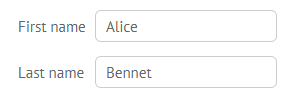
webix.ui({
    view:"toolbar",
    elements:[
        { view:"button", value:"Button 1"},
        { view:"button", value:"Button 2"}
    ]
});
webix.ui({
view:"form",
elements:[
{ view:"text", value:"Alice"},
{ view:"text", value:"Bennet"}
]
});Form elements
- row, cols are valid
- elements - value holders - have "name"
Layout Types
{ rows:[...], type:"line" }, //default
{ rows:[...], type:"space" },
{ rows:[...], type:"wide" },
{ rows:[...], type:"clean" }
{ view:"form", rows:[...]/*, type:"form"*/ },
{ view:"toolbar", cols: [...]/*, type:"toolbar"*/ }webix.ui({
type:"space", rows:[
{ cols:[...]},
{ type:"wide", cols:[...]}
]
});Type is not inherited!
- Margin
- Borders
- Padding
- Background
Type sets:
Layout Margins
webix.ui({
    margin:20,
    paddingX:5, paddingY: 10, //or padding
    rows:[...]
});
How to reset:
1.
2.
webix.skin.$active.layoutPadding.line = 10;
webix.skin.$active.layoutMargin.space = 10;
For one specific layout
Globally:
- webix.skin.$active stores settings for the skin in use
- avoid changing the above parameters in CSS
Sizing in Apps
- Size to content (not for all)
View rules
- No size
- Fixed size
    { view:"list"},
    { view:"calendar", height:0, width:0}
{ view:"list", height:300, width:200 },
{ view:"button", value:"Click me" } //set by default
- Min/max size
{ view:"list", minHeight:200, maxWidth:800 }{ view:"datatable", autoheight:true, autowidth:true }Sizing in Apps
- Mixed
Layout rules
- Evenly 1:1
- Proportionally x1:x2
    rows:[
        { view:"list" },
        { view:"datatable" }
    ]
//1:2
rows:[
{ view:"list" },
{ view:"datatable", gravity:2 }
] rows:[
{ view:"calendar" }, //fixed sized
{ view:"datatable", gravity:2 },
{ view:"list" }
]Scroll in Views
Scroll modes - for those who support
ScrollView - to wrap anything
- x, xy, y Datatable, Dataview, Template, Tree, ScrollView
- y Lists, Form
    view:"scrollview",
    scroll:"xy",
    body:{
        rows:[ ... ]
    }
{ view:"tree", scroll:"xy" },
{ view:"form", scroll:"y" } //scroll:trueScroll in Apps
HTML container or not
Custom Scrollbars
- HTML container: browser priority
- document body: Webix app priority
    if (!webix.env.touch)
      webix.CustomScroll.init();
    view:"scrollview",
    body:{ .. }, //view with custom scrolls
    scroll:"native-y" //native scrollbar
Leave native scrollbars for particular views:
Multiple Page Layouts
Multiview
Tabview (alias for Tabbar + Multiview)
- cells
- cells with header and body
Accordion
- rows or cols with header and body
Carousel
- rows or cols defining swipe direction
Multiview and Tabview
{
   { view:"tabbar", multiview:true, options:[
       { id:"tab1", value:"Tab 1"}
   ]},
   { cells:[
       { id:"tab1", template:"Content 1"}
   ]}
}
{ view:"tabview", cells:[
     { header:"Tab 1", body:{ template:"Content 1"}}
]}

console.log($$("$tabview1").getTabbar().config.options);
// {value: "Tab 1", id: "view1519045588595"}
{ view:"tabview", cells:[
     { header:"Tab 1", body:{ id:"tab1", template:"Content 1"}}
]}

console.log($$("$tabview1").getTabbar().config.options);
// {value: "Tab 1", id: "tab1"}
cell id = tab id
cell id = tab id = auto id
cell id = tab id = custom id
Multiview and Tabview
    <!-- default -->
    <div class="webix_view webix_multiview" view_id="$multiview1">
        <div class="webix_view" view_id="view1519156647870">...</div>
    </div>

    <!-- with keepViews:true -->
    <div class="webix_view webix_multiview" view_id="$multiview1">
        <div class="webix_view" view_id="view1519156647870">...</div>
        <div class="webix_view" view_id="view1519156647871">...</div>
    </div>
webix.ui({
view:"tabview",
multiview:{
//keepViews:true
},
cells:[
{ header:"Tab 1", body:{ template: "Content 1"}},
{ header:"Tab 2", body:{ template: "Content 2"}}
]
});JS:
HTML:
Accordion
<div class="webix_view webix_accordionitem vertical" view_id="$accordionitem1">
    <div webix_ai_id="$accordionitem1" class="webix_accordionitem_header">...</div>
    <div class="webix_accordionitem_body"> ... </div>
</div>

<div class="webix_view webix_accordionitem vertical collapsed" view_id="$accordionitem2">
    <div webix_ai_id="$accordionitem2" class="webix_accordionitem_header collapsed"> ... </div>
    <div class="webix_accordionitem_body" style="display: none;"> ... </div>
</div>
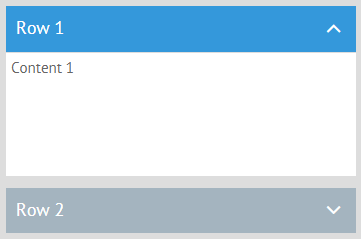
webix.ui({
multi:true,
rows:[
{ header:"Row 1", body:"Content 1"},
{ header:"Row 2", body:"Content 2"}
]
});
Carousel
<div class="webix_view webix_layout_clean" view_id="$layout1" touch_scroll="x"
    style="width:1000px; transform: translate3d(-500px, 0px, 0px);>
    <div class="webix_view tpl1" view_id="$template1" style="width:500px; display: inline-block;">
        ...
    </div>
    <div class="webix_view tpl2" view_id="$template2" style="width:500px; display: inline-block;">
        ...
    </div>
</div>
webix.ui({
view:"carousel",
width:500, height:400,
cols:[
{ template: "Content 1", css:"tpl1"},
{ template: "Content 2", css:"tpl2"}
]
});
Navigation in Multi Layouts
Side
Top / bottom
By Api
- list
- sidebar
- menu (y)
- tabbar
- segmented
- menu (x)
- multiview.setValue("cellId");
- carousel.setActive("cellId");
- cell.show();
Accordion
Multiview / Carousel
- cell.expand();
- cell.collapse();
By user
Peculiar Layouts
- FlexLayout
- AbsLayout
- GridLayout / Dashboard
* flex boxes, IE11+
* absolute positioning of elements
* cell positioning relative to abstract grid
{ view:"flexlayout", cols:[ ... ] }{ view:"abslayout", cells:[
{ view:"list", relative:true},
{ view:"button", bottom: 20, right:35 }
]}
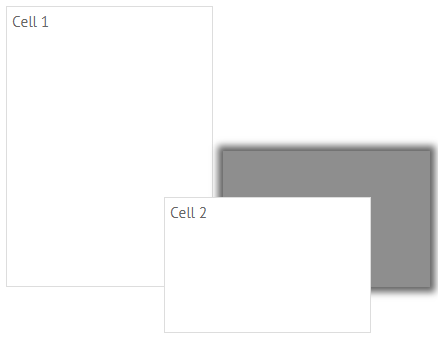
{ view:"dashboard", cells:[
    { view:"panel", x:0, y:0, dx:1, dy:2, body:{...}},
    { view:"panel", x: 1, y:2, dx:2, dx:y, body:{...}}
]}
Browsing Nested Layouts
var views = webix.ui.views;
/*{
    top:{ ..view object ..},
    addBtn:{ ..view object ..},
    delBtn:{ ..view object ..}
}*/
webix.ui({
id:"top", cols:[
{ view:"button", id:"addBtn", value:"Add" },
{ view:"button", id:"delBtn", value:"Delete" }
]
});$$("top").queryView("button");
$$("top").queryView({ view:"button"}, "all"); //"parent", "self"
$$("top").queryView(function(config){
return config.view == "button";
});$$("top").getChildViews(); // [ { ..view object..}, { ..view object..} ]
$$("addBtn").getParentView(); // view object
$$("addBtn").getFormView(); // form view object1.
2.
3.
Windows and Popups
<div class="webix_view webix_layout_line" view_id="$layout1"
    style="width: 523px; height: 962px;"> <!--layout HTML-->
</div>
<div class="webix_view webix_window" tabindex="0" view_id="$window1"
    style="top: 358px; left: 112px; z-index: 100;"><!--window 1 HTML-->
</div>

<div class="webix_view webix_window" tabindex="0" view_id="$window2"
    style="top: 200px; left: 200px; z-index: 101;"><!--window 2 HTML-->
</div>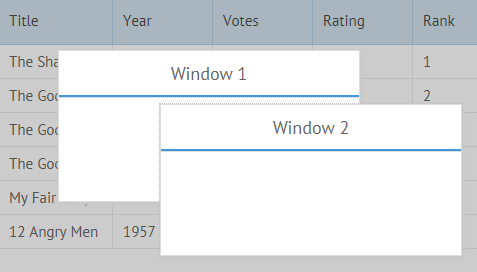
    webix.ui({
        view:"window"
}).show();- lie above layout
- need to be shown explicitely
webix.ui.zIndexBase = 100;
webix.ui.zIndex();
Modifying Windows
.close()
Note:
win.hide();
win.show();
is better than
win.close();
webix.ui({..same win..});
.hide()
var win = webix.ui({
    view:"window"
});
win.show();
win.hide()
win.show();win.close()
win.show();
//errorChanging views dynamically
- define (prop, value)
- view.config.prop = value
calendar.define("width", 200);
//or
calendar.define({
    width: 200,
    height:300
});
calendar.config.width = 200;
//or
webix.extend(calendar.config, {
    width: 200,
    height:300
}, true);
Setters!
Apply changed properties
- define and resize
- define and repaint
calendar.define("width", 400);
calendar.config.height = 400;
calendar.resize();
calendar.config.date = new Date(2017, 01, 01);
calendar.refresh();- define and rebuild
layout.define("rows", [ ... ]);
layout.reconstruct();
datatable.define("columns", [ ... ]);
datatable.refreshColumns();
Change and apply properties
calendar.showCalendar(new Date(2017, 01, 01));
text.setValue("New value");
calendar.config.date = new Date(2017, 01, 01);
calendar.refresh();
text.config.value = "New value";
text.refresh();
.showCalendar()
.setValue()
Dynamic Modifications
webix.ui
    //familiar webix ui
    webix.ui({ ..new config..});

    //replaces datatable
    webix.ui({ ..new config..}, $$("mydatatable"));

    //replaces datatable in the given layout
webix.ui({ ..new config..}, $$("mylayout"), $$("mydatatable"));- destroys base view
- same ID for the new view
Replacing Views
webix.ui with collection:
    webix.ui({
        view:"form", id:"myform", rows:[ {}, {} ]
    });

    //replaces all form rows
    webix.ui([ ..array of new configs..], $$("myform"));
.reconstruct() for collections
    $$("myform").define("rows", [
        { }, { }
    ]);
    $$("myform").reconstruct();
- child elements are destroyed
- same IDs can be used
Adding/Removing Views
.addView()
.remove View()
$$("myform").addView({ view:"button" });

$$("myform").addView({
    cols:[{ view:"button" },{ view:"button" }]
});
$$("myform").removeView("addBtn");

$$("myform").destructor();
Note:
is better than
$$("myform").removeView("addBtn");$$("addBtn").destructor();Adaptive Apps
- At least 1 view in Layout is non-sized
- or Spacer is used in as Layout row/column
App views change size depending on viewport, if:
    cols:[
        { view:"list", width:200 },
        { view:"datatable" }, //fillspace for at least 1 column
        { view:"form", width:300 }
    ]
view:"form", rows:[
{ view:"text" },
{ view:"text" },
{}, //spacer
{ view:"button" }
]Responsive Apps
- FlexLayout is used (IE11+)
- Responsive behaviour is maintained
    view:"flexlayout", cols:[
        { view:"list", minWidth:200 },
        { view:"datatable", minWidth:400, minHeight:300 },
        { view:"form", width:300, minHeight:300 }
    ]
id:"top", rows:[
{
responsive:"top", //child view will move to "top" layout
responsive:true, //child views will be hidden
cols:[
{ view:"list", width:200 },
{ view:"template", width:200 },
{ view:"datatable", minWidth:300 }
]
}
]
App views change position depending on viewport, if:
2-2. Webix Intermediate. App Structure.
By ihelga
2-2. Webix Intermediate. App Structure.
Layouts and dynamic modifications within them. Adaptive techniques.