Data in Webix Widgets
DataDriver
Templating
Parsing
Mouse Actions
Data Widgets
Single-value widgets
Multiple-value widgets
- Template
- Form
- Property sheet
- Lists
- Dataview
- Datatable
- Tree /Treetable
- Chart
- ...
{ name:"Alex", age:31}
[
    { name:"Alex", age:31},
    { name:"Christin", age:28},
    { name:"Brian", age:19}
]
Data Widgets
Linear data
Hierarchical widgets
- Tree
- Treetable
- Grouplist
- Organogram
- Lists
- Dataview
- Datatable
- Chart
[
    { name:"Alex", age:31},
    { name:"Christin", age:28},
    { name:"Brian", age:19}
]
[
{ name:"Devs", data:[
{ name:"Alex", age:31},
{ name:"Christin", age:28}
]},
{ name:"QA", data:[
{ name:"Brian", age:19}
]}
]JSON, XML, JSArray, CSV
JSON, XML
Data Origin and Loading
- Client side (available in browser)
- Server side (in external file or on server)
| Client side | Server side | |
| in config | { view:"list" data:data } |
|
| by method | $$("mylist").parse(data); | $$("mylist").load("data.js"); |
{
    view:"list",
    id:"mylist",
    data:data
}
$$("list1").load("data.js");
$$("list1").load("data.php");cols:[
{ view:"list", id:"list1", url:"data.js"},
{ view:"list", id:"list2", url:"data.php"}
]$$("mylist").parse(data);Form, Template & Property
webix.ui({
    view:"form", rows:[
        {view:"text", name:"name", label:"Name"},
        {view:"counter", name:"age", label:"Age"}
    ]
});

$$("$form1").parse(data);
//equal to
$$("$form1").setValues(data);- view.setValues(): JSON only
- view.parse() or view.load(): JSON or XML
Data Drivers
- JSON
- XML
- CSV
- JSArray
all ends up with JSON
- webix.DataDriver.JSON
- webix.DataDriver.XML
- webix.DataDriver.CSV
- webix.DataDriver.JSArray
{ view:"datatable", data:grid_data, datatype:"json" }Data Drivers
- JSON
- XML
- CSV
- JSArray
all ends up with JSON
- webix.DataDriver.JSON
- webix.DataDriver.XML
- webix.DataDriver.CSV
- webix.DataDriver.JSArray
{ view:"datatable", data:grid_data, datatype:"json" }webix.DataDriver.JSON = {
toObject:function(data){...},
getRecords:function(data){...},
getDetails:function(data){...},
getInfo:function(data){...},
...
child:"data"
}- Parses incoming data
- Gets an array of records
- Parses each record
- Gets loading markers
- Child item pointer
Data Drivers
[
    { id:1, value:"One"},
    { id:2, value:"Two"},
    "Three"
]
'[{"id":1,"value":"One"},{"id":2,"value":"Two"},"Three"]'Raw JSON string
After .toObject() and .getRecords()
After .getDetails()
[
    { id:1, value:"One"},
    { id:2, value:"Two"},
    { id:"Three", value:"Three"}
]
Data Drivers
{
    data:[
    	{ "id":1, "value":"One"},
    	{ "id":2, "value":"Two"}
    ],
    pos:0,
    total_count:100
}'{"data":[{"id":1,"value":"One"},{"id":2,"value":"Two"}],"pos":0,"total_count":100}'Raw JSON string
After .toObject()
.getInfo()
{
    from:0,
    size:100
}
[
{ "id":1, "value":"One"},
{ "id":2, "value":"Two"}
]After .getRecords()
[
    { "id":1, "value":"One"},
    { "id":2, "value":"Two"}
]
After .getDetails()
Customizing JSON Driver
webix.DataDriver.myJSON = webix.extend({
    getRecords:function(data){
    	return data.records;
    }
}, webix.DataDriver.json);
webix.DataDriver.myTreeJSON = webix.extend({
child:"people"
}, webix.DataDriver.json);webix.extend({ ..new functionality.. }, base driver);
{
    records:[
        { name:"Alex", age:31},
        { name:"Christin", age:28},
        { name:"Brian", age:19}
    ]
}
[
{ name:"Devs", people:[
{ name:"Alex", age:31},
{ name:"Christin", age:28}
]},
{ name:"QA", people:[
{ name:"Brian", age:19}
]}
]Inner Data Parsing
Widgets can modify data
var tree_data = [
    { id:1, name:"Devs", data:[
        { id:2, name:"Alex", age:31},
        { id:3, name:"Christin", age:28}
    ]}
]
[
{"id":1,"name":"Devs","$count":2,"$parent":0,"$level":1},
{"id":2,"name":"Alex","age":31,"$count":0,"$parent":1,"$level":2},
{"id":3,"name":"Christin","age":28,"$count":0,"$parent":1,"$level":2}
]webix.ui({
cols:[
{ view:"tree", data:tree_data },
{ view:"tree", data:tree_data }
]
});Inner Data Parsing
Widgets can modify data
var tree_data = [
    { id:1, name:"Devs", data:[
        { id:2, name:"Alex", age:31},
        { id:3, name:"Christin", age:28}
    ]}
]
[
{"id":1,"name":"Devs","$count":2,"$parent":0,"$level":1},
{"id":2,"name":"Alex","age":31,"$count":0,"$parent":1,"$level":2},
{"id":3,"name":"Christin","age":28,"$count":0,"$parent":1,"$level":2}
]webix.ui({
cols:[
{ view:"tree", data:webix.copy(tree_data) },
{ view:"tree", data:webix.copy(tree_data) }
]
});webix.copy()
Data Pre Processing
Scheme functions
- $init
- $group
- $sort
- $change
- $update
- $save
- $serialize
{
    view:"datatable",
    scheme:{
        $init:function(obj){
            obj.date = new Date(2018, 23, obj.id);
        },
        $sort:{
            by:"title",
            dir:"asc"
        }
    }
}
Data Post Processing
Events:
{
    view:"datatable",
    ready:function(){
        console.log(this.count());
    }
}
Lifetime handlers:
- onAfterLoad
- "data->onParse"
- ready
{
    view:"datatable",
    on:{
        onAfterLoad:function(){
            console.log(this.count());
        },
        "data->onParse":function(){
            console.log(this.count());
        }
    }
}
Limitations for synced views: only DataStore events (onStoreLoad, onStoreUpdated)
Visualizing Data
Simple rendering
Lazy rendering
Canvas and SVG
- tree
- list
- template
- Dataview
- Datatable
- Treetable
- Chart
- Organogram
- Gage, GeoChart
all items in DOM
visible items in DOM
Data Templates
{
    view:"list",
    template:"#title#",
    data:[
        { id:"Dashboard", title:"Dashboard"},
        { id:"Users", title:"Users"}
    ]
}
{
view:"list",
template:function(obj){
return obj.title;
},
data:[
{ id:"Dashboard", title:"Dashboard"},
{ id:"Users", title:"Users"}
]
}String template:
Function template:
- Simple
- Custom HTML
- Complex HTML
- Conditions
DataTable Templates
{
    view:"datatable",
    columns:[
        { id:"id",	header:"", width:50},
        { id:"title",	header:"Film title", width:200},
        { id:"year",    header:"Year"}
    ],
    data: [
	{ id:1, title:"The Shawshank Redemption", year:1994},
	{ id:2, title:"The Godfather", year:1972}
    ]
}
columns:[
    { id:"title", header:"Title", template:"Film name is #title#" }
]
Column ids:
Templates for columns:
DropDown Templates
{ view:"combo", options:[
    "One",
    "Two"
]}
{ view:"combo", options:{
    template:"#name#",
    data:[
        { id:1, name:"One"},
        { id:2, name:"Two"}
    ]
}}
id, value
Templates for dropdown list:
{ view:"combo", options:[
    { id:1, value:"One"},
    { id:2, value:"Two"}
]}
or
{ view:"combo", options:{
    template:"#name#",
    body:{
        template:"#name#",
        data:[
            { id:1, name:"One"},
            { id:2, name:"Two"}
        ]
    }
}}
DropDown Templates
{ view:"combo", options:[
     "One",
     "Two"
]}
id, value
Filters for dropdown list:
{ view:"combo", options:[
    { id:1, value:"One"},
    { id:2, value:"Two"}
]}
or
{ view:"combo", options:{
    template:"#name#",
    filter:function(item, value){
         return (item.name.toString().toLowerCase().indexOf(value.toLowerCase())===0)
    },
    body:{
        template:"#name#",
        data:[
            { id:1, name:"One"},
            { id:2, name:"Two"}
        ]
    }
}}
Date Templates
webix.i18n.{method}
webix.Date.dateToStr(format)
    // use as widget / datatable column template
    { header:"Date", id:"start", template:function(obj){
        return webix.i18n.dateFormatStr(obj.start);
    }}
    // set as datatable column format
    { header:"Date", id:"start", format:webix.i18n.dateFormatStr}
// use as widget / datatable column template
{ id:"start", template:function(obj){
return webix.Date.dateToStr("%Y-%m-%d")(obj.start);
}}
// set as datatable column format
{ id:"start", format:webix.Date.dateToStr("%Y-%m-%d")}
* Datatable: template has higher priority!
Number Templates
webix.i18n.numberFormat
webix.Number.numToStr(format)
    // use as widget / datatable column template
    { id:"votes", template:function(obj){
      return webix.i18n.numberFormat(obj.votes);
    }}
    //set as datatable column format
    { id:"votes",  format:webix.i18n.numberFormat }
    var format = webix.Number.numToStr({
       groupDelimiter:" ", groupSize:3,
       decimalDelimiter:",", decimalSize:2
     });

    // use as widget / datatable column template
    { id:"votes", header:"Custom", template:function(obj){
      return format(obj.votes);
    }}
    //set as datatable column format
    { id:"votes",  format:format }
Item Configuration
webix.ui({
    view:"list",
    template:"#name#. #age#",
    type:{ //or item
        height:60,
        css:"some"
    }
});- width: number or "auto"
- height: number or "auto"
- css
- template
Item Settings Tree, List, Dataview
Item controls Tree, Treetable, Datatable
webix.ui({
    view:"tree",
    template:"{common.icon()} {common.folder()} #name#"
    //or
    template:function(obj, common){
        return common.icon(obj, common)+
               common.folder(obj, common)+
               obj.name;
    }
});- icon
- folder
- checkbox
- radio
- editIcon
- trashIcon
Active Zones in Items
webix.ui({
    view:"list",
    template:"{common.vehicle()} #name#",
    type:{
        vehicle:function(obj, common){
            return "<span class='webix_icon mdi mdi-"+obj.vehicle+"'></span>";
        }
    },
    data:[
        { id:1, name:"Alex", vehicle:"car"},
        { id:2, name:"Christin", vehicle:"bicycle"}
    ]
});
Adding controls to type and /or show them in a template
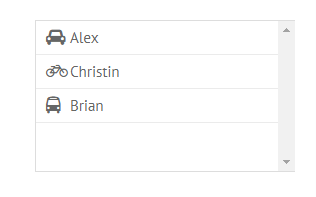
onClick:{
    webix_icon:function(e, id){
        var item = this.getItem(id);
        webix.message(
            item.name+" goes to work by "+item.vehicle
        );
    }
}
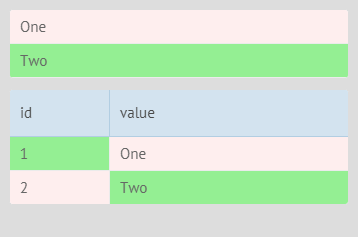
Item CSS
In data: item.$css, item.$cellCss
data:[
    { id:1, value:"One", $css:"red"},
    { id:2, value:"Two", $css:"green"}
]
data:[
{ id:1, value:"One", $cellCss:{
value:"red", id:"green"
}}
]By method:
- list.addCss(id, class) / .removeCss(..)
- dtable.addRowCss(id, class) / .removeRowCss(..)
- dtable.addCellCss(row, col, class) / .removeCellCss(..)
Item Selection
CSS: .webix_selected
Navigation: moved by arrow keys or
List, DataView, Tree
Datatable, Treetable
API:
    view.select(id / [ids], preserve);
    view.getSelectedIds(asArray);

    on: {
        onBefore/AferSelect:handler1,
        onBefore/AfterUnSelect:handler2,
        onSelectChange:handler3
    }
select:true,
multiselect:true // "touch"select: "row", //true, "cell", "column"
multiselect:true, //"touch"
blockselect:tru,
areaselect:true view.moveSelection("bottom");2-3. Webix Intermediate. Widgets and Data.
By ihelga
2-3. Webix Intermediate. Widgets and Data.
Data in Webix widgets. Data rendering and linking techniques.