JavaEE workshop #5
Viktor Martiš
(logback in detail, JPA/Hibernate in detail)

Previous workshop
- IDEA shortcut: Ctrl + Alt + L
- Proxy pattern
- CI basics
- Logging basics
- JPA basics
Contents
- IDEA shortcut: Ctrl + Alt + (v, f, c)
- Strategy pattern
- Logback configuration
- JPA
- Entity lifecycle
- JPQL and criteria API
- Relations
- Fetch type
- Named queries
IDEA shortcut
-
IDEA shortcut: Ctrl + Alt + v/p/c/f
- variable/parameter/field/constant
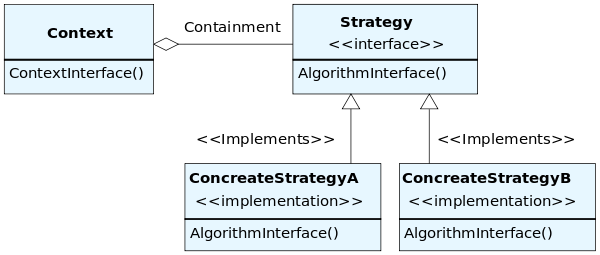
- behavioral software design pattern that enables selecting an algorithm at runtime
- InMemory/JPA repository implementation
- from same developer as log4j
- brings a very large number of improvements over log4j, big and small
- 10x faster on certain critical execution paths then log4j
- configuration is done through the logback.xml or with Groovy
- speaks SLF4J natively
- automatic reloading of configuration files
- graceful recovery from I/O failures
- automatic removal of old log archives
- automatic compression of archived log files
- prudent mode
<dependency>
    <groupId>ch.qos.logback</groupId>
    <artifactId>logback-classic</artifactId>
    <version>1.0.13</version>
</dependency>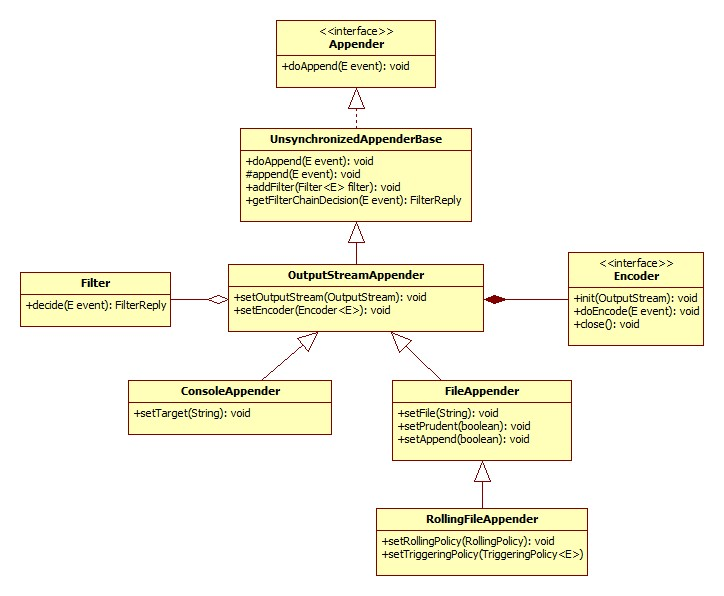
ConsoleAppender - example
<configuration>

  <appender name="STDOUT" class="ch.qos.logback.core.ConsoleAppender">
    <!-- encoders are assigned the type
         ch.qos.logback.classic.encoder.PatternLayoutEncoder by default -->
    <encoder>
      <pattern>%-4relative [%thread] %-5level %logger{35} - %msg %n</pattern>
    </encoder>
  </appender>

  <root level="DEBUG">
    <appender-ref ref="STDOUT" />
  </root>
</configuration>
FileAppender - example
<configuration>

  <!-- Insert the current time formatted as "yyyyMMdd'T'HHmmss" under
       the key "bySecond" into the logger context. This value will be
       available to all subsequent configuration elements. -->
  <timestamp key="bySecond" datePattern="yyyyMMdd'T'HHmmss"/>

  <appender name="FILE" class="ch.qos.logback.core.FileAppender">
    <!-- use the previously created timestamp to create a uniquely
         named log file -->
    <file>log-${bySecond}.txt</file>
    <encoder>
      <pattern>%logger{35} - %msg%n</pattern>
    </encoder>
  </appender>

  <root level="DEBUG">
    <appender-ref ref="FILE" />
  </root>
</configuration>
Logback configuration
- <logger> - takes exactly one mandatory name attribute, an optional level attribute, and an optional additivity attribute, admitting the values true or false. The value of the level attribute admitting one of the case-insensitive string values TRACE, DEBUG, INFO, WARN, ERROR, ALL or OFF. The special case-insensitive value INHERITED, or its synonym NULL, will force the level of the logger to be inherited from higher up in the hierarchy. may contain zero or more <appender-ref> elements
- <root> - configures the root logger, supports a single level attribute.
<logger name="chapters.configuration" level="INFO"/>

<logger name="chapters.configuration">
  <appender-ref ref="STDOUT" />
</logger>
Logging and Spring
- mandatory logging dependency in Spring is the Jakarta Commons Logging API (JCL)
- can be replaced with other logging solution by exluding of common-logging
<dependencies>
    <dependency>
        <groupId>org.springframework</groupId>
        <artifactId>spring-core</artifactId>
        <version>4.2.6.RELEASE</version>
        <exclusions>
            <exclusion>
                <groupId>commons-logging</groupId>
                <artifactId>commons-logging</artifactId>
            </exclusion>
        </exclusions>
    </dependency>
</dependencies>
Spring logging - slf4j & logback
<dependencies>
    <dependency>
        <groupId>org.springframework</groupId>
        <artifactId>spring-core</artifactId>
        <exclusions>
            <exclusion>
                <groupId>commons-logging</groupId>
                <artifactId>commons-logging</artifactId>
            </exclusion>
        </exclusions>
    </dependency>
    <dependency>
        <groupId>org.slf4j</groupId>
        <artifactId>jcl-over-slf4j</artifactId>n>
    </dependency>
    <dependency>
        <groupId>org.slf4j</groupId>
        <artifactId>slf4j-api</artifactId>
    </dependency>
    <dependency>
        <groupId>ch.qos.logback</groupId>
        <artifactId>logback-classic</artifactId>
    </dependency>
</dependencies>
Logging - links
- http://www.slideshare.net/ZeeshanBilal/java-logging-23101361?next_slideshow=1
- http://www.slideshare.net/mxc4/java-logging
- http://www.slideshare.net/RiccardoCardin/java-exception-handling-assertions-and-logging
- https://speakerdeck.com/xorlev/java-logging-ninth-circle-of-hell-a-gentle-introduction-to-java-logging
- https://speakerd.s3.amazonaws.com/presentations/b782c8a089fa013077b222000a1e906d/java-logging-hell-april-18th.pdf
- https://www.javacodegeeks.com/2011/01/10-tips-proper-application-logging.html
- http://www.slf4j.org/
- http://logback.qos.ch/
JPA - EntityManager
| find(Class<T> entityClass, Object primaryKey) | Find by primary key. |
| getReference(Class<T> entityClass, Object primaryKey) | Get an instance, whose state may be lazily fetched. |
| persist(Object entity) | Make an instance managed and persistent. |
| merge(T entity) | Merge the state of the given entity into the current persistence context. |
| remove(Object entity) | Remove the entity instance. |
| refresh(Object entity) | Refresh the state of the instance from the database, overwriting changes made to the entity, if any. |
| flush() | Synchronize the persistence context to the underlying database. |
| createQuery(String qlString) | Create an instance of Query for executing a Java Persistence query language statement. |
| createNamedQuery(String name) | Create an instance of Query for executing a named query (in the Java Persistence query language or in native SQL). |
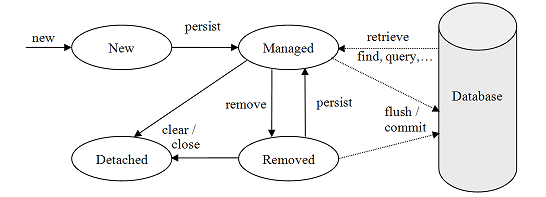
JPA Entity Lifecycle
- managed vs detached
- entity updates in active transaction are persisted
- lazy loading works only in active transaction
JPA - @MappedSuperclass
- Designates a class whose mapping information is applied to the entities that inherit from it. A mapped superclass has no separate table defined for it.
@MappedSuperclass
public class AbstractEntity {

@GeneratedValue(strategy = GenerationType.IDENTITY)
@Column(name = "id", columnDefinition = "serial")
@Id
private Long id;
JPA - Inheritance Strategies
- SINGLE_TABLE
- makes all classes fields (both super and sub classes) and map them down into a single table
- JOINED_TABLE
- share the referenced column which contains unique values to join the table
- TABLE_PER_CONCRETE_CLASS
- create a table for each sub entity. Table will contain null records
@Entity
@Inheritance( strategy = InheritanceType.JOINED)
public class User {
JPA - Relations
- Unidirectional vs bidirectional
- Side owner
- Relation types
- One to Many
- Many to One
- One to One
- Many to Many
JPA - entity Relationships
@Entity(name = "Person")
public static class Person {

    @Id
    @GeneratedValue
    private Long id;

    public Person() {
    }
}

@Entity(name = "Phone")
public static class Phone {

    @Id
    @GeneratedValue
    private Long id;

    private String number;

    @ManyToOne
    @JoinColumn(name = "person_id",
            foreignKey = @ForeignKey(name = "PERSON_ID_FK")
    )
    private Person person;

    ...
}
JPA - entity Relationships
-
@OneToMany
- If doesn’t have a mirroring @ManyToOne association on the child side, the @OneToMany association is unidirectional. If there is a @ManyToOne association on the child side, the @OneToMany association is bidirectional
- with @JoinColumn hibernate doesn't create database join table.
@Entity
public class Trainer {
    @OneToMany
    @JoinTable(
        name="TrainedMonkeys",
        joinColumns = @JoinColumn( name="trainer_id"),
        inverseJoinColumns = @JoinColumn( name="monkey_id")
    )
    public Set<Monkey> getTrainedMonkeys() {
    ...
}
JPA - entity Relationships
//unidirectional example
@Entity(name = "Phone")
public static class Phone {

    @Id
    @GeneratedValue
    private Long id;

    private String number;

    @OneToOne
    @JoinColumn(name = "details_id")
    private PhoneDetails details;

    public Phone() {
    }

...
JPA - entity Relationships
@Entity(name = "Employee")
public static class Employee {
    @Id
    private Long id;
    @Column(name = "pswd")
    @ColumnTransformer(
        read = "decrypt( 'AES', '00', pswd  )",
        write = "encrypt('AES', '00', ?)"
    )
    private String password;

    @ManyToMany(mappedBy = "employees")
    private List<Project> projects = new ArrayList<>();
    ...
}

@Entity(name = "Project")
public class Project {
    @Id
    private Long id;
    @ManyToMany
    private List<Employee> employees = new ArrayList<>();
    ...
}
JPA - JPQL
- Java Persistence Query Language defined in JPA specification.
- based on SQL syntax
- won’t affect the database directly
- SQL like syntax
- SQL works directly against relational database tables, JPQL works with Java classes and instances
- aggregate functions (COUNT, SUM, AVG, MIN, MAX)
- BETWEEN, LIKE
Query query = entitymanager.createQuery("Select UPPER(e.ename) from Employee e ORDER BY e.ename ASC");
List<String> list = query.getResultList();
JPA - named queries
- @NamedQuery annotation define query with a predefined unchangeable query string
- improve code organization by separating the JPQL query strings from POJO
@Entity
@Table
@NamedQuery(query = "Select e from Employee e where e.eid = :id", name = "find employee by id")

public class Employee {
   @Id
   @GeneratedValue(strategy = GenerationType.AUTO)
   private int eid;
   private String ename;
   private double salary;
   private String deg;
Query query = entitymanager.createNamedQuery("find employee by id");
query.setParameter("id", 1204);
List<Employee> list = query.getResultList( );JPA - criteria API
- alternative way for defining JPA queries
- useful for building dynamic queries
EntityManager em = ...;
CriteriaBuilder cb = em.getCriteriaBuilder();
CriteriaQuery<Country> cq = cb.createQuery(Country.class);
Root<Country> country = cq.from(Country.class);
cq.select(country);
TypedQuery<Cuntry> q = em.createQuery(cq);
List<Country> allCountries = q.getResultList()
JPA - Eager vs. Lazy Loading
- Eager fetching - fetching the whole record while finding the record using Primary Key.
- Lazy fetch - It checks for the availability of notifies it with primary key if it exists. Then later if you call any of the getter method of that entity then it fetches the whole.
- Fetch join - enables the fetching of an association as a side effect of the execution of a query
- JPA 2.1
- allows to customize the data that is retrieved with a query or find operation
@NamedEntityGraph(name="emailEntityGraph", attributeNodes={
    @NamedAttributeNode("subject"),
    @NamedAttributeNode("sender")
})
@Entity
public class EmailMessage { ... }

...

EntityGraph<EmailMessage> eg = em.getEntityGraph("previewEmailEntityGraph");

CriteriaQuery<EmailMessage> cq = cb.createQuery(EmailMessage.class);
Root<EmailMessage> message = cq.from(EmailMessage.class);
TypedQuery<EmailMessage> q = em.createQuery(cq);
q.setHint("javax.persistence.loadgraph", eg);
List<EmailMessage> messages = q.getResultList();
Q & A
ITA-04-JavaEE, Workshop 5
By IT-absolvent
ITA-04-JavaEE, Workshop 5
Workshop #5