JavaEE workshop #5
Marek Ondrák
(Bean Lifecycle, Logging, Testing, Exception handling)
Previous workshop
- IoC/DI
- Bean, Configuration
- Multitier architecture
- JSON, REST - Statelessness, Operations, HttpStatus
Content
- Logging
- Bean lifecycle
- Exception handling
- Testing
Logging
- Needed during development to identify errors
- Needed during production for troubleshooting
- Java provides a default framework in the java.util.logging package
- many third-party frameworks including Log4j, Logback, and tinylog
- SLF4J and Apache Commons Logging, provide abstraction layers which decouple your code from the underlying logging framework, allowing you to switch between logging frameworks
- simple facade or abstraction for various logging frameworks
- If no binding is found on the class path, then SLF4J will default to a no-operation implementation.
<dependency>
	<groupId>org.slf4j</groupId>
	<artifactId>slf4j-api</artifactId>
	<version>1.7.29</version>
</dependency>
import org.slf4j.Logger;
import org.slf4j.LoggerFactory;

public class HelloWorld {
  public static void main(String[] args) {
    Logger logger = LoggerFactory.getLogger(HelloWorld.class);
    logger.info("Hello World");
  }
}
SLF4J - best practices
- Log parametrization
logger.debug("The new entry is {}. It replaces {}.", entry, oldEntry);- Log level enabled conditions
if(logger.isDebugEnabled()) {
  logger.debug("Calculated number: {}", doHeavyCalculation());
}
Log levels
- ERROR – something terribly wrong had happened, that must be investigated immediately. No system can tolerate items logged on this level. Example: NPE, database unavailable, mission critical use case cannot be continued.
- WARN – the process might be continued, but take extra caution. Actually I always wanted to have two levels here: one for obvious problems where work-around exists (for example: “Current data unavailable, using cached values”) and second (name it: ATTENTION) for potential problems and suggestions. Example: “Application running in development mode” or “Administration console is not secured with a password”. The application can tolerate warning messages, but they should always be justified and examined.
- INFO – Important business process has finished. In ideal world, administrator or advanced user should be able to understand INFO messages and quickly find out what the application is doing. For example if an application is all about booking airplane tickets, there should be only one INFO statement per each ticket saying “[Who] booked ticket from [Where] to [Where]”. Other definition of INFO message: each action that changes the state of the application significantly (database update, external system request).
- DEBUG – Developers stuff. I will discuss later what sort of information deserves to be logged.
- TRACE – Very detailed information, intended only for development. You might keep trace messages for a short period of time after deployment on production environment, but treat these log statements as temporary, that should or might be turned-off eventually. The distinction between DEBUG and TRACE is the most difficult, but if you put logging statement and remove it after the feature has been developed and tested, it should probably be on TRACE level.
- from same developer as log4j
- brings a very large number of improvements over log4j, big and small
- 10x faster on certain critical execution paths then log4j
- configuration is done through the logback.xml or with Groovy
- speaks SLF4J natively
- automatic reloading of configuration files
- graceful recovery from I/O failures
- automatic removal of old log archives
- automatic compression of archived log files
- prudent mode
<dependency>
    <groupId>ch.qos.logback</groupId>
    <artifactId>logback-classic</artifactId>
    <version>1.2.3</version>
</dependency>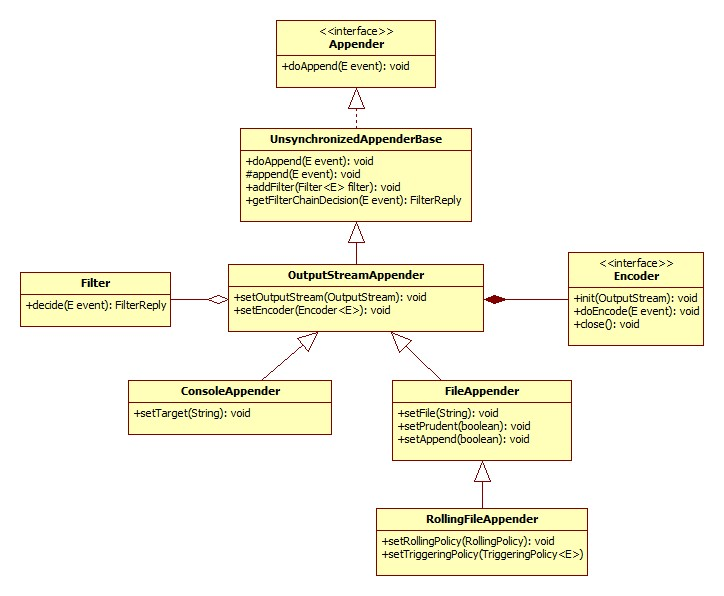
ConsoleAppender - example
<configuration>

  <appender name="STDOUT" class="ch.qos.logback.core.ConsoleAppender">
    <!-- encoders are assigned the type
         ch.qos.logback.classic.encoder.PatternLayoutEncoder by default -->
    <encoder>
      <pattern>%-4relative [%thread] %-5level %logger{35} - %msg %n</pattern>
    </encoder>
  </appender>

  <root level="DEBUG">
    <appender-ref ref="STDOUT" />
  </root>
</configuration>
FileAppender - example
<configuration>

  <!-- Insert the current time formatted as "yyyyMMdd'T'HHmmss" under
       the key "bySecond" into the logger context. This value will be
       available to all subsequent configuration elements. -->
  <timestamp key="bySecond" datePattern="yyyyMMdd'T'HHmmss"/>

  <appender name="FILE" class="ch.qos.logback.core.FileAppender">
    <!-- use the previously created timestamp to create a uniquely
         named log file -->
    <file>log-${bySecond}.txt</file>
    <encoder>
      <pattern>%logger{35} - %msg%n</pattern>
    </encoder>
  </appender>

  <root level="DEBUG">
    <appender-ref ref="FILE" />
  </root>
</configuration>
Logback configuration
- <logger> - takes exactly one mandatory name attribute, an optional level attribute, and an optional additivity attribute, admitting the values true or false. The value of the level attribute admitting one of the case-insensitive string values TRACE, DEBUG, INFO, WARN, ERROR, ALL or OFF. The special case-insensitive value INHERITED, or its synonym NULL, will force the level of the logger to be inherited from higher up in the hierarchy. may contain zero or more <appender-ref> elements
- <root> - configures the root logger, supports a single level attribute.
<logger name="chapters.configuration" level="INFO"/>

<logger name="chapters.configuration">
  <appender-ref ref="STDOUT" />
</logger>
Logging and Spring
- mandatory logging dependency in Spring is the Jakarta Commons Logging API (JCL)
- can be replaced with other logging solution by exluding of common-logging
<dependencies>
    <dependency>
        <groupId>org.springframework</groupId>
        <artifactId>spring-core</artifactId>
        <version>4.2.6.RELEASE</version>
        <exclusions>
            <exclusion>
                <groupId>commons-logging</groupId>
                <artifactId>commons-logging</artifactId>
            </exclusion>
        </exclusions>
    </dependency>
</dependencies>
Spring logging - slf4j & logback
<dependencies>
    <dependency>
        <groupId>org.springframework</groupId>
        <artifactId>spring-core</artifactId>
        <exclusions>
            <exclusion>
                <groupId>commons-logging</groupId>
                <artifactId>commons-logging</artifactId>
            </exclusion>
        </exclusions>
    </dependency>
    <dependency>
        <groupId>org.slf4j</groupId>
        <artifactId>jcl-over-slf4j</artifactId>n>
    </dependency>
    <dependency>
        <groupId>org.slf4j</groupId>
        <artifactId>slf4j-api</artifactId>
    </dependency>
    <dependency>
        <groupId>ch.qos.logback</groupId>
        <artifactId>logback-classic</artifactId>
    </dependency>
</dependencies>
Bean lifecycle
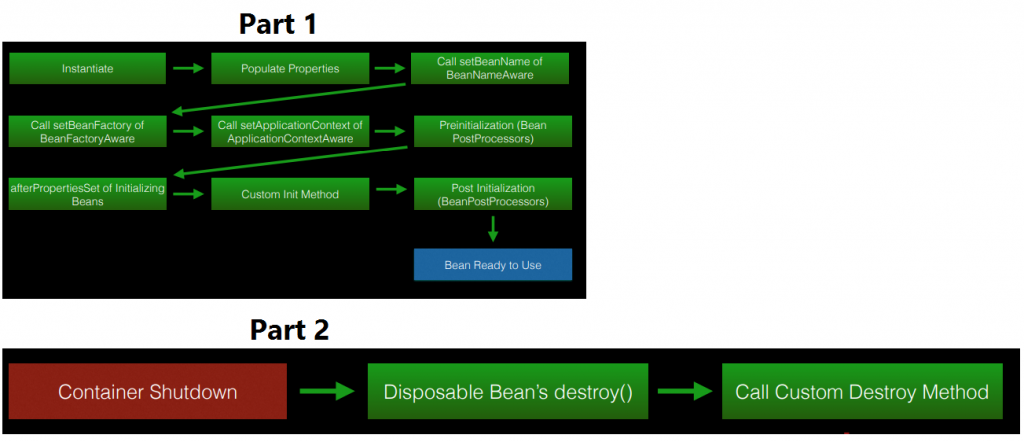
Bean lifecycle
- Instantiating
- *Aware intefaces
- PostProcessor
- @PostConstruct, @PreDestroy
Exception Handling
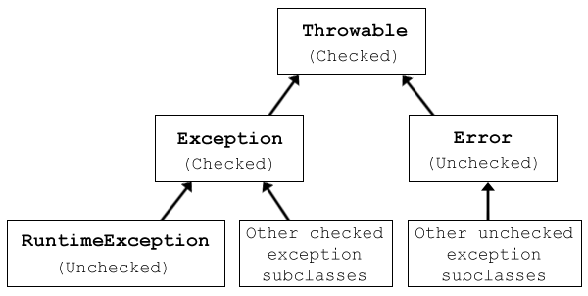
Exception handling
- Checked vs Unchecked
- Custom exceptions
- try-catch-finally, try-with-resources
- Log and throw antipattern
- NEVER do Exception-driven programming!
Exception handling
Testing - Why?
- Functional verification
- Refactoring
- Regression
Testing
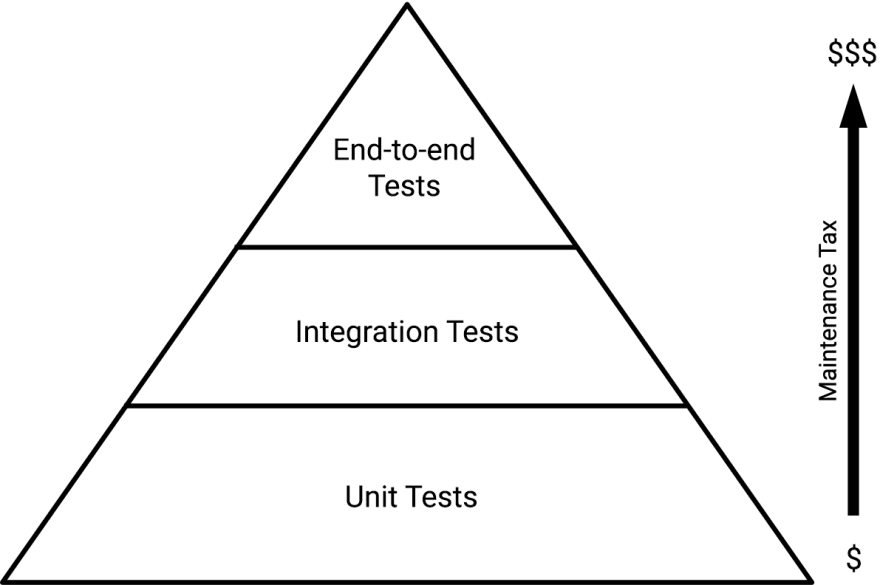
Testing
- Isolation
- One test, one feature
- Simplicity - DAMP (Descriptive And Meaningful Phrases) is more than DRY (Do not Repeat Yourself)
- Test coverage
UNIT TESTING is a level of software testing where individual units/components of a software are tested. The purpose is to validate that each unit of the software performs as designed.
Q & A
ITA-05-Java W5
By IT-absolvent
ITA-05-Java W5
Workshop #5