GraphQL
with Apollo
Before we continue...
Spaces or Tabs?

What is GraphQL?
GraphQL is a query language for APIs and a runtime for fulfilling those queries with your existing data.
What is Apollo?
The flexible, production ready GraphQL client for React and native apps.
Queries, caching, mutations, optimistic UI, subscriptions, pagination, server-side rendering, prefetching, and more.
Queries and Mutations
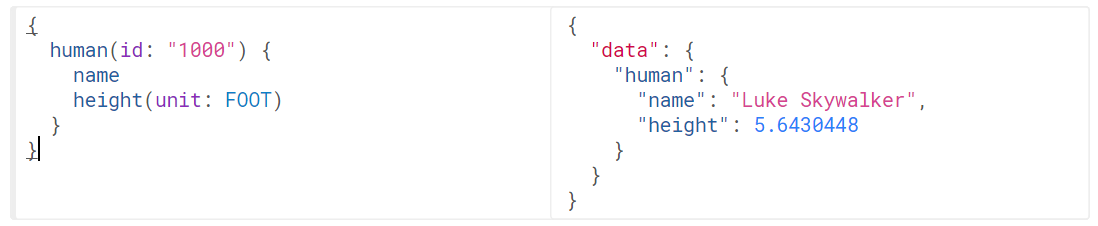
Get human with id of 1000 which includes name and height in feet.
Schema
type Author {
  id: Int! # the ! means that every author object _must_ have an id
  firstName: String
  lastName: String
  posts: [Post] # the list of Posts by this author
}

type Post {
  id: Int!
  title: String
  author: Author
  votes: Int
}

# the schema allows the following query:
type Query {
  posts: [Post]
}
Angular.js Demo
Queries
Apollo makes fetching the exact data you need for your component easy and allows you to put your queries exactly where you need them.
import { Component, OnInit } from '@angular/core';
import { Apollo } from 'apollo-angular';
import gql from 'graphql-tag';

@Component({
  selector: 'post-list',
  template: `
    <div *ngIf="loading">Loading</div>
    <ul *ngIf="!loading">
      <li *ngFor="let post of posts">
        {{post.title}} by
        {{post.author.firstName}} {{post.author.lastName}}
        ({{post.votes}} votes)
      </li>
    </ul>
  `
})
class PostListComponent implements OnInit {
loading: boolean;
posts: any[];
constructor(private apollo: Apollo) {}
ngOnInit() {
this.apollo.watchQuery({
query: gql`
query allPosts {
posts {
id
title
votes
author {
id
firstName
lastName
}
}
}
`
}).subscribe(({ loading, data }) => {
this.loading = loading;
this.posts = data.posts;
});
}
}import { Component, Input } from '@angular/core';
import { Apollo } from 'apollo-angular';
import gql from 'graphql-tag';
@Component({
selector: 'post-upvoter',
template: `
<button (click)="upvote(postId)>
Upvote
</button>
`
})
class PostUpvoterComponent {
@Input() postId: number;
constructor(private apollo: Apollo) {}
upvote(postId: number) {
this.apollo.mutate({
mutation: gql`
mutation upvotePost($postId: Int!) {
upvotePost(postId: $postId) {
id
votes
}
}
`,
variables: {
postId
}
});
}
}React.js Demo
import React from 'react';
import gql from 'graphql-tag';
import { graphql } from 'react-apollo';

// The data prop, which is provided by the wrapper below contains,
// a `loading` key while the query is in flight and posts when it is ready
function PostList({ data: { loading, posts } }) {
  if (loading) {
    return <div>Loading</div>;
  } else {
    return (
      <ul>
        {posts.map(post =>
          <li key={post.id}>
            {post.title} by {' '}
            {post.author.firstName} {post.author.lastName} {' '}
            ({post.votes} votes)
          </li>
        )}
      </ul>
    );
  }
}
Queries
// The `graphql` wrapper executes a GraphQL query and makes the results
// available on the `data` prop of the wrapped component (PostList here)
export default graphql(gql`
  query allPosts {
    posts {
      id
      title
      votes
      author {
        id
        firstName
        lastName
      }
    }
  }
`)(PostList);
Queries (cont.)
import React from 'react';
import gql from 'graphql-tag';
import { graphql } from 'react-apollo';

// A mutation is made available on a callback called `mutate`
// Other props of the wrapping component are passed through.
function PostUpvoter({ mutate, postId }) {
  return (
    <button onClick={() => mutate({ variables: { postId }})}>
      Upvote
    </button>
  )
}

// You can also use `graphql` for GraphQL mutations
export default graphql(gql`
  mutation upvotePost($postId: Int!) {
    upvotePost(postId: $postId) {
      id
      votes
    }
  }
`)(PostUpvoter);
Mutations
GraphQL
By James Brinkerhoff