Inhoud
- Wat is AngularJS
- Features
- Ontwikkelomgeving
Superheroic Javascript MVW framework
Angularjs is what HTML would have been, had it been designed for building web-apps
AngularJS is
framework, geen library
Single page applications

- Begonnen als open source project van Miško Hevery
- Opgepakt door Google
- Honderden contributors versie 1.2
- Weddenschap: project herbouwen in 2 weken (3)
- 17000 regels code -> 1000 regels

Text
En meer dan 200 anderen: https://builtwith.angularjs.org/

Gebruikt door
Filosofie
- Declaratief in html
- DOM manipulatie != application logic
- Databinding
- Modulair
- Dependency injection
- Testbaar
- Plain javascript
Wat kan je ermee
User input
- inlezen
- valideren (valid/pristine/dirty)
- structureren van input data (model)
Views renderen
- samenstellen van sub-views
- data injectie
- aanpassen wanneer data verandert
Code structuur
- separation of concerns
- testability
Deep linking
- URL's versturen naar anderen
- Pagina's herlaadbaar
Server communicatie
- Ajax/REST (promises)
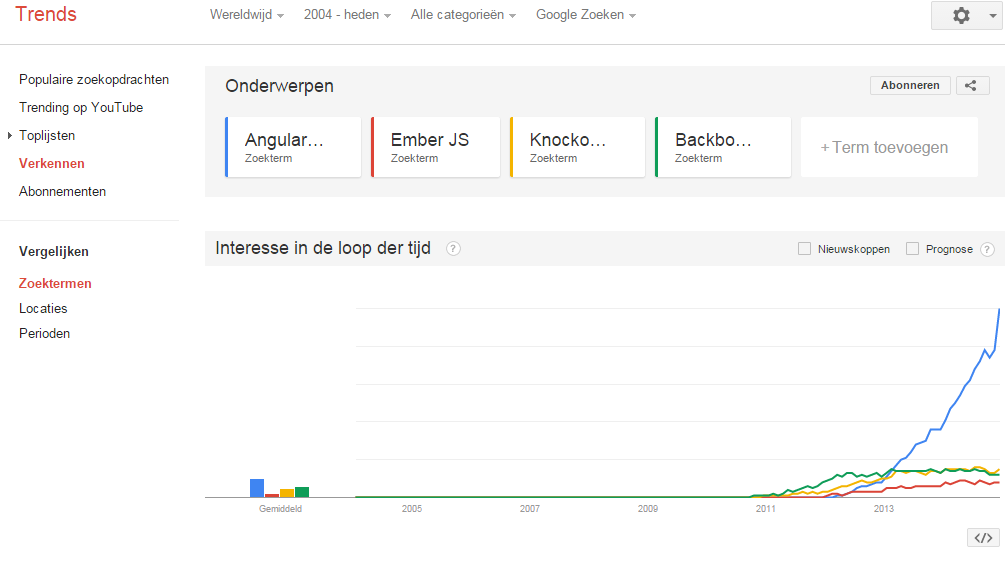
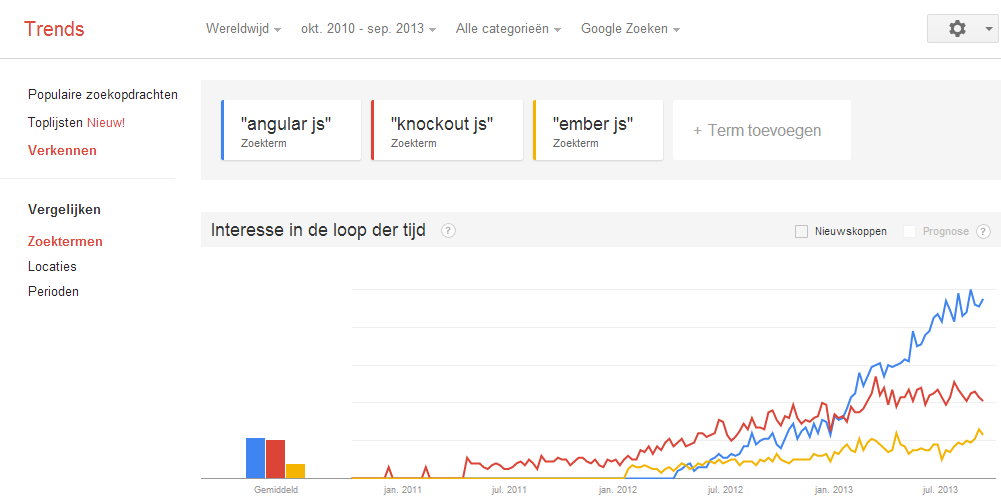
sep 2013
nu
JQuery
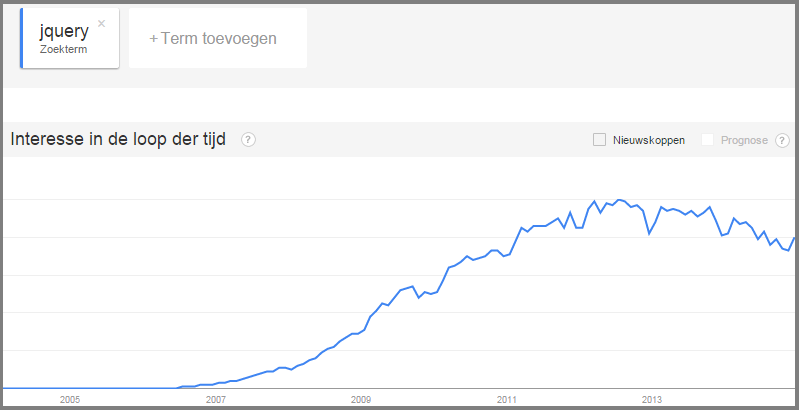
Forget everything you know about JQuery
Features
Data binding
<div ng-app>
      <h3>AngularJS data binding</h3>
      <input type="text" ng-model="inputTekst"/><br>
      <span>{{inputTekst}}</span>
</div>
( Bidirectioneel )
Voorbeeld: http://jsfiddle.net/tammingajp/pesr94jt/
function resetInput(){
    $scope.inputText = '';
}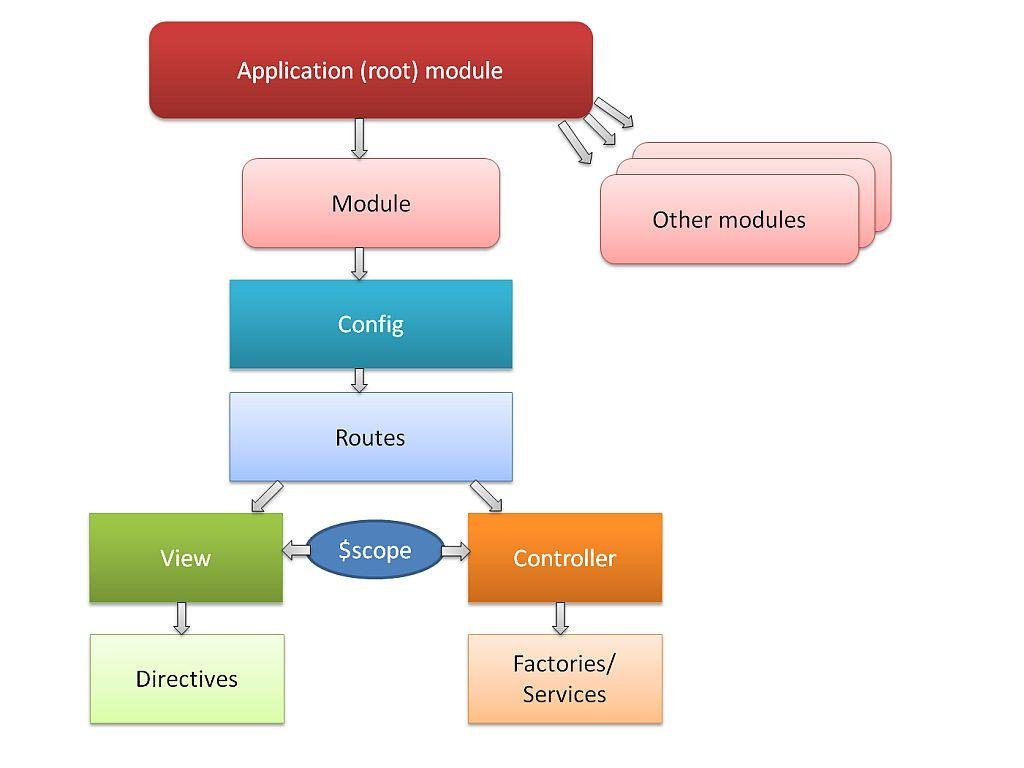
Applicatie structuur
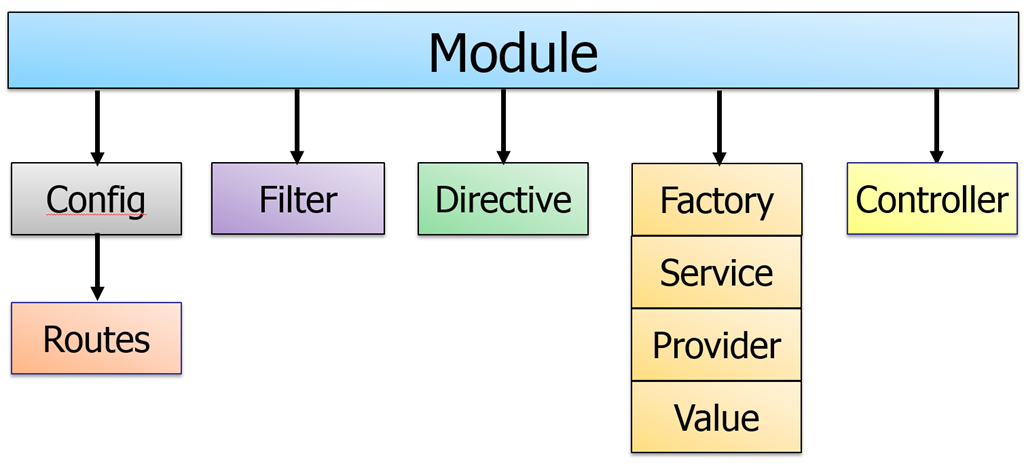
Dependency Injection
angular.module('wiseSelectietool',['wiseMessages', ngRoute])

.controller('ListCtrl',
    function ($scope, SelectionService, $location) {

        $scope.previewReady = true;

        $scope.selections = SelectionService.getSelections();

    }
);
.controller('ListCtrl', ['$scope', 'SelectionService', '$location',
function ($scope, SelectionService, $location) {
$scope.previewReady = true;
$scope.selections = SelectionService.getSelections();
}
]);Voorbeeld: http://jsfiddle.net/tammingajp/v67ecurv/
Routing
Single Page Application
<body>
    ...
    <div ng-view></div>
    ...
</body>
angular.module('myAppl', ['ngRoute'])
.config(function ($routeProvider) {
$routeProvider
.when('/', {
controller : 'view0Ctrl',
templateUrl: 'view0.html'
})
.when('/view1', {
controller : 'view1Ctrl',
templateUrl: 'view1.html'
})
.when('/view2', {
controller : 'view2Ctrl',
templateUrl: 'view2.html'
})
.otherwise({
redirectTo: '/'
});
});Voorbeeld: http://192.168.47.63:8000/app
Directives
- Marker op een DOM element om gedrag te koppelen
- <wise-messages />
- <div wise-messages>...</div>
- <section class="wise-messages">...
angular.module('myApp')
    .directive('wise-messages', function () {
    return {
        restrict: 'EA', //E = element, A = attribute, C = class, M = comment
        scope: {
            //@ reads the attribute value, = provides two-way binding, & works with functions
            title: '@'         },
        template: '<div>{{ myVal }}</div>',
        templateUrl: 'mytemplate.html',
        controller: controllerFunction, //Embed a custom controller in the directive
        link: function ($scope, element, attrs) { } //DOM manipulation
    }
});
Directive voorbeeld
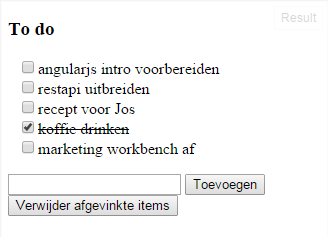
<ul>
    <to-do-item item="item" ng-repeat="item in todos" />
</ul>
.directive('toDoItem',function(){
var toDoItem={
restrict: 'AE',
replace : true,
template : '<li><input type="checkbox" ng-model="item.done"/>' +
'<span ng-class="{done: item.done}">{{item.tekst}}</span></li>'
}
return toDoItem;
})Voorbeeld: http://jsfiddle.net/tammingajp/6zkej96s/
DOM manipulation voorbeeld
app.directive('klikker', function () {
    return {
        link: function ($scope, element, attrs) {
            element.bind('click', function () {
                element.html('Je klikte me!');
            });
            element.bind('mouseenter', function () {
                element.css('background-color', 'yellow');
            });
            element.bind('mouseleave', function () {
                element.css('background-color', 'white');
            });
        }
    };
});
<div klikker>Klik mij!</div>Voorbeeld: http://jsfiddle.net/tammingajp/nhe71j51/
Filter
myApp.filter("labelAttrFilter", function propertyTypeFilter() {

    return function (items, searchText) {
               var arrayToReturn = [];
               if (items instanceof Array) {
                   if (searchText || '') {
                       searchText = searchText.toLowerCase();
                       for (var i = 0; i < items.length; i++) {
                           if (items[i].label.toLowerCase().indexOf(searchText) != -1) {
                               arrayToReturn.push(items[i]);
                           }
                       }
                   }
               }
        return arrayToReturn;
    };
});
Default filtering op alle attributen van object
<ul>
    <li ng-repeat="item in mozaictypes | orderBy: 'label' | filter:labelAttrFilter">{{item.label}}</li>
</ul>
[
{value: "A01", label: "Studentenvrijheid"},
{value: "A02", label: "Online Starters"},
{value: "A03", label: "Digitale Singles"}
]Let nu op:
Ontwikkel omgeving
- npm (opzetten ontwikkel omgeving)
- Bower (package/dependency manager)
- Grunt (+ plugins, task runner)
- Karma / Jasmine (unit tests)
- Protractor (end-to-end tests (todo))






Node Package Manager
> npm installOntwikkeltools installeren
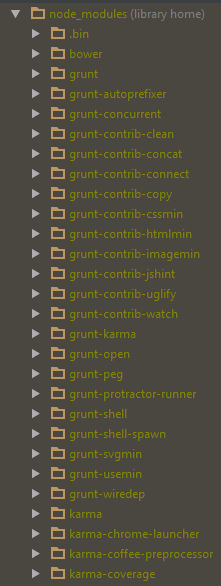
{
  "name": "wise-selectie-tool",
  "version": "0.0.1",
  "scripts": {
    "postinstall": "node ./node_modules/bower/bin/bower install"
  },
  "devDependencies": {
    "matchdep": "~0.1.2",
    "grunt": "~0.4.1",
    "grunt-contrib-connect": "~0.5.0",
    "grunt-contrib-jshint": "~0.6.0",
    "grunt-contrib-clean": "^0.6.0",
    "grunt-contrib-watch": "~0.5.3",
    "grunt-contrib-concat": "~0.3.0",
    "grunt-contrib-uglify": "^0.6.0",
    "grunt-contrib-copy": "^0.6.0",
    "grunt-contrib-imagemin": "^0.8.1",
    "grunt-contrib-cssmin": "^0.10.0",
    "grunt-contrib-htmlmin": "^0.3.0",
    "grunt-autoprefixer": "^1.0.1",
    "grunt-svgmin": "^1.0.0",
    "grunt-wiredep": "^1.9.0",
    "grunt-usemin": "^2.4.0",
    "grunt-concurrent": "^1.0.0",
    "grunt-peg": "^1.5.0",
    "grunt-shell": "~0.4.0",
    "grunt-karma": "~0.6.2",
    "grunt-open": "~0.2.2",
    "grunt-protractor-runner": "~0.1.6",
    "grunt-shell-spawn": "~0.3.0",
    "bower": "^1.2.8",
    "karma-script-launcher": "~0.1.0",
    "karma-firefox-launcher": "~0.1.0",
    "karma-chrome-launcher": "~0.1.0",
    "karma-html2js-preprocessor": "~0.1.0",
    "karma-jasmine": "~0.1.3",
    "karma-requirejs": "~0.2.0",
    "karma-coffee-preprocessor": "~0.1.0",
    "karma-phantomjs-launcher": "~0.1.0",
    "karma-coverage": "^0.2.6",
    "karma": "~0.10.2",
    "protractor": "~0.14.0",
    "time-grunt": "^1.0.0"
  }
}
package.json
{
  "name": "wise-selectie-tool",
  "version": "0.0.1",
  "dependencies": {
    "jquery": "~2.1.1",
    "jquery-ui": "~1.11.1",
    "angular": "~1.2.16",
    "angular-route": "~1.2.16",
    "angular-animate": "~1.2.16",
    "angular-mocks": "~1.2.16",
    "angular-resource": "~1.2.16",
    "angular-dragdrop": "~1.0.8",
    "components-font-awesome": "~4.2.0",
    "angular-sanitize": "~1.2.16",
    "angular-cookies": "~1.2.16",
    "angular-ui-slider": "0.0.2"
  },
  "resolutions": {
    "angular": "~1.2.16",
    "jquery-ui": "~1.11.1"
  }
}
bower.json
<!-- bower:js -->
    <script src="../bower_components/jquery/dist/jquery.js"></script>
    <script src="../bower_components/jquery-ui/jquery-ui.js"></script>
    <script src="../bower_components/angular/angular.js"></script>
    <script src="../bower_components/angular-route/angular-route.js"></script>
    <script src="../bower_components/angular-animate/angular-animate.js"></script>
    <script src="../bower_components/angular-mocks/angular-mocks.js"></script>
    <script src="../bower_components/angular-resource/angular-resource.js"></script>
    <script src="../bower_components/angular-dragdrop/src/angular-dragdrop.js"></script>
    <script src="../bower_components/angular-sanitize/angular-sanitize.js"></script>
    <script src="../bower_components/angular-cookies/angular-cookies.js"></script>
    <script src="../bower_components/angular-ui-slider/src/slider.js"></script>
<!-- endbower -->
i.c.m. grunt-wiredep:
inject components in HTML
> bower install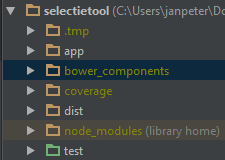
Gruntfile.js
Plugins
module.exports = function(grunt) {
	"use strict";
  require('time-grunt')(grunt);

 ...

  //autotest and watch tests
  grunt.registerTask('autotest', ['karma:unit_auto']);
  grunt.registerTask('autotest:unit', ['karma:unit_auto']);
  grunt.registerTask('autotest:e2e',
    ['connect:testserver',
     'shell:selenium',
     'watch:protractor']);

  //coverage testing
  grunt.registerTask('test:coverage', ['karma:unit_coverage']);
  grunt.registerTask('coverage',
    ['karma:unit_coverage',
     'open:coverage',
     'connect:coverage']);

  //installation-related
  grunt.registerTask('install', ['update','shell:protractor_install']);
  grunt.registerTask('update', ['shell:npm_install', 'concat']);

  //server daemon
  grunt.registerTask('serve', ['connect:webserver']);

  grunt.registerTask('build', [
		'test:unit',
		'clean:dist',
		'wiredep',
		'useminPrepare',
		'concurrent:dist',
		'autoprefixer',
		'concat',
		'cssmin',
		'uglify',
		'copy:dist',
                'rev',
		'usemin',
		'htmlmin'
	]);
};
- clean
- concat
- cssmin
- htmlmin
- uglify
- wiredep
- peg
- karma
- watch
- ...
module.exports = function(config) {
  config.set({
    files : [
	  // AngularJS
          'bower_components/angular/angular.js',
          'bower_components/angular-route/angular-route.js',
          'bower_components/angular-resource/angular-resource.js',
          'bower_components/angular-sanitize/angular-sanitize.js',
          'bower_components/angular-ui-slider/src/slider.js',
          'bower_components/angular-mocks/angular-mocks.js',
          'bower_components/angular-dragdrop/src/angular-dragdrop.js',

	  // wellicht later als bower component?
	  './../AngularJS/target/wise-auth/wise-auth.js',

	  // de applicatie
	  'app/scripts/app.js',
	  'app/scripts/util/map.js',
	  'app/scripts/util/MD5.js',
	  'app/scripts/cql/normalize.js',
	  'app/scripts/cql/cql-parser.js',
	  'app/scripts/wise-messages/wise-messages-module.js',
	  'app/scripts/wise-messages/wise-messages-service.js',
	  'app/scripts/wise-messages/wise-messages-directive.js',
	  // TODO: de wise modules t.b.v. tests aanbieden op een stabiel systeem
	  'http://hkadev01.bicat.com/rsrc/AngularJS/components/wise-modal/wise-modal-module.js',
	  'http://hkadev01.bicat.com/rsrc/AngularJS/components/wise-modal/wise-modal-service.js',
	  'http://hkadev01.bicat.com/rsrc/AngularJS/components/wise-modal/wise-modal-directive.js',
	  'app/scripts/app.js',
	  'app/scripts/selection/selectionResource.js',
	  'app/scripts/selection/selectionService.js',
	  'app/scripts/rubrieken/rubriekenService.js',
	  'app/scripts/results/resultService.js',
	  'app/scripts/nodes/queryBuilder.js',
	  'app/scripts/rubrieken/rubriekEditor.js',
	  'app/scripts/rubrieken/abstractRubriekCtrl.js',
	  'app/scripts/rubrieken/rubriekSexeCtrl.js',
	  'app/scripts/rubrieken/rubriekLeeftijdCtrl.js',
	  'app/scripts/nodes/leaf.js',
	  'app/scripts/nodes/node.js',
	  'app/scripts/rest.js',
	  'app/scripts/auth/loginCtrl.js',

          // de tests
	  './test/unit/listCtrlSpec.js',
	  './test/unit/buildCtrlSpec.js'
	  './test/unit/selectionServiceSpec.js'
    ],
    basePath: '../',
    frameworks: ['jasmine'],
    reporters: ['progress'],
    browsers: ['PhantomJS'],
	  plugins: [
		  'karma-jasmine',
		  'karma-coverage',
		  'karma-phantomjs-launcher',
		  'karma-chrome-launcher',
	  ],
    autoWatch: false,
    singleRun: false,
    colors: true
  });
};
karma-unit.conf.js
"use strict";

describe('SelectionService', function() {
    beforeEach(angular.mock.module('wiseSelectietool'));

    var mockSelectionResource;
    var $httpBackend;

    beforeEach(function() {
	angular.mock.inject(function($injector){
            $httpBackend = $injector.get('$httpBackend');
	    mockSelectionResource = $injector.get('Selection');
	})
    });

    describe('Selection.get ', function() {
	it('should get all selections', inject(function (Selection) {
	    $httpBackend.expectGET("/restapi/service/selection").respond({
	        data: [
		    {"id": 17, "name": "Mijn selectie", "description": "",
                     "cqlQuery": "((T.leeftijd = \"D\") and (E.plaatsing <> \"YLE|YLI|YSP|YTS|YYA\"))", "owner": 102},
		    {"id": 16, "name": "testvw3", "description": "", "cqlQuery": "((K.bieb_ab_nr = \"42\"))", "owner": 51624},
		    {"id": 15, "name": "Mijn selectie", "description": "", "cqlQuery": "((K.aantal_uitl = \"50\"))", "owner": 102},
		    {"id": 14, "name": "Mijn selectie", "description": "", "cqlQuery": "((K.aantal_uitl = \"50\"))", "owner": 102},
		    {"id": 12, "name": "jennifer 2", "description": "", "cqlQuery": "((E.materiaal = \"B2\"))", "owner": 51624},
		    {"id": 10, "name": "ex", "description": "", "cqlQuery": "((E.materiaal = \"\"))", "owner": 51624},
		    {"id": 1, "name": "Voorlopige Titels", "description": "Voorlopige Titels",
                     "cqlQuery": "((T.boven = \"J\") and (T.titstat = \"V\"))", "owner": 0}
		]
	    });
	    var result = mockSelectionResource.get();
	    $httpBackend.flush();
            expect(result.data[0].id).toEqual(17);
	}));
    });

    describe('Selection.get ', function() {
	it('should get one selection', inject(function (Selection) {
	    $httpBackend.expectGET("/restapi/service/selection/17").respond({
		data: { "id": 17, "name": "Mijn selectie", "description": "",
                        "cqlQuery": "((T.leeftijd = \"D\") and (E.plaatsing <> \"YLE|YLI|YSP|YTS|YYA\"))", "owner": 102}
		});
		var result = mockSelectionResource.get(17);
		$httpBackend.flush();
		expect(result.data.id).toEqual(17);
	    }));
    });
});
selectionServiceSpec.js
exports.config = {

  seleniumServerJar: '../node_modules/protractor/selenium/selenium-server-standalone-2.37.0.jar',
  seleniumPort: null,
  chromeDriver: '../node_modules/protractor/selenium/chromedriver',
  seleniumArgs: [],

  // If sauceUser and sauceKey are specified, seleniumServerJar will be ignored.
  // The tests will be run remotely using SauceLabs.
  sauceUser: null,
  sauceKey: null,

  // ----- What tests to run -----
  //
  // Spec patterns are relative to the location of this config.
  specs: [
    './e2e/*.js'
  ],

  capabilities: {
    'browserName': 'chrome'
  },

  // A base URL for your application under test. Calls to protractor.get()
  // with relative paths will be prepended with this.
  baseUrl: 'http://localhost:9999',

  // Selector for the element housing the angular app - this defaults to
  // body, but is necessary if ng-app is on a descendant of <body>
  rootElement: 'body',

  // ----- Options to be passed to minijasminenode -----
  jasmineNodeOpts: {
    // onComplete will be called just before the driver quits.
    onComplete: null,
    // If true, display spec names.
    isVerbose: false,
    // If true, print colors to the terminal.
    showColors: true,
    // If true, include stack traces in failures.
    includeStackTrace: true,
    // Default time to wait in ms before a test fails.
    defaultTimeoutInterval: 10000
  }
};
protractor.conf.js
binnenkort
describe('Home Page', function() {

  var ptor = protractor.getInstance();

  it('should have a title', function() {
    browser.get('http://hkadev01.bicat.com/selectietool/app/index.html#/');
    expect(browser.getTitle()).toEqual('Wise Marketing Workbench');
  });

});
homePageSpec.js
Werken aan frontend
- Sources ophalen
- Tools installeren
- Ontwikkelen
node.js installeren (platform afhankelijk)

grunt commandline installeren (global, eenmalig):
> npm install -g grunt-cli

rest ontwikkeltools installeren:
> npm install

dependencies voor dit project installeren:
> bower install
> cvs -d ':ext:user@cvs.bicat.com:/home/cvsroot' co bxmcgiWise Modules
<div data-wise-paging-summary
     data-offset="paging().offset"
     data-total="paging().total"
     data-perpage="paging().perpage">
</div>


<div data-wise-paging
     data-offset="paging().offset"
     data-total="paging().total"
     data-perpage="paging().perpage"
     data-on-offset-change="setPagingOffset">
</div>
wise-paging
2. Module injecteren in app
var searchApp = angular.module('searchApp', ['wisePaging']);
1. Scripts opnemen in html
3. Directive plaatsen
4. Callback functie maken
5. Enjoy


Wise Modules
<div data-wise-modal
     data-close-on-backdrop-click="true">
</div>
wise-modal
2. Module injecteren in app
var searchApp = angular.module('searchApp', ['wiseModal']);1. Scripts opnemen in html
3. Directive plaatsen
4. Activeren (externe content in iFrame
5. Enjoy
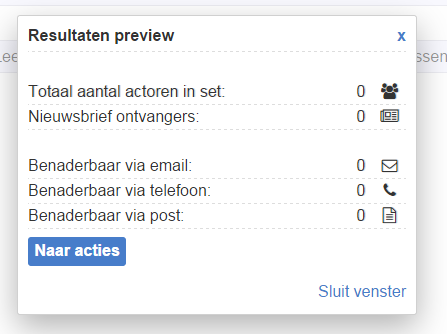
WiseModalService.openModal('include:partials/resultsPreview.html', 'Resultaten preview');Wise Modules
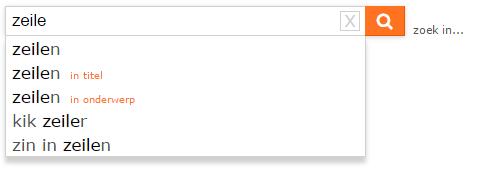
<span data-wise-suggest
    data-ng-model="qs"
    data-current-qs="qsCopy()"
    data-get-suggestions="getSuggestions()"
    data-select-callback="newSearch()"
    data-suggestion-list="suggestions"
    data-wait-time-ms="300"
    data-min-chars="2"
    data-placeholder="Vind..."
    class="suggestions">
</span>
wise-suggest
2. Module injecteren in app
var searchApp = angular.module('searchApp', ['wiseSuggest']);
1. Scripts opnemen in html
3. Directive plaatsen
4. Callback functies maken
5. Enjoy
Wise Modules
<div data-wise-messages="myQueue"></div>

<div data-wise-last-message="otherQueue"></div>
wise-messages
2. Module injecteren in app
var searchApp = angular.module('searchApp', ['wiseMessages']);1. Scripts opnemen in html
3. Directive plaatsen
4. Activeren
5. Enjoy
WiseMessageService.success('Opgeslagen',"myQueue");

Wise Modules
angular.module('wiseSelectietool')

.controller('LoginCtrl', ['$scope', '$rootScope',
                          'AuthenticationService',
                          function ($scope, $rootScope, AuthenticationService) {

    $scope.login = function(authType){
        return AuthenticationService.login($scope.username, md5($scope.password),
                                           authType, $scope.vestigingId, $scope.instantieId)
	           .then(function(data){
			$rootScope.gebruikersnaam = data.username;
		    }
	       );
    };

    $scope.logoff = function(){
	AuthenticationService.logoff();
	$rootScope.gebruikersnaam = '';
    };
}]);
wise-auth
2. Module injecteren in app
var searchApp = angular.module('searchApp', ['wiseAuth']);1. Scripts opnemen in html
3. Configureren
AngularJS Intro
By Jan Peter Tamminga