React.js

Jaroslav Kubicek
Content
- What you know about JS?
- jQuery - why and why not?
- React.js fundamentals
- Building React.js component tree
- How to deal with application state
- abtracting us from ugly browser native interface
jQuery - when we need it
$.get('http://example.com').then(processData);var httpRequest = new XMLHttpRequest();
httpRequest.open('GET', 'http://example.com');
httpRequest.send();
httpRequest.onreadystatechange = function() {
if (httpRequest.readyState === XMLHttpRequest.DONE) {
if (httpRequest.status === 200) {
processData(httpRequest.responseText);
}
}
};- helping with DOM manipulation
jQuery - when we need it
$(document).on('click', '#button', function () {
  var count = $(this).data('clicked-count');
  $('#input').value(count);
});- Single page application
- It's just helper library, not framework
- things that jQuery doesn't solve:
- modularity & composability
- managing application state
- splitting application logic and model from visual presentation
jQuery - when it's not sufficient anymore
We need more...

React.js
- Have one job - and it's doing it well
- View in MVC
- abstract us from ugly DOM with really simple interface
- doesn't solve managing application state*

How you should feel right now...
React.js - basics
var CustomButton = React.createClass({
  render: function() {
    return (
      <div className="my-button">
        <button>Click me!</button>
      </div>
    );
  }
});

var RootComponent = React.createClass({
  render: function() {
    return (
      <div>
        <h1>Hello world!</h1>
        <CustomButton />
      </div>
    );
  }
});

ReactDOM.render(
  <RootComponent />,
  document.getElementById('my-spa')
);
React.js - props
class RootComponent extends React.Component {

  render() {
    return (
      <div>
        <h1>Hello {this.props.name}!</h1>
      </div>
    );
  }

}

RootComponent.propTypes = {
  name: React.PropTypes.string.isRequired
};

ReactDOM.render(
  <RootComponent name={'Jouda'} />,
  document.getElementById('my-spa')
);
React.js - events
class ButtonSend extends React.Component {

  constructor(props) {
    super(props);

    this._onClick = this._onClick.bind(this);
  }

  _onClick(event) {
    doStuffWithSyntethicEvent(event);
    this.props.onFormSend();
  }

  render() {
    return (
      <button type="submit" onClick={this._onClick}>Submit</button>
    );
  }

}React.js - state
class CustomButton extends React.Component {

  constructor(props) {
    super(props);

    this.state = {count: 0};
    this._onClick = this._onClick.bind(this);
  }

  _onClick() {
    this.setState({count: this.state.count + 1})
  }

  render() {
    return (
      <div>
          <div>You clicked {this.state.count} times.</div>
          <button type="submit" onClick={this._onClick}>Click me</button>
      </div>
    );
  }

}
React.js - component lifecycle
class CustomButton extends React.Component {

  constructor(props) {
    super(props);
    // initialisation
  }

  componentDidMount() {} // before component is attached to DOM

  componentDidMount() {
    // after component is attached to DOM
    findDOMNode(this) // <div> element
  }

  // return true/false if component should be updated
  shouldComponentUpdate(newProps, newState) {}

  componentWillUpdate() {} // before component is updated

  componentDidUpdate() {} // after component is updated

  componentWillUnmount() {} // before element is detached from tree

  render() {
    return (<div></div>);
  }

}
React.js - how NOT to deal with state
class Comments extends React.Component {

  constructor(props) {
    super(props);

    this.state = {items: []};
  }

  componentDidUpdate() {
    $.get('http://example.com/comments').then(function(data) {
      this.setState({items: JSON.parse(data)});
    });
  }


  render() {
    return (
      <div>
        {this.state.items.map((comment) => <p>{comment}</p>)}
      </div>
    );
  }

}
React.js - how to deal with state

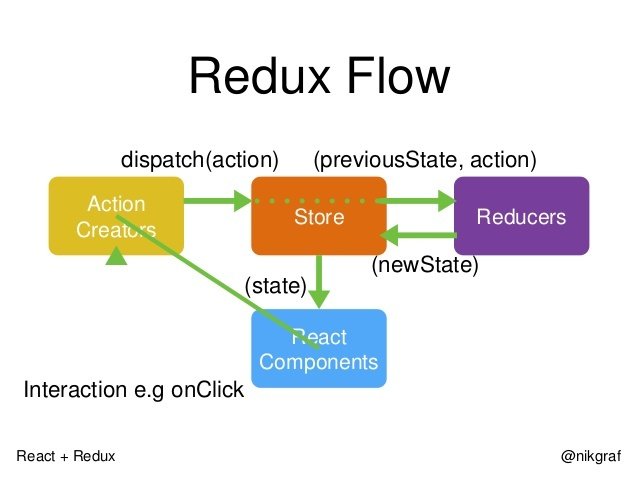
Demo time!

Thanks!
-
React.js: https://facebook.github.io
-
ES2015: http://exploringjs.com/es6/
React.js basics
By Jaroslav Kubíček