Angular Directives
Directive types
// element name
<hug-rank></hug-rank>

// attribute
<span hug-rank="exp"></span>

// class name
<span class="hug-rank"></span>
$compile can match directives based on element names, attributes, and class names
Best Practice is to use element or attribute names when declaring directives
Older browsers (IE8) only support class name declaration
Declaring a directive
var app = angular.module('datahugApp', []);

app.directive('hugRank', function() {
  return {
      restrict: 'AE',
      replace: false,
      template: '<div class="hugrank-container">{{hugrank}}</div>'
  };
});
app.directive() registers a new directive on our app module
This contains the directive definition which includes its name and a function which returns the directive definition object.
During comiplation the angular compiler strips dashes from element or attribute names and converts them to camel case
Directive definition object
app.directive('hugRank', function() {
  return {
      restrict: 'AE',
      replace: false,
      scope: {
          hugrankValue: '=hugrankValue'
      },
      controller: function(){
        $scope.hugrankPercentage = $scope.hugrankValue + '%';
      },
      link: function(scope, elem, attrs){
      },
      template: '<div class="hugrank-container">{{hugrankPercentage}}</div>'
  };
});


//Usage

<hug-rank hugrank-value="75"></hug-rank>
The directive definition object can contain, restrict, replace, scope, controller function, compile function, link function, template or templateUrl
restrict
app.directive('hugRank', function() {
  return {
      restrict: 'E' // element
  };
});

<hug-rank hugrank-value="75"></hug-rank>

app.directive('hugRank', function() {
  return {
      restrict: 'C' // class
  };
});

<div class="hug-rank" hugrank-value="75"></div>

app.directive('hugRank', function() {
  return {
      restrict: 'A' // attribute
  };
});

<div hugrank-value="75" hug-rank></div>
This defines how a directive should be used in HTML
It provides instructions to the compiler which directive type should be rendered
Best practice is 'A' or 'E'
You can also combine types in your definition e.g.
restrict: 'AE'
scope types
scope: {}
// return a new isolated scope

scope: true
// use a child scope that inherits from parent

scope: {
    hugrankValue: '@hugrankValue'
}
// isolated scope - string or angular expression

scope: {
    hugrankValue: '=hugrankValue'
}
// isolated scope - bi-direction binding
// to an object

scope: {
    hugrankValue: '&hugrankValue'
}
Defaults to no definition - scope is inherited from parent.

If set to true, then a new child scope will be created for this directive. The directive doesn't automatically inherit scope from its parent resulting in more re-usable components and easier to test.

For us isolated scope is usually the best approach.
scope: {
    hugrankValue: '@hugrankValue'
}

<hug-rank hugrank-value="'75'">

// isolated scope - string or angular expression


scope: {
    hugrankValue: '&hugrankValue'
}

<hug-rank hugrank-value="updateHugrank(value);">

// isolated scope - binding to an expression


scope: {
    hugrankValue: '=hugrankValue'
}

<hug-rank hugrank-value="hugrank">
// isolated scope - bi-direction binding
// to an object
'@' or '@hugrankValue': Pass in string or angular expression from parent. One way communication between parent and child. '&' or '&hugrankValue': Allows the directive's isolate scope to pass values into the parent scope for evaluation in an expression. In our example 'value' can be set in directive and passed to parent controller method. '=' or '=hugrankValue' : Pass in data model from parent. Set up bi-directional binding between local scope property and the parent scope property. Changes in parent reflected in child and vice-versa.
controller vs link
scope: {
    hugrankValue: '='
},
controller: function($scope, $element, $attr){

    $scope.hugrank = $scope.hugrankValue;
    $scope.hugrankPercentage = $scope.hugrankValue + '%';

    $scope.alertHugrank = function(hugrank){
        console.log(hugrank);
    }

},
link: function(scope, element, attr){

    element.find('progress-bar').css('width', scope.hugrankPercentage)

},
template: '<div class="hugrank-container" title="hugrank" ng-click="alertHugrank(hugrank);">' +
          '<div class="progress-bar">{{hugrank}}</div>'+
          '</div>'

<hug-rank hugrank-value="hugrank"></hug-rank>
Contoller for business logic, link for DOM maniplation. Controller runs before compilation, link runs after.
controller vs link
Contollers are injectable, so you can call a method in a parent directive controller from the child directive. This is useful for nested directives.
Child directives link function compiles before its parent. In a lot of instances controller methods can be adapted to work in link function, as the link function has access to scope but link function is clearly in the realm of DOM manipulation and event listeners
link: function(scope, element, attr){
    var alertHugrank = function(){
        alert(scope.hugrankValue)
    }
    element.bind('click', alertHugrank);
}

controller: function($scope, $element, $attr){
    $scope.alertHugrank = function(hugrank){
        alert(hugrank);
    }
}
link: function(scope, element, attr){
    element.on('click', function(){
        scope.alertHugrank(scope.hugrank)
    });
},
controller: function($scope, $element, $attr){
    $scope.alertHugrank = function(hugrank){
        alert(hugrank);
    }
}
compile
The compile function is used to perform any DOM transformation before the link function runs. It accepts the following arguments:
tElement – The element on which the directive is applied.
attrs – The list of attributes declared on the element.
The compile function doesn't have access to scope, it can make DOM transformations on the template, it can also only return a link function.
app.directive('hugRank', function() {
  return {
    compile: function(tElem,attrs) {
      return function(scope,elem,attrs) {
        //linking function here
      };
    }
  };
});
compile vs link
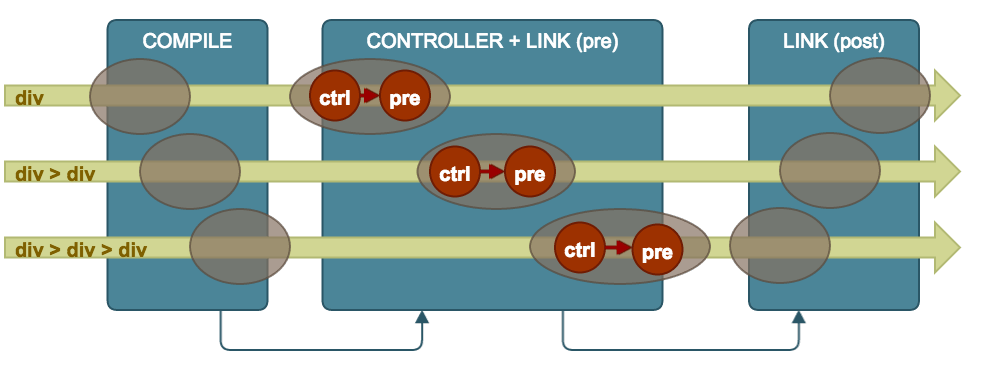
When the application bootstraps, Angular starts parsing the DOM using the $compile service.

Template loads with all the angular directives

Angular script loads, it looks for ng-app to find application boundaries

Compile phase - angular traverses the DOM to find registered directives and transform them - this only happens once when the directive is being registered.

Link phase  - this runs a link function which creates event listeners or carries out DOM manipulation - this happens for every instance of a directive
Why is this important?
If a directive needs to be cloned multiple times (e.g. ng-repeat), we get a performance benefit as the compile function runs once for the cloned template, but the link function runs for each cloned instance.

After the compile phase is over the linking phase starts. This is where the templates produced by the directives are evaluated against correct scope and are turned into DOM elements usually with events attached.
Other definitions
template
templateUrl
replace
transclude
Full code example
app.directive('hugRank', function() {
  return {
      restrict: 'E',
      replace: false,
      scope: {
          hugrankValue: '=hugrankValue'
      },
      controller: function($scope, $element, $attr){

        $scope.hugrank = $scope.hugrankValue;
        $scope.hugrankPercentage = $scope.hugrankValue + '%';

        $scope.alertHugrank = function(hugrank){
            console.log(hugrank);
        }

      },
      link: function(scope, element, attr){

        element.find('.progress-bar').css('width', scope.hugrankPercentage)

      },
      template: '<div class="hugrank-container" title="hugrank" ng-click="alertHugrank(hugrank);">' +
                '<div class="progress-bar">{{hugrank}}</div>'+
                '</div>'
    }

  }
});

<hug-rank hugrank-value="hugrank"></hug-rank>
Angular 2.0
What to expect

-
No indication of release date -
Promises of big performance improvements - separation of angular app and angular render - similar to React Native -
Based on Typescript & ES6 standards -
Two way binding no longer default -
No clear upgrade path but promises that the angular team are thinking about it. (insert worried face here) -
It may be too soon to plan for upgrade as changes are still happening -
Controllers are gone -
Directives are gone -
$scope is gone
What will <hug-rank></hug-rank > look like in Angular 2.0
import { Component, View } from 'angular2/angular2';

@Component({
    selector: 'hug-rank'
})

@View({
    template: '<hug-rank [model]="hugrank" (alertHugrank)="alertHugrank()">'+
              '<div class="progress-bar"></div>'+
              '</hug-rank>',
    directives: [NgIf, NgModel],
    events: [alertHugrank]

})

class hugRank{
    hugrank: string;

    constructor () {
        this.hugrank= 75;
        this.alertHugrank= new EventEmitter();

    }

    alertHugrank() : string {
        return hugrank;
    }

}

export default hugRank
Resources
1) https://egghead.io/lessons/angularjs-isolate-scope-review
2) http://jasonmore.net/angular-js-directives-difference-controller-link/
3) http://www.sitepoint.com/practical-guide-angularjs-directives/
4) https://docs.angularjs.org/api/ng/service/$compile#directive-definition-object
5) http://triangular.io/blog/directive-compilation-in-angularjs-step-by-step/
6) https://d2eip9sf3oo6c2.cloudfront.net/pdf/egghead-io-directive-definition-object-cheat-sheet.pdf
deck
By Jennifer Brady