<info 340/>
HTML Basics
Joel Ross
Spring 2020
Client-side Web Development



protocol
domain
resource

"Hi Wikipedia, I'd like you to send me the Informatics page!"
two
t
(how to handle info)
(who has info)
(what info you want)
Web Server
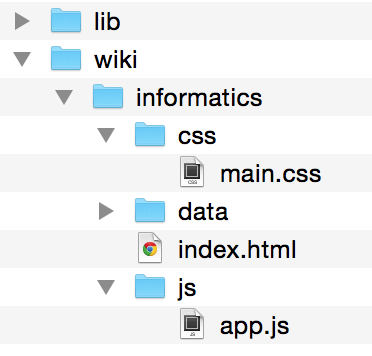
Response
Using the Internet
Request
+

=
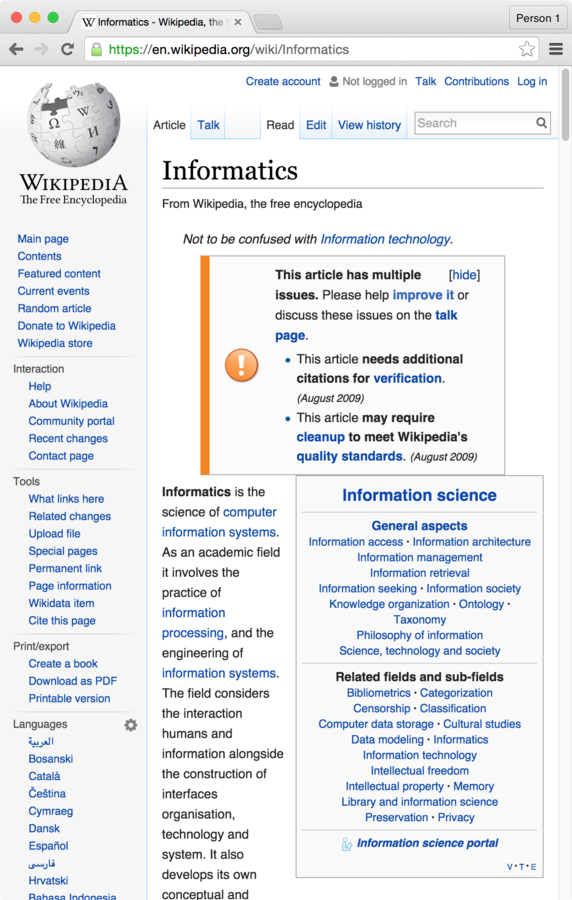
Let's make those files!
Clone Starter Code
Clone the lecture demo git repo to work along with me

Visual Studio Code
Edit the index.html file


Open the file with Chrome
What if we want so say how
the content is rendered?
HTML
Hyper Text Markup Language
Adds meaning to otherwise plain text

"this is a heading, this is a paragraph, this is a definition, this is a hyperlink..."
for documents that link to one another!
HTML Syntax
Annotate
content by surrounding it
with
<tags>
<tag>

Content

</tag>


<tag>content</TAG>
open/start tag
close/end tag (leading slash)
content
}
ignores whitespace and tag case (use lowercase)
Some Common Tags
-
<h1>: a 1st-level heading -
<h2>: a 2nd-level heading (and so on, down to <h6>) -
<p>: a paragraph of text -
<a>: an “anchor”, or a hyperlink -
<img>: an image -
<button>: a button -
<em>: emphasized content (not necessarily italic). The same as _text_ in Markdown. -
<ul>: an unordered list (and <ol> is an ordered list) -
<li>: a list item (an item in a list) -
<table>: a data table -
<form>: a form for the user to fill out -
<div>: a division (section) of content. Also acts as an empty block element (followed by a line break) -
<span>: a span (section) of content. Also acts as an empty inline element (not followed by a line break)
And more at http://www.w3schools.com/tags/ref_byfunc.asp
HTML Attributes
Elements can include attributes in the start tag, which specify options or add further meaning.
<tag attributeA="value" attributeB="value">
    content
</tag>
Attributes are a space-separated list of names (think: variables) and values.
Values are (almost) always Strings.
<html lang="en">
...
</html>
<!-- an image -->
<img src="baby_picture.jpg" alt="a cute baby"><!-- a is an "anchor" (hyperlink) -->
<a href="https://ischool.uw.edu">iSchool homepage</a>
Example Attributes
"hypertext reference"
alternate text for screen readers
source
images have no (text) content so no closing tag
language of document is English
Nesting Elements
The content of a tag can contain
other HTML tags.
<h1>Hello <em>(with emphasis)</em> world!</h1>open h1
close h1
open em
close em
What's wrong here?
<p>I <strong>never<strong> make mistakes</p>important text
did not close tag!
Example: Nested Lists
<!-- An unordered list (ul) with 3 items.
  The second item's content contains an
  ordered list (ol) containing 2 items. -->
<ul>
  <li>Pigeons</li>
  <li>
    Swallows:
    <ol>
      <li>African</li>
      <li>European</li>
    </ol>
  </li>
  <li>Budgies</li>
</ul>
cmd + / to
comment a line
comments
VS Code
Command Palette
Open up the command palette with
F1 or
cmd-shift-p for quick access to commands.

HTML Tree

HTML documents are structured as an ordered tree of elements.
HTML for the Web
<html lang="en">
<body>
   <h1>Some content...</h1>
   ...
</body>
</html>
A particular structure is needed to make the HTML work as a "web" page (online):
declare language
<!DOCTYPE html>
<html lang="en">
<body>
   <h1>Some content...</h1>
   ...
</body>
</html>
for search engines, etc.
document format
<!DOCTYPE html>
<html lang="en">
<head>
   <title>My Page Title</title>
</head>
<body>
   <h1>Some content...</h1>
   ...
</body>
</html>
document "header" (not shown)
title in tab
<!DOCTYPE html>
<html lang="en">
<head>
   <meta charset="UTF-8">
   <title>My Page Title</title>
</head>
<body>
   <h1>Some content...</h1>
   ...
</body>
</html>
for non-English chars
<!DOCTYPE html>
<html lang="en">
<head>
   <meta charset="UTF-8">
   <meta name="author" content="your name">
   <title>My Page Title</title>
</head>
<body>
   <h1>Some content...</h1>
   ...
</body>
</html>
start document body (shown) content
start HTML document (web page)
end of body content
end of document
info340sp20-html-basics
By Joel Ross