COMP1701-004
fall 2023
lec-04
Off In the Distance
any A1 Part 3 questions?
I have a few comments about the first parts.
Learning moment for both parties!
speaking of questions
This might be a good keyboard shortcut to memorize.
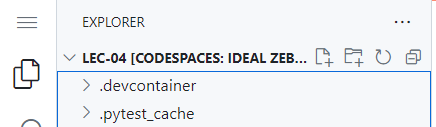
hamburger
btw: hot dog
continuing to speak of questions
onlinequestions.org
202304170104RECALL
Did you know?...
let's talk about these things today:
⦾ variables
⦾ data types
⦾ operators
variables
Section 2.7 in our text.
weight
blood_type
-
computer memory is a bunch of "little boxes" next to each other
-
each box holds ONE thing
-
each box can be given a "name"
-
each box/label combo is a variable
One way of viewing a variable:
as a little box with a name.
34
"A"
variables
Memory only holds 0's and 1's....

...but that's only a useful detail in advanced situations, so we handwave it most of the time.
But you still have to remember this -
it will definitely resurface in future courses!
weight
blood_type
00100010
01000001
This just in:
variables
assigning values to variables
weight = 34
What's blah = blahblah called again?!?
Which of our 7 measly things are these?
weight
blood_type
34
"A"
blood_type = "A"variables
syntax for Python variables
syntax: rules for combining symbols resulting in valid code for a given language
- start with a letter or _
- contain only letters, numbers, _
Just 2 Rules: variable names MUST
🙋🏻♂️❓🙋🏻♀️
variables
naming conventions for Python variables
naming conventions: guidelines for the format of names used in a specific language
- ...contain only lowercase letters
- ...separate words with _ (aka "snake_case")
Just 2 Conventions: variable names SHOULD...
🙋🏻♂️❓🙋🏻♀️
variables
best practices for naming variables
best practices: practices to follow if you want to be considered a "good developer"
- ...expressive - they should never confuse or deceive
- ...concise - but if this conflicts with 1, 1 should win
Just 2 Practices: variable names SHOULD BE...
*
A very important truth:
“Programs are meant to be read by humans and only incidentally for computers to execute.”
- Donald Knuth
Follow the syntax to make the computer happy. Follow conventions and best practices to make your fellow programmers happy.
- JP
Which leads to this advice:
variables
check your noggin
x

1potato

num_lotions_in_basket

gravForceOnMoon

_coins_in_hand

Life_Remaining

_

print

temp_1
Which of these...
- are syntactically correct?
- follow Python naming conventions?
- follow best practices?
== FRIENDLY WARNING ==
You don't have the squiggles on a written test.


data types
Do you think 14 and 14.000 are the same things?
How about 42 and "42"?
data types
| Type | Represents | Examples |
|---|---|---|
| int | integer numbers | 12, 0, -15918291 |
| float | floating-point numbers | 3.14, -1.0 |
| str | a string of characters (text) | 'yo', "", "game over, man", '2', '4/6' |
| bool | Boolean values | True, False |
common data types in Python
empty string
very common term
data types
variables in Python are dynamically typed
somevar = 5
somevar = -3000.1234
somevar = "There's a snake in my boot!"
somevar = True
🙋🏻♂️❓🙋🏻♀️
🙋🏻♂️❓🙋🏻♀️
🙋🏻♂️❓🙋🏻♀️
🙋🏻♂️❓🙋🏻♀️
data types
Python is strongly typed
4 + 6  # ok

4 + 6.0 # also ok...but interesting...

6 / 2 # saywhatnow?

5 + "howzitgoing?" # nope

"True" + True

True + "True"

true + "false" # careful!
Would you REPL this to find out? Or script it?
Are you predicting as we go through these? You really, really should.
Are you reading the errors coming up and trying to understand 'em?
data types
variables in Python are also strongly typed
num_my_cats = 0
num_your_cats = 4
curr_volume = 11.0
fav_movie = "Aliens"
everything_is_groovy = True

num_my_cats + num_your_cats

curr_volume * num_my_cats

fav_movie * num_your_cats

everything_is_groovy - num_my_cats
Are you predicting as we go through these? You really, really should.
Are you reading the errors coming up and trying to understand 'em?
If there are no errors and you thought there would be, what's going on?
data types
Python allows explicit type casting
float(4) + 6

4 + int(6.0)

str(5) + "howzitgoing?"

"True" + str(True)
Are you still predicting?!?! Or has your brain turned to goo?
Mini Brain Break!
operators
Wait...what's an "operator"?!?
Ah - sorry. It's just a symbol (or sometimes a word, as we'll see in a few weeks) that means "do something with the two thingies on either side of the operator".
Cleared that right up, yes?
operators
2 + 3
pallets = 4
x = 12 // num_bags
the assignment operator
num_chickens = 17Which of our 7 measly things does this show?
What did we call this kind of statement?
the math operators
Math operators (like + - / * ) are fairly self-explanatory, but you have to be a bit careful, because familiar multiplication and division shorthands aren't available.
3(x + 2)
(x + y)
4
3 * (x + 2)(x + y) / 4** (the exponent operator)
There are also some weirdos we should talk about:
% (the modulus operator)
// (the floor division operator)
aka integer division
math operators
the
exponent operator
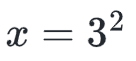
x = 3**2math operators
the
modulus operator
Find what's "left over" after doing integer division.
num_eggs = 17
leftover = num_eggs % 12

print("There are", leftover, "eggs left over.")
math operators
the
floor division operator
Rounds down to the nearest integer.
num_eggs = 17
num_cartons = num_eggs // 12

print("You need", num_cartons, "to hold", num_eggs, "eggs.")
Which of our 7 measly things do you see happening here?
math operators
a brief word about
parenthesis
use them
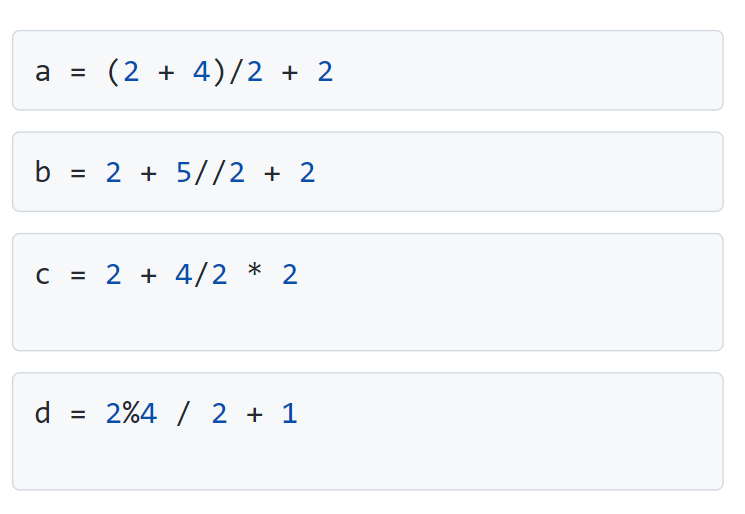
Data types and operators go hand in hand...how the operators "behave" depends on the data types involved!
This is an important abstract concept, but I didn't know how to bring it in earlier, so I have this awkward slide here.
RECAP
What did we talk about today?

lec-04
By Jordan Pratt
lec-04
variables | data types | operators