COMP1701-004
fall 2023
lec-05

Over the Horizon

questions from last time
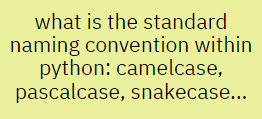
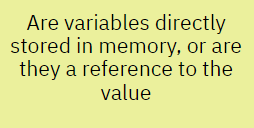
onlinequestions.org
202304170105some cleanup regarding last lecture
I forgot to show you an example like this:
6 / 3 # predict this resultI also misspoke regarding print being a keyword in Python - it's not. It's a built-in function. But there are keywords and you can't play with them.
PREDICT
print "foo"print ("foo")print("\t\tfoo\nbar")stuff = 1.3
more_stuff = 2
stuff_stuff = stuff + more_stuff
Print(stuff_stuff)print("Sum is:", end="")
sum = 5 + 5.0
print(sum)
print(str(sum) * 2)Valid syntax or not?
If not, what's wrong?
If valid, what is printed?
let's talk about these things today:
⦾ keyboard input
⦾ strings
⦾ string operators
⦾ a wee bit of f-strings
keyboard input
What can a CPU do again?
-
read from an input device
-
write to an output device
-
read a value from storage
-
write a value to storage
-
"do math"
-
branch
-
loop (repeated branching)
keyboard input
What can a CPU do again?
-
read from an input device
-
write to an output device
-
read a value from storage
-
write a value to storage
-
"do math"
-
branch
-
loop (repeated branching)
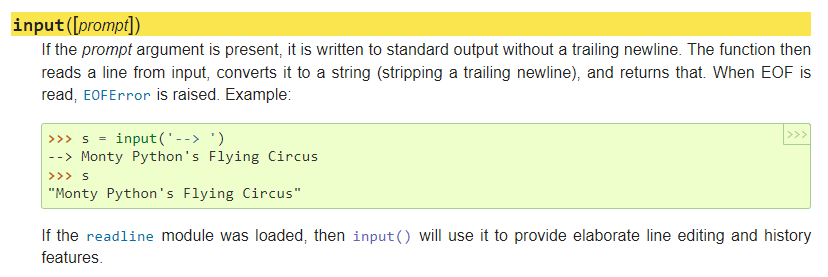
Let's futz around with this input() thingie and see what we can find out.
(but there is some scariness here, I'll admit)
keyboard input
day_of_week = input("What day is it today?")

print(day_of_week)
print("Wow.")
What will appear on the screen when we run this?
What value will be in day_of_week if we type Wed and press Enter?
What type does day_of_week have?
What will be printed?
Do you notice anything annoying about the prompt ending and the stuff entered by the user?
How can we fix that annoying thing?
What special name do we give the string "What day is it today?
Is the newline character included in day_of_week? How can you tell?
PREDICT
print("Welcome to the Day of the Week App")
print()
print("My only wish is to serve you in a servile manner.")
print()
print("What day is it today, oh munificent one? ", end="")
day_of_week = input()

print(day_of_week, "What a wonderful choice!", sep="...")
What will appear on the screen?
What value will be in day_of_week if we type Wed and press Enter?
What does end="" do? Why is it used here?
What will be printed?
Is calling input() without a prompt a syntax error?
What's the equivalent way of writing line 5 & 6 on one line? Which way is "better"?
PREDICT
keyboard input
size_in_toasters = input(
  "How big was that thing you saw, compared to a toaster? "
)

# assume a toaster has a size of 30.7 whatevers
size = 30.7 * size_in_toasters

print("Wow. That thing you saw was", size, "big?!?")
What will appear on the screen? Will the weird formatting blow things up? Why/why not?
What value will be in size_in_toasters if we type 4 and press Enter?
What will be printed? Why?
What is that # blahblah thing called? What's it useful for?
What can we do to fix the problem?
PREDICT
size_in_toasters_as_text = input("How big ... ")

size_in_toasters = int(size_in_toasters_as_text)

size = 30.7 * size_in_toasters
pick your poison
size_in_toasters_as_text = input("How big ... ")

size = 30.7 * int(size_in_toasters_as_text)
size_in_toasters = int(input("How big ... "))
size = 30.7 * size_in_toasterssize_in_toasters = input("How big ... ")
size = 30.7 * int(size_in_toasters)BTW - don't be rude
something is a bit off here...what is it?
input("Greetings, biped. How does it go?")keyboard input
Sanity check
- How do we get input from the keyboard?
- What do we call the string we toss into input()?
- What type of thing does input() return?


"strings"
strings are common, awesome things in pretty well every language
time spent getting to know them is time well spent
so let's do that
strings
Why are they called strings?
Anyone wish to hazard a guess?
...
| f | o | o |
|---|
strings
how to spot a string
that's it
look for PAIRS of " or '
flavour = "disturbingly bold cheddar"

mood = 'cautiously pessimistic'

you_can_do_that = "that's a bit tricksy"

and_this_too = '"Who thought this was a good idea?!?" she said.'

this_is_a_string = 3.13  # such a lie
string operators
string operators
Wait...what's an operator again?!?
A symbol (sometimes a word) that means "do something - an operation - with the two thingies on either side of the operator".
string operators
2 + 3
terrain = "rough"
x = 12 * 3.14
string operators
Here are some basic string operators you should memorize:
= (the assignment operator)
* (the repetition operator)
+ (the concatenation operator)
strings
the assignment operator
prompt = "Gimme a number, or the string gets it."

forcibly_obtained_num = input(prompt)
What kind of thing is going to be in forcibly_obtained_num?
assignment operators
strings
the
repetition operator
heading = "Wokka Wokka"
separator = "-" * 11

print(heading)
print(separator)
This can be a useful operator to have - in special circumstances - but you won't find it in all languages (hi, C++!).
It's also a bit of a gotcha when used with input():
days_left = input("How many days left? ")
hours_left = days_left * 24

print("There are", hours_left, "hours left.")
strings
the
concatenation operator
word_to_excitify = input("Gimme a word to get excited about: ")

excitified_word = "!!!!" + word_to_excitify + "!!!!"

print(excitified_word)
super super super common term
concatenation practice
PREDICT
# assume we have these variables
colour = "brown"
animal = 'unicorn'  # remember, single quotes ok!
height = 3

"Look!" + ' A' + " " + colour + " " + animal + "!"

"It must be at least " + height + " tall!"
What values will the expressions on lines 6 and 8 have?
Look. An orange word.
concatenation practice
CREATE
# assume we have these variables
width = 6
height = 5
area = width * height

# your expression here
What expression would you create to produce the string
'The area of a 6 x 5 rectangle is 30.0'?

a taste of f-strings
Guess what the "f" stands for.
No, it's not that.
first_word = "fly"
second_word = "ointment"

formatted_string = f"{first_word} in the {second_word}."

print(formatted_string)

first_word = 'hole'
second_word = 'roof'
formatted_string = f'{first_word} in the {second_word}.'

print(formatted_string)
predict the output
TRACE IT
predict the output
TRACE IT
room_width_ft = 10
room_length_ft = 20

print(f'Room area: {room_width_ft * room_length_ft}.')
JP being a kind namer of things
not a big fan of this - how could we make this more readable?
p1_name = 'luX0R'
p1_score = 4

p2_name = 'MizKit'
p2_score = 12

print("12345678901234567890")
print(f"{'nickname':<10}{'score':>10}")
print(f"{p1_name:<10}{p1_score:>10}")
print(f"{p2_name:<10}{p2_score:>10}")
the f stands for fun format, so it's more than just fill in the blanks
12345678901234567890
nickname       score
luX0R              4
MizKit            12
these numbers just here to help us see how wide things are
As per the last Weekend Suggestions (you're following those, right?), there are references available to you. Use them.
No, really.
RECAP RECAP
What did we talk about?

lec-05
By Jordan Pratt
lec-05
keyboard input | strings | string operators | f-strings