COMP3512
winter 2023
lec-20
the
doneometer
what's ahead?
⚠️
⚠️
⚠️

some truths (I think)
asynchronous coding is hard
asynchronous coding is confusing
but
...as long as nothing goes south
you can follow some reasonably simple "recipes" to make things work...
we'll take things slow and experimental today...
...and you'll have some "recipes" that will move you forward with The Project
🤔What general steps do we need to take in our JS code to make this happen?
DEMO
1-fetch
let's do an extended demo
Say we want to place some image ids in a list on a page when a button is clicked, but the ids are only accessible from an API endpoint.
setting the scene
DEMO
1-fetch
our simple API endpoint
<?php

header('Content-Type: application/json');

echo json_encode([13, 121, 2, 17, 42]);🤔What response do we get if we go to the endpoint URL?
🤔 BTW: how can you confirm you're returning valid JSON?
DEMO
1-fetch
consuming that endpoint - a first attempt
let fetchResult = fetch("");

console.log(fetchResult);🤔What should our argument to fetch() be?
🤔What will be logged? What is fetchResult? Is this surprising?
🤔What is coming across the network? Where could we see that?
DEMO
1-fetch
huh.
🤔What's up with the ?
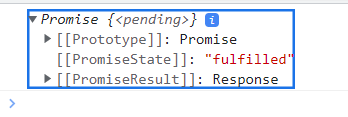


🤔What are these [[blahblah]] things?
🤔What is "pending" and "fulfilled" telling us?
DEMO
1-fetch
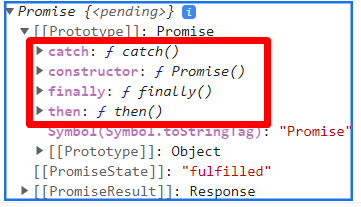
opening up the Promise
🤔What methods do these Promise objects have?
DEMO
1-fetch
🤔 In the [[PromiseResult]], what is json? What does it return?
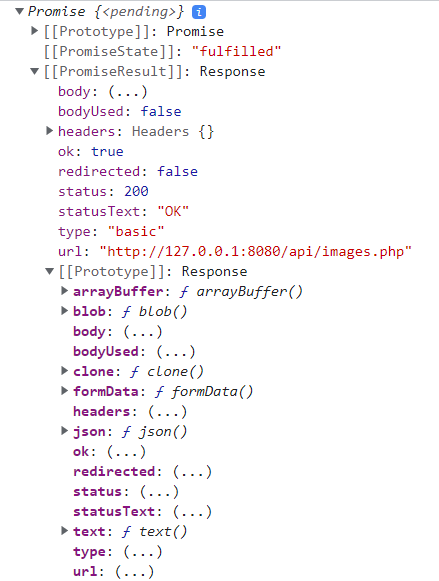
opening up the PromiseResult
so what have we discovered?
...that fetch() returns some weird thing called a Promise that contains a whole bunch of properties...and that the thing we actually want - the JSON from the fetch - isn't even directly available from this beast.
...that this Promise object seems to have (at least) 2 states: pending and fulfilled.
Wonderful.
...that we can consume an API endpoint with fetch()
But wait!
There's more!
Let's tell our API to be a sleepyhead.
<?php

header('Content-Type: application/json');

sleep(10); // sleep for 10 seconds

echo json_encode([13, 121, 2, 17, 42]);
🤔 Predict how this will affect what we see in the console.
🤔 What happens when we expand the Promise this time?
🤔 What happens if we wait 10 seconds and THEN expand?
🤔 What's going on in Fetch/XHR land this time?
🤔 What in the name of all that is holy is going on?!?!
JS is single-threaded...it just executes a script one line at a time, fully completing each line of code before moving on to the next.
But that contradicts what we're seeing here, doesn't it? That console.log is happening right away, despite the endpoint sleeping for 10 seconds!
let fetchResult = fetch("../api/images.php");

console.log(fetchResult);
fetch() immediately returns a Promise object, which goes into fetchResult, and...
A two-pronged statement
...the browser goes to work actually grabbing the data, hopefully eventually fulfilling the Promise
so how do you get the stuff "in" the Promise?
DEMO
2-fetch-json
// http://127.0.0.1:8080/2-fetch-json/index.html

let response = await fetch("/api/images.php");
console.log("line 4:", response);

let ids = await response.json();
console.log("line 7:", ids);
DEMO 2-fetch-json
🤔Predict what will appear in the console.
🤔What does await seem to be doing?
🤔What would happen if we removed type="module" from our <script>?
using await and json() w/ fetch()
🤔So can I only use await in a module?
A Project Hint
🤔 What do we want to do when the user-facing page loads?
Some reminders:
There are some things you need to put into local storage if they aren't there already. What are they?
What should the user see on the page when they arrive?
🤔 How can we do this using a single <script> file?
🤔 Should you do this with a single <script> file?
BRAIN
BREAK


async functions
A reminder - we are trying to build an event handler.
That means we're building a function...so we can't just "use a script with awaits" here.
Cue the music for...
maybe we can build a function that gets the ids we want via the fetch?
// http://127.0.0.1:8080/3-async-await/index.html

async function picIds() {
  let response = await fetch("../api/images.php");
  let ids = await response.json();
  return ids;
}

let ids = picIds();
console.log("The ids are:", ids);
this looks reasonable
🤔 Predict what will be displayed in the console.
note async
🤬
DEMO
3-async-await-trace
let's dig
// http://127.0.0.1:8080/3-async-await/index.html

async function picIds() {
  console.log("line 4:", "picIds starts");

  let response = await fetch("/api/images.php");
  console.log("line 7:", response.constructor.name);

  let ids = await response.json();
  console.log("line 10:", ids.constructor.name);

  return ids;
}

let ids = picIds();
console.log("line 16:", ids.constructor.name);

console.log("Line 18:", ids);
neat trick
🤔Predict what will appear in the console. Does this seem like quiz fodder?
DEMO
3-async-await
let's unpack this
// http://127.0.0.1:8080/3-async-await/index.html

async function picIds() {
  console.log("line 4:", "picIds starts");

  let response = await fetch("/api/images.php");
  console.log("line 7:", response.constructor.name);

  let ids = await response.json();
  console.log("line 10:", ids.constructor.name);

  return ids;
}

let ids = picIds();
console.log("line 16:", ids.constructor.name);

console.log("Line 18:", ids);
1. the script loads
2. line 15 runs, calling picIds()
3. line 4 runs
4. line 6 runs...but since there's an await, JS punts us out of the function!
5. line 15 stores the ???
PSA: I have to do an "Empty Cache and Hard Reload" in the browser sometimes when async/await is involved. Just sayin'.
6. line 16 runs
7. line 18 runs. JS is now done running SYNCHRONOUS CODE, so will give "paused" ASYNC CODE a chance
8. line 6 picks up where it left off
9. line 7 runs
10. line 9 runs...the "pause" happens again, but again - no sync code, so back in we go
11. line 10 runs
12. line 12 returns an Array...but it's too late!
DEMO
3-async-await
let's unpack this
// http://127.0.0.1:8080/3-async-await/index.html

async function picIds() {
  console.log("line 4:", "picIds starts");

  let response = await fetch("/api/images.php");
  console.log("line 7:", response.constructor.name);

  let ids = await response.json();
  console.log("line 10:", ids.constructor.name);

  return ids;
}

let ids = picIds();
console.log("line 16:", ids.constructor.name);

console.log("Line 18:", ids);
1. the script loads
2. line 15 runs, calling picIds()
3. line 4 runs
4. line 6 runs...but since there's an await, JS punts us out of the function!
5. line 15 stores the ???
PSA: I have to do an "Empty Cache and Hard Reload" in the browser sometimes when async/await is involved. Just sayin'.
6. line 16 runs
7. line 18 runs. JS is now done running SYNCHRONOUS CODE, so will give "paused" ASYNC CODE a chance
8. line 6 picks up where it left off
9. line 7 runs
10. line 9 runs...the "pause" happens again, but again - no sync code, so back in we go
11. line 10 runs
12. line 12 returns an Array...but it's too late!
ow
ANOTHER BRAIN BREAK
('cause ow)
DEMO
3-async-await
how can we fix this?
// http://127.0.0.1:8080/2-fetch/index.html

async function picIds() {
  console.log("line 4:", "picIds starts");

  let response = await fetch("/api/images.php");
  console.log("line 7:", response.constructor.name);

  let ids = await response.json();
  console.log("line 10:", ids.constructor.name);

  return ids;
}

let ids = picIds();
console.log("line 16:", ids.constructor.name);

console.log("Line 18:", ids);
What does this return?
🤔What is picIds() returning?
🤔So how do we make line 15 wait?
whew
Another Project Hint
🤔 When a user clicks on a country name, what should they see?
🤔 What information from the DB is needed to make that happen?
🤔 How many API calls are needed to get that information?
🤔 Is there a way to make a number of API calls in parallel?
Promise.all
We'll talk about this on Monday, but if you are itching to get this done over this weekend, you can look at how it's used with async/await over on MDN. (the textbook doesn't talk about Promise.all in conjunction with async/await)
lec-20
By Jordan Pratt
lec-20
2023-03-22: fetch(), async/await