COMP3512
winter 2024
lec-js-03
Countdown Time
⚠️
⚠️
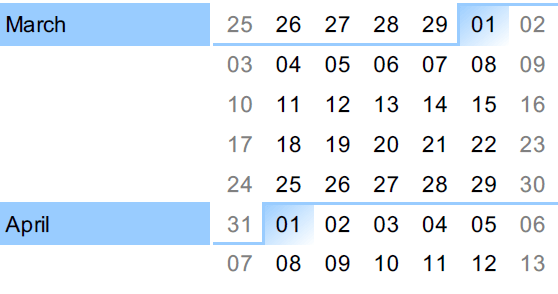
March 13th: Midterm 2 (JS)
March 15th: Withdraw Deadline
⚠️
⚠️
⚠️
April 5th: Project Submission
April 11th: Final Exam
RECALL
00-recall
<!DOCTYPE html>
<html lang="en">
  <head>
    <meta charset="UTF-8" />
    <script src="recall.js"></script>
    <title>00-callbacks</title>
  </head>
  <body>
    <h1>00-callbacks</h1>
  </body>
</html>
Why are we loading our JS file in the browser?🤔
What attribute is missing from the <script> tag?🤔
What benefit do we get from NOT using that attribute?🤔
RECALL
00-recall
const courses = [
  {
    subj: "COMP",
    number: "1701",
    required: true,
  },
  {
    subj: "MATH",
    number: "1505",
    required: true,
  },
  {
    subj: "COMP",
    number: "5590",
    required: false,
  },
];
What value is courses[1].required ?🤔
Is courses[2]["subj"] a primitive or object ?🤔
How would you sort courses by number?🤔
How would you find the first Math course?🤔
How would you find all optional courses?🤔
How would you find all optional courses?🤔
How would you print all courses to the console?🤔
How would you get an array of course names (like "COMP1701"?🤔
let's talk about these things today:
◉ What is The DOM?
◉ How do you grab single DOM elements?
◉ How do you grab multiple DOM elements?
The DOM
The DOM
(Document Object Model)
The definitions of the DOM out there can be confusing.
The Document Object Model (DOM) is a programming API for HTML and XML documents. It defines the logical structure of documents and the way a document is accessed and manipulated.
The name "Document Object Model" was chosen because it is an "object model" used in the traditional object oriented design sense: documents are modeled using objects, and the model encompasses not only the structure of a document, but also the behavior of a document and the objects of which it is composed.
-W3.org (What is the Document Object Model?)
The definitions of the DOM out there can be confusing.
The Document Object Model (DOM) is a programming interface for web documents. It represents the page so that programs can change the document structure, style, and content. The DOM represents the document as nodes and objects; that way, programming languages can interact with the page.
A web page is a document that can be either displayed in the browser window or as the HTML source. In both cases, it is the same document but the Document Object Model (DOM) representation allows it to be manipulated. As an object-oriented representation of the web page, it can be modified with a scripting language such as JavaScript.
-MDN (Introduction to the DOM)
The definitions of the DOM out there can be confusing.
The Document Object Model (DOM) is a cross-platform and language-independent interface that treats an HTML or XML document as a tree structure wherein each node is an object representing a part of the document. The DOM represents a document with a logical tree. Each branch of the tree ends in a node, and each node contains objects. DOM methods allow programmatic access to the tree; with them one can change the structure, style or content of a document.
- Wikipedia (Document Object Model)
From all of this, we can pull out some practical bits
- The DOM lets us view web pages as document objects.
- These document objects are composed of node objects. (shades of 2503, yes?).
- The DOM is an API, so that means it provides public fields and methods for accessing the document and manipulating it.
- The DOM is cross-platform, so while we use JS to call DOM methods in this course, you can totally use other languages.
Behind the scenes...
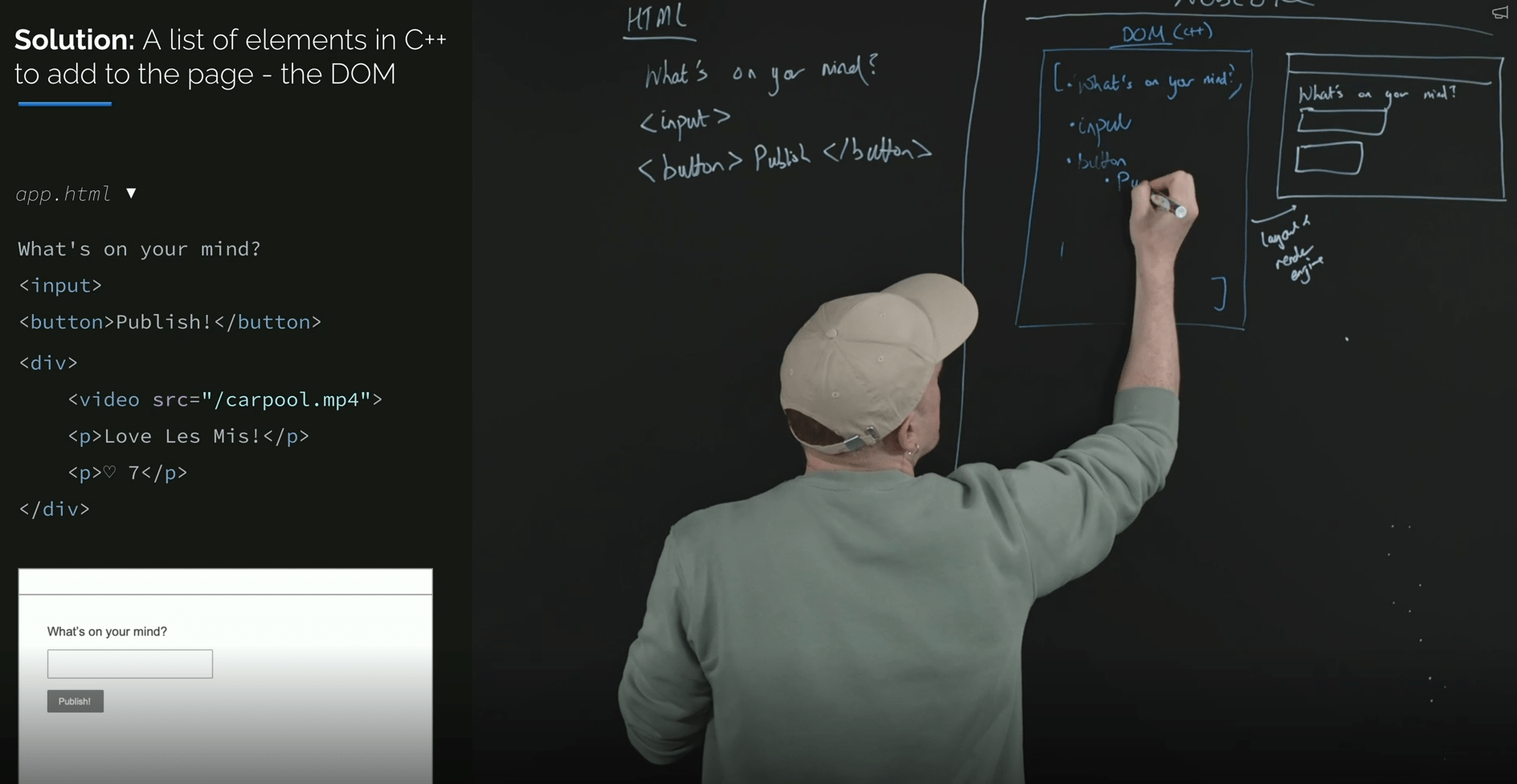
The document is implemented as a C++ data structure that's very much like a nested list.
When you download an HTML document, the browser parses the HTML from top to bottom, adding things - nodes - to the DOM document.
As these nodes are added, a rendering engine paints a bitmap of a visual representation of the nodes many times a second.
1️⃣
2️⃣
3️⃣
From FrontendMasters' "The Hard Parts of UI Development" course
Playtime.
01-simple-tree
I've installed a Chrome extension called DOM node tree viewer.
Let's use it to look at a simple web page from the eyes of the DOM.
Look at the contents of the Elements tab in the devtools. What tags do you see?🤔
Now use the extension. What do you notice?
What's with these funky things?🤔

Use the console and type in document. (don't forget the period!) What are these things that appear in the dropdown?🤔
Keep playing.
01-simple-tree
Wait a second...is that document The DOM?🤔
document is an object, right? How can we tell whether one of its public properties is a function or not?🤔
The MDN documentation is invaluable for finding out more about all the objects and methods available in the DOM and in .
What happens if we just hit Enter?
How about console.dir(thingie)? (No funcs, though.)
There is always...documentation.
No - but, unfortunately, in common usage things get fuzzy. We'll say things like "after the DOM is loaded" or "I have to add this <div> to the DOM"...which aren't technically accurate. But welcome to language.
Grabbing Elements
While it's true that document is the Big Kahuna object in the DOM, as web developers, we wind up using Element objects a LOT - maybe more than document.
In particular, we will do the vast majority of our work with HTMLElement objects - a subclass of Element. If you want to manipulate any HTML tag, you're going to need the HTMLElement object for that tag.
Because it's awkward to say "HTML element" a lot, we'll just assume whenever we say "element", we mean "HTML element".
Elements are Nodes
To make things a bit more confusing (because why not), all Element objects are subclasses of an abstract base class called Node.
Yes, this Node class represents the nodes that were mentioned earlier!
I bring this all up because we're going to be seeing the word Node pop up a lot.
Many of the useful properties and methods we use with Elements actually come from Node!
Grabbing Single Elements
To grab a single element, we'll be using the querySelector() method from the document object.
This requires you to work with CSS selectors a lot. As you may recall from Web I, these can get complex...but we can usually get away with very simple selectors, so don't freak out.
We'll also see some other ways to get around using selectors...but I urge you to get used to them, if only to be prepared for the midterm and final exam.
02-html-elements
Let's get grabbing.
How do we grab the <h1>? The first <div>? The second <div>? The <span> inside the <li>?🤔
Grabbing the only thing, first thing, and an id'd thing are straightforward. So yay.
Here are some commonly used properties and methods of these HTMLElements we're grabbing. Try them out!
from Node
from Element
from HTMLElement
dataset
style
classList
className
id
tagName
append()
prepend()
remove()
replaceChildren()
setAttribute()
textContent
nodeName*
appendChild()*
A quick PSA
Data attributes are very cool.
Data attributes make the Project easier.
Data attributes are on the midterm.
Grab the first <p> tag. Look at its dataset property. What do you see?🤔
⚠️If you're doing math with the values, I'd suggest changing it into a number with Number() ⚠️
02-html-elements
More grabbing.
Grab the <a> tag. Trigger the dropdown. Anything look useful in here?🤔
HTMLElements have subclasses for many (all?) of the tags you know and love. Check out the sidebar in the HTMLElement doc page!
If you look at the docs of these classes, you can often find useful properties and methods.
HTMLAnchorElement, HTMLFormElement, HTMLImageElement...there's some useful gold in there!
02-html-elements
A gotcha.
Bring in a script file. Inside, log the text in the h1. Everything seems fine, right?
Remove the type="module" from our script tag, then try? What's going on? And how did folks get around this problem before type="module" was a thing? 🤔

BRAIN BREAK
Grabbing Multiple Elements
To grab a multiple elements, we'll be using the querySelectorAll() method from the document object.
This method returns an array-like thing called a NodeList.
We can access items in a NodeList. with [ ] notation, just like an array. We can use one in a for..of loop. And we can use it with forEach().
02-html-elements
Time to grab handfuls.
How do we grab all the <p> tags? All elements with class "special"?🤔
How could be print out the class name for all <li> elements? 🤔
The text in all <p> elements?🤔
Um...aren't you leaving out other ways of selecting things?!?
getElementById
getElementsByClassName
getElementsByTagName
Heck, yah!
- I like having only 2 things to remember (actually 1, since QuerySelectorAll is just QuerySelector with "All" tacked on).
- I like the power and flexibility that CSS selectors give you.
- The getElements methods return an HTMLCollection - you can't forEach through those.
- Also, the HTMLCollections returned are LIVE - they can change from under you if you're not careful!

lec-js-03
By Jordan Pratt
lec-js-03
DOM 1