COMP3512
winter 2024
lec-js-07

Fun Week
⚠️
⚠️
JP incommunicado
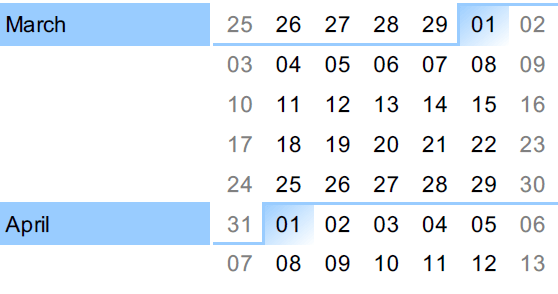
March 15th: Withdraw Deadline
⚠️
⚠️
⚠️
April 5th: Project Submission
April 11th: Final Exam
⚠️
🔖
🔖
🔖
🔖
🔖
March 13th: Midterm 2
Any Qs about the midterm before we get started?
If you're feeling anonymousy:
onlinequestions.org
(event id: 351220240311)
let's talk about these things today:
◉ What is "Web Storage"?
◉ How do you put things in it?
◉ How do you take things out of it?
Web Storage API
◉ What requirements are unclear?
◉ What sticking points are there?
◉ Where's the low-hanging fruit? The time-consuming fruit?
◉ Some suggestions for the codez.
Project Ponderings
Web Storage API
What is "Web Storage"?
Modern browsers provide developers with a way other than cookies to save state.
This is through the Web Storage API.
Unlike cookies, which do the remora thing with request/response headers, Web Storage is limited strictly to the client side. This means it's tricky for the server side to manipulate Web Storage without some kind of script shenanigans.
The browser's global window object provides easy access to 2 storage objects:
localstorage and sessionstorage
What's the difference? 🤔
You can consider these storage objects as simple dictionaries that use strings as their key/value pairs.
How do you put things in Web Storage?

Saving things in storage is blessedly easy.
localStorage.setItem("foo", "bar");

localStorage.setItem("size", 3);

localStorage.setItem("isHappy", true);

localStorage.setItem(3, 4);
Let's pop open a browser and putz around.
Let's start with some primitives.
What is the data type of the stored value?
What is the data type of the stored value?
What is the data type of the stored key?
⚠️ The devtools are being a bit disingenuous when displaying the storage contents.
Since we can only store strings, objects require a little more work.
How do we turn JS objects into strings again?🤔
let gameResult = {
  player: "Max",
  score: 12
};

localStorage.setItem("result", JSON.stringify(gameResult));
let gameResults = [
{name: "Max", score: 12},
{name: "Aki", score: 17}
];
localStorage.setItem("results", JSON.stringify(gameResults));A single JS object
An array of objects
let cashier =  {
  empId: 731823,
  startDate: new Date('2024-03-09'),
  daysEmployed: function() {
    let timeDiff = new Date() - this.startDate;
    return timeDiff / (1000 * 60 * 60 * 24);
  }
}
What about an object containing functions?
What will be in local storage in this case?🤔
localStorage.setItem("cashier", JSON.stringify(cashier));The previous slide, plus this recently-added Project requirement might give you pause....
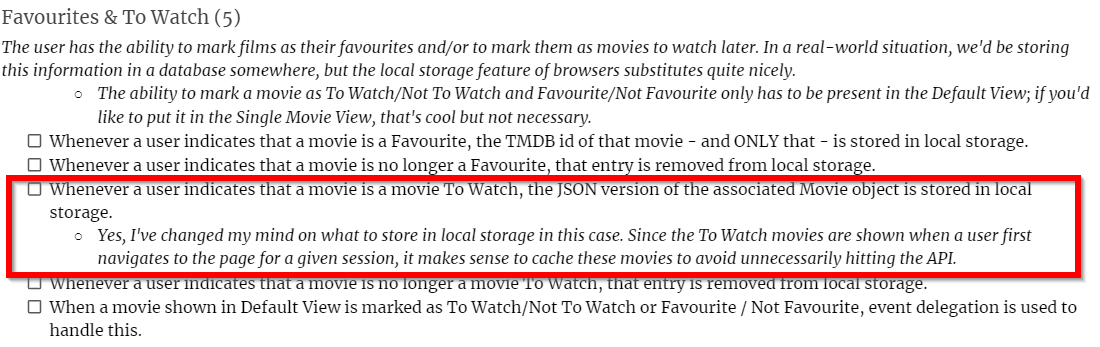
Does a Movie object need methods?
How do you get things out of Web Storage?
Retrieving things from Web Storage is also easy!
More
localStorage.setItem("foo", "bar");
localStorage.getItem("foo");

localStorage.setItem("size", 3);
localStorage.getItem("size");

localStorage.setItem("isHappy", true);
localStorage.getItem("isHappy");

localStorage.setItem(3, 4);
localStorage.getItem(3);
Let the putzing commence.
What is the data type of the retrieved value?
What is the data type of the retrieved value?
What is the data type of the retrieved value?
How would you turn the retrieved values to their original types? 🤔
Since we can only store strings, objects again require a little more work.
How do we turn JSON into JS objects again?🤔
let gameResult = {
  player: "Max",
  score: 12
};

localStorage.setItem("result", JSON.stringify(gameResult));

JSON.parse(localStorage.getItem("result"));
let gameResults = [
{name: "Max", score: 12},
{name: "Aki", score: 17}
];
localStorage.setItem("results", JSON.stringify(gameResults));
JSON.parse(localStorage.getItem("results"));A single JS object
An array of objects
let cashier =  {
  empId: 731823,
  startDate: new Date('2024-03-09'),
  daysEmployed: function() {
    let timeDiff = new Date() - this.startDate;
    return timeDiff / (1000 * 60 * 60 * 24);
  }
}
What about an object containing functions?
What will resulting object look like in this case?🤔
localStorage.setItem("cashier", JSON.stringify(cashier));

JSON.parse(localStorage.getItem("cashier"));
🤔 What if the key is not present?


BRAIN BREAK
What Project requirements are still unclear?
onlinequestions.org
(event id: 351220240311)
What sticking points are there?
Where's the low-hanging fruit?
The time-consuming fruit?
Some suggestions for your codez.
These are just suggestions.
I think they're useful suggestion...but they're just suggestions.
Make a global object that holds your commonly-used DOM elements.
const commonElements = {
  movieTitle: document.querySelector("some selector"),
  searchInitiator: document.querySelector("some selector"),
  sortTitleAscInitiator: document.querySelector("some selector"),
  etc....
}

export { commonElements };- Should hold DOM elements that aren't dynamically generated.
- If your selectors change, you only need to make changes here.
import { commonElements } from "./some/path";

commonElements.searchInitiator.addEventListener("click", someHandler);
Use well-named function declarations for event handlers, and gather them together.
function handleIncreasePlayerCount() {
  // This doesn't use the triggering event.
}

function handleDropPlayer(clickEvent) {
  // This one is currently reacting to a click.
}

function handleSearchTermEntry(inputEvent) {
  // This one is currently reacting to an input.
}- Starting names with handle is common, though not a rule.
- Describe the higher-level concept being handled, not the event name.
- Putting the event type (if needed) into the parameter name makes things easier to understand.
- Can put all in one well-named file if not too many, but gathering together into purpose-related files can be very helpful.
Register your event handlers all in one place, as one of the first thing your app does.
import {
  commonElements
} from "./blah/blah";

import {
  handleIncreasePlayerCount,
  handleDropPlayer
} from "./blah/blah";

function registerEventHandlers() {
  commonElements
    .incPlayerCountInitiator
    .addEventHandler("click", handleIncreasePlayerCount);

  commonElements
    .dropPlayerInitiator
    .addEventHandler("click", handleDropPlayer);

}

export { registerEventHandlers };
import { registerEventHandlers } from "./blah/blah";
registerEventHandlers();
lec-js-07
By Jordan Pratt
lec-js-07
web storage API | Project ponderings