COMP3512
winter 2024
lec-js-08
Have you gotten your initial SPoT salvo?
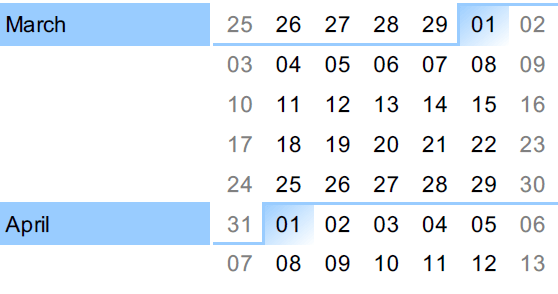
I reckoned people were going to be crazy drained by the end of the semester, so I'm trying to grab folks while they're still only half zombies: March 18 - March 20.
Fun Week
JP incommunicado
⚠️
⚠️
⚠️
April 5th: Project Submission
April 11th: Final Exam
⚠️
🔖
🔖
🔖
🔖
🔖
Let me ask you a question.

let's talk about these things today:
fetch() and Promises
fetch() is a globally-available method the browser provides.
It's used to grab resources over a network.
It's our go-to weapon of choice when we want to consume an API endpoint.
fetch is an example of one of those things that look like JS...but is not part of the JS language.
Instead, it's part of one of the Web APIs available thanks to the web browser.
🤔 What are some other examples of things that look like they're part of the JS language, but are actually something the web browser provides?
We'll explore fetch by experimenting with a tweaked API from lab-05.
Here are the 3 API endpoints we'll be experimenting with.
api/airport.php?code={some airport code}

api/slowairport.php?code={some airport code}

api/superslowairport.php?code={some airport code}
They each respond with JSON like this:
{
  "city": "Calgary",
  "code": "YYC"
}
The only difference in APIs is (as you might guess) how long it takes for the API to respond!
Let's look at each of these responses on this particular Codespace.
fast
slow
superslow
Experiment 1
exp-01
let fetchResult = fetch(Endpoint.SUPERSLOW);

console.log(fetchResult);
fetch() is typically really easy to use - you just feed it a string with the URI you're trying to hit.

We're getting some kind of object back.
And it seems to be...pending?
A Quick Aside
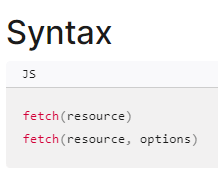
From the MDN docs on fetch()
fetch() can take in a second argument, options, that allows a lot of tweaking of fetch()'s behaviour.
You will need to pass in options to communicate with the TMDB API. See the docs (like these for Movie Details) for the individual endpoints for examples and useful code!
If we expand the Promise object right away, here's what we see:
Those things in [[Double Brackets]]?
Although the console shows them, they are NOT ACCESSIBLE to the code we write!
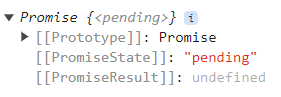
This promise seems to be in a "pending" state...
...and has an undefined "result".
⚠️I'll often call [[PromiseResult]] just result, because it's easier to type on a slide.
If we wait long enough and THEN expand the Promise object, here's what we see:
So this Promise thingie changed significantly simply because we waited a while to look at it.
Huh.
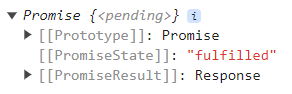
Now the promise seems to be in a "fulfilled" state...
...and has a Response as a result.
Let's jot down our findings so far.
- We can call an API using fetch(). Usually we just call it with a URI, but sometimes we can add some options.
- fetch() returns an object called a Promise.
- The Promise has a state and a result...but they're not properties we can access directly.
- The fetch() seems to return immediately, even though we know the API call takes a long time to respond!
- The Promise seems to change over time.
Points 4 & 5 don't make any sense, do they???
What the heck is going on?!?
A hidden minion is at work!
let fetchResult = fetch(Endpoint.SUPERSLOW);

console.log({ P });
A Promise object { P } is immediately returned by fetch()...
...and behind the scenes, the web browser, spins up a minion to go make a request, grab the response, and...somehow change { P }.

{ P }
Experiment 2
exp-02
Let's do our sneaky "attach things we want to see in the console to window" hack.
let fetchedPromise = fetch(Endpoint.FAST);

window.fetchedPromise = fetchedPromise;
And let's also name our variable a bit more expressively to keep things very clear what we're dealing with.
I'm usually not a fan of variables like blahString, blahArray, etc. ... but with Promises, I'm willing to make an exception!
Let's examine this Promise in the console a bit more.
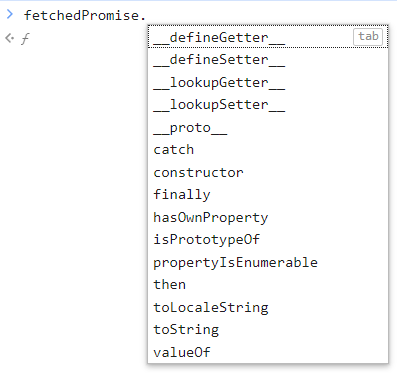
Hitting the . on this sucker shows that this Promise object doesn't have a ton of properties.
The vast majority of the time, you'll only ever use these 3.
And to be honest, the most frequently used one from those 3 is then().
=🥇
Further findings.
- Promises have 3 commonly-used methods: catch(), finally(), and then().
- then() is by far the most common of them all.
But what does then() actually do?
Experiment 3
exp-03
What does this then() method do?
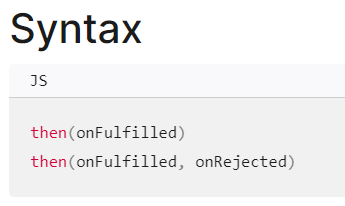
If you look in the docs for then(), you'll see that it has two forms, and takes up to 2 callbacks as arguments.
The first form is the one most commonly used, so we'll focus our discussion on that.
🤔 That word "fulfilled" seems kinda familar...where did we see that before? We'll get back to that in a few slides.
function handleMovieSearch(clickEvent) {
  let clickedElem = clickEvent.target;
  // Do other awesome things.
}

someDomElem.addEventListener("click", handleMovieSearch);
Remember how with the addEventListener() method, there was an "invisible" event argument being passed into our event handler callback?
event object passed, ninja-like, into handler
We'll provide an exploratory callback to see what arguments that callback is being passed.
let fetchedPromise = fetch(Endpoint.FAST);

function callbackExplorer(param1, param2, param3, param4) {
  console.log("callbackExplorer called");
  console.log("param1 is", param1);
  console.log("param2 is", param2);
  console.log("param3 is", param3);
  console.log("param4 is", param4);
}

fetchedPromise.then(callbackExplorer);
Let's get proactive and see what's being passed into the then() callback.
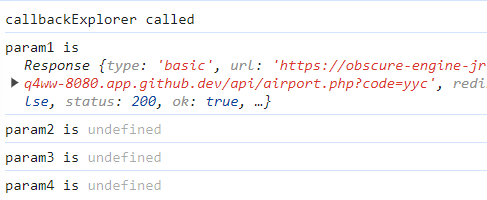
Here are the results.
So it seems that the callback provided to then() is given 1 argument - that [[PromiseResult]] we're unable to access directly! And it seems that result is the API Response in the case of a fetch().
Yes, that Response is the same Response we saw earlier!
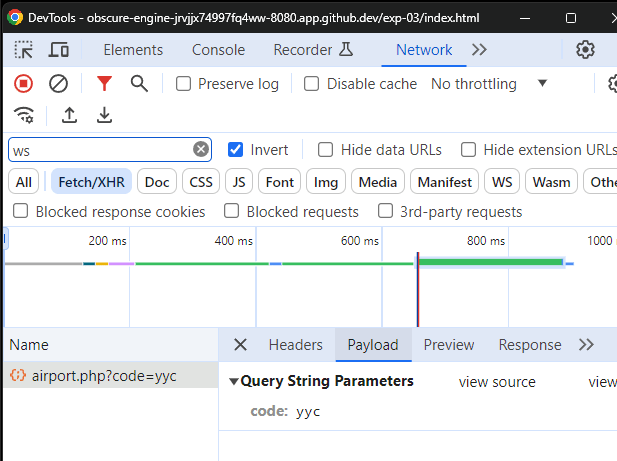
If we look in the Network tab of the dev tools, we can confirm that we are getting what we want coming back over the network!
There's the API response.
With the payload of sweet JSON we want!
As promised, let's talk about fulfilled for a sec.
A Promise is fulfilled if the operation it was trying to do was completed successfully.
let fetchResult = fetch(Endpoint.SUPERSLOW);

console.log({ P });
{ P }
Remember our minion?
For a fetch(), fulfillment will happen when the minion successfully comes back from talking to the API.
When this happens, the Promise's internal state is changed from pending to fulfilled and the "armed" function is placed in a queue, with the result ready to be passed into it.
This slide is a placeholder for the on-the-board work done during the lecture.
A diagram involving web processes and a queue go here.
let fetchedPromise = fetch(Endpoint.FAST);

function callbackExplorer(param1, param2, param3, param4) {
  console.log("callbackExplorer called");
  console.log("param1 is", param1);
  console.log("param2 is", param2);
  console.log("param3 is", param3);
  console.log("param4 is", param4);
}

fetchedPromise.then(callbackExplorer);
🤔...how do we get that dang JSON?!?
That's all nice, but...
Further findings.
- then() takes in a callback.
- The callback will receive, ninja-like, a single argument - the inaccessible [[PromiseResult]] of the Promise which called then().
- ⚠️In the specific case of a Promise returned from a fetch(), that result is a Response object - in our case, the response from the API endpoint!
- The callback will be "armed" with the result and placed in a queue when the operation the Promise was trying to do was successful.
- We still can't seem to find a way to get the actual payload - the JSON - from that Response object, though.
(Technically, it can take 2 callbacks, but we're not going to worry about the 2nd one.)
Experiment 4
exp-04
Let's do that "attach to window" thing again so we can see what methods this Response object has.
Maybe one of them can give us the JSON we want?
let fetchedPromiseResult;
let fetchedPromise = fetch(Endpoint.FAST);

function grabFetchedPromiseResult(resultPassedInByThen) {
  fetchedPromiseResult = resultPassedInByThen;
}

fetchedPromise.then(grabFetchedPromiseResult);

window.fetchedPromiseResult = fetchedPromiseResult;
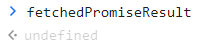
Well, poop.
Maybe the debugger can help?!?
A
B
C
What order will these breakpoints be hit if we run this code?
Try and see!
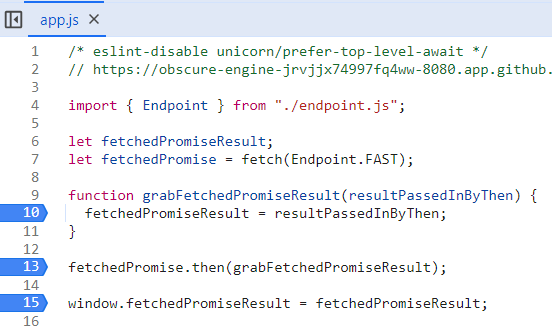
If this were synchronous code - code that runs sequentially, with the browser waiting for each line to execute before proceeding - then B => A => C seems the sane answer.
A
B
C
But that's not what happens, is it?
We instead see B => C => A occur.
The code seems to be running asynchronously - literally,
"not synchronously".
A
B
C
Unsettling findings.
- Code involving Promises seems to behave asynchronously. What's going on?!?!


BRAIN BREAK
Remember COMP2531?
You know, that course you thought wasn't important and you would never "use"?
😏
This slide is a placeholder for the on-the-board work done during the lecture.
import { Endpoint } from "./endpoint.js";

let fetchedPromiseResult;
let fetchedPromise = fetch(Endpoint.FAST);

function grabFetchedPromiseResult(resultPassedInByThen) {
  fetchedPromiseResult = resultPassedInByThen;
}

fetchedPromise.then(grabFetchedPromiseResult);

window.fetchedPromiseResult = fetchedPromiseResult;
Enough is enough. Let's just trace what's going on.
Experiment 5
exp-05
let fetchedPromiseResult;
let fetchedPromise = fetch(Endpoint.FAST);

function grabFetchedPromiseResult(resultPassedInByThen) {
  fetchedPromiseResult = resultPassedInByThen;
  window.fetchedPromiseResult = fetchedPromiseResult;
}

fetchedPromise.then(grabFetchedPromiseResult);
Since the grabFetchedPromiseResult() body will run after the app.js module pops off the stack, we need to do this:
Attach to the window inside our callback.
Now we can finally examine this Response thingie in the console properly:
Success!
While that status property bears further lookin', let's park that.
What we're really interested in is that json, right? We're looking for the API endpoint's JSON, after all!
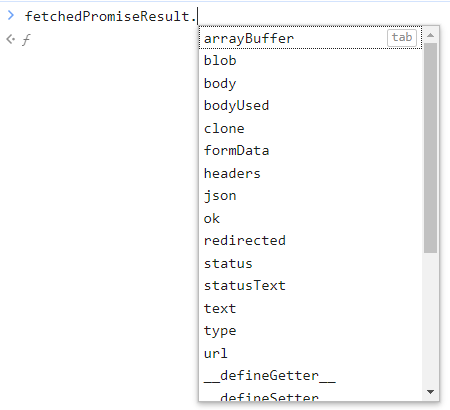
Oh for five cents.
Is this some kind of a sick joke?
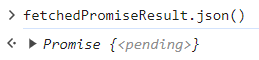
Maddening findings.
- The Response object that's passed in to a fetch()'s Promise's then() has a method called json().
- The json() method does NOT return JSON. It returns a Promise. FML.
Experiment 6
exp-06
Let's just shrug our shoulders and embrace the madness.
let fetchedPromise = fetch(Endpoint.FAST);

function grabFetchedPromiseResultAndLogJson(resultPassedInByThen) {
  let jsonCallPromise = resultPassedInByThen.json();
  jsonCallPromise.then(log);
}

function log(whatever) {
  console.log(whatever);
}

fetchedPromise.then(grabFetchedPromiseResultAndLogJson);
import { Endpoint } from "./endpoint.js";

let fetchedPromise = fetch(Endpoint.SLOW);

function grabFetchedPromiseResultAndLogJson(resultPassedInByThen) {
  let jsonCallPromise = resultPassedInByThen.json();
  jsonCallPromise.then(log);
}

function log(whatever) {
  console.log(whatever);
}

fetchedPromise.then(grabFetchedPromiseResultAndLogJson);
Let's trace this from start to finish.

Let's poke that "Promise showed up in the console, despite the API being superslow" thing.
That's weird, right?
How would you expect THIS code to behave?
function loopAWholeBunch() {
  for (let i = 0; i < 5_000_000_000; i += 1) {
    // do absolutely nothing but spin wheels
  }
}

let fetchResult = fetch(Endpoint.FAST);

loopAWholeBunch();

console.log(fetchResult);
Should log out that Response thing, right?
lec-js-08
By Jordan Pratt
lec-js-08
fetch | Promises