COMP3512
winter 2024
lec-php-04

Up and Coming
RECALL
<?php
if ($_SERVER['REQUEST_METHOD'] === "GET") {
    $cheese = "gouda";
} else if ($_SERVER['REQUEST_METHOD'] === "POST") {
    $cheese = "cheddar";
}
require 'form.view.php';
Sketch what is seen when you go to form.php via the URL.
<form method="post">

  <label for="cheese">Name:</label>
  <input type="text" id="cheese" name="cheese" value="<?= $cheese ?>" />

  <button type="submit">Submit It!</button>

</form>
form.php
form.view.php
RECALL
Write the HTML needed to create another text input to display a price.
What goes in ??? if we wanted to grab the submitted text field value?
<form method="post">

  <label for="cheese">Name:</label>
  <input type="text" id="cheese" name="the-cheese"  />

  <button type="submit">Submit It!</button>

</form>
<?php
$cheese = ???let's talk about these things today:
◉ Null coalescing operator (??)
Forms
◉ What is a query string? What format does it have?
◉ How do we grab those delicious values from a query string with PHP?
◉ What are they useful for?
◉ What are 3 ways you could create one?
◉ How can we deal with invalid query strings?
Query Strings
The null coalescing operator. (i.e. ??)
At the tail end of last lecture, we were trying to get our form to redisplay entered fields when the form had validation errors...
...but ran into a wee snag.
if ($_SERVER['REQUEST_METHOD'] === "GET") {
	require './views/form.view.php';
} else if ($_SERVER['REQUEST_METHOD'] === "POST") {
    $name = $_POST['user-name'];
    $password = $_POST['pwd'];
    $message = $_POST['user-message'];

	// so much amazing stuff here

    if (// no errors present) {
    	require './views/form-confirmation.view.php';
    } else {
        require './views/form.view.php';
    }
}
<li>
<label for="pwd">Password:</label>
<input type="password" id="pwd" name="pwd" value="<?= $password ?>" />
</li>Snipped from our controller (form.php).
Snipped from our view (form.view.php).
If we submitted the form, everything worked...but if we just typed in the form's URL...
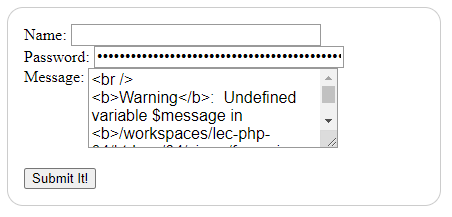
Ouch.
What's the problem?
if ($_SERVER['REQUEST_METHOD'] === "GET") {
	require './views/form.view.php';
} else if ($_SERVER['REQUEST_METHOD'] === "POST") {
    $name = $_POST['user-name'];
    $password = $_POST['pwd'];
    $message = $_POST['user-message'];

	// so much amazing stuff here

    if (// no errors present) {
    	require './views/form-confirmation.view.php';
    } else {
        require './views/form.view.php';
    }
}
<li>
<label for="pwd">Password:</label>
<input type="password" id="pwd" name="pwd" value="<?= $password ?>" />
</li>1. We arrive via a GET, so...
3. ...when we get here, $password is uninitialized!
2. ...we drop in here and display the view, which means....
I suggested two fixes (if you look at the pushed code I provided for the lecture).
They both involve the ominously named coalescing operator with the equally WTF operator: ??
$some_variable = "hi";

$another_variable = $some_variable ?? "foo";  // hi

$another_variable = $yet_another_variable ?? "bar"; // bar

$another_variable = $pancakes ?? "baz"; // baz

$yet_another_variable = "bye";

$another_variable = $yet_another_variable ?? "bar"; // bye00/coalesce.phpFix 1: use ?? in the view
<li>
    <label for="pwd">Password:</label>
    <input type="password" id="pwd" name="pwd" value="<?= $password ?? '' ?>" />
</li>
<li>
    <label for="msg">Message:</label>
    <textarea id="msg" name="user-message"><?= $message ?? '' ?></textarea>
</li>
If $password and $message are uninitialized, no problem - just put in an empty string.
Fix 2: use ?? in the controller
$name = $_POST['user-name'] ?? "";
$password = $_POST['pwd'] ?? "";
$message = $_POST['user-message'] ?? "";

if ($_SERVER['REQUEST_METHOD'] === "GET") {
    require './views/form.view.php';
} ....
Initialize all our form field variables out of the gate with default values.
What is a query string? What format does it have?
https://somehost/resource/path?key1=val1&key2=val2%21
Query strings are optional parts of URLs.
- They are composed of key=value pairs.
- If more than one pair is present, pairs are separated with a &.
- If a key/value is not alphanumeric or '-', it should be encoded.
They come after the resource path and are preceded by a ?
a query string
We can use the browser to see what the key value pairs are.
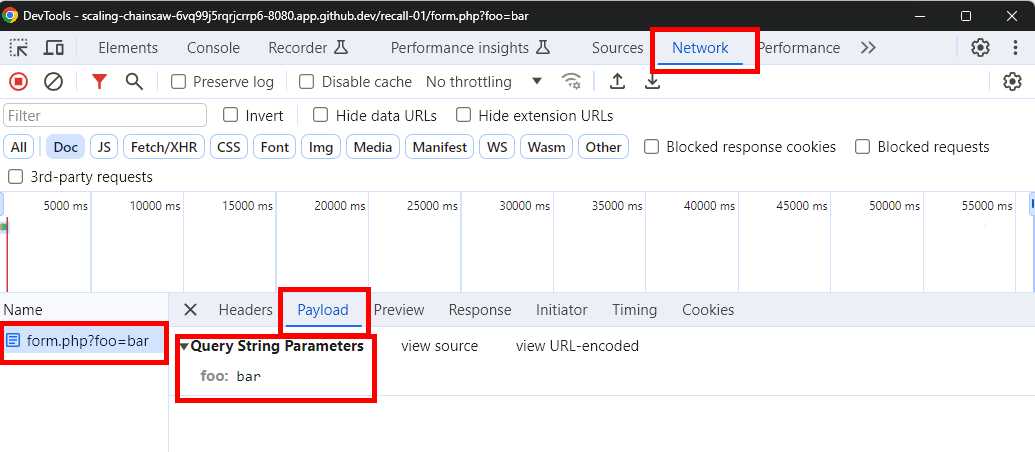
Let's play a bit.
01/qs-play.htmlFurther references:
How do we grab those delicious values from a query string with PHP?
02/qs-play.php
With a superglobal, of course!
Tip:
Use WATCHPOINTS in the debugger to track variables of interest.
What are they useful for?
We've just found another, very cool, way to get data into a PHP page...via the URL itself!
Your pages can react to the URL itself!
03/qs-at-work.php
What are 3 ways you could create one?
1: Add links in your views
04/list.php
Works, but....
<a href="detail.php?name=<?= $name ?>&designer=<?= $designer ?>&bgg_id=<?= $bgg_id ?>"><?= "{$name} ({$designer})" ?></a>...ew?
1a: Add links in your views (cleaned up a bit)
04a/list.php
Use http_build_query to make things cleaner - and it handles encoding, too!
Use PHP's heredoc strings to make dealing with lots of quotes less painful.
2: Use a GET form
05/form.php
3: Type them into the URL

BRAIN BREAK
How can we deal with invalid query strings?
1: Validate the query string - and ignore invalid ones
06/validate.php
<?php
$colour = $_GET['colour'] ?? "black";


require './views/validate.view.php';
What kind of nonsense could be coming in via the URL that would mess us up?
How would you modify this code to detect improper values?
2: Validate the query string - and redirect to an error page
07/validate.php
If we want to be more...forceful...we can redirect to another page if we detect qs problems
if ($colour === "purple") {
    header("Location: error.php");
    exit();
}
PHP's header function provides the secret sauce for this.
One warning about header:
Do NOT write anything to the response before calling it!

lec-php-04
By Jordan Pratt
lec-php-04
query strings