COMP3512
winter 2024
lec-php-07
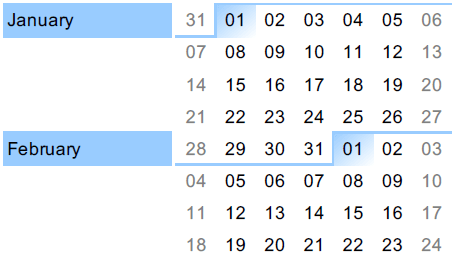
Oh Look - February
About that midterm
RECALL
A user goes to hello.php for the first time.
hello.php
- What special thing will be in the response from the web server?
- What will be displayed in the browser?
OUT OF ORDER
Lab-03 Code Review
A Project issue I've seen a bit
views including controllers, instead of the other way around
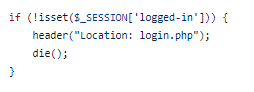
Always do an exit after a redirect.
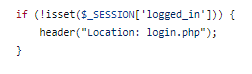
I'm totally guilty of not doing this, and I should know better.
Careful using die vs exit.
It works the same as exit...but sends a slightly different message to the reader.
let's talk about these things today:
◉ How do I connect to a database?
◉ How do I query the database?
◉ What form do the results take?
◉ What's a prepared statement - and why should I use them?
◉ Can we clean this up at all?
DB
How do I connect to a database?
If we want to get data from a database, the first thing we'll need to do is to connect to it!
Then we can have a civilized conversation.
But hold on there, cowboy.
We need a database first!
Remember how we did that last week?
Let's connect.
RECAP
- We use a PDO (PHP Data Object) object to connect to a database in our code.
- A DSN (data source name), username , and password are required by the PDO constructor.
- Things might go wrong when we attempt to create our PDO object, so we should try/catch it and report the error.
- Be careful in production with this, though - some info you might not want to share is in the message!
How do I query the database?
Before you go charging in...do you know what data you need?
- Do you have a view that needs that data? Or do you just need data that's never displayed (like validating a user's login information)?
- Are all the restrictions on the data known ahead of time? Or do you need information from the user?
- Do the results need to be ordered in any way? Formatted in any way?
- Do you need ALL the fields? Or just a few? Use * reluctantly!
In short: HAVE A PLAN!
Try out your query FIRST.
It's easier to troubleshoot problems if you do.
Trust me. I've been there.
Once you have a plan, don't just start coding!
Let's start off easy.
Build a query that returns the names of all cheeses in the DB.
Let's try some variants, too - to get those SQL juices flowing again after a (long?) absence.
- Select aliases?
- Table aliases?
- Order?
- Only cheese starting with 'c'?
- Limit to 3 results.
Say we want to display a list of the cheeses we sell in a view.
Once we have a valid query, we're ready to rock.
Query time.
RECAP
- Know what you need before you start coding up db code.
- Only grab what you NEED in a query - think VERY carefully whether you need to use that SELECT *, bucko.
- If you want to run a query inside your code, make sure it works outside of code first.
- Use a heredoc string to write your SQL - it's much more readable.
- Tell your PDO minion to "run" the query using the query() method.
- Buuuuuuut....there's a but here we'll get to.

BRAIN BREAK
What form do the results take?
Let's take a look at our $result in the debugger.
What data type is it?
Maybe $result isn't such a great name.
This usually is a WTF moment for folks.
You would expect the results of the query, like you would see if you were in COMP2521, right?
No such luck.
What can we do with this PDOStatement doohickie?
Using a PDOStatement.
3-results/foreach.php
3-results/fetch.php
3-results/fetchAll.php
3-results/view.php
RECAP

I think you should be summarizing what's been covered now.

BRAIN BREAK
Let's put what we've got so far all together.
We want to create a page that shows the names of all cheeses that are out of stock in the Banff store.
And we want the results in alphabetical order.
Build the view FIRST.
This will guide our choices of what query we need to build.
NOW populate with placeholder data.
Finally, bring in the "real" data from the DB.
What are prepared statements - and why should I use them?
Can we clean this up at all?
'cuz it's a bit of a dumpster fire.

lec-php-07
By Jordan Pratt
lec-php-07
PDO