Jhonathan Howard Falcutela (Kaii)
Imaginative Dreamer & Hack Artist
Hi, I'm Jhonathan
PHP, Python and JS
Docker is an open-source engine that automates the deployment of any application as a lightweight, portable, self-sufficient container that will run virtually anywhere.
any cloud (as long ay they dont ship with their customers crappy kernels)
Docker Components
( Daemon,Client and Registry )
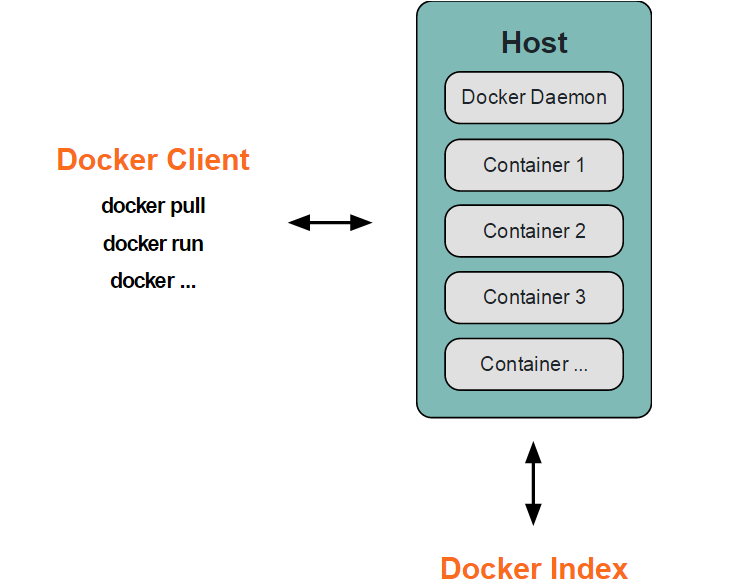
Daemon (docker -d)
Receives and processes commands to manage lifecycle of containers
Client (docker <command>)
Accepts commands from the user and communicates back and forth with Docker daemon.
Registry (https://registry.hub.docker.com)
archive and directory for user supplied Docker images
Docker Elements
( Dockerfile,Images and Containers )
Dockerfile
skeleton/blueprint of building images
Images (docker images)
templates where containers are build from
Registry (docker registry)
docker image storage
Containers (docker ps)
isolated env that runs your apps
How docker works?
Lets do some examples!
// Outputs a Hello World text

$ sudo docker run ubuntu:14.04 /bin/echo 'Hello World'
Hello World


// run an interactive ubuntu terminal shell
$ sudo docker run -t -i ubuntu:14.04 /bin/bash
root@containername:/#


// daemonize - run as background
$ sudo docker run -d ubuntu:14.04 /bin/sh -c "while true; do echo hello world; sleep 1; done"
1e5535038e285177d5214659a068137486f96ee5c2e85a4ac52dc83f2ebe4147
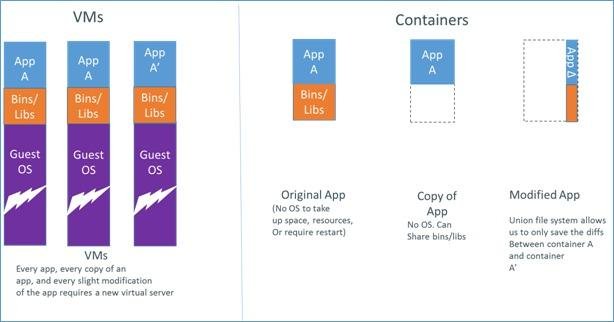
Virtual Machine
vs
Docker Containers
VM
Containers
Why Developers care?
Reduce/eliminate concerns about compatibility on different platforms, either your own or your customers.
Cheap, zero-penalty containers to deploy services? A VM without the overhead of a VM? Instant replay and reset of image snapshots?
Build once, run anywhere... Yey!
Docker interests me because it allows simple environment isolation and repeatability. I can create a run-time environment once, package it up, then run it again on any other machine. Furthermore, everything that runs in that environment is isolated from the underlying host (much like a virtual machine). And best of all, everything is fast and simple.
-Gregory Szorc, Mozilla Foundation
http://gregoryszorc.com/blog/2013/05/19/using-docker-to-build-firefox/
Tools
Orchestration
Web Interface
PAAS
The End...
By Jhonathan Howard Falcutela (Kaii)
A Malayan College Campus Devcon Talk