Social and Political Data Science: Introduction

Knowledge Mining

Karl Ho

School of Economic, Political and Policy Sciences

University of Texas at Dallas

Exploratory Data Analysis

Overview

  • What is Exploratory Data Analysis?

  • Exploring data

    • Data scale and type
    • Tables
    • Charts
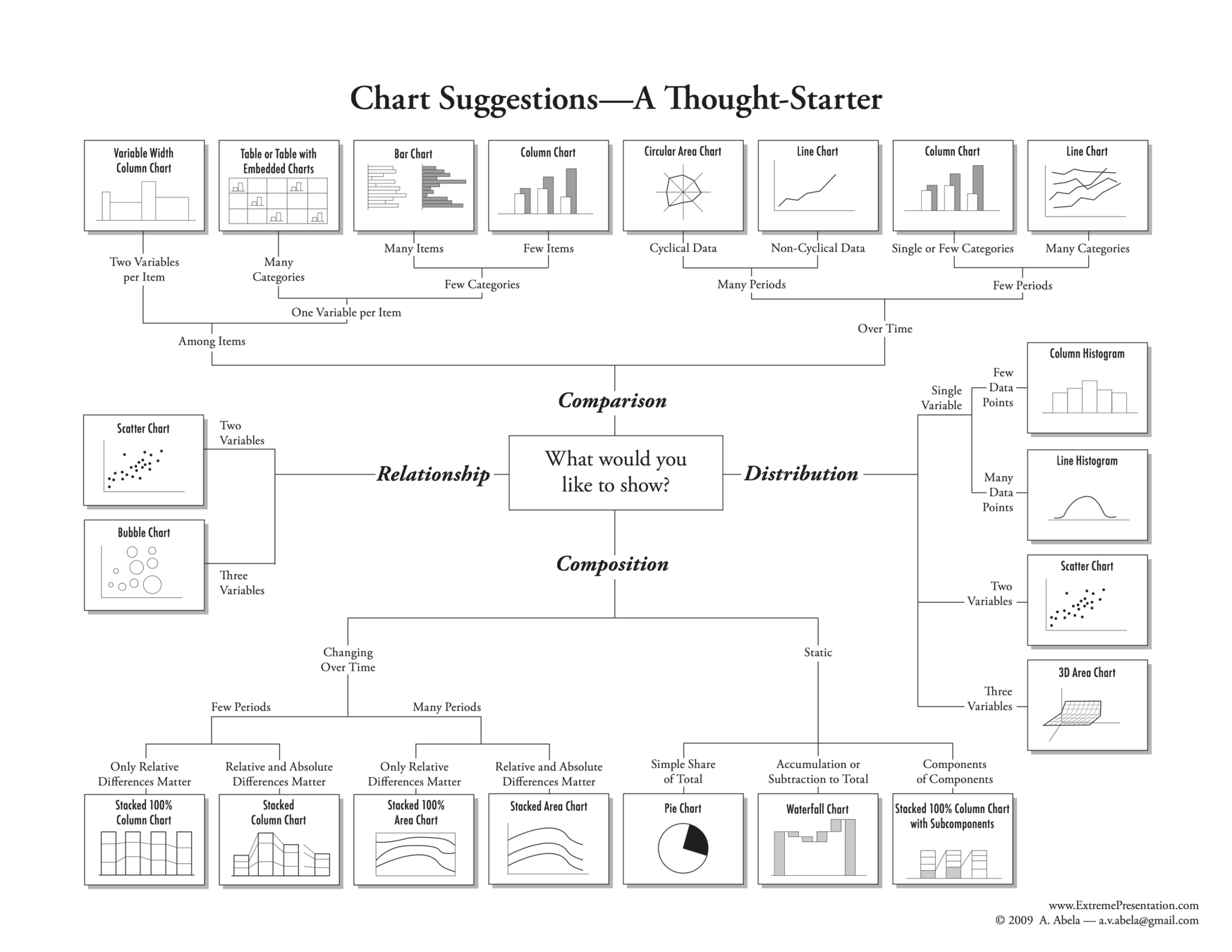
  • Chart chooser

  • Examples and illustrations

Exploratory Data Analysis (EDA)

The very first step of data modeling and machine learning is to understand your data.  This critical procedure will determine what methods to be used in the following data analytics process.  Whether a clear output variable is identified, the data type of that variable and scale of such variable are key questions to be addressed in the stage of exploratory data analysis.  Visualizing the data is first and foremost of the entire data analytics process.

Exploratory Data Analysis (EDA)

  • Data visualization basics

  • Hypothesis generation

  • Visualizing, Transforming, and Modeling data

  • Refine research questions and/or generate new questions

Exploratory Data Analysis (EDA)

John T. Behrens lists the objectives of EDA for researchers to:

  • Suggest hypotheses about the causes of observed phenomena
  • Assess assumptions on which statistical inference will be based
  • Support the selection of appropriate statistical tools and techniques
  • Provide a basis for further data collection through surveys or experiments

Exploratory Data Analysis (EDA)

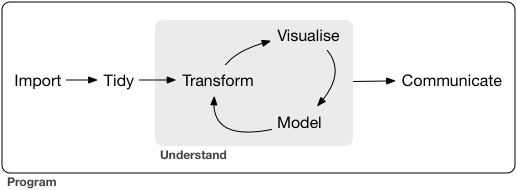
Grolemund and Wickham describe the EDA process as an iterative cycle:

  • Generate questions about data
  • Search for answers by visualizing, transforming, and modeling the data
  • Refine the research questions and/or generate new questions
  • Frequency table

  • Histogram 

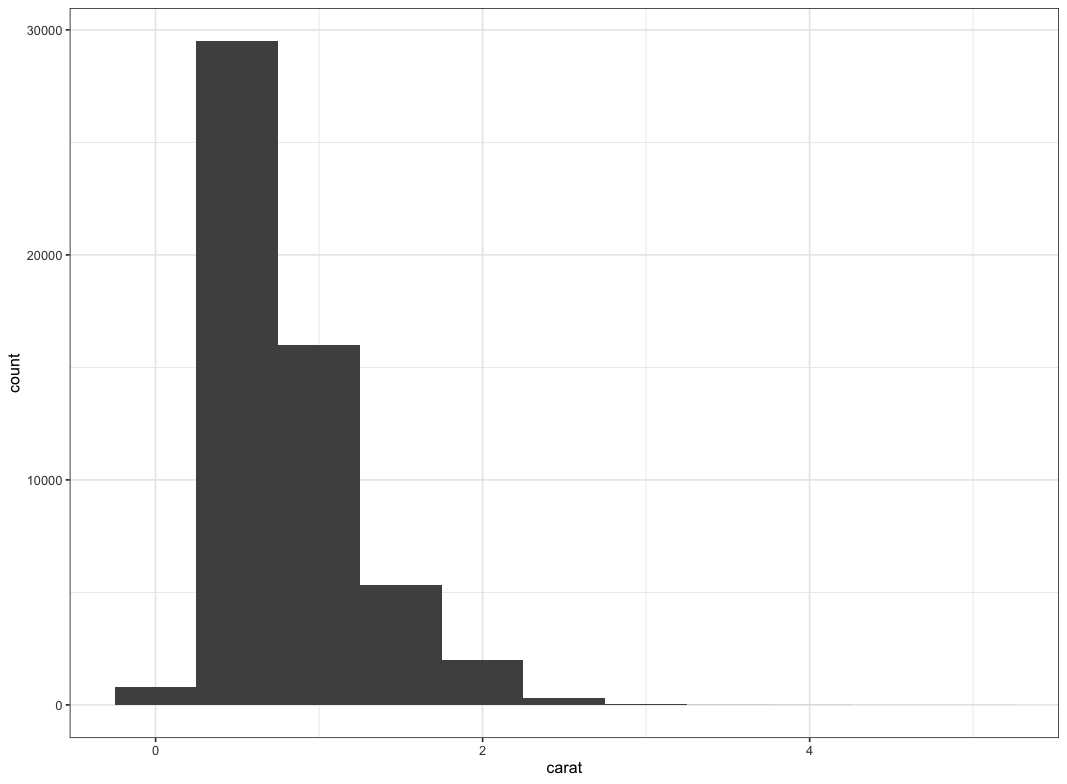
    • A histogram divides the x-axis into equally spaced bins and then uses the height of a bar to display the number of observations that fall in each bin.

  • Charts

  • Improve the chart/table visualization

Exploring data

Exploring data

Data scales

  • Nominal

  • Ordinal

  • Interval

  • Ratio

Quantitative

Qualitative

}

}

  • Categorical variables                             

    • Nominal

    • Ordinal

  • as.factor, as.ordered in R

Exploring data

  • Continuous variables                             

    • Interval

    • Ratio

  • as.integer, as.numeric in R

Exploring data

Dependent on the variable of interest, we can generate charts using the following "chooser" suggestions

Chart chooser

  1. Univariate

  2. Groups

  3. Bivariate or Multivariate Relationship

  4. Time series

  5. Multiple variables multiple methods

  6. Ensemble

Chart chooser

Chart chooser

We can also visualize by functions.  In other words, to show attributes by what we want to see:

Chart chooser

  1. Univariate: Distribution

  2. Univariate: Composition

  3. Groups: Comparison

  4. Bivariate or Multivariate Relationship: Relationship

  5. Time series: Trend/Projection

  6. Multiple variables multiple methods: Combination of information

  7. Ensemble: Combination of information

Chart chooser: Distribution

Chart chooser: Distribution

Chart chooser: Distribution

Chart chooser: Distribution

Chart chooser: Distribution

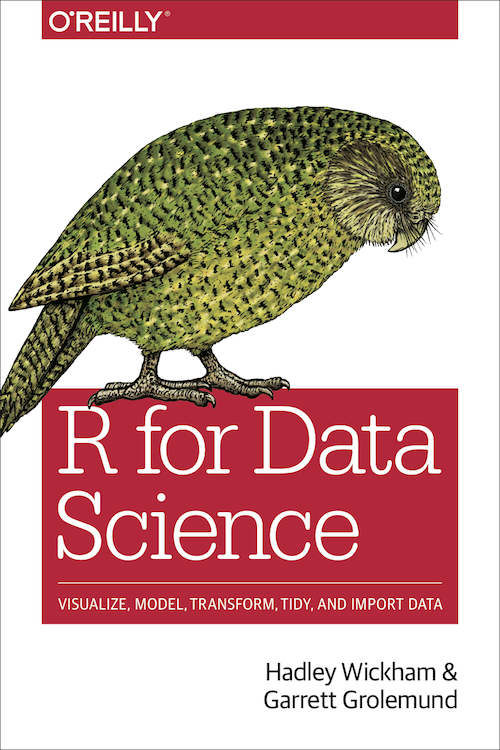
Two books


Grolemund and Wickham:

"tidy" Data Science

Source: Grolemund, Garrett, and Hadley Wickham. 2018.  R for data science.  (https://r4ds.had.co.nz/).

Grolemund and Wickham:

"tidy" EDA

  1. Variation
  2. Covariation
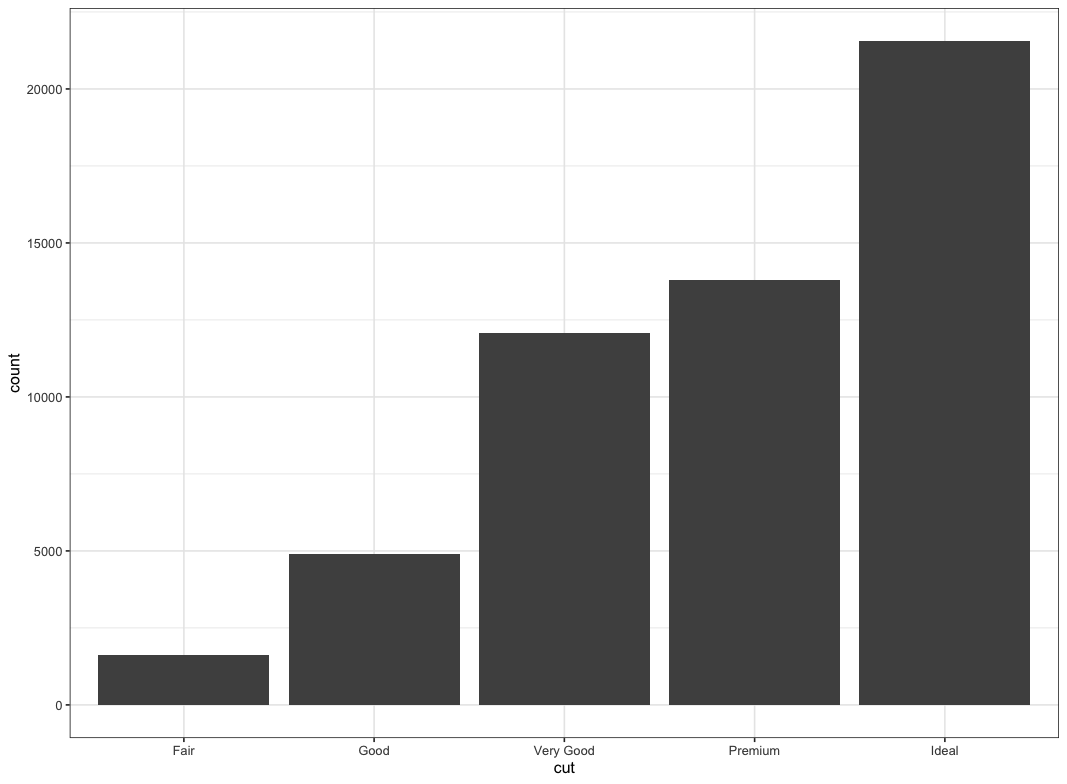
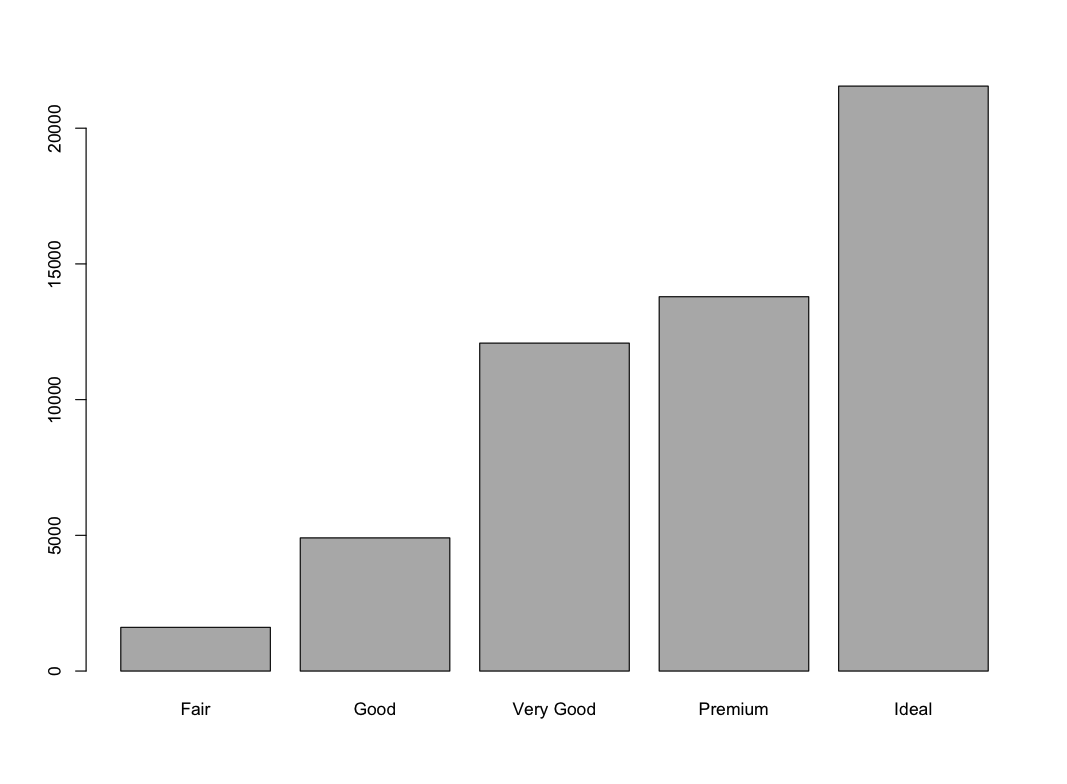
ggplot(data = diamonds) +
  geom_bar(mapping = aes(x = cut)) +
  theme_bw()
> library(descr)
> freq(diamonds$cut)
diamonds$cut 
          Frequency Percent Cum Percent
Fair           1610   2.985       2.985
Good           4906   9.095      12.080
Very Good     12082  22.399      34.479
Premium       13791  25.567      60.046
Ideal         21551  39.954     100.000
Total         53940 100.000
> library(descr)
> freq(diamonds$cut)
diamonds$cut 
          Frequency Percent Cum Percent
Fair           1610   2.985       2.985
Good           4906   9.095      12.080
Very Good     12082  22.399      34.479
Premium       13791  25.567      60.046
Ideal         21551  39.954     100.000
Total         53940 100.000
ggplot(data = diamonds) +
  geom_histogram(mapping = aes(x = carat), binwidth = 0.5) +
  theme_bw()

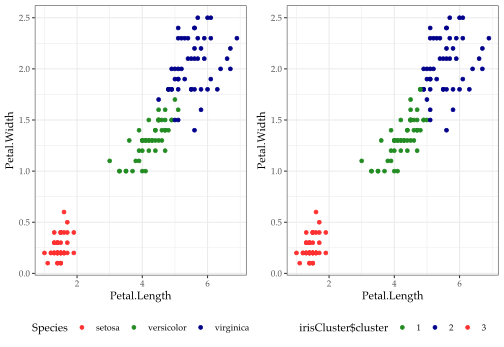
K-Means Cluster: Iris data

Interpretation

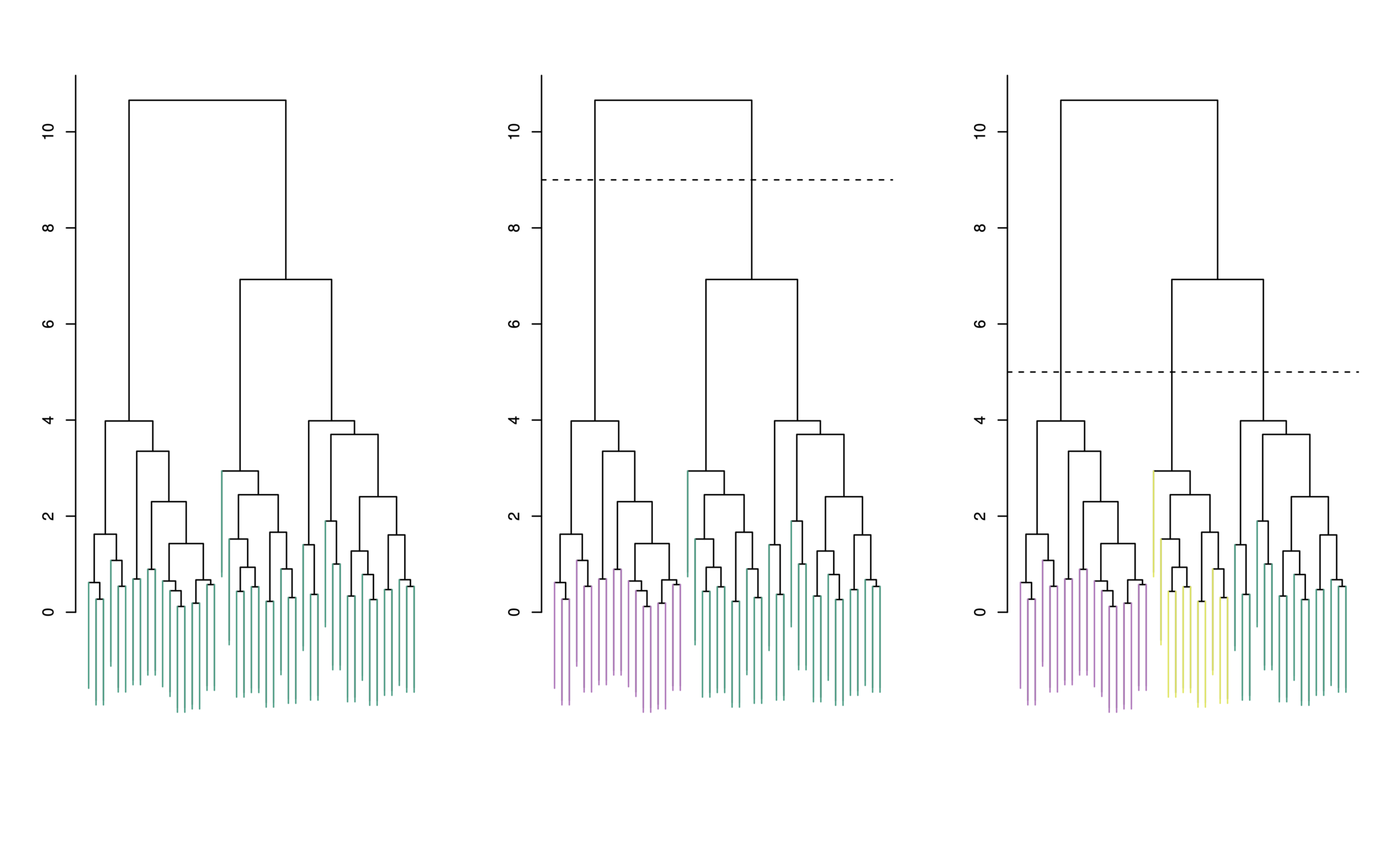
  • Each “leaf” of the dendogram represents one of the 45 observations

  • At the bottom of the dendogram, each observation is a distinct leaf. However, as we move up the tree, some leaves begin to fuse. These correspond to observations that are similar to each other.

  • As we move higher up the tree, an increasing number of observations have fused. The earlier (lower in the tree) two observations fuse, the more similar they are to each other.

  • Observations that fuse later are quite different


Choosing Clusters

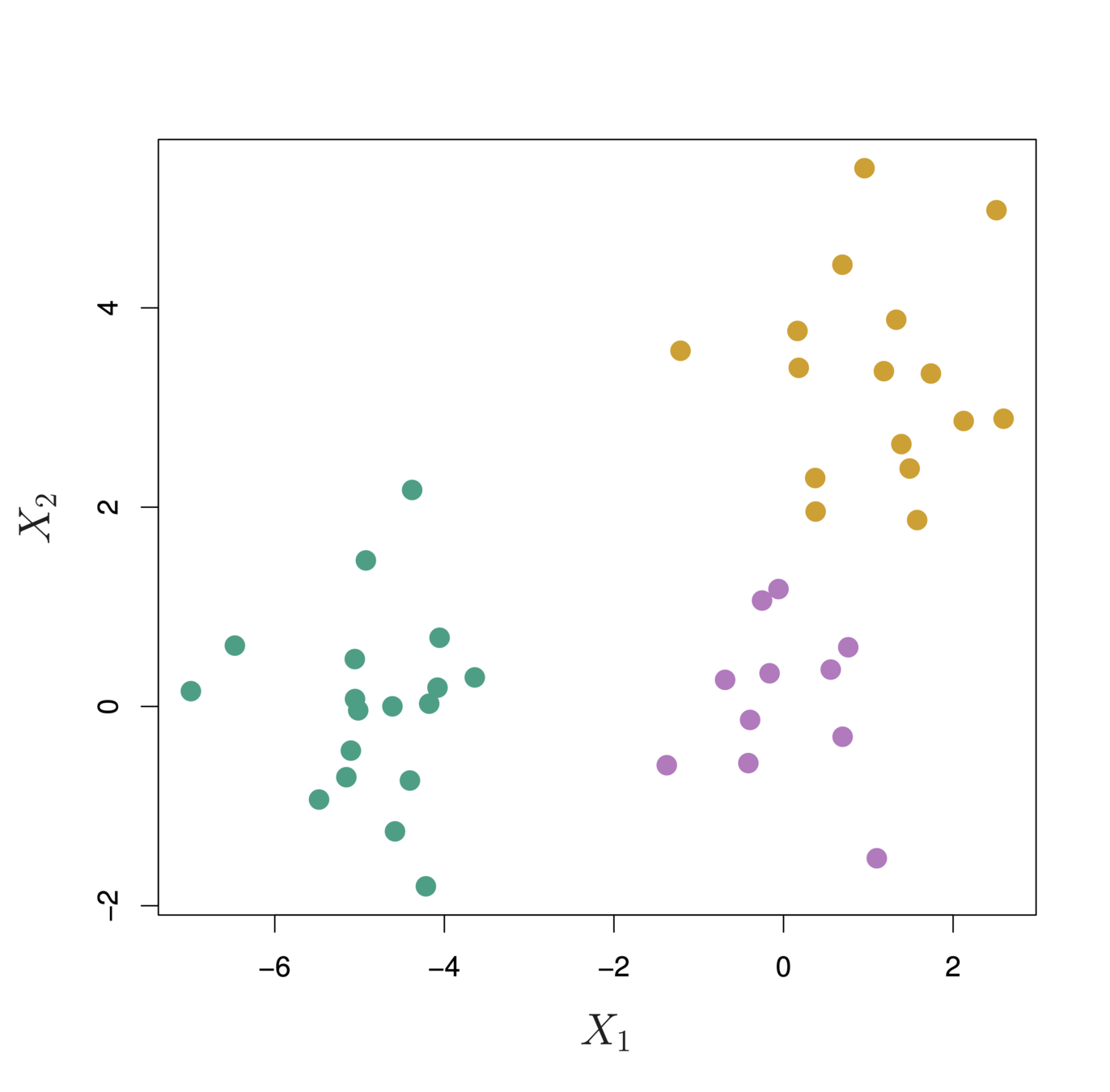
  • To choose clusters we draw lines across the dendrogram

  • We can form any number of clusters depending on where we draw the break point.

One cluster

Two clusters

Three clusters

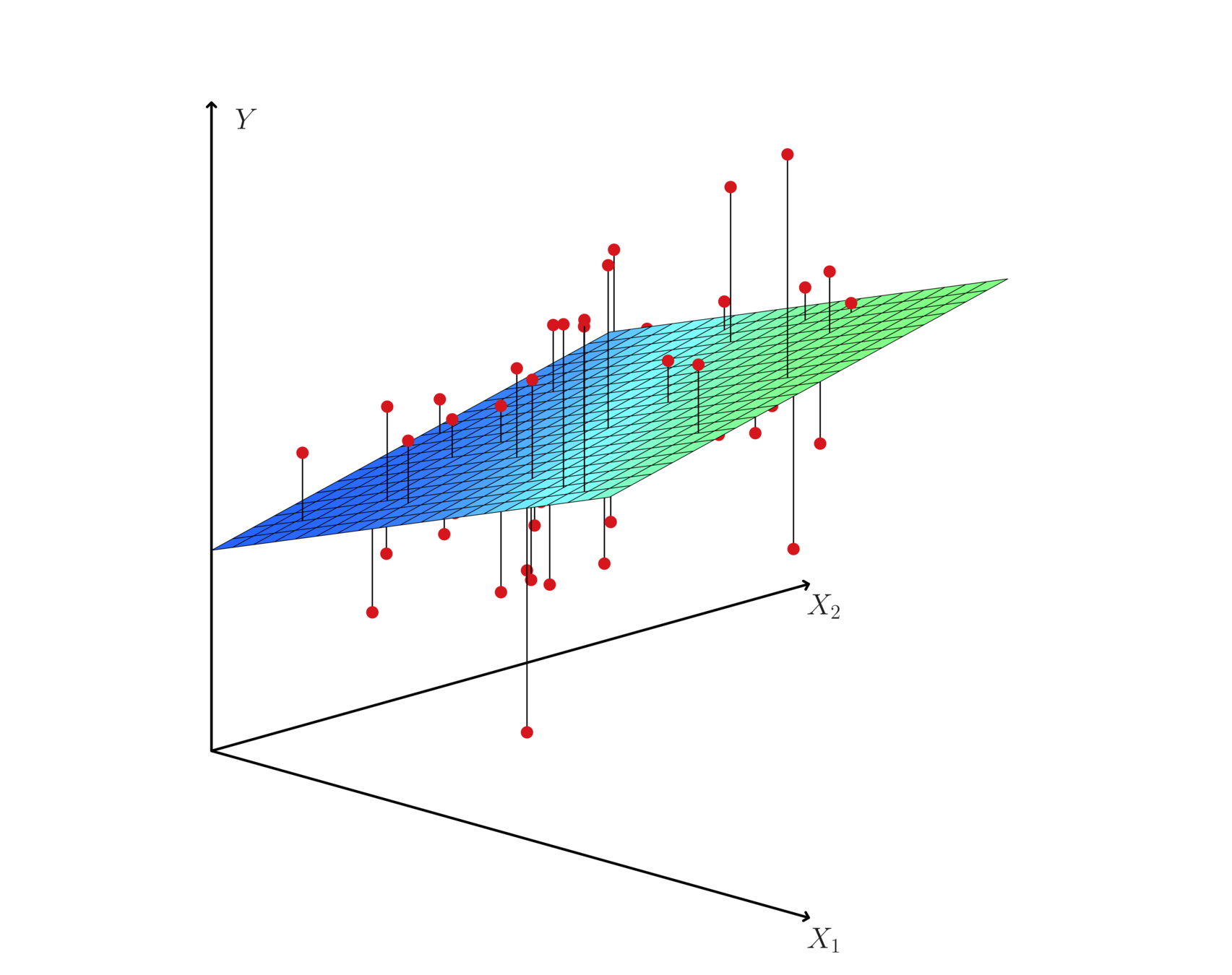
Hyperplane: multiple (linear) regression

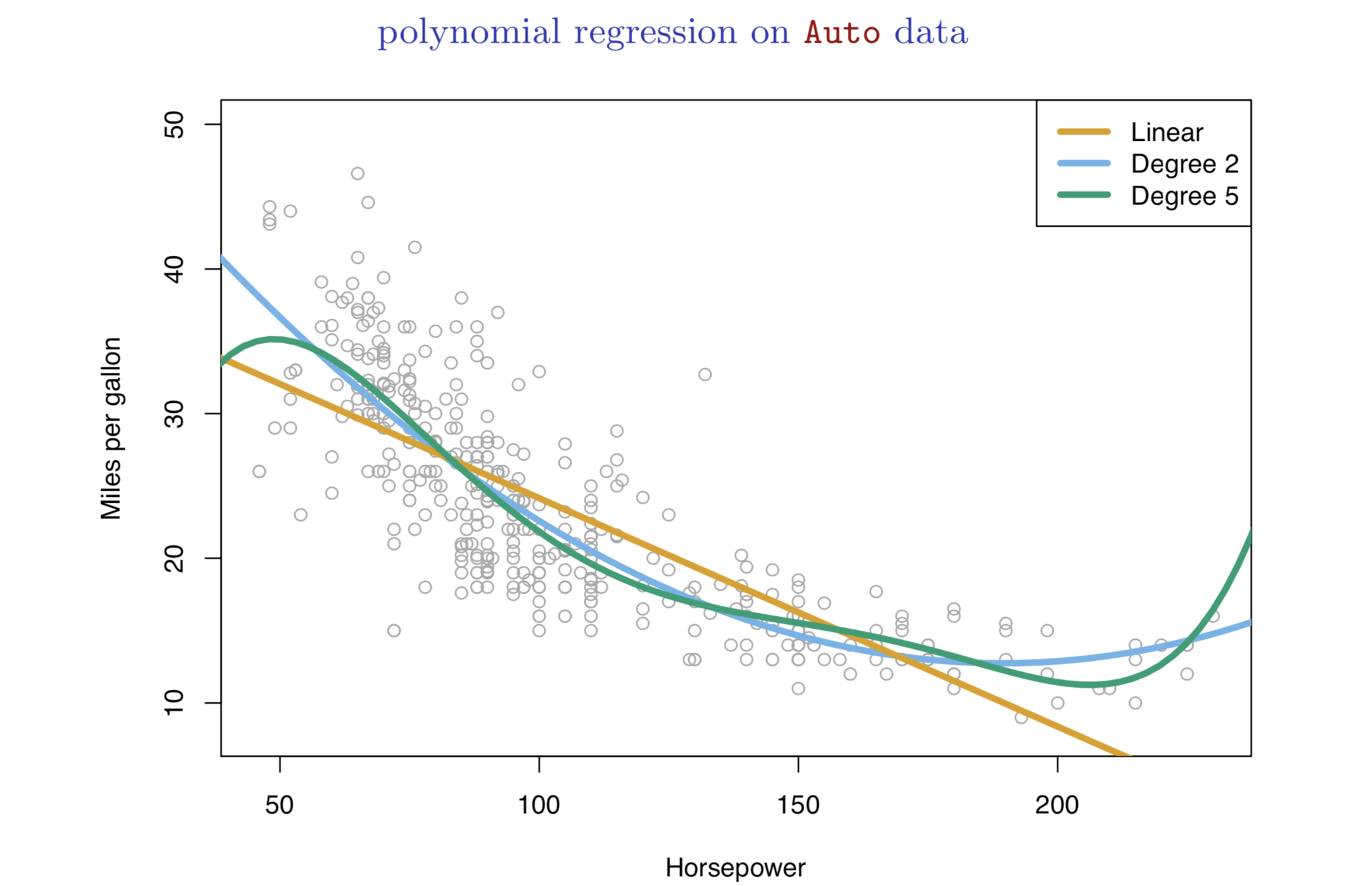
Nonlinear effects

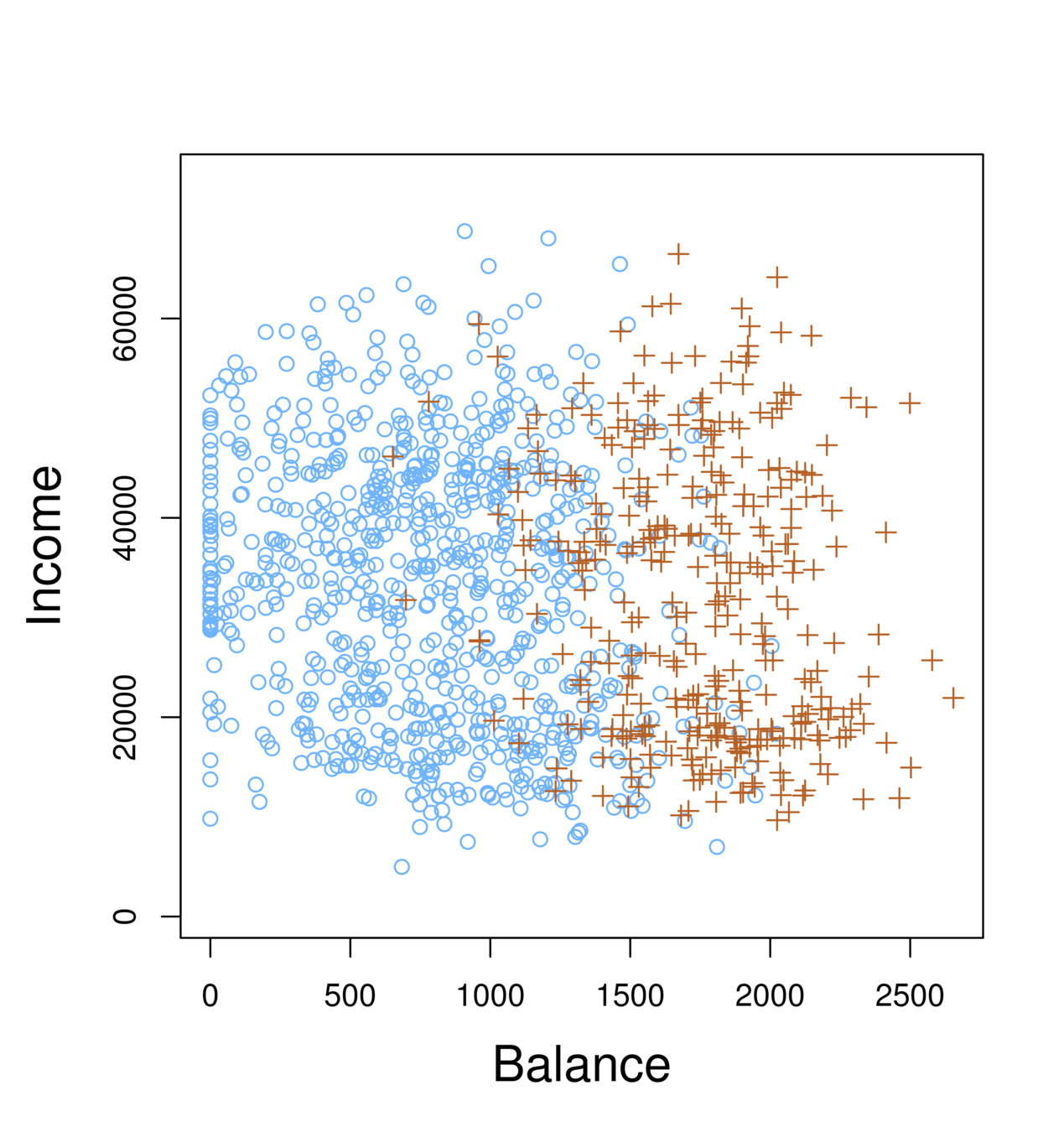
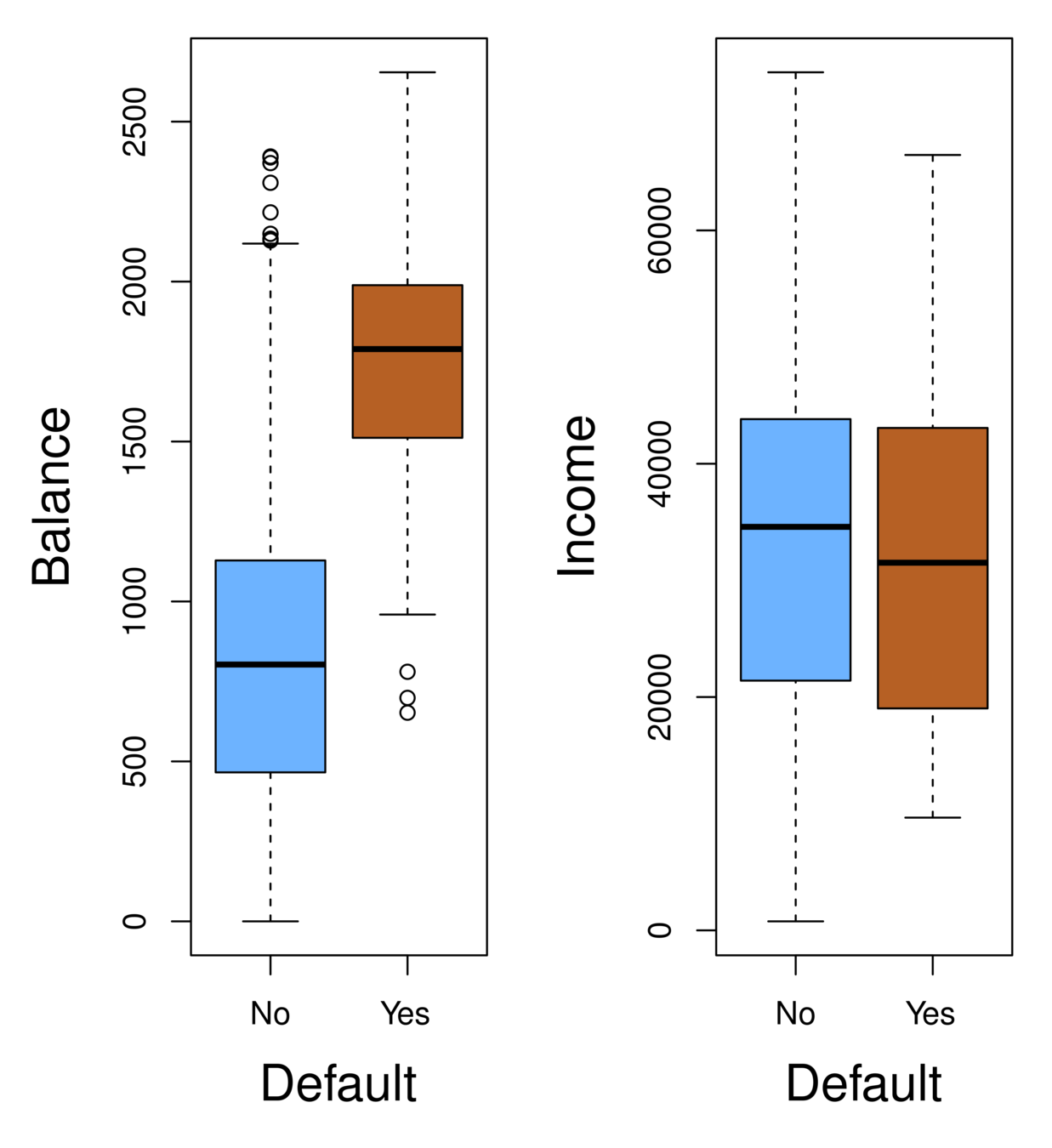
  • Orange: default, Blue: not

  • Overall default rate: 3%

  • Higher balance tend to default

  • Income has any impact?

Sensitivity and Specificity

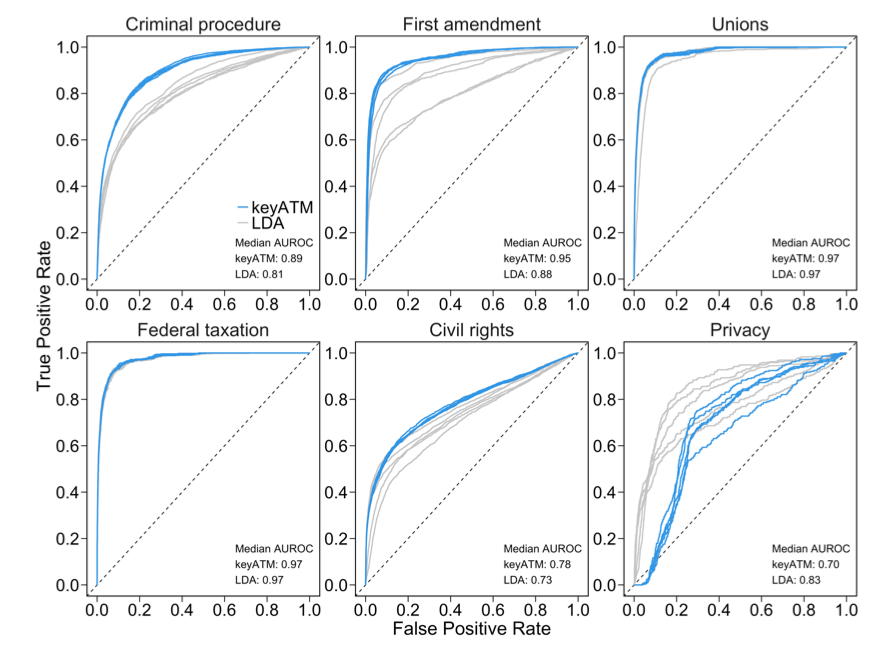
The Receiver Operating Characteristics (ROC) curve display the overall performance of a classifier, summarized over all possible thresholds, is given by the area under the (ROC) curve (AUC). An ideal ROC curve will hug the top left corner, so the larger the AUC the better the classifier.

Model Diagnosis: ROC

Source: Eshima, Shusei, Kosuke Imai, and Tomoya Sasaki. "Keyword Assisted Topic Models." arXiv preprint arXiv:2004.05964(2020).

Knowledge Mining: Exploratory Data Analysis

By Karl Ho

Knowledge Mining: Exploratory Data Analysis

  • 379