Online Privacy & Security
21st Jul 2018
About
-
Developer
- Hobby since age 10
- Computer engineering
-
Experience
- SaaS
- e-commence
-
Disclaimer
- I practice almost everything preached
Conduct
-
Connect all the dots first
- Simple questions
- Take note of slide numbers
-
Trust, but verify
- Q&A
- Discussion
Objectives and Key Results
-
Concepts & Foundation
-
Understand how things actually work
- Discussions can go deep
-
Understand how things actually work
-
Practical tips + Best practices
- Personal/Business
- Decisions <> Policies
- Personal/Business
-
Differentiate
- Dispel common myths
- Separate wheat from the chaff

Security
- (R) Privacy is maintained
- (W) Protect from tampering
Online
- Communications in public can be intercepted
- Don't be the weakest link
Privacy
- Secrets are kept secret
- Nothing to hide, but something to protect
Encryption^
-
Layman's ZIP approach
- Think zip file with password
- Sender creates the password
-
Secret Key
- Lock + Unlock
- E + D
- Symmetric
-
Classic problem
- How to tell Receiver the password securely?
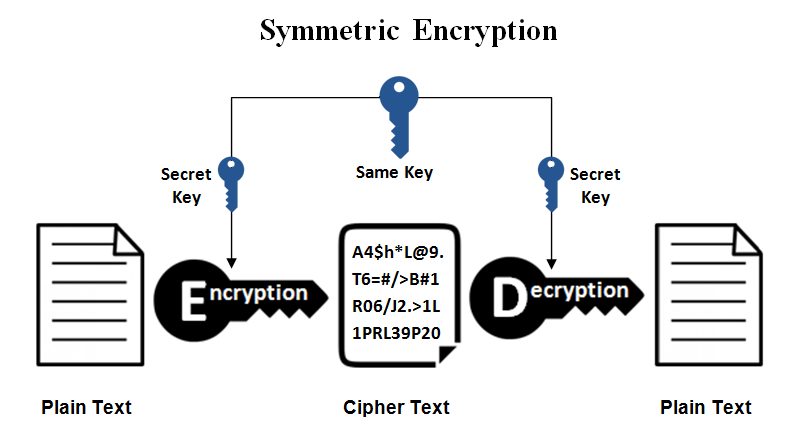
Encryption
-
Modern approach
- Receiver creates the keys
-
Secret Key
- Lock + Unlock
- E + D
-
Public Key
- Lock (E only)
- Asymmetric
- Solution
- No need to share Secret Key at all
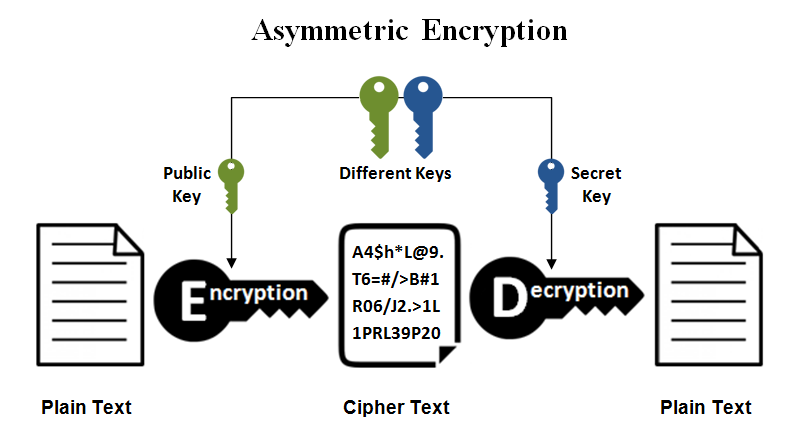
Encryption
-
Another problem...
-
Asymmetric
- Safe way to share public key, but extremely slow
-
Symmetric
- Faster, but no way to share key securely online
-
Asymmetric
-
Real world practice
- Data is zipped (#1) with password, e.g. applecar
- applecar is locked up with Public Key as $%^& (#2)
- #1 and #2 is sent to Receiver
Encryption*
- Mathematically secured... for now
-
(Lack of) Computation power as deterrence
- FBI vs Apple
-
Usually broken via other means
- Enigma in WW2 broken through frequency analysis
- Few are qualified to invent crypto algo
- Stealing Private Keys or passwords
- Enigma in WW2 broken through frequency analysis
-
So, is my WhatsApp really encrypted?
- Yes, only until your Private Key is compromised
Passwords^
-
Why use a unique password for each account?
-
Amateurs store your password as-is
-
Proper way is to store as hash (not encryption)
-
Irreversible transformation, e.g. 1 + 4 + 6 = 10
-
-
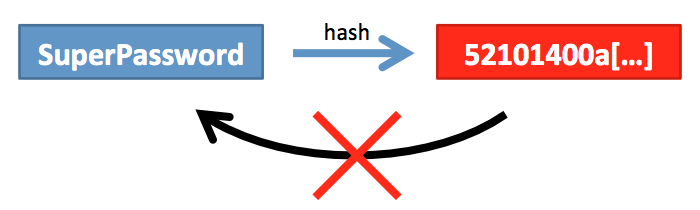
Passwords
-
Phone
- Poor Pattern, Numeric (Easily memorable)
- Subjective Face ID (Stereography)
- Good* Fingerprint
-
Good account passwords
-
Non dictionary words, applecar is still weak
-
Use symbols/digits/caps in the middle
-
Non-memorable
-
2agDKiA1wBpBGBW8ox7a
-
-
Passwords
-
Solution?
-
Online password manager
- Dashlane, Lastpass
- Secured? Same as WhatsApp
-
Offline password manager
-
KeePass
-
-
Passwords*
-
Avoid transmitting username and password together
-
Good system
-
Must not be a hassle to use
- 2FA is a big hassle
- Guessing/brute force is not feasible
- Difficult to steal
-
Must not be a hassle to use
Social Media
-
How does Facebook know?
- Mobile # is very sticky
- Comparing contacts to infer friends
-
For the paranoid
- Uninstall from phone
- Decouple # from accounts
Social Engineering
-
Unsafe
- Incoming calls
- SMSes
- Why? No checks, can be spoofed
-
Safer
- Emails
- Websites
- Check the domains carefully
- Big players have authentication in place
Online Persona
-
For dubious websites
-
A set of alternative
-
Name
-
Date of birth
-
Throw away email address
-
Online Shopping
-
HTTPS (Encryption)
- Varying grades depending on server config
- https://www.ssllabs.com/ssltest/
- Is free, all reputable sites ought to use
- Varying grades depending on server config
-
Cookies
- Used to "see" where you go and what you do
- Chrome Incognito mode (Ctrl-Shift-N)
-
Financial fraud
- Use PayPal only
- Reserve a card for online shopping only


Wifi/VPN
-
Disable router's Wifi Protected Setup
-
Use public wifi only if
- Firewall enabled
-
Network applications are using encryption
- e.g. Outlook
-
Avoid if you have/use
- Non web-based network applications
- e.g. StarHub Digital Voice Global (VoIP)
- Non web-based network applications
Apps/Antivirus/Malware^
-
Avoid pirated software
-
Avoid rooting/jailbreak your phone
-
Enable auto-updates (pros and cons)
-
Prefer open source
-
Usually safer, although functionally poorer
-
More users, better tested, less bugs and safer
-
It is hard to keep a secret among many
-
-
Select your apps with carefully
-
Use a VM to test, e.g. www.virtualbox.org
-
Apps/Antivirus/Malware*
-
Antivirus (a free one will do)
- Avast (Win/Mac/Android/iOS)
- AVG (Win/Mac/Android)
-
Signs of malicious activity
- High CPU load (Ctrl-Shift-Escape)
- CPU fan spinning constantly
- Sluggish response
- Unsolicited ads
USB Devices^
-
Don't any how plug
-
Charging points
-
Can steal data
-
Can destroy hardware
-
-
-
Key loggers
- Available in hardware and software
-
Keyboard <> Key logger <> Computer
-
Wireless keyboard sniffer
-
Check for encryption
-
USB Storage
-
Looks can be deceiving
-
Thumb drive may not be a thumb drive
-
Can contain malicious software
-
-
Privacy
- Avoid sharing
- Have a public/private set
- Keep the public set empty
- Index your storage devices
USB Storage*
-
Solid State Storage
- SSD/SD cards/Thumb drives
- Crashes are catastrophic
- Sudden and irrecoverable
Solution?
-
Backup
-
Full protection
-
Loss/crash/ransomware
-
-
Cloud based
- Backblaze (Win/Mac)
-
In house
-
Bvckup2 (Win)
-
-
Backup
-
Don't(s)
- NAS will also crash
- RAID (is not a backup)
- Copy everything (Separate Content/Code)
- Have untracked copies
-
Do(s)
-
Daily
-
Offsite
-
Have a system
-
End of life
-
Logical destruction
-
Disk wipe
-
-
Physical destruction
-
HDD (open and break)
-
USB storage
-
-
Estate planning (Work in progress)
- Passwords
- Accounts closure
Summary
-
Be prepared
- Use a password manager or at least strong passwords
- Backup
- Habits/Rules of thumb
- Always reveal as little as possible, esp sticky info
- Prefer email over calls
- Online credit card/PayPal only
-
Find a balance after seeing the big picture
- Have a system from start to end
Q&A + Discussion
- End -
Y Slides 1
By kdkf