FE Trends

Krzysztof Jung

Head of Front-end @
2016 Q2
JavaScript - the new stuff:
- "better, faster, stronger"
- modern module bundler
- Angular 2 + ReactJS





New Syntax
And features
EcmaScript 6
2015
EcmaScript?
- 1995: Brendan Eich creates Mocha
- Netstape Navigator - LiveScript
- Sun Microsystems - JavaScript
- Microsoft - JScript
- 1997 - Ecma International - specification ECMAScript1
- 1998 - ECMAScript 2, 1999 - ECMAScript 3
ECMAScript
implementations
- JavaScript
- JScript
- ActionScript
- Adobe ExtendScript
- QtScript
- many others...
Then...
- ECMAScript 4 never came out
- 2009 - ECMAScript 5 (that's Your JS!)
- 2015 - ECMAScript 6
- 6 -> 2015, 7 -> 2016
- let / const
- multiline strings + string templates
- arrow functions
- destructuring
- for of
- default parameter values + named parameters
- spread operator ...
- classes
- maps, sets
- modules
- iterators, generators
- proxies
- promises
ES2015 - superset (backward compatibility)
How to use it?
- Browsers are implementing features
- Node implements them too (6.0 - 93%)!
- Transpile to ES5 With BabelJS
http://kangax.github.io/compat-table/es6/
How about speed?
asm.js

What???
- speed race since V8 by Google
- JS: dynamic, untyped, and interpreted
- JIT - Just In Time Compiler
- compilation at execution
- adaptive optimization
- asm.js - strict subset of JS, generated by source to source compilers
- ex. C / C++ -> Emscripten -> asm.js
Result?
Up to 66% of native speed
On a browser!!!

Who uses it?
- as a proof of concept Mozilla ported simple
Unreal Engine game (asm.js+WebGL interface) - some heavy-performance JS libs use it
- game engines like Unity, Godot or Unreal allow to export game to HTML5
Is that all?
Nope
Web Assembly is on the way
= native browser sandbox to run bytecode
WeaklyTyped JS?
"Strongly" Typed Script!
TypeScript
TypeScript
- Inspired by Java/C#/C++
- Superset of JavaScript
- Allows to define types (+base types)
- Compiles to ES5 (compiler check types)
- includes some of ES6 features (class etc.)
- developed by Mircosoft (open source)
- merged with AtScript by Google
Webpack
For all the fun stuff
by Facebook
It's all about performance
- Mature frameworks for big SPA apps
- Angular digest cycle for data-binding
- Complex interface is slow (DOM + watchers)
Virtual DOM
- DOM operations are expensive
- Minimize number of operations
- Perform all calculations on "virtual" DOM
- Apply minimal change of DOM tree
- VirtualDOM is "proxy" to DOM interface
How to optimize it?
- JS operates mostly on objects (references)
- It's hard to detect change when state mutate
- It's easier to compare two state object instances
- Let's keep all data in one place (state tree)
- Any state change returns whole new state object
Components everywhere
- State is tree of data, app is tree of components
- Component = cutom HTML tag + component class
- Component class = logic + VirtualDOM renders
- VirtualDOM syntax is not pleasant
var child1 = React.createElement('li', null, 'First Text Content');
var child2 = React.createElement('li', null, 'Second Text Content');
var root = React.createElement('ul', { className: 'my-list' }, child1, child2);
ReactDOM.render(root, document.getElementById('example'));
var App = (
React.createElement(Form, null,
React.createElement(Form.Row, null,
React.createElement(Form.Label, null),
React.createElement(Form.Input, null)
)
)
);var Form = MyFormComponent;
var App = (
<Form>
<Form.Row>
<Form.Label />
<Form.Input />
</Form.Row>
</Form>
);JSX
To sum up:
- React is a library (not a framework)
- React is only view layer
-
You DO NOT GET any of the following:
- An event system (other than vanilla DOM events)
- Any AJAX capabilities whatsoever
- Any form of a data layer
- Promises
- Any application framework at all
- Any idea how implement the above
So why React is so important?
- VirtualDOM was THE BIG THING
- After Angular2 rollout exploration started
- React got a lot of interest so it's ecosystem grew
- It put focus on Reactive approach to state change
- Lot of new stuff was invented
- Unidirectional state flow (Flux, Redux)
- HotReload (hot code replacement)
- TimeTravel (state change debugging)
- Relay + GraphQL (super flexible API)
- CSS Modules (scoped CSS)
AngularJS


2
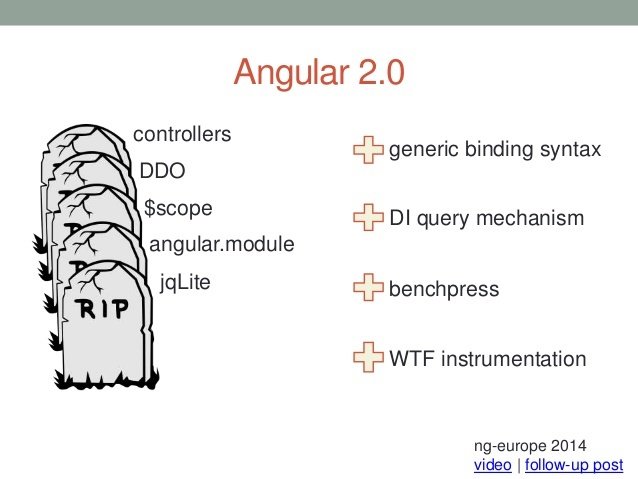
EntirelyNewFrameworkWithSameName 2.0
So how it is now?
- There are some similarities
- There is a way to migrate
- Angular 1.5 provides some of 2's concepts
- Angular 1.x will be supported for about a year
"Main difference in architectural design is probably the unidirectional data flow and the focus on components.
Start using controllerAs with Typescript classes as your controllers if you want a more easy transition.
Start learning the basics of RxJS, Ng2 is built on it."
Yeah, but what's the difference?
#0 TypeScript
- written entirely in TypeScript
- uses ES6 classes and modules
- + types and annotations
- can be used with ES5 (TS recommended)
- no module declaration
- uses ES6 module syntax
#1 Components
- custom directives
- + templates
- + dedicated controller(As)
- template (HTML + magic)
- class with logic
- data interface
- inputs, outputs
- state change strategy
#2 template syntax
- data interpolation (+binding)
- filters -> pipes
- some of old directives
- new: properties (with bindings)
// One way from data source to view target
{{expression}}
[target] = "expression"
bind-target = "expression"

// One-way from view target to data source
(target) = "statement"
on-target = "statement"

// Two-way
[(target)] = "expression"
bindon-target = "expression"

#2 template syntax
// Property
<img [src] = "heroImageUrl">
<hero-detail [hero]="currentHero"></hero-detail>
<div [ngClass] = "{selected: isSelected}"></div>

// Event
<button (click) = "onSave()">Save</button>
<hero-detail (deleteRequest)="deleteHero()"></hero-detail>
<div (myClick)="clicked=$event">click me</div>

// Two way
<input [(ngModel)]="heroName">

// Attribute
<button [attr.aria-label]="help">help</button>

// Class
<div [class.special]="isSpecial">Special</div>

// Style
<button [style.color] = "isSpecial ? 'red' : 'green'">
#3 Data change detection
- Observables (RxJS)
- detects change in mutable structures
- treat changes as events in streams
- for immutable structures component can emit change event
- state change applied in single pass of components tree
Example
<h2>Hero List</h2>
<p><i>Pick a hero from the list</i></p>
<div *ngFor="#hero of heroes" (click)="selectHero(hero)">
  {{hero.name}}
</div>
<hero-detail *ngIf="selectedHero" [hero]="selectedHero"></hero-detail>

@Component({
  selector:    'hero-list',
  templateUrl: 'app/hero-list.component.html',
  directives:  [HeroDetailComponent],
  providers:   [HeroService]
})

export class HeroListComponent implements OnInit {
  constructor(private _service: HeroService){ }
  heroes:Hero[];
  selectedHero: Hero;
  ngOnInit(){
    this.heroes = this._service.getHeroes();
  }
  selectHero(hero: Hero) { this.selectedHero = hero; }
}
#4 Directives
- logic injected to markup
- @Directive
- Component = directive + template
<div *ngFor="#hero of heroes"></div>
<hero-detail *ngIf="selectedHero"></hero-detail>
<input [(ngModel)]="hero.name">
#5 Other stuff
- Services hold logic
- Services are just classes
- Services are injected to constructors
- Yes, there is still Dependency Injection


BONUS CONTENT
Flux
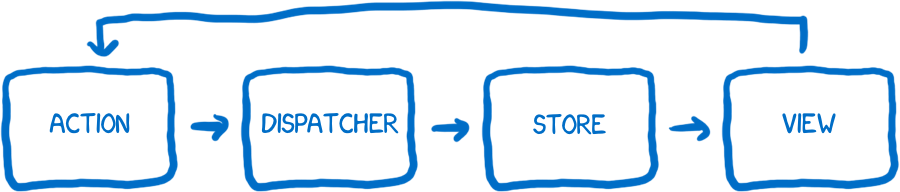
- Your Views "Dispatch" "Actions"
- Your "Store" Responds to Dispatched Actions
- A store is not a model. A store contains models
- A store is the only thing in your application that knows how to update data. This is the most important part of Flux
- Your Store Emits a "Change" Event
-
Your View Responds to the "Change" Event
Flux is a word made up to describe "one way" data flow with very specific events and listeners
Flux = data flow pattern
Flux
When you add a new item, the view dispatchesan action, the store responds to that action, the store mutates data, the store triggers a change event, and the view responds to the change event by re-rendering.
Hot Reloading
- Make the change in your code
- Refresh the page in your browser
- Re-add the data and push all of the same buttons
Normally:
Hot Reload:
- Make the change in code
- Build system detects it
- Hot Reload module prepare code-swap logic
- Components logic is replaced "live"
- App state remains the same
Time Travel

State + actions (transformations) = state travel
FE
By Krzysztof Jung