html
&
css
fed training -2
main point
ABOUT FED / 關於前端工程師
ABOUT WEB / 關於網頁
ABOUT HTML / 關於HTML
ABOUT CSS / 關於CSS
ABOUT LAYOUT / 關於切版
實作 &QA
網頁的構成
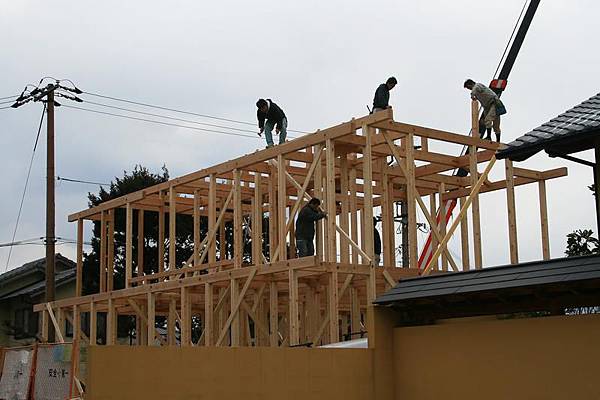
房子的材料 綱筋 水泥?

HTML 房子的結構/ CSS 房子的裝潢/JS 房子的電光熱線路
01.jpg)
切版的工作流程

TOOLS

Windows:
color cop / photoshop / faststone


MAC :

Editor:
sublime text 2 /notepad ++


W3school

HTML
HTML4 > HTML5
html dtd

Strict vs. quirks modes

http://helephant.com/2008/01/07/friends-don%E2%80%99t-let-friends-use-quirks-mode/
dtd 文本宣告
HTML 4.01 version of the doctype
<!DOCTYPE html PUBLIC "-//W3C//DTD HTML 4.01//EN"
"http://www.w3.org/TR/html4/strict.dtd">
HTML 5
<!doctype html>
META 頁面訊息
HTML 4
<meta http-equiv="content-type" content="text/html; charset=UTF-8">
HTML 5
<meta charset="utf-8">
http://www.w3school.com.cn/html5/html5_meta.asp
<link>
HTML 4
<link type="text/css" rel="stylesheet" href=“style.css">
HTML 5
<link rel="stylesheet" href="style.css">
JAVASCRIPT
HTML 4
<script src="template_singleton.js" type="text/javascript"></script>
HTML 5
<script src="template_singleton.js"></script>

練習
HTML4 >> HTML5
請同學取用練習用TEMPLETE
//192.168.11.60/share/UX/FedTraining
CSS
CSS selectors

進階選擇器
分組選擇器(div,h1,p)demo
相鄰選擇器(h1+p)demo
子選擇器
(ul > li)demo
通配符號選擇器(*)
屬性選擇器(a[rel="external"])

選擇器的效率

延申閱讀:有效率的CSS選擇器
CSS HACK
! GOOD OR BED? 原則上不使用

Three Ways to Insert CSS
There are three ways of inserting a style sheet:
- External style sheet 外部樣式
- Internal style sheet 內部樣式
- Inline style 行內樣式
! 我們儘可能的不使用 內部 跟 行內 樣式
layout
讓我們開始寫HTML跟CSS
HTML的概念
工作前的準備
Sematic HTML 語意化的HTML
好處:
Ease of use /好維護
Accessibility / 無障礙
Search Engine Optimization /SEO
Repurposing /可重覆使用
引用
Block vs. inline elements
Most HTML elements are defined as block level elements or as inline elements.
HTML 4 Block-Level Elements
http://htmlhelp.com/reference/html40/block.html
HTML 4 Inline Elements
Modularization /模組化


模組化的ISSUE
重覆的CLASS(hd、bd、ft)
會造成佈局時彼此的樣式影響的風險
使用相鄰選擇器避免這一個狀況
#moduleName > { background:red; }
我把HTML寫完了,下班??!!!!!
別急
檢查你的HTML
W3C Markup Validation
練習
寫出模組化結構的HTML
10分鐘
CSS的概念
工作前的準備
CSS Reset
http://meyerweb.com/eric/tools/css/reset/
http://www.yahooapis.com/yui/reset/

YUI Font


練習
算數時間
display:
display:block;
display:inline:
display:inline-block;
display:none;
Floating Elements

DEMO
.clearfix 1

DEMO
Float VS INLINEBLOCK

mARGIN 重疊
這不是一個BUG但一樣令人蛋疼

解決方法參考
position:
position:static;
position:absolute;
position:relitive;
relitive 跟 absolute 是會彼此影響的
Shorthand property
!原則是能省就省
margin-top:100px;
margin-bottom:100px;
margin-right:50px;
margin-left:50px;
margin:100px 50px;
CSS3
圓角

陰影

CSS寫完了!!?吃宵夜去!!!
別急 還有一些工作要作
CSS Lint
CSS Sprite(DEMO)
http://spritegen.website-performance.org/
實作
評分BAR

星星要有HOVER效果
注意margin跟padding
HOME WORK
1. CSS Sprite
2. CSS Reset Font
3. CSS Lint
4. Browser Support(IE,Firefox,Chrome,Safari)
Q&A
fed training2
By lauraluo