Webpack
contents
- module
- webpack
babellint
왜 why?
- 웹팩이전의 세계
<html>
<header></header>
<body>
 <script src="./math.js">
 <script>
   console.log(sum(1, 2)); // 3
 </script>
</body>
// math.js
function sum(a, b) {
return a+b;
}IIFE 방식의 모듈
- 스코프를 만들어서 외부에서 안으로 접근하지 못하도록 격리
<html>
<header></header>
<body>
 <script src="./math.js">
 <script>
   console.log(math.sum(1, 2)); // 3
 </script>
</body>
// math.js
var math = math || {};
(function(){
function sum(a, b) {
return a+b;
}
math.sum = sum;
})();다양한 모듈 스펙
- CommonJS
- AMD(Asynchronous Module Definition)
- UMD(Universal Module Definition)
(function (root, factory) {
    if (typeof define === 'function' && define.amd) {
        // AMD. Register as an anonymous module.
        define(['exports', 'b'], factory);
    } else if (typeof exports === 'object' && typeof exports.nodeName !== 'string') {
        // CommonJS
        factory(exports, require('b'));
    } else {
        // Browser globals
        factory((root.commonJsStrict = {}), root.b);
    }
}(typeof self !== 'undefined' ? self : this, function (exports, b) {
    // Use b in some fashion.

    // attach properties to the exports object to define
    // the exported module properties.
    exports.action = function () {};
}));
ES2015 표준 모듈 시스템
// math.js
export function sum(a, b) {
  return a+b;
}
// app.js
import * as math from './math.js';
math.sum(1,2); // 3<script type="module" src="./math.js"></script>브라우저에서 모듈 사용
Webpack
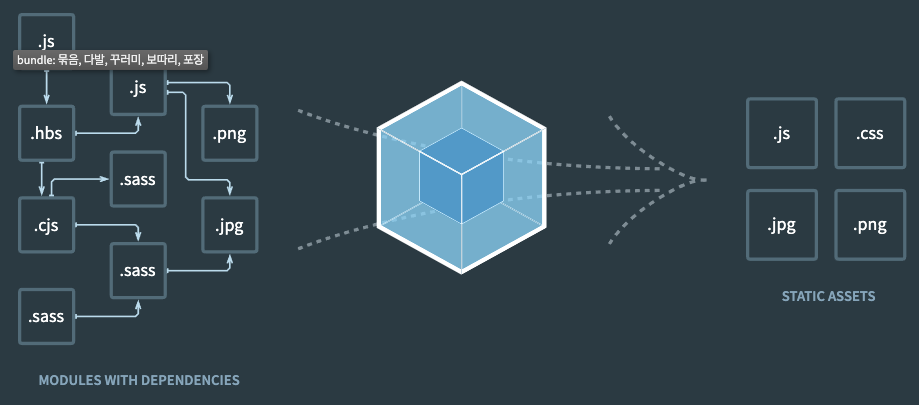
- 웹팩은 여러개의 파일을 하나의 파일로 합쳐주는 번들러(bundler)
엔트리/아웃풋
// 번들 작업을 하는 webpack 패키지와 웹팩 터미널 도구인 webpack-cli를 설치
npm install -D webpack webpack-cli

// --help 옵션으로 실행가능한 명령어 들을 확인
node_modules/.bin/webpack --help

--mode       	Enable production optimizations or development hints.
                           [선택: "development", "production", "none"]
--entry      	The entry point(s) of the compilation.[문자열]
--output, -o    The output path and file for compilation assets
...등등

// webpack을 통한 번들링
node_modules/.bin/webpack --mode development --entry ./src/app.js --output ./dist/main.js

// config 옵션
--config        Path to the config file
                           [문자열] [기본: webpack.config.js or webpackfile.js]
로더
로더의 이해
- 자주쓰는 로더의 종류
- css-loader
- style-loader
- file-loader
- url-loader
module: {
  rules: [{
    test: /\.js$/,
    use: [path.resolve('./myloader.js')]
  }]
}
// myloader.js
module.exports = function myloader(content) {
console.log("myloader 동작");
return content;
};- 커스텀 로더 만들기
css-loader
// app.js
import './style.css'

// style.css
body {
  background-color: red;
}
// css-loader 설치
npm install -D css-loader// 로더 적용
module.exports = {
module: {
rules: [{
test: /\.css$/,
use: ['css-loader']
}]
}
}style-loader
// style-loader 설치
npm install -D style-loader
// 로더 적용
module.exports = {
module: {
rules: [{
test: /\.css$/,
use: ['style-loader','css-loader']
}]
}
}file-loader
// style-loader 설치
npm install -D file-loader
// 로더 적용
module.exports = {
module: {
rules: [{
test: /\.jpg$/,
loader: 'file-loader',
options: {
publicPath: './dist', // prefix를 아웃풋 경로로 지정
name: '[name].[ext]?[hash]' // 파일명 형식
}
}]
}
}url-loader
// style-loader 설치
npm install -D url-loader
// 로더 적용
module.exports = {
module: {
rules: [{
test: /\.jpg$/,
loader: 'file-loader',
options: {
publicPath: './dist', // prefix를 아웃풋 경로로 지정
name: '[name].[ext]?[hash]' // 파일명 형식
limit: 5000 // 5kb 미만이면 data url
}
}]
}
}플러그인
커스텀 플러그인
const MyPlugin = require('./myplugin');
module.exports = {
  plugins : [
    new MyPlugin(),
  ]
}
자주 사용되는 플러그인
- BannerPlugin
- DefinePlugin
- HtmlTemplatePlugin
- CleanWebpackPlugin
- MiniCssExtractPlugin
javascr
By leejaemin